การแนะนำ
This manual provides comprehensive instructions for setting up, operating, and maintaining your RCA RCRP05BR 5-Device Universal Remote Control. This remote is designed to consolidate control of up to five audio/video devices, offering a familiar layout for cable box control and supporting various digital television features.
เค้าโครงรีโมทคอนโทรล
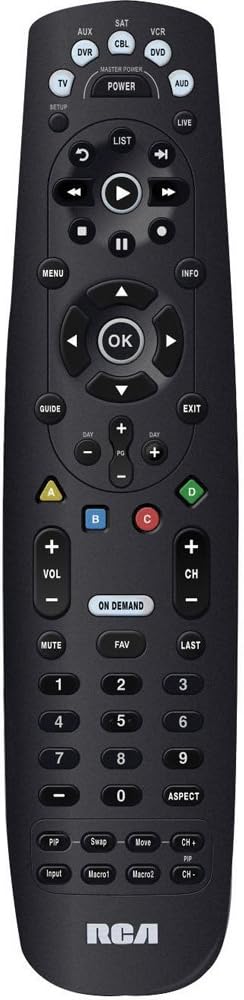
The image above displays the RCA RCRP05BR universal remote control. Key sections include:
- ส่วนบน: Device selection buttons (TV, AUX, SAT, CBL, VCR, DVD, AUD) and the Master Power button. The SETUP button is also located here.
- Middle Section (Playback & Navigation): Includes playback controls (Play, Pause, Stop, Rewind, Fast Forward, Skip), a circular navigation pad with an OK button, and MENU, INFO, GUIDE, and EXIT buttons.
- Lower Middle Section (Channel & Volume): Features Volume (+/-), Channel (+/-), MUTE, FAV (Favorites), LAST, and the colored A, B, C, D buttons. The ON DEMAND button is also present.
- Bottom Section (Numeric Keypad & Advanced Functions): A standard numeric keypad (0-9) and buttons for ASPECT, PIP (Picture-in-Picture), Swap, Move, Input, Macro1, and Macro2. The RCA logo is at the very bottom.
การตั้งค่า
1. การติดตั้งแบตเตอรี่
- ถอดฝาครอบช่องใส่แบตเตอรี่ที่ด้านหลังของรีโมทออก
- Insert two (2) fresh AA alkaline batteries, matching the polarity (+ and -) indicators inside the compartment.
- เปลี่ยนฝาครอบช่องใส่แบตเตอรี่
2. การตั้งโปรแกรมรีโมท
The remote can be programmed using direct code entry, auto code search, or a learning feature.
การป้อนรหัสโดยตรง
- เปิดอุปกรณ์ที่คุณต้องการควบคุม (เช่น ทีวี เครื่องเล่นดีวีดี)
- กดปุ่มค้างไว้ การตั้งค่า button until the red indicator light illuminates.
- กดปุ่มอุปกรณ์ที่คุณต้องการตั้งโปรแกรม (เช่น TV, ดีวีดี). The red indicator light will blink once and remain lit.
- Enter the 4-digit code for your brand and device from the provided code list (not included in this manual, refer to product packaging or manufacturer's webเว็บไซต์).
- If the code is valid, the red indicator light will turn off. If the light blinks four times, the code is invalid; re-enter the code.
- ทดสอบรีโมตโดยการกดปุ่ม พลัง button. If the device turns off, try other functions like volume or channel. If it works, programming is complete. If not, try the next code for your brand or use auto code search.
ค้นหาโค้ดอัตโนมัติ
- เปิดอุปกรณ์ที่คุณต้องการควบคุม
- กดปุ่มค้างไว้ การตั้งค่า button until the red indicator light illuminates.
- Press the device button you want to program. The red indicator light will blink once and remain lit.
- กดปุ่ม พลัง button repeatedly (approximately every 2 seconds) until your device turns off.
- เมื่ออุปกรณ์ปิดแล้ว ให้กดปุ่ม เข้า button (usually the OK button in the center navigation pad) to save the code. The red indicator light will turn off.
- Test the remote. If it works, programming is complete.
คุณสมบัติการเรียนรู้
This feature allows the universal remote to learn functions directly from your original remote control. This is useful for functions not covered by pre-programmed codes or for devices not listed.
- Place the RCA universal remote and your original remote control on a flat surface, facing each other, about 1-2 inches apart.
- กดปุ่มค้างไว้ การตั้งค่า button until the red indicator light illuminates.
- กดปุ่มบนอุปกรณ์ (เช่น TV) you want to assign the learned function to. The red indicator light will blink once and remain lit.
- Press the button on the RCA remote that you want to teach a function (e.g., a specific function button). The red indicator light will blink rapidly.
- Press and hold the corresponding button on your original remote control until the red indicator light on the RCA remote blinks twice and then stays lit. This indicates successful learning.
- Repeat steps 4 and 5 for any other functions you wish to learn.
- กดปุ่ม การตั้งค่า button to exit learning mode. The red indicator light will turn off.
- Test the learned functions.
3. Volume Punch-Through
This feature allows the volume control (VOL +/-) to always control a specific device, regardless of which device mode the remote is currently in. This is useful if you use an audio receiver for all sound.
- กดปุ่มค้างไว้ การตั้งค่า button until the red indicator light illuminates.
- กดปุ่มบนอุปกรณ์ (เช่น ออสเตรเลียดอลลาร์) that you want to control the volume. The red indicator light will blink once and remain lit.
- กดปุ่ม เล่ม+ button. The red indicator light will blink twice and turn off.
- Now, when you press ฉบับ+/- in any device mode, it will control the volume of the selected device (e.g., AUD).
- To disable volume punch-through, repeat steps 1-3, but in step 3, press the ฉบับ- ปุ่มแทน เล่ม+.
การใช้งานรีโมท
การเลือกอุปกรณ์
To control a specific device, press the corresponding device button at the top of the remote (e.g., TV, ซีบีแอล, ดีวีดี). The remote will then send commands for that device.
ฟังก์ชั่นพื้นฐาน
- พลัง: เปิดหรือปิดอุปกรณ์ที่เลือก
- ฉบับ +/-: ปรับระดับเสียง.
- ช +/-: เปลี่ยนช่อง
- ใบ้: ปิดเสียงหรือเปิดเสียง
- แผงปุ่มกดตัวเลข (0-9): สำหรับการป้อนช่องสัญญาณโดยตรงหรืออินพุตตัวเลขอื่นๆ
ฟังก์ชั่นขั้นสูง
- เมนู: เข้าถึงเมนูบนหน้าจอของอุปกรณ์ที่เลือก
- แนะนำ: Displays the program guide (for TV/Cable/Satellite).
- ข้อมูล: Displays information about the current program or selection.
- แผงนำทาง (ขึ้น/ลง/ซ้าย/ขวา/ตกลง): ใช้สำหรับนำทางเมนูและยืนยันการเลือก
- Playback Controls (Play, Pause, Stop, Rewind, Fast Forward, Skip): Controls playback for DVRs, VCRs, and DVD/Blu-ray players.
- ปุ่มสี (A, B, C, D): These buttons (Red, Blue, Yellow, Green) are often used for special functions in cable/satellite boxes or Blu-ray players. Their function varies by device.
- ตามความต้องการ: Accesses On Demand services (for cable/satellite).
- PIP (Picture-in-Picture), Swap, Move, Input, Macro1, Macro2: These buttons provide additional functionality, which may need to be programmed via the learning feature or specific codes for your devices.
การซ่อมบำรุง
- การเปลี่ยนแบตเตอรี่: Replace batteries when the remote's indicator light becomes dim or functions become unreliable. Always use fresh AA alkaline batteries.
- การทำความสะอาด: เช็ดรีโมทด้วยผ้าแห้งนุ่มๆ หลีกเลี่ยงการใช้น้ำยาทำความสะอาดหรือวัสดุที่มีฤทธิ์กัดกร่อน
- พื้นที่จัดเก็บ: เก็บรีโมทไว้ในที่แห้งและเย็น ห่างจากแสงแดดโดยตรงและอุณหภูมิที่สูงหรือต่ำมาก
การแก้ไขปัญหา
- รีโมทไม่สามารถใช้งานอุปกรณ์ได้:
- ตรวจสอบให้แน่ใจว่าได้ติดตั้งแบตเตอรี่ใหม่ถูกต้องแล้ว
- Verify the correct device button (e.g., TV, CBL) is pressed before attempting to control the device.
- Reprogram the remote using a different code for your device, or try the auto code search method.
- ตรวจสอบให้แน่ใจว่าไม่มีสิ่งกีดขวางระหว่างรีโมทและอุปกรณ์
- Some buttons do not work after programming:
- The selected code may only support basic functions. Try another code for your device.
- Use the learning feature to teach specific functions from your original remote.
- Roku "Back" button not working (as noted in user reviewNS):
- The RCA RCRP05BR may not have a pre-programmed "Back" function for all Roku devices.
- If your original Roku remote is IR-based, use the learning feature to teach the "Back" function to an unused button on the RCA remote.
- If your Roku remote uses Wi-Fi Direct (not IR), the learning feature will not work directly. Some users have successfully used IR remote apps on smartphones (if the phone has an IR blaster) to teach the function.
- Volume control not working as expected:
- Check if Volume Punch-Through is enabled for a different device than intended. Adjust or disable it as needed.
ข้อมูลจำเพาะ
| คุณสมบัติ | รายละเอียด |
|---|---|
| หมายเลขรุ่น | RCRP05BR |
| จำนวนอุปกรณ์ | 5 |
| แหล่งพลังงาน | แบตเตอรี่ AA 2 ก้อน (ไม่รวม) |
| ขนาด | 11.1 x 4.75 x 2 นิ้ว |
| น้ำหนัก | 6.4 ออนซ์ |
| คุณสมบัติพิเศษ | Universal compatibility, Learning feature, Volume Punch-Through |
ข้อมูลการรับประกัน
ผลิตภัณฑ์ของ RCA โดยทั่วไปมาพร้อมกับการรับประกันแบบจำกัด โปรดดูรายละเอียดในบัตรรับประกันที่แนบมากับสินค้า หรือเยี่ยมชมเว็บไซต์อย่างเป็นทางการของ RCA website for detailed warranty terms and conditions specific to the RCRP05BR model. Keep your proof of purchase for warranty claims.
การสนับสนุนลูกค้า
For further assistance, technical support, or to access the latest code lists, please visit the official RCA support website or contact their customer service department. Contact information can usually be found on the product packaging or the RCA brand webเว็บไซต์.


