1. บทนำ
This manual provides essential information for the safe and effective operation, maintenance, and care of your BLACK+DECKER LI4000 4V MAX Cordless Screwdriver. Please read this manual thoroughly before using the tool and retain it for future reference.
The BLACK+DECKER LI4000 is a lithium-ion battery-powered cordless screwdriver designed for various household tasks, including furniture assembly and general screw driving. It features SmartSelect technology for torque control, a retractable screw holder with a magnetic tip, and a built-in LED work light.
2. ข้อมูลด้านความปลอดภัย
คำเตือน: อ่านคำเตือนด้านความปลอดภัย คำแนะนำ ภาพประกอบ และข้อมูลจำเพาะทั้งหมดที่ให้มาพร้อมกับเครื่องมือไฟฟ้านี้ การไม่ปฏิบัติตามคำแนะนำทั้งหมดที่ระบุไว้ด้านล่างอาจส่งผลให้เกิดไฟฟ้าช็อต ไฟไหม้ และ/หรือบาดเจ็บสาหัสได้
- สวมอุปกรณ์ป้องกันดวงตาทุกครั้งเมื่อใช้งานเครื่องมือไฟฟ้า
- รักษาพื้นที่ทำงานให้สะอาดและมีแสงสว่างเพียงพอ พื้นที่ที่รกหรือมืดอาจเกิดอุบัติเหตุได้
- ห้ามใช้เครื่องมือไฟฟ้าในสภาพแวดล้อมที่อาจเกิดการระเบิด เช่น ในบริเวณที่มีของเหลวไวไฟ แก๊ส หรือฝุ่น
- กันเด็กและบุคคลภายนอกให้ห่างขณะใช้งานเครื่องมือไฟฟ้า
- หลีกเลี่ยงการสตาร์ทโดยไม่ได้ตั้งใจ ตรวจสอบให้แน่ใจว่าสวิตช์อยู่ในตำแหน่งปิดก่อนต่อเข้ากับชุดแบตเตอรี่ หยิบหรือพกพาเครื่องมือ
- ใช้เครื่องมือไฟฟ้าที่ถูกต้องสำหรับการใช้งานของคุณ
- อย่าเอื้อมเกินตัว ควรวางเท้าให้เหมาะสมและทรงตัวอยู่เสมอ
- ถอดแบตเตอรี่ออกจากเครื่องมือไฟฟ้าก่อนทำการปรับแต่ง เปลี่ยนอุปกรณ์เสริม หรือจัดเก็บเครื่องมือไฟฟ้า
- เก็บเครื่องมือไฟฟ้าที่ไม่ได้ใช้งานให้พ้นจากมือเด็ก และอย่าให้บุคคลที่ไม่คุ้นเคยกับเครื่องมือไฟฟ้าหรือคำแนะนำเหล่านี้ใช้งานเครื่องมือไฟฟ้า
3. เนื้อหาบรรจุภัณฑ์
Your BLACK+DECKER LI4000 Cordless Screwdriver package includes:
- BLACK+DECKER LI4000 4V MAX Cordless Screwdriver
- Lithium-Ion Battery (integrated)
- Wall-mountable/Table-top Charging Cradle with bit storage
- ดอกไขควงแบบต่างๆ
4. การตั้งค่า
4.1 การชาร์จไขควง
The LI4000 screwdriver is equipped with an integrated Lithium-Ion battery. Before first use, fully charge the battery. The battery is designed to hold a charge for up to 18 months when not in use.
- Place the screwdriver into the charging cradle. Ensure the metal contacts on the screwdriver align with those in the cradle.
- Plug the charging cradle into a standard electrical outlet.
- A charging indicator light on the cradle will illuminate to show that the battery is charging.
- Allow the screwdriver to charge until the indicator light signals a full charge (refer to your specific model's light behavior for full charge indication).
4.2 การใส่หัวไขควง
To insert a screwdriver bit:
- ตรวจสอบให้แน่ใจว่าไขควงปิดอยู่
- Push the desired screwdriver bit firmly into the chuck until it clicks into place.
- ในการถอด ให้ดึงดอกสว่านออกมาตรงๆ
5. คู่มือการใช้งาน
5.1 SmartSelect Dial and Torque Control
The SmartSelect dial allows you to choose the appropriate torque setting for your task, helping to prevent stripped screws. Rotate the dial to align the desired project icon with the indicator mark. The icons typically represent different screw sizes or material types, indicating increasing torque levels.
5.2 Retractable Screw Holder with Magnetic Tip
The exclusive retractable screw holder with a magnetic tip is designed to hold screws in place, allowing for one-handed operation and preventing screws from dropping, especially in tight spaces.
- To use, extend the screw holder forward. The magnetic tip will secure the screw to the bit.
- Once the screw is started, the holder can retract as the screw drives into the material.
5.3 Forward/Reverse Indicator
A clearly marked forward/reverse window allows for easy selection of the driving direction. Push the switch to the left for forward (driving screws) and to the right for reverse (removing screws).
5.4 Built-in LED Work Light
The integrated LED light illuminates the work area, providing improved visibility when working in dimly lit or confined spaces.
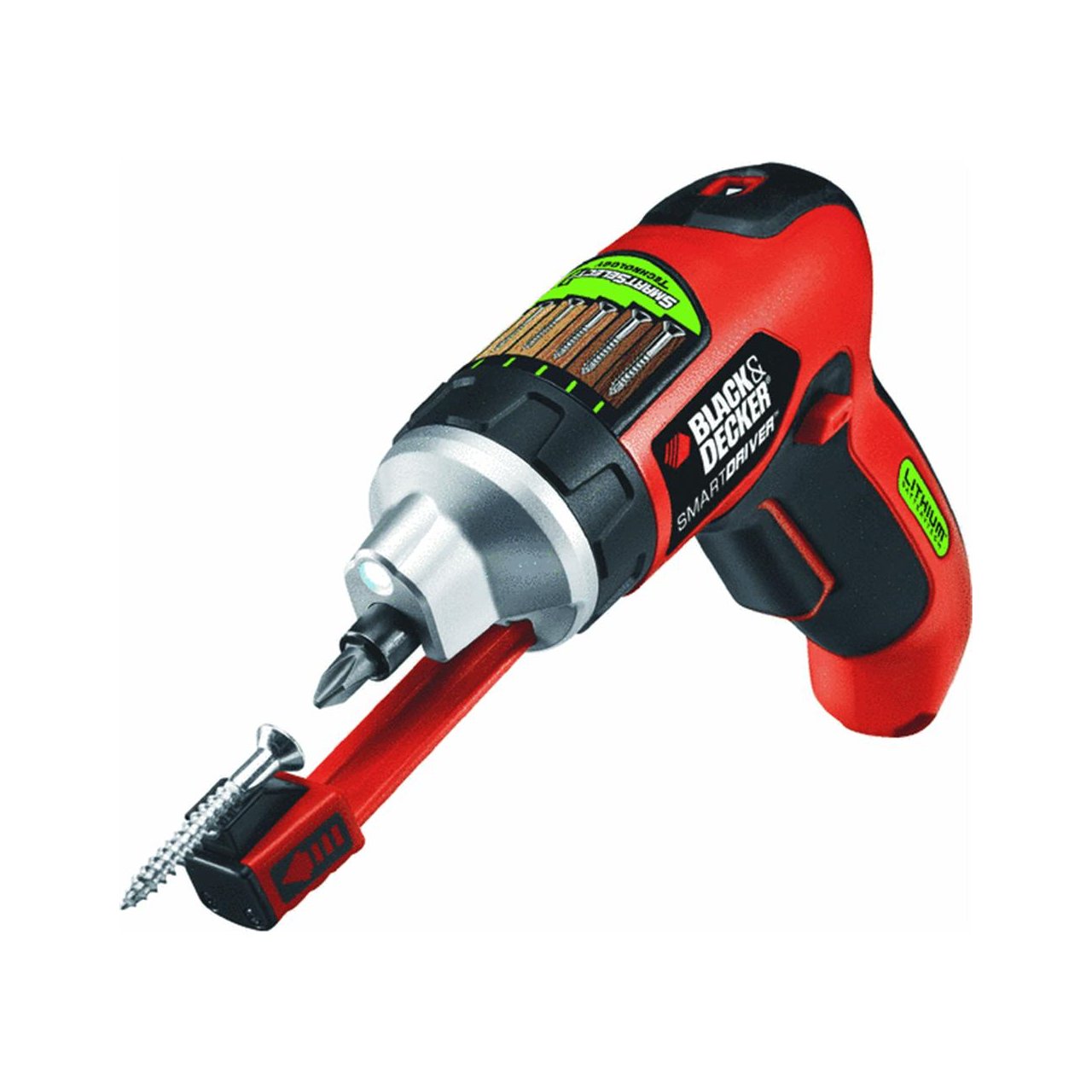
Image: The BLACK+DECKER LI4000 cordless screwdriver in use, highlighting its compact size and LED work light for improved visibility during tasks like hanging items on a wall.
Video: Demonstration of the BLACK+DECKER LI4000 Smart Select Cordless Screwdriver's features, including the SmartSelect dial, retractable screw holder, and built-in LED light, showcasing its ease of use for various tasks.
6. การบำรุงรักษา
6.1 การทำความสะอาด
ทำความสะอาดช่องระบายอากาศของเครื่องมือเป็นประจำเพื่อป้องกันความร้อนสูงเกินไป ใช้แปรงขนนุ่มหรือผ้าแห้งเช็ด ห้ามใช้น้ำหรือสารเคมีทำความสะอาด
6.2 การดูแลแบตเตอรี่
To ensure optimal battery life:
- เก็บเครื่องมือไว้ในที่แห้งและเย็น หลีกเลี่ยงแสงแดดโดยตรงและอุณหภูมิที่สูงหรือต่ำเกินไป
- ชาร์จแบตเตอรี่ให้เต็มก่อนที่จะจัดเก็บเป็นเวลานาน
- อย่าพยายามถอดแยกชิ้นส่วนแบตเตอรี่
7 การแก้ไขปัญหา
If your BLACK+DECKER LI4000 screwdriver is not functioning as expected, refer to the following common issues and solutions:
- เครื่องมือไม่เปิดใช้งาน: Ensure the battery is charged. Check the forward/reverse switch is not in the neutral (locked) position.
- Reduced power/torque: The battery may need recharging. Ensure the SmartSelect dial is set to an appropriate torque level for the task.
- เกลียวสกรูเสียหาย: Adjust the SmartSelect dial to a lower torque setting. Ensure you are using the correct bit for the screw head.
- ไฟแสดงสถานะการชาร์จไม่ทำงาน: Verify the charging cradle is properly plugged into a working outlet and the screwdriver is correctly seated in the cradle.
หากปัญหายังไม่ได้รับการแก้ไขหลังจากทำตามขั้นตอนเหล่านี้แล้ว โปรดติดต่อฝ่ายบริการลูกค้าของ BLACK+DECKER
8. ข้อมูลจำเพาะ
| ยี่ห้อ | แบล็ค+เด็คเกอร์ |
| หมายเลขรุ่น | LI4000 |
| เล่มที่tage | 3.6 โวลต์ (4V สูงสุด) |
| แหล่งพลังงาน | ใช้แบตเตอรี่ (ลิเธียมไอออน) |
| ความเร็ว | 2500 รอบต่อนาที |
| รายการ แรงบิด | 70 นิ้วปอนด์ |
| น้ำหนักสินค้า | 0.01 ออนซ์ |
| ขนาดสินค้า | 11.25 x 4 x 10 นิ้ว |
| สไตล์หัว | ผูกพัน |
| รูปแบบการแสดงผล | นำ |
9. การรับประกันและการสนับสนุน
9.1 การรับประกันของผู้ผลิต
This BLACK+DECKER LI4000 Cordless Screwdriver comes with a การรับประกันจากผู้ผลิต 2 ปี นับจากวันที่ซื้อสินค้า การรับประกันนี้ครอบคลุมถึงข้อบกพร่องในวัสดุหรือฝีมือการผลิต โปรดเก็บหลักฐานการซื้อไว้เพื่อใช้ในการเรียกร้องการรับประกัน
9.2 การสนับสนุนลูกค้า
หากต้องการความช่วยเหลือด้านเทคนิค บริการรับประกัน หรือสั่งซื้ออะไหล่ โปรดติดต่อฝ่ายบริการลูกค้าของ BLACK+DECKER อ้างอิงจากเอกสารทางการของ BLACK+DECKER webเพื่อตรวจสอบข้อมูลติดต่อล่าสุดได้จากเว็บไซต์หรือบรรจุภัณฑ์ของผลิตภัณฑ์


