1. บทนำ
This manual provides comprehensive instructions for the installation, operation, and maintenance of your SMC EZ Connect G 802.11g Wireless Cardbus Adapter (Model: SMCWCB-G2). This device enables your laptop computer to connect to wireless networks using the 802.11g standard, offering reliable and fast wireless connectivity.
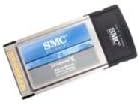
Figure 1.1: The SMC EZ Connect G Wireless Cardbus Adapter. This image shows the compact Cardbus adapter, designed to fit into a laptop's PC Card slot, with the SMC logo visible on its metallic casing.
2. เนื้อหาบรรจุภัณฑ์
โปรดตรวจสอบว่าสินค้าทั้งหมดมีอยู่ในบรรจุภัณฑ์ผลิตภัณฑ์ของคุณ:
- SMC EZ Connect G 802.11g Wireless Cardbus Adapter (SMCWCB-G2)
- Driver and Utility CD-ROM
- Quick Installation Guide (this document serves as the full manual)
3. ข้อกำหนดของระบบ
ก่อนการติดตั้ง โปรดตรวจสอบให้แน่ใจว่าระบบของคุณตรงตามข้อกำหนดขั้นต่ำต่อไปนี้:
- Laptop computer with an available Cardbus (PC Card Type II) slot.
- Operating System: Windows 98SE, ME, 2000, XP, or Vista (compatibility with newer OS versions may vary and require updated drivers from the manufacturer's webเว็บไซต์).
- CD-ROM drive for driver installation (if not installing from downloaded drivers).
4. คู่มือการติดตั้ง
4.1 การติดตั้งไดรเวอร์
- Do not insert the Cardbus Adapter yet. Power on your laptop and allow the operating system to load completely.
- Insert the Driver and Utility CD-ROM into your laptop's CD-ROM drive.
- If the installer does not launch automatically, navigate to the CD-ROM drive in "My Computer" or "This PC" and double-click on "Setup.exe" or "Install.exe".
- Follow the on-screen instructions to complete the driver installation. You may be prompted to restart your computer after installation.
4.2 การติดตั้งฮาร์ดแวร์
- Locate an available Cardbus (PC Card Type II) slot on your laptop. This is typically on the side of the laptop.
- Gently slide the SMC Wireless Cardbus Adapter into the slot until it clicks into place and is fully seated. Ensure the adapter is inserted in the correct orientation.
- Your operating system should detect the new hardware and, if drivers were pre-installed, configure the adapter automatically. If prompted, direct the system to the driver files on the CD-ROM or the location where you saved downloaded drivers.
5. คู่มือการใช้งาน
5.1 การเชื่อมต่อกับเครือข่ายไร้สาย
- Once the adapter is installed and recognized, open your operating system's wireless network utility. This is often accessible via an icon in the system tray (bottom right corner of the screen).
- Scan for available wireless networks. A list of detected networks (SSIDs) will appear.
- เลือกเครือข่ายที่คุณต้องการจากรายการ แล้วคลิก "เชื่อมต่อ"
- If the network is secured (WPA, WEP, etc.), you will be prompted to enter the network security key or passphrase. Enter the correct key and confirm.
- Once connected, the utility will indicate a successful connection, and you should have internet access (if the network provides it).
5.2 Basic Network Settings
Most home users will use DHCP for automatic IP address assignment. For advanced configurations (e.g., static IP, specific DNS servers), refer to your operating system's network settings or the SMC utility provided on the CD-ROM.
6. การบำรุงรักษา
- การอัปเดตไดรเวอร์: ตรวจสอบการสนับสนุน SMC เป็นระยะ webงาน (www.smc.com/support - Note: This link is illustrative and may not be active.) for updated drivers. Keeping drivers current can improve performance and compatibility.
- การดูแลทางกายภาพ: Keep the adapter clean and free from dust. When not in use, store it in a protective case to prevent damage to the connectors. Avoid exposing the adapter to extreme temperatures or moisture.
- การกำจัดอย่างปลอดภัย: Before removing the adapter from your laptop, it is recommended to use the "Safely Remove Hardware" option in your operating system's system tray to prevent data corruption or system instability.
7 การแก้ไขปัญหา
ปัญหาทั่วไปและวิธีแก้ไข:
- No Wireless Connection:
- Ensure the adapter is fully seated in the Cardbus slot.
- Verify that the wireless function is enabled on your laptop (some laptops have a physical switch or function key combination).
- Check that the correct drivers are installed and the adapter is enabled in Device Manager.
- Confirm that your wireless router/access point is powered on and broadcasting a signal.
- ความเร็วการเชื่อมต่อช้า:
- Ensure you are within range of your wireless router.
- Minimize interference from other electronic devices (e.g., cordless phones, microwaves).
- Update your adapter's drivers to the latest version.
- Check for other devices consuming bandwidth on your network.
- Cannot Find Wireless Networks:
- Verify the adapter is functioning correctly in Device Manager.
- Ensure your router's SSID broadcast is enabled.
- Try restarting both your laptop and the wireless router.
For further assistance, refer to the manufacturer's support resources or consult a qualified technician.
8. ข้อมูลจำเพาะ
| คุณสมบัติ | คำอธิบาย |
|---|---|
| หมายเลขรุ่น | SMCWCB-G2 |
| ไร้มาตรฐาน | IEEE 802.11g, backward compatible with 802.11b |
| อัตราการถ่ายโอนข้อมูล | Up to 54 Mbps (802.11g) |
| ย่านความถี่ | 2.4 กิกะเฮิรตซ์ |
| อินเทอร์เฟซ | Cardbus (PC Card Type II) |
| ความปลอดภัย | WPA, WEP (64/128-bit) |
| ขนาด (กว้าง x ยาว x สูง) | 4.53 x 2.13 x 0.2 นิ้ว |
| น้ำหนัก | 1.28 ออนซ์ |
| ยูพีซี | 662698707113 |
9. การรับประกันและการสนับสนุน
For detailed warranty information, please refer to the warranty card included with your product or visit the official SMC website. Technical support and additional resources, including updated drivers and FAQs, can typically be found on the manufacturer's support pages.
ผู้ผลิต: เอสเอ็มซี
Webเว็บไซต์: www.smc.com (Note: This link is illustrative and may not be active.)


