การแนะนำ
ขอบคุณสำหรับการซื้อasing the Technics SL-PD807 MASH 5 Disc CD Player. This manual provides detailed instructions for the proper setup, operation, and maintenance of your new audio component. Please read this manual thoroughly before using the unit to ensure optimal performance and longevity.
The SL-PD807 features a 5-disc carousel changer, allowing for extended playback without interruption, and incorporates MASH (Multi-stage Noise Shaping) D/A conversion for high-quality audio reproduction.
ข้อมูลด้านความปลอดภัยที่สำคัญ
- แหล่งพลังงาน: Ensure the unit is connected to an AC 120V, 60Hz power supply.
- การระบายอากาศ : อย่าปิดกั้นช่องระบายอากาศ ควรเว้นพื้นที่รอบตัวเครื่องให้เพียงพอเพื่อให้อากาศถ่ายเทได้สะดวก เพื่อป้องกันความร้อนสูงเกินไป
- ความชื้น: อย่าให้ตัวเครื่องโดนฝนหรือความชื้น อย่าวางสิ่งของที่บรรจุของเหลว เช่น แจกัน ไว้บนตัวเครื่อง
- การทำความสะอาด: ถอดปลั๊กเครื่องออกจากเต้ารับที่ผนังก่อนทำความสะอาด ใช้ผ้าแห้งเช็ดทำความสะอาด
- การบริการ: อย่าพยายามซ่อมบำรุงเครื่องนี้ด้วยตนเอง แนะนำให้ช่างผู้ชำนาญการเป็นผู้ซ่อมบำรุงทุกครั้ง
เนื้อหาแพ็คเกจ
กรุณาตรวจสอบว่าสินค้าทั้งหมดมีอยู่ในแพ็คเกจ:
- Technics SL-PD807 MASH 5 Disc CD Player
- สายไฟ
- สายสัญญาณเสียงอาร์ซีเอ
Note: A remote control is not included with this unit.
การตั้งค่า
1. การแกะกล่อง
Carefully remove the CD player and all accessories from the packaging. Retain the packaging materials for future transport or storage.
2 การวาง
Place the CD player on a stable, level surface away from direct sunlight, heat sources, and excessive dust or vibrations. Ensure there is sufficient space around the unit for proper ventilation.

รูปที่ 1: ด้านหน้า view of the Technics SL-PD807 CD Player with included RCA cables.
3. การเชื่อมต่อ
เชื่อมต่อเครื่องเล่นซีดีเข้ากับ... amplifier or receiver using the supplied RCA audio cables.
- Connect one end of the RCA audio cables (red and white plugs) to the 'LINE OUT' jacks on the rear of the SL-PD807.
- Connect the other end of the RCA audio cables to an available 'CD IN' or 'AUX IN' input on your amplifier/receiver. Match the red plug to the 'R' (right) input and the white plug to the 'L' (left) input.
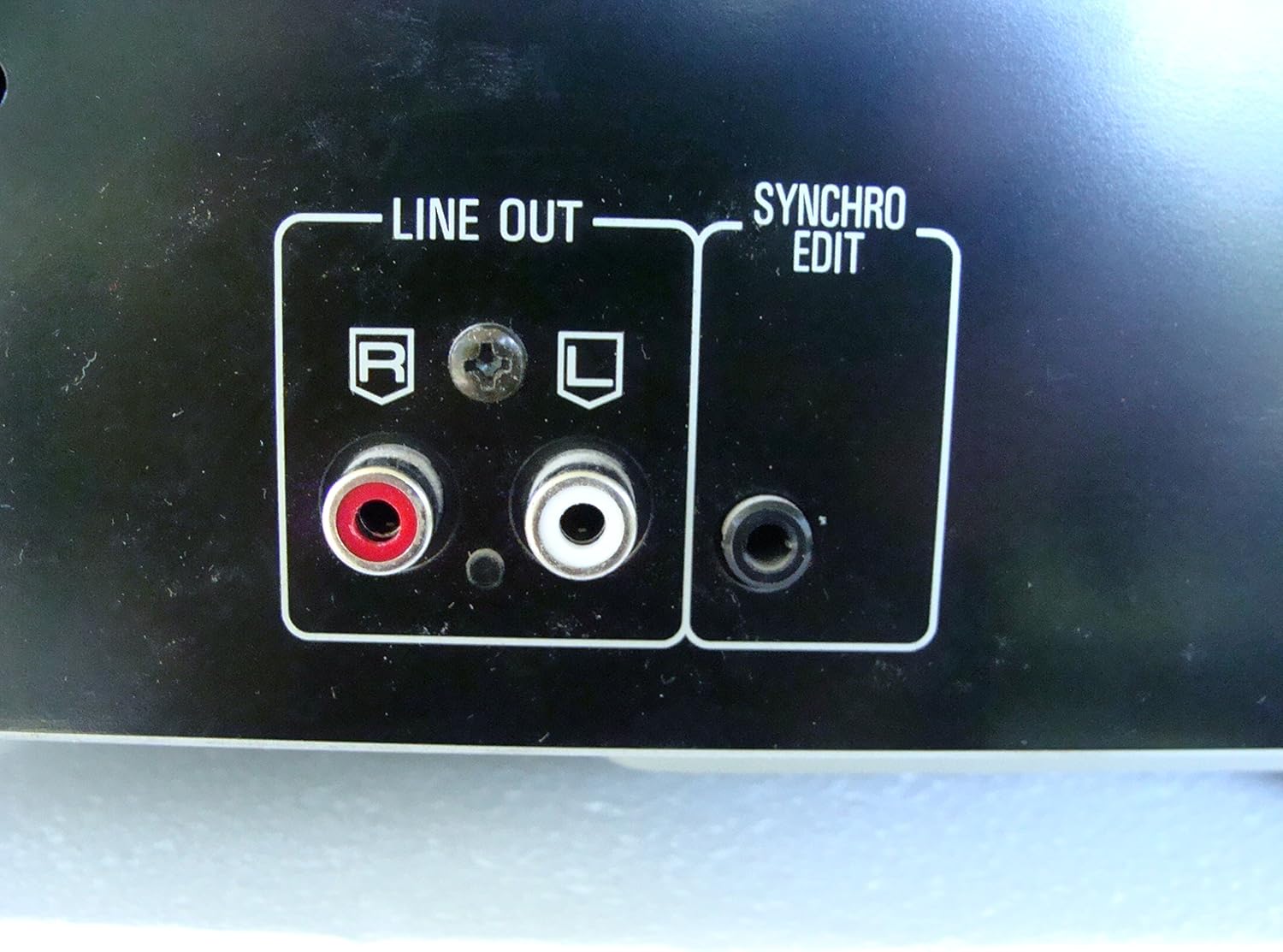
รูปที่ 2: Rear panel connections, highlighting the 'LINE OUT' (RCA) and 'SYNCHRO EDIT' ports.
- Plug the power cord into the AC inlet on the rear of the CD player, then plug the other end into a standard AC wall outlet.
คำแนะนำการใช้งาน
1. เปิด/ปิดเครื่อง
กดปุ่ม พลัง button located on the front left of the unit to turn the CD player on or off.
2. การโหลดแผ่นดิสก์
The SL-PD807 features a 5-disc carousel. Press the เปิด/ปิด button to open the disc tray. Place up to five CDs onto the numbered disc slots with the label side facing up. Press เปิด/ปิด อีกครั้งเพื่อปิดถาด

รูปที่ 3: Front panel controls including disc tray, display, and playback buttons.
3. การเล่นพื้นฐาน
- เล่น: กดปุ่ม เล่น กดปุ่ม (►) เพื่อเริ่มเล่น
- หยุดชั่วคราว: กดปุ่ม หยุดชั่วคราว button (⏸) to temporarily stop playback. Press again to resume.
- หยุด: กดปุ่ม หยุด กดปุ่ม (■) เพื่อหยุดการเล่น
- ข้ามแทร็ก: กดปุ่ม ข้าม buttons (⏭︎ / ⏮︎) to skip to the next or previous track.
- ค้นหา: กดค้างไว้ ค้นหา buttons (⏪︎ / ⏩︎) to fast forward or rewind within a track.
4. Disc Exchange
You can exchange discs while another disc is playing. Press the ข้ามดิสก์ button to rotate the carousel to an empty slot or a disc you wish to remove/replace. The currently playing disc will continue to play until you select a new disc to play.
5. โหมดการเล่น
- เล่นสุ่ม: กดปุ่ม สุ่ม button to play tracks on the current disc or all loaded discs in a random order.
- โปรแกรมการเล่น: ใช้ โปรแกรม button to create a custom playback sequence of tracks from the loaded discs. Refer to the on-screen display for programming steps.
- เล่นซ้ำ: กดปุ่ม ทำซ้ำ ปุ่มสำหรับเล่นซ้ำแทร็กปัจจุบัน แผ่นปัจจุบัน หรือทุกแผ่น
การซ่อมบำรุง
1. การทำความสะอาดตัวเครื่อง
เช็ดทำความสะอาดภายนอกตัวเครื่องด้วยผ้าแห้งนุ่มๆ สำหรับคราบฝังแน่น ให้ใช้ผ้าชุบน้ำหมาดๆ เช็ดเบาๆampen the cloth with water and a mild detergent, then wipe dry. Do not use abrasive cleaners, benzene, thinner, or alcohol, as these can damage the finish.

รูปที่ 4: Top surface of the unit, illustrating areas that may require cleaning or show wear.
2. การดูแลแผ่นดิสก์
- จับแผ่นดิสก์โดยจับที่ขอบเพื่อหลีกเลี่ยงรอยนิ้วมือบนพื้นผิวการเล่น
- Keep discs clean. Wipe from the center outwards with a soft, lint-free cloth if necessary.
- เก็บแผ่นดิสก์ไว้ในกล่องเพื่อป้องกันฝุ่นและรอยขีดข่วน
การแก้ไขปัญหา
If you experience problems with your CD player, please consult the following table before seeking service.
| ปัญหา | สาเหตุที่เป็นไปได้ | สารละลาย |
|---|---|---|
| ไม่มีไฟฟ้า | สายไฟไม่ได้เชื่อมต่ออย่างแน่นหนา | ตรวจสอบการเชื่อมต่อสายไฟเข้ากับเครื่องและเต้ารับที่ผนัง |
| ไม่มีเสียง | RCA audio cables not connected correctly. Ampไม่ได้เลือกอินพุตเครื่องขยายเสียง/เครื่องรับสัญญาณ | Ensure RCA cables are securely connected to both the CD player and ampเลือกอินพุตที่ถูกต้องบนเครื่องขยายเสียงของคุณ amplifier/เครื่องรับ. |
| Disc does not play / Skipping | แผ่นดิสก์สกปรกหรือมีรอยขีดข่วน ใส่แผ่นดิสก์ไม่ถูกต้อง | Clean the disc with a soft, lint-free cloth. Ensure the disc is placed label-side up in the tray. Try another disc. |
| Carousel does not rotate | Obstruction in the disc tray. | Ensure no foreign objects are obstructing the carousel mechanism. |
ข้อมูลจำเพาะ
The following are the technical specifications for the Technics SL-PD807 MASH 5 Disc CD Player:
| คุณสมบัติ | ข้อมูลจำเพาะ |
|---|---|
| ชื่อรุ่น | SL-PD807 |
| ผู้ผลิต | เทคนิค |
| ความจุของแผ่นดิสก์ | 5 แผ่น |
| ความต้องการด้านพลังงาน | ไฟฟ้ากระแสสลับ 120V, 60Hz, 13W |
| ขนาดแพ็คเกจ | 17 x 17 x 5 นิ้ว |
| น้ำหนักสินค้า | 15.02 ปอนด์ |
| เทคโนโลยีการเชื่อมต่อ | Auxiliary, Infrared |
| คุณสมบัติพิเศษ | ป้องกันการข้ามการป้องกัน |

รูปที่ 5: Product label displaying model number and power specifications.
การรับประกันและการสนับสนุน
For information regarding warranty coverage and customer support for your Technics SL-PD807 CD Player, please refer to the warranty card included with your purchase or visit the official Technics website. If you require further assistance, please contact Technics customer service.


