1. บทนำ
The JBL On Stage Micro is a portable docking sound system designed for iPods and other audio devices. It provides clear, powerful sound and offers convenient features for music playback and device charging.
1.1. คุณสมบัติหลัก
- ความเข้ากันได้ของ iPod: Supports all docking versions of the iPod, including iPod mini 1G; iPod nano 1G, 2G, 3G; iPod 3G, 4G, 5G, 5.5G, 6G; and iPod touch.
- อินพุตเสริม: A 3.5mm stereo mini jack allows connection of other audio devices such as MP3 players, CD players, desktop computers, satellite radios, and laptops.
- OnePoint iPod Dock Connection: Facilitates synchronization with iTunes and charging.
- Evercharge Topology: Charges your iPod even when the unit is switched off or not connected to a computer.
- รีโมทคอนโทรล IR: Provides full iPod navigation and volume control.
- การออกแบบพกพา: Can be powered by AC adapter or AAA batteries for on-the-go use.
2. การตั้งค่า
2.1. การแกะกล่อง
Carefully remove all components from the packaging. Ensure you have the JBL On Stage Micro unit, remote control, and auxiliary audio input cable.
2.2. การเชื่อมต่อไฟฟ้า
The JBL On Stage Micro can be powered in two ways:
- ไฟฟ้ากระแสสลับ: Connect the provided AC adapter to the power input on the rear of the unit and then to a wall outlet.
- พลังงานแบตเตอรี่: For portable use, insert four AAA batteries into the battery compartment located on the underside of the unit. Ensure correct polarity.
2.3. Docking an iPod
Gently place your compatible iPod into the dock connector located at the center of the JBL On Stage Micro. Ensure it is seated firmly for proper connection and charging.
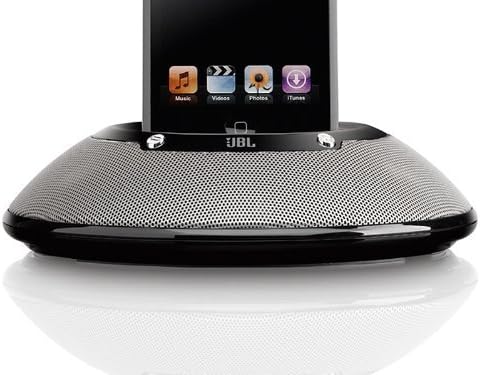
ภาพที่ 1: The JBL On Stage Micro portable speaker dock in black. An iPod is securely docked in the center, showcasing its screen with music, video, photos, and iTunes icons. The speaker features a sleek, circular design with a perforated metallic grille covering the speakers, and the JBL logo is visible below the dock connector. The device is designed for portability and integrates seamlessly with iPods.
2.4. การเชื่อมต่ออุปกรณ์เสริม
To connect an external audio source (e.g., MP3 player, CD player), use the provided 3.5mm auxiliary audio input cable. Connect one end to the auxiliary input jack on the JBL On Stage Micro and the other end to the headphone or line-out jack of your audio device.
2.5. USB Connection for Computer
To synchronize your iPod with iTunes or connect to a computer, use a USB cable (not included). Connect the USB cable to the rear of the JBL On Stage Micro and to an available USB port on your computer. When your iPod is docked, it will establish a connection for synchronization and charging.
3. การดำเนินการ
3.1. เปิด/ปิดเครื่อง
Press the power button on the unit or the remote control to turn the JBL On Stage Micro on or off.
3.2. การควบคุมระดับเสียง
Adjust the volume using the dedicated volume buttons on the unit or the IR remote control. The left button decreases volume, and the right button increases it.
3.3. ฟังก์ชั่นการควบคุมระยะไกล
The IR remote control offers comprehensive control over your docked iPod:
- โหมดเพลง: Control volume, change tracks, fast forward, and fast reverse.
- iPod Navigation Mode: Navigate iPod menus, browse songs, photos, and playlists, and adjust settings as if directly interacting with the iPod.
3.4. Charging Your iPod
When your iPod is docked and the JBL On Stage Micro is connected to AC power, the iPod will charge automatically, even if the speaker system is turned off, thanks to the Evercharge topology.
4. Advanced Technologies and Features
The JBL On Stage Micro incorporates several proprietary technologies to deliver high-quality audio performance:
- Odyssey Transducers: These drivers provide accurate high frequencies and extended low-frequency response, offering a full and rich sound from low bass to high treble.
- Slipstream Port Design: Minimizes boundary layer separation, resulting in high-output bass with reduced distortion.
- COE (Computer-Optimized Equalization): The system's equalization is optimized by computer to create a rich, complete soundstage across various listening positions.
- OCT (Optimized Compression Topology): A proprietary compression technology ensures clean and accurate sound reproduction even at high output levels.
- AEMS (Advanced Energy Management System): Features an automatic battery-saving shutoff. The system enters sleep mode when no audio input is detected and awakens with a touch, resuming at the previous volume level.
5. การบำรุงรักษา
5.1. การทำความสะอาด
Wipe the unit with a soft, dry cloth. Do not use liquid cleaners or aerosols, as they may damage the finish or internal components.
5.2. การดูแลแบตเตอรี่
If using batteries, replace them when the amber LED flashes, indicating low battery power. JBL encourages the use of rechargeable batteries to minimize waste.
6 การแก้ไขปัญหา
- ไม่มีไฟฟ้า: Ensure the AC adapter is securely connected to both the unit and a working power outlet. If using batteries, check if they are inserted correctly and are not depleted.
- ไม่มีเสียง: Verify that the iPod or auxiliary device is playing and its volume is turned up. Check the volume level on the JBL On Stage Micro. Ensure the iPod is properly docked or the auxiliary cable is fully inserted.
- รีโมทคอนโทรลไม่ทำงาน: Check the battery in the remote control. Ensure there are no obstructions between the remote and the unit's IR receiver.
- iPod Not Charging: Confirm the JBL On Stage Micro is connected to AC power. Ensure the iPod is correctly docked.
- เสียงผิดเพี้ยน: Reduce the volume on both the JBL On Stage Micro and the connected audio source. Ensure the audio source is not outputting a distorted signal.
7. ข้อมูลจำเพาะ
| คุณสมบัติ | ข้อมูลจำเพาะ |
|---|---|
| ขนาดสินค้า | 3.9 x 8.2 x 8.8 นิ้ว |
| น้ำหนักสินค้า | 1 ปอนด์ (16 ออนซ์) |
| ผู้ผลิต | ฮาร์แมน การ์ดอน |
| หมายเลขรุ่น | JBLONSTMBLK2P |
| ฮาร์ดแวร์อินเตอร์เฟซ | ยูเอสบี |
| อุปกรณ์ที่รองรับ | iPod Nano, iPod Touch (and other docking iPod models) |
| จำนวนพอร์ต | 1 (ยูเอสบี) |
| ยูพีซี | 050036916882 |
8. วิดีโอผลิตภัณฑ์อย่างเป็นทางการ
8.1. Paul McCartney for JBL
1 วิดีโอ: This video showcases Paul McCartney in various settings, including a recording studio, a street, and a bedroom, highlighting the presence and quality of JBL audio equipment in everyday life and professional environments. The video emphasizes the clarity and truthfulness of sound reproduction by JBL products.
9. ข้อมูลการรับประกัน
The JBL On Stage Micro Portable Speaker Dock is covered by a manufacturer's limited warranty. Please refer to the warranty card included with your product for specific terms, conditions, and duration. Retain your proof of purchase for warranty claims.
10. การสนับสนุนลูกค้า
For technical assistance, troubleshooting, or service inquiries, please visit the official JBL support webหรือติดต่อฝ่ายบริการลูกค้า โดยทั่วไปข้อมูลการติดต่อจะอยู่ในเว็บไซต์ของผู้ผลิต webเว็บไซต์หรือในบรรจุภัณฑ์ของผลิตภัณฑ์


