การแนะนำ
This manual provides comprehensive instructions for the safe and proper installation, operation, and maintenance of your Peerless-AV Paramount Articulating Wall Mount, model PA740. Please read all instructions carefully before beginning installation.
ข้อมูลด้านความปลอดภัยที่สำคัญ
- ตรวจสอบให้แน่ใจว่าพื้นผิวที่ติดตั้งสามารถรองรับน้ำหนักรวมของขาตั้งและจอแสดงผลได้อย่างปลอดภัย
- ห้ามเกินขีดจำกัดน้ำหนักสูงสุดที่สามารถรองรับได้คือ 80 ปอนด์ (36.3 กก.)
- ควรใช้เครื่องมือและอุปกรณ์ความปลอดภัยที่เหมาะสมเสมอในระหว่างการติดตั้ง
- หากคุณไม่แน่ใจเกี่ยวกับส่วนใดส่วนหนึ่งของกระบวนการติดตั้ง โปรดปรึกษาผู้เชี่ยวชาญที่มีคุณสมบัติเหมาะสม
- ผลิตภัณฑ์นี้ได้รับการออกแบบสำหรับใช้ภายในอาคารเท่านั้น
เนื้อหาแพ็คเกจ
ตรวจสอบว่าส่วนประกอบทั้งหมดมีอยู่ก่อนเริ่มการติดตั้ง:
- Peerless-AV PA740 Articulating Wall Mount
- VESA Adapter Plate
- Mounting Hardware (for wall attachment)
- Screen Attachment Hardware (various sizes for display compatibility)
- คู่มือการติดตั้ง (เอกสารนี้)
การติดตั้งและการตั้งค่า
This section outlines the steps for mounting the PA740 to your wall and attaching your display.
1. เตรียมสถานที่ติดตั้ง
Identify a suitable wall stud for mounting. The mount is designed to attach to a single wall stud. Use a stud finder to locate the center of the stud. Ensure there are no electrical wires or plumbing in the drilling path.
บันทึก: When folded flat against the wall, the display will be centered approximately 2.81 inches to the left of the stud center. Plan your mounting location accordingly.
2. ติดแผ่นผนัง
- Hold the wall plate against the wall at the desired height and mark the two drilling locations for the lag screws.
- Drill pilot holes into the center of the stud at the marked locations. Refer to the installation manual for recommended drill bit size (typically 1/4 inch, but verify).
- Secure the wall plate to the stud using the provided lag screws. Ensure the plate is level before fully tightening.

ภาพที่ 1: ด้านหน้า view of the Peerless-AV PA740 Articulating Wall Mount. This image shows the main components of the mount, including the wall plate, articulating arm, and the VESA compliant display attachment plate. The mount is black and appears robust.
3. Attach VESA Adapter to Display
The PA740 is compatible with VESA 75/100, 200x100, and 200x200 mm mounting patterns.
- Carefully place your display face down on a soft, clean surface.
- Identify the correct size screws from the provided hardware kit that fit your display's VESA mounting holes. Refer to your display's manual for screw size recommendations.
- Attach the VESA adapter plate to the back of your display using the selected screws. Do not overtighten.
4. Mount Display to Wall Arm
- With assistance, carefully lift the display and align the VESA adapter plate on the display with the arm assembly on the wall mount.
- Slide the display onto the arm until it is securely seated.
- Secure the display to the arm using the small set screw, as indicated in the detailed installation guide.
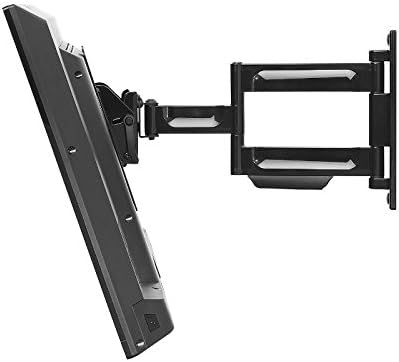
ภาพที่ 2: ด้านข้าง view of the Peerless-AV PA740 Articulating Wall Mount with a television attached. The image demonstrates the mount's extension capability from the wall and its articulating arm design, allowing for flexible display positioning.
คำแนะนำการใช้งาน
The PA740 mount offers versatile positioning for optimal viewการไอเอ็นจี
การปรับตำแหน่ง
- การยืดและการหด: Gently pull the display away from the wall to extend the arm. Push the display back towards the wall to retract it. The mount extends up to 15.6 inches and retracts to 2.93 inches.
- หมุน: The articulating arm allows for 180 degrees of swivel. Carefully pivot the display left or right to achieve the desired viewมุมอิง
- เอียง: The mount features +15° to -5° of continuous one-touch tilt. Adjust the tilt by gently pushing the top or bottom of the display forward or backward. No tools are required for this adjustment.
- การปรับระดับ: The mount includes a leveling feature that allows for +/-5 degrees of roll adjustment. This can be used to fine-tune the display's horizontal alignment after installation. Refer to the detailed manual for specific screw adjustments.
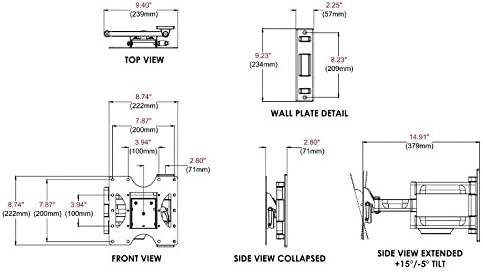
ภาพที่ 3: Technical diagram illustrating the dimensions and movement capabilities of the Peerless-AV PA740 Articulating Wall Mount. This includes top, front, side collapsed, and side extended views with tilt angles, providing precise measurements for planning and installation.
การจัดการสายเคเบิล
The PA740 features integrated cable management to keep cables organized and out of sight. Route your display's input/output cables along the arm and through the designated channels to maintain a clean appearance, even when the display is extended or retracted.
การซ่อมบำรุง
- Periodically check all mounting screws and connections to ensure they remain secure.
- ทำความสะอาดฐานยึดด้วยผ้าแห้งเนื้อนุ่ม หลีกเลี่ยงการใช้สารทำความสะอาดที่มีฤทธิ์กัดกร่อนหรือตัวทำละลาย
- The articulating joints are designed for smooth operation. If movement becomes stiff, consult the manufacturer's support for guidance; do not apply lubricants unless specifically instructed.
การแก้ไขปัญหา
| ปัญหา | สาเหตุที่เป็นไปได้ | สารละลาย |
|---|---|---|
| Display is not level after installation. | เกิดความคลาดเคลื่อนเล็กน้อยระหว่างการติดตั้ง | Use the +/-5 degree roll adjustment feature. Refer to the detailed manual for specific screw adjustments to level the screen. |
| การปรับตั้งฐานยึดนั้นฝืดเกินไปหรือหลวมเกินไป | Joint tension requires adjustment. | The pivot adjustment screws can be adjusted. Do not loosen more than 1/2 turn. If unsure, contact support. |
| Display does not fit the mount. | Incorrect VESA pattern or display size. | Verify your display's VESA pattern (75/100, 200x100, 200x200 mm) and weight (max 80 lbs). Ensure display size is between 22" and 43". |
| ฐานยึดดูไม่มั่นคง | Improper wall attachment or overloaded. | Ensure lag screws are securely fastened into a wall stud. Do not exceed the 80 lb weight capacity. Re-check all connections. If instability persists, consult a professional. |
ข้อมูลจำเพาะ
- แบบอย่าง: PA740
- ยี่ห้อ: Peerless-AV
- Display Size Compatibility: 22" ถึง 43"
- ความจุน้ำหนัก: 80 ปอนด์ (36.3 กก.)
- ความเข้ากันได้ของ VESA: 75x75mm, 100x100mm, 200x100mm, 200x200mm
- ส่วนต่อขยายจากผนัง: 2.93 นิ้ว (หด) ถึง 15.6 นิ้ว (ยืดออก)
- เอียง: +15° / -5° continuous one-touch
- หมุน: 180°
- Roll (Leveling): +/-5°
- วัสดุ: Durable Metal (Fused Epoxy Coated)
- สี: สีดำ
- ขนาดสินค้า : 8.75 x 2.93 x 9.35 inches (Wall Plate: 9.23" H x 2.25" W)
- น้ำหนักสินค้า: 5.28 ปอนด์
- ใบรับรอง: ได้รับการรับรองจาก UL
ข้อมูลการรับประกัน
The Peerless-AV PA740 Articulating Wall Mount is backed by a limited five-year warranty. This warranty covers defects in materials and workmanship under normal use. For full warranty terms and conditions, please refer to the official Peerless-AV webไซต์หรือติดต่อฝ่ายสนับสนุนลูกค้า
การสนับสนุนและการติดต่อ
For technical assistance, troubleshooting, or warranty inquiries, please contact Peerless-AV customer support:
- Webเว็บไซต์: www.peerless-av.com
- Refer to the official Peerless-AV webไซต์สำหรับข้อมูลติดต่อและทรัพยากรสนับสนุนล่าสุด


