1. บทนำ
This manual provides detailed instructions for the installation, operation, maintenance, and troubleshooting of your Antec TPQ-1000 TruePower Quattro 1000W Power Supply. Please read this manual thoroughly before installation and use to ensure proper functionality and safety.
The Antec TPQ-1000 is a high-performance power supply designed for demanding computer systems, featuring 1000 watts of continuous power, 80PLUS certification for efficiency, and a modular cable design for improved cable management.
2. ข้อมูลด้านความปลอดภัย
คำเตือน: Improper installation or use can lead to equipment damage, electric shock, or serious injury. Always follow these safety guidelines:
- โปรดตรวจสอบให้แน่ใจว่าได้ถอดปลั๊กไฟออกจากเต้ารับไฟฟ้ากระแสสลับก่อนทำการติดตั้งหรือเคลื่อนย้าย
- ห้ามเปิดแหล่งจ่ายไฟ casinก. ปริมาตรสูงtages are present inside, even when disconnected. There are no user-serviceable parts.
- Install the power supply in a well-ventilated area. Do not block any ventilation openings.
- Use only the modular cables provided with the power supply.
- ตรวจสอบให้แน่ใจว่าเชื่อมต่อสายเคเบิลทั้งหมดอย่างแน่นหนา ก่อนที่จะเปิดระบบ
- This product is designed for use with personal computers. Do not use it for any other purpose.
3. เนื้อหาบรรจุภัณฑ์
ตรวจสอบว่าแพ็คเกจของคุณมีรายการต่อไปนี้:
- Antec TPQ-1000 TruePower Quattro 1000W Power Supply Unit
- Modular Cable Set (including ATX 20+4 pin, EPS12V 8-pin, PCI-E 6+2 pin, SATA, Molex)
- สายไฟ AC
- สกรูยึด
- คู่มือการใช้งาน (เอกสารนี้)
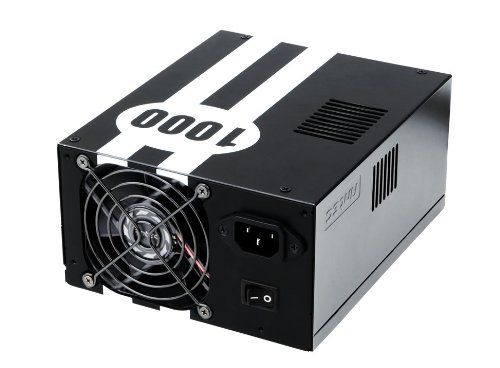
Image: The Antec TPQ-1000 TruePower Quattro 1000W Power Supply unit, typically shown with its modular cables. This image illustrates the main power supply unit and its various connectors.
4. การตั้งค่าและการติดตั้ง
4.1 รายการตรวจสอบก่อนการติดตั้ง
- ตรวจสอบให้แน่ใจว่าเคสคอมพิวเตอร์ของคุณรองรับพาวเวอร์ซัพพลายแบบ ATX
- รวบรวมเครื่องมือที่จำเป็น: ไขควงปากแฉก
- Unplug your computer from the wall outlet and discharge any residual power by pressing the power button.
- ถอดแผงด้านข้างของเคสคอมพิวเตอร์ของคุณออก
4.2 การติดตั้งแหล่งจ่ายไฟ
- Carefully place the Antec TPQ-1000 into the power supply mounting bay of your computer case. Ensure the fan is oriented correctly for optimal airflow (usually facing down if there's a bottom vent, or facing into the case if top-mounted).
- ยึดแหล่งจ่ายไฟเข้ากับเคสโดยใช้สกรูยึดที่ให้มา
4.3 การเชื่อมต่อสายเคเบิลแบบโมดูลาร์
Connect only the necessary modular cables to the power supply and your components. This reduces cable clutter and improves airflow.
- 20+4 Pin ATX Motherboard Power: Connect the main ATX cable to the corresponding port on your motherboard.
- 4+4 Pin EPS12V CPU Power: Connect this cable to the CPU power connector on your motherboard. Modern motherboards typically use an 8-pin connector.
- 6+2 Pin PCI-E Power: For graphics cards. The TPQ-1000 provides multiple PCI-E connectors. Connect as many as required by your graphics card(s).
- กำลังไฟ SATA: Connect to SATA devices such as hard drives, SSDs, and optical drives.
- Molex Power: เชื่อมต่อกับอุปกรณ์ต่อพ่วงรุ่นเก่าหรือพัดลมเคสที่ใช้ขั้วต่อ Molex
Ensure all connections are firm and properly seated. Route cables neatly to avoid obstructing airflow.
4.4 การเปิดเครื่องครั้งแรก
- Once all components are connected, replace the computer case side panel.
- เชื่อมต่อสายไฟ AC เข้ากับแหล่งจ่ายไฟ จากนั้นต่อเข้ากับเต้ารับไฟฟ้าที่ผนัง
- Flip the power switch on the back of the power supply to the "ON" position (usually marked with "I").
- กดปุ่มเปิด/ปิดบนเคสคอมพิวเตอร์ของคุณเพื่อเริ่มระบบ
5. คู่มือการใช้งาน
The Antec TPQ-1000 TruePower Quattro is designed for continuous and stable operation once properly installed. It features:
- 80PLUS Certification: This indicates high power efficiency, reducing wasted energy and heat generation.
- อินพุตสากล: Automatically adjusts for 100V to 240V power grids, making it suitable for global use.
- การแก้ไขค่าตัวประกอบกำลังไฟฟ้าแบบแอคทีฟ (PFC): Improves power efficiency and reduces electrical waste.
- Multiple 12V Rails: Provides stable power delivery to critical components.
No specific user interaction is required during normal operation beyond ensuring adequate ventilation and a stable power source.
6. การบำรุงรักษา
เพื่อให้มั่นใจว่าแหล่งจ่ายไฟของคุณจะมีอายุการใช้งานยาวนานและทำงานได้อย่างมีประสิทธิภาพสูงสุด โปรดพิจารณาคำแนะนำในการบำรุงรักษาต่อไปนี้:
- การทำความสะอาดฝุ่น: Periodically (e.g., every 6-12 months), disconnect the power supply from the AC outlet and use compressed air to gently clean dust from the fan grille and ventilation openings. Do not open the power supply casing.
- การระบายอากาศ : Ensure that the power supply's fan and ventilation openings are not obstructed by cables or other components within the PC case. Maintain good airflow within the entire system.
- การจัดการสายเคเบิล: Keep cables tidy to prevent them from interfering with airflow or fan operation.
7 การแก้ไขปัญหา
If you encounter issues with your Antec TPQ-1000 power supply, refer to the following common troubleshooting steps:
- ระบบไม่เปิดใช้งาน:
- ตรวจสอบว่าสายไฟ AC เชื่อมต่อกับแหล่งจ่ายไฟและเต้ารับที่ผนังอย่างแน่นหนาหรือไม่
- Ensure the power switch on the back of the power supply is in the "ON" (I) position.
- Verify that the 20+4 pin ATX and 4+4 pin EPS12V CPU power cables are correctly and firmly connected to the motherboard.
- ทดสอบเต้ารับไฟที่ผนังด้วยอุปกรณ์อื่นเพื่อยืนยันว่ามีไฟอยู่
- System Powers On but Shuts Down Immediately:
- This could indicate a short circuit or an overloaded component. Disconnect all non-essential components (e.g., extra drives, graphics card if integrated graphics are available) and try again.
- Ensure all modular cables are correctly seated at both the power supply and component ends.
- System Instability or Random Restarts:
- Ensure adequate ventilation within the PC case to prevent overheating of components, including the PSU.
- ตรวจสอบว่าความต้องการพลังงานของระบบของคุณไม่เกินความจุ 1000 วัตต์ของแหล่งจ่ายไฟ
- ตรวจสอบการเชื่อมต่อสายเคเบิลหลวม
If issues persist after performing these steps, contact Antec customer support or a qualified technician.
8. ข้อมูลจำเพาะ
| คุณสมบัติ | ข้อมูลจำเพาะ |
|---|---|
| หมายเลขรุ่น | TPQ-1000 |
| เอาท์พุต วัดtage | 1000 วัตต์ |
| ฟอร์มแฟกเตอร์ | เอทีเอ็กซ์12วี |
| การรับรองประสิทธิภาพ | 80PLUS Certified |
| อินพุต Voltage | 100V - 240V (Universal Input) |
| การแก้ไขค่ากำลังไฟฟ้า | Active PFC ที่ใช้งานอยู่ |
| ขนาด (กว้าง x ยาว x สูง) | 7.1 x 5.9 x 3.4 นิ้ว |
| น้ำหนักสินค้า | 8.3 ปอนด์ |
| วิธีการทำความเย็น | อากาศ |
| ประเภทของขั้วต่อ | PCI-E, PCI-Express |
9. การรับประกันและการสนับสนุน
Antec products are manufactured to the highest quality standards. This product is covered by Antec's limited warranty. For specific warranty terms and conditions, please refer to the warranty card included with your product or visit the official Antec webเว็บไซต์.
For technical support, troubleshooting assistance, or warranty claims, please contact Antec Customer Service:
- Webเว็บไซต์: www.antec.com/support (อดีตampลิงค์จริงอาจแตกต่างกัน)
- อีเมล: Refer to the Antec webเว็บไซต์สำหรับข้อมูลการติดต่อในแต่ละภูมิภาค
- โทรศัพท์: Refer to the Antec webเว็บไซต์สำหรับข้อมูลการติดต่อในแต่ละภูมิภาค
Please have your product model number (TPQ-1000) and purchase date available when contacting support.


