การแนะนำ
Welcome to the user manual for your Logitech X-240 2.1 Speaker System. This system is designed to transform your computer, iPod, MP3 player, or other compatible devices into a powerful digital music center. It features a control center with an integrated cradle for portable devices, a down-firing subwoofer for deep bass, and high-excursion satellite speakers for rich sound. Please read this manual carefully to ensure proper setup and optimal performance of your speaker system.
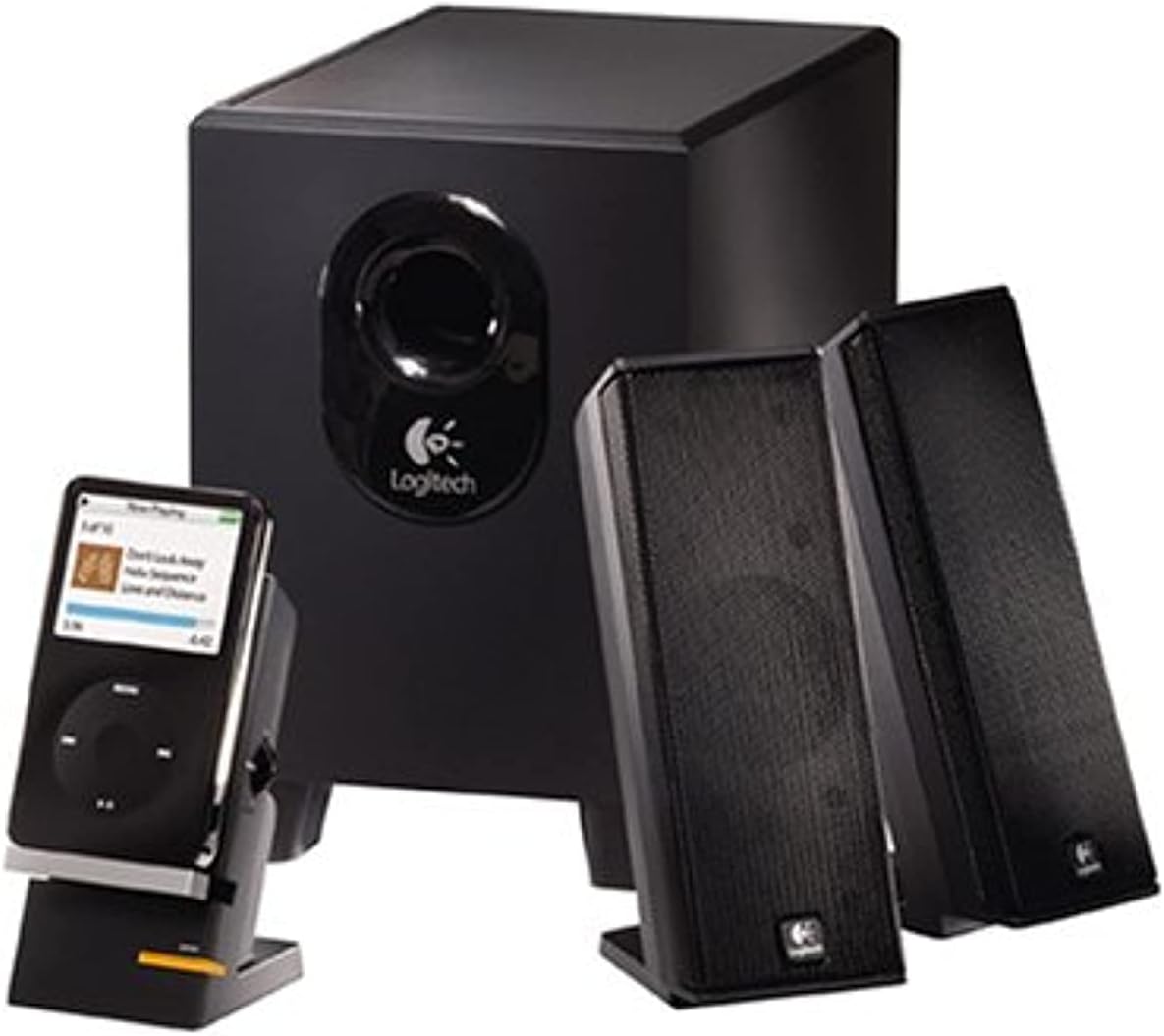
รูปที่ 1: The Logitech X-240 2.1 Speaker System, showcasing the subwoofer, two satellite speakers, and the control center with a portable media player docked.
เนื้อหาแพ็คเกจ
ก่อนที่คุณจะเริ่มต้น โปรดตรวจสอบให้แน่ใจว่ามีสินค้าทั้งหมดที่ระบุไว้ด้านล่างนี้อยู่ในแพ็คเกจของคุณ:
- 1 ซับวูฟเฟอร์
- ลำโพงแซทเทิลไลท์ 2 ตัว
- 1 Control Center with integrated MP3 player cradle
- 1 Color-coded audio cable
- 1 MP3 player cable (auxiliary input cable)
- iPod, iPod video, iPod nano adapters
- Microsoft Zune adapter
- คู่มือผู้ใช้ (เอกสารนี้)
คำแนะนำการตั้งค่า
Follow these steps to set up your Logitech X-240 speaker system:
- ตำแหน่งซับวูฟเฟอร์: Place the subwoofer on the floor, preferably under your desk or in a corner, to maximize bass response. Ensure adequate ventilation around the unit.
- Position the Satellite Speakers: Place the two satellite speakers on either side of your monitor or listening area. For optimal stereo imaging, ensure they are equidistant from your listening position.
- เชื่อมต่อลำโพงดาวเทียมกับซับวูฟเฟอร์: Connect the cables from the satellite speakers to the corresponding ports on the back of the subwoofer. The cables are typically color-coded for easy identification.
- Connect Control Center: Plug the cable from the control center into the designated speaker jack on the subwoofer.
- เชื่อมต่อกับแหล่งเสียง:
- สำหรับคอมพิวเตอร์: Connect the color-coded audio cable from the subwoofer to the audio output (usually green) on your computer's sound card.
- For MP3 Player/iPod/Zune: Use the provided MP3 player cable (auxiliary input cable) to connect your device to the auxiliary input on the control center. You can also use your device's USB/power cable with the integrated cradle and appropriate adapter for syncing and charging while playing.
- เชื่อมต่อพลังงาน: Plug the subwoofer's power cord into a standard electrical outlet.
- เปิดเครื่อง: Turn on the speaker system using the power button on the control center.
การใช้งานระบบลำโพงของคุณ
The Logitech X-240 system is designed for user-friendly operation.
- เปิด/ปิดเครื่อง: Use the dedicated power button on the control center to turn the system on or off.
- การควบคุมระดับเสียง: Adjust the master volume using the rotary knob on the control center.
- แจ็คหูฟัง: For private listening, plug your headphones into the 3.5mm headphone jack located on the control center. This will automatically mute the speakers.
- แท่นวางอุปกรณ์: The integrated cradle on the control center allows you to conveniently place your iPod, MP3 player, PDA, or mobile phone. Use your device's USB/power cable with the appropriate adapter (iPod, Zune) to sync, charge, or play music directly through the system's auxiliary input.
- การปรับเสียงเบส: The system features dynamic, real-time bass equalization. While there isn't a separate bass knob, the system automatically optimizes bass response.
การบำรุงรักษาและการดูแล
To ensure the longevity and optimal performance of your Logitech X-240 speaker system, follow these maintenance guidelines:
- การทำความสะอาด: Use a soft, dry cloth to clean the surfaces of the speakers and subwoofer. Avoid using liquid cleaners or abrasive materials, as they may damage the finish or internal components.
- การระบายอากาศ : Ensure that the subwoofer and satellite speakers have adequate airflow. Do not block the subwoofer's port or place speakers in enclosed spaces that could lead to overheating.
- การจัดวาง: ควรหลีกเลี่ยงการวางลำโพงไว้ในที่ที่มีแสงแดดส่องโดยตรง ใกล้แหล่งความร้อน หรือในบริเวณที่มีความชื้นสูง
- การจัดการสายเคเบิล: Keep cables tidy and untangled to prevent damage and ensure a clean setup.
การแก้ไขปัญหา
If you encounter any issues with your speaker system, please refer to the following common troubleshooting steps:
| ปัญหา | สาเหตุที่เป็นไปได้ | สารละลาย |
|---|---|---|
| ไม่มีเสียง |
|
|
| เสียงเพี้ยน |
|
|
| Subwoofer not producing bass |
|
|
ข้อมูลจำเพาะทางเทคนิค
- Total FTC Power: 25 วัตต์ RMS
- ซับวูฟเฟอร์: 15 Watts RMS (into 8 ohms, @ 100Hz, @ 10% THD)
- ดาวเทียม: 5 Watts RMS x 2 (into 8 ohms, @ 1kHz, @ 10% THD)
- พลังงานสูงสุดรวม: 50 วัตต์
- การตอบสนองความถี่: 40เฮิรตซ์ - 20กิโลเฮิรตซ์
- อัตราส่วนสัญญาณต่อเสียงรบกวน: มากกว่า 96 เดซิเบล
- ไดรเวอร์:
- Satellites: 2-inch high-excursion driver
- Subwoofer: 4-inch ported driver
- ขนาดลำโพง (สูง x กว้าง x ลึก):
- Satellites: 6.9" x 2.6" x 3.8"
- Subwoofer: 8.7" x 5.9" x 8.7"
- การเชื่อมต่อ: Wired (3.5mm auxiliary input)
- อุปกรณ์ที่รองรับ: MP3 Player, iPod, Zune, PC
- หมายเลขรุ่น: 970285-0403
- ยูพีซี: 097855039866, 097855044693
ข้อมูลการรับประกัน
Your Logitech X-240 2.1 Speaker System comes with a รับประกันจำกัด 2 ปี. This warranty covers defects in materials and workmanship under normal use. For specific terms and conditions, please refer to the warranty documentation included with your product or visit the official Logitech support webเว็บไซต์.
การสนับสนุนลูกค้า
For further assistance, technical support, or to inquire about warranty claims, please visit the official Logitech support webเว็บไซต์หรือติดต่อฝ่ายบริการลูกค้าของพวกเขา
ฝ่ายสนับสนุนของ Logitech Webเว็บไซต์: www.logitech.com/support


