การแนะนำ
This manual provides comprehensive instructions for the setup, operation, and maintenance of your Logitech Cordless Desktop LX 710 Laser. This product is designed to enhance your computing experience with its cordless keyboard and laser mouse, offering advanced features for media control and navigation.
เนื้อหาแพ็คเกจ
ตรวจสอบว่ารายการทั้งหมดที่ระบุไว้ด้านล่างมีอยู่ในบรรจุภัณฑ์ผลิตภัณฑ์ของคุณ:
- Logitech LX 710 Cordless Keyboard
- Logitech LX 7 Cordless Laser Mouse
- USB mini-receiver
- ถ่านอัลคาไลน์ขนาด AA จำนวน 4 ก้อน
- CD with software, comfort guidelines, and help center
- คู่มือเริ่มต้นอย่างรวดเร็ว
รูปที่ 1: Contents of the Logitech Cordless Desktop LX 710 Laser package, including the keyboard, mouse, USB receiver, and documentation.
การตั้งค่า
ความต้องการของระบบ
- PC with Windows XP or Windows Vista
- 1 พอร์ต USB ที่ใช้ได้
- ไดรฟ์ CD-ROM
1. ติดตั้งแบตเตอรี่
Insert the provided AA alkaline batteries into the keyboard and mouse. Ensure correct polarity as indicated inside the battery compartments.
The keyboard typically requires 2 AA batteries, and the mouse typically requires 2 AA batteries.
2. Connect the USB Mini-Receiver
Plug the USB mini-receiver into an available USB port on your computer. The operating system should automatically detect the new hardware.
3. ติดตั้งซอฟต์แวร์
Insert the provided CD into your computer's CD-ROM drive. Follow the on-screen instructions to install the Logitech software. This software enables customization of hot-keys and other advanced features.
After installation, restart your computer if prompted.
คำแนะนำการใช้งาน
คุณสมบัติของแป้นพิมพ์

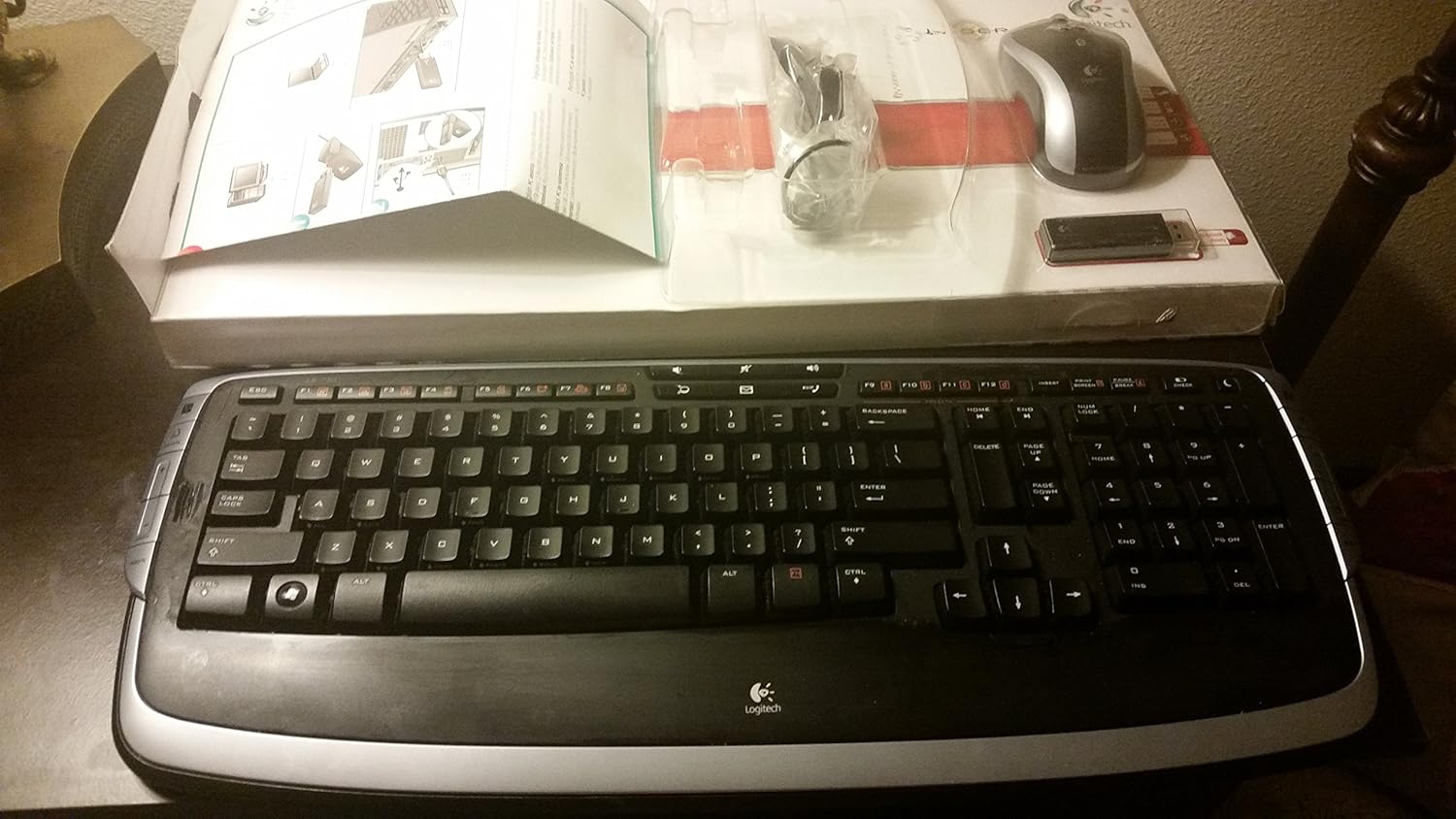
รูปที่ 2: ภาพระยะใกล้ view of the Logitech LX 710 Cordless Keyboard, highlighting its layout and media controls.
- Adjustable Keyboard Angles: Utilize the 3-way adjustable tilt legs located on the underside of the keyboard to set your preferred typing angle for maximum comfort.
- Programmable Hot-Keys: Convenient hot-keys are available to instantly open applications, games, folders, and web pages. To customize a hot-key, perform a long press on the desired key.
- Instant Access to Your Music: Powerful, side-mounted controls provide quick access to your favorite media applications, including Apple iTunes or Windows Media Player.
- One-Touch Communication: Manage your Internet communications with dedicated controls for launching email, messaging, or Internet call applications, and for adjusting volume.
- Windows Vista/XP Compatibility: Features a Start key and handy DocFlip controls for Windows Vista. These functions are also compatible with Windows XP.
- ความสบายระดับพรีเมียม: The integrated soft-touch palm rest provides comfort and support, designed to reduce fatigue during extended use.
คุณสมบัติของเมาส์
The cordless laser mouse offers precise navigation and additional functionalities:
- Pixel Precision: The laser tracking technology allows for accurate photo editing and general navigation.
- การเลื่อน: Supports both vertical and horizontal scrolling for enhanced document and web การนำทางหน้า
- One-Touch Zoom: A dedicated button provides quick zoom functionality.
- จำนวนปุ่ม: The mouse features 2 primary buttons.
- ล้อเลื่อน: Equipped with a 2-way scroll wheel.

รูปที่ 3: The Logitech Cordless Desktop LX 710 Laser, showcasing both the keyboard and mouse components.
การซ่อมบำรุง
การทำความสะอาด
- To clean the keyboard and mouse, use a soft, damp ผ้า.
- Avoid using harsh chemicals, abrasive cleaners, or solvents, as these may damage the product's finish.
- ตรวจสอบให้แน่ใจว่าไม่มีของเหลวเข้าไปในส่วนประกอบภายใน
การเปลี่ยนแบตเตอรี่
When the keyboard or mouse performance degrades, it may be time to replace the batteries. Open the battery compartment on the underside of each device and replace the old batteries with new AA alkaline batteries, observing correct polarity.
การแก้ไขปัญหา
อุปกรณ์ไม่ตอบสนอง
- ตรวจสอบแบตเตอรี่: ตรวจสอบให้แน่ใจว่าติดตั้งแบตเตอรี่อย่างถูกต้องและมีประจุเพียงพอ เปลี่ยนแบตเตอรี่หากจำเป็น
- ตรวจสอบตัวรับสัญญาณ USB: Verify that the USB mini-receiver is securely plugged into a working USB port on your computer. Try a different USB port.
- สร้างการเชื่อมต่อใหม่: Some cordless devices have a "Connect" or "Sync" button on both the receiver and the device. Press these buttons as per the quick-start guide to re-establish the connection.
- การรบกวน: Move the keyboard and mouse closer to the USB receiver. Avoid placing the receiver near other electronic devices that might cause interference (e.g., cordless phones, Wi-Fi routers).
ปัญหาด้านซอฟต์แวร์
- ติดตั้งซอฟต์แวร์ใหม่: If custom functions or hot-keys are not working, try uninstalling and then reinstalling the Logitech software from the provided CD.
- ตรวจสอบการอัปเดต: เยี่ยมชมฝ่ายสนับสนุนของ Logitech website for the latest software drivers and updates for your model.
ข้อมูลจำเพาะ
| คุณสมบัติ | รายละเอียด |
|---|---|
| ขนาดสินค้า | 21 x 2 x 10 นิ้ว |
| น้ำหนักสินค้า | 3.3 ปอนด์ |
| หมายเลขรุ่น | 967670-0403 |
| เทคโนโลยีการเชื่อมต่อ | ไร้สาย |
| คุณสมบัติพิเศษ | ไร้สาย |
| อุปกรณ์ที่รองรับ | เครื่องคอมพิวเตอร์ส่วนบุคคล |
| คำอธิบายแป้นพิมพ์ | ในร่ม |
| Mouse Button Count | 2 |
| Mouse Scroll Wheel | 2 ทาง |
| แบตเตอรี่ที่จำเป็น | 4 AA alkaline batteries (2 for keyboard, 2 for mouse) |
| การรองรับระบบปฏิบัติการ | Windows XP, Windows Vista |
การรับประกันและการสนับสนุน
ข้อมูลการรับประกัน
This Logitech Cordless Desktop LX 710 Laser comes with a การรับประกันฮาร์ดแวร์แบบจำกัด 5 ปี. This warranty covers defects in materials and workmanship under normal use. For full terms and conditions, please refer to the warranty documentation included with your product or visit the official Logitech webเว็บไซต์.
การสนับสนุนลูกค้า
For technical assistance, product inquiries, or warranty claims, please visit the Logitech support website or contact their customer service. Details can be found in the quick-start guide or on the Logitech official webเว็บไซต์.
การสนับสนุนทางออนไลน์: www.logitech.com/support


