1. บทนำ
This manual provides comprehensive instructions for the safe and efficient use of your Logisys PS480D 480W ATX Power Supply. Please read this manual thoroughly before installation and operation to ensure proper functionality and to prevent damage to the unit or other components.

Figure 1: Logisys PS480D 480W ATX Power Supply, front view with cables bundled.
2. ข้อมูลด้านความปลอดภัย
คำเตือน: แหล่งจ่ายไฟมีแรงดันไฟฟ้าสูงtagส่วนประกอบต่างๆ ห้ามเปิดแหล่งจ่ายไฟasinก. ไม่มีชิ้นส่วนใดที่ผู้ใช้สามารถซ่อมบำรุงเองได้ภายใน
- ตรวจสอบให้แน่ใจว่าได้ตัดการเชื่อมต่อแหล่งจ่ายไฟจากเต้ารับไฟฟ้ากระแสสลับก่อนการติดตั้งหรือการบำรุงรักษา
- Always ground yourself to prevent electrostatic discharge (ESD) when handling internal computer components.
- ห้ามใช้งานแหล่งจ่ายไฟในที่เปียกหรือชื้นamp เงื่อนไข.
- ตรวจสอบให้แน่ใจว่ามีการระบายอากาศที่เหมาะสมรอบๆ แหล่งจ่ายไฟเพื่อป้องกันความร้อนสูงเกินไป
- Use only the provided power cables and connectors.
3. คุณสมบัติของผลิตภัณฑ์
The Logisys PS480D is a 480W ATX power supply designed for personal computers. Key features include:
- ประสิทธิภาพสูง
- Low Noise & Ripple
- มากกว่าVoltagการป้องกันอี
- ระบบป้องกันไฟฟ้าลัดวงจร
- Built-in EMI Filter
- Insulation Resistance 100MΩ min.
- Complies with FCC part 15J class B 115VAC operation and CISPR 22 230 VAC operation.
- Meets UL 1950, CSA 22.2 LEVEL 3 Requirement.
- 100% Burn-in test / Vibration test / Hi-pot test / Leakage current test.
- MTBF above 100,000 hours at 25 °C.

Figure 2: Rear panel of the power supply with fan, AC inlet, and power switch.
4. การตั้งค่าและการติดตั้ง
Follow these steps to install the Logisys PS480D power supply into your computer system.
- การตระเตรียม: Ensure your computer is completely powered off and unplugged from the wall outlet. Open your computer case according to its manufacturer's instructions.
- ถอดแหล่งจ่ายไฟเก่าออก (ถ้ามี): Disconnect all cables from the old power supply to the motherboard, drives, and other components. Unscrew and remove the old power supply from the case.
- ติดตั้งแหล่งจ่ายไฟใหม่: Carefully place the Logisys PS480D into the power supply bay of your computer case. Secure it with screws.
- เชื่อมต่อแหล่งจ่ายไฟหลัก: Connect the 20+4 pin ATX mainboard connector to your motherboard. If your motherboard uses a 20-pin connector, detach the 4-pin section. If it uses a 24-pin connector, connect both sections.
- เชื่อมต่อพลังงาน CPU: Connect the 4-pin +12V power connector to the corresponding port on your motherboard.
- เชื่อมต่อแหล่งจ่ายไฟอุปกรณ์ต่อพ่วง:
- Use the 4-pin standard drive connectors for HDDs and CD/DVD-ROM drives.
- Use the 4-pin 3.5" FDD or ZIP connectors for floppy disk drives or similar devices.
- Use the Serial ATA (SATA) connectors for SATA hard drives and SSDs.
- การจัดการสายเคเบิล: จัดเรียงสายเคเบิลให้เรียบร้อยเพื่อให้แน่ใจว่ามีการไหลเวียนของอากาศที่ดีภายในเคส
- ปิดคดี: เมื่อเชื่อมต่อทุกอย่างเรียบร้อยแล้ว ให้ปิดเคสคอมพิวเตอร์ของคุณ
- เชื่อมต่อไฟ AC: Plug the AC power cord into the power supply's AC inlet and then into a wall outlet.
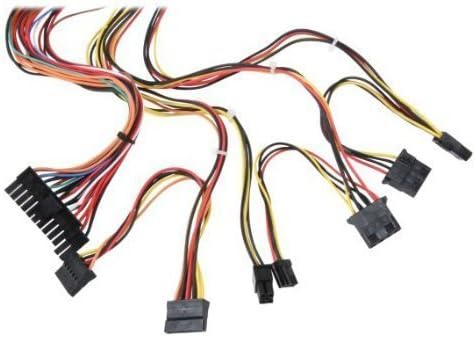
รูปที่ 3: เกินview of power supply connectors.

Figure 4: Power supply dimensions and included AC power cord.
5. คู่มือการใช้งาน
After successful installation, you can power on your computer.
- Ensure the power switch on the rear of the power supply (Figure 2) is in the "ON" (I) position.
- กดปุ่มเปิด/ปิดบนเคสคอมพิวเตอร์ของคุณ
- The power supply will provide stable power to your system components.
- To power off, shut down your operating system normally. For complete power disconnection, switch the power supply to the "OFF" (O) position and unplug the AC cord.
6. การบำรุงรักษา
การบำรุงรักษาอย่างสม่ำเสมอจะช่วยให้แหล่งจ่ายไฟของคุณมีอายุการใช้งานยาวนานและทำงานได้อย่างมีประสิทธิภาพสูงสุด
- การทำความสะอาด: Periodically clean dust from the power supply's fan and vents using compressed air. Ensure the power supply is unplugged before cleaning.
- การไหลเวียนของอากาศ: Ensure that the computer case has adequate airflow and that the power supply's fan is not obstructed.
- ความสมบูรณ์ของสายเคเบิล: Periodically check all power cables for secure connections and signs of wear or damage.
7 การแก้ไขปัญหา
หากคุณพบปัญหาเกี่ยวกับแหล่งจ่ายไฟ โปรดดูขั้นตอนการแก้ไขปัญหาทั่วไปต่อไปนี้:
- ไม่มีไฟฟ้า:
- ตรวจสอบว่าสายไฟ AC เสียบเข้ากับแหล่งจ่ายไฟและเต้ารับที่ผนังอย่างแน่นหนาหรือไม่
- Ensure the power switch on the rear of the power supply is in the "ON" (I) position.
- ตรวจสอบว่าปลั๊กไฟใช้งานได้หรือไม่ โดยลองเสียบอุปกรณ์อื่นเข้าไป
- Check all internal power connections (20/24-pin ATX, 4-pin +12V, peripheral connectors) are firmly seated.
- ระบบไม่เสถียร/ปิดเครื่องเองโดยไม่ทราบสาเหตุ:
- This could indicate an overloaded or failing power supply. Ensure your system's power requirements do not exceed the PS480D's 480W capacity.
- ตรวจสอบการระบายอากาศที่เหมาะสมและตรวจสอบให้แน่ใจว่าพัดลมของแหล่งจ่ายไฟหมุนอยู่ ความร้อนสูงเกินไปอาจทำให้ระบบไม่เสถียร
- เสียงผิดปกติ:
- A loud fan noise might indicate dust buildup or a failing fan bearing. Clean the fan as described in the Maintenance section.
If problems persist after attempting these steps, contact Logisys customer support or a qualified technician.
8. ข้อมูลจำเพาะ
| คุณสมบัติ | ข้อมูลจำเพาะ |
|---|---|
| ยี่ห้อ | โลจิซิส |
| หมายเลขรุ่น | พีเอส480ดี |
| เอาท์พุต วัดtage | 480 วัตต์ |
| ฟอร์มแฟกเตอร์ | เอทีเอ็กซ์ |
| ขนาด (กxยxส) | ขนาด 6 นิ้ว ยาว x 5.5 นิ้ว กว้าง x 3.25 นิ้ว สูง (15.24 x 13.97 x 8.25 ซม.) |
| น้ำหนักสินค้า | 2.06 ปอนด์ (0.93 กก.) |
| ขั้วต่อเมนบอร์ด | 1x 20+4 Pin ATX |
| ขั้วต่อสายไฟของ CPU | 1x 4 Pin +12V |
| Standard Drive Connectors | 4x 4 Pin (Molex) |
| FDD/ZIP Connectors | 1x 4 Pin 3.5" |
| ขั้วต่ออนุกรม ATA | 1x SATA |
| วิธีการทำความเย็น | อากาศ |
| การคุ้มครอง | มากกว่าVoltage การป้องกัน, การป้องกันไฟฟ้าลัดวงจร |
| การรับรอง | FCC part 15J class B, CISPR 22, UL 1950, CSA 22.2 LEVEL 3 |
9. การรับประกันและการสนับสนุน
For warranty information, technical support, or service inquiries, please refer to the official Logisys webหรือติดต่อฝ่ายบริการลูกค้า เก็บใบเสร็จรับเงินไว้เป็นหลักฐานการซื้อ

