1. บทนำ
ขอบคุณสำหรับการซื้อasing the Pentax Optio W10 Digital Camera. This manual provides essential information for the safe and effective use of your camera. The Optio W10 is a compact 6.0-megapixel digital camera featuring a 3x optical zoom lens, designed for capturing high-quality still images and video. Its robust design makes it suitable for various environments.
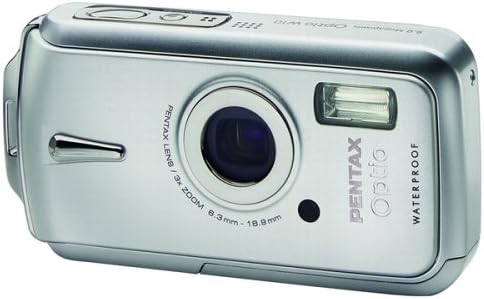
รูปที่ 1.1 : ด้านหน้า view of the Pentax Optio W10 Digital Camera, showcasinเช่น เลนส์ แฟลช และตราสินค้า
2. ข้อมูลด้านความปลอดภัย
Please read and understand all safety precautions before using the camera. Failure to do so may result in injury or damage to the product.
- อย่าพยายามถอดประกอบหรือดัดแปลงกล้อง
- ควรเก็บกล้องให้ห่างจากอุณหภูมิที่สูงจัด แสงแดดโดยตรง และความชื้นสูง
- Ensure all compartment covers (battery, memory card) are securely closed and locked before exposing the camera to water or dust.
- Use only the specified battery type (Lithium-ion DL-I8) and charger.
- เก็บให้พ้นจากมือเด็ก
3. เนื้อหาบรรจุภัณฑ์
ตรวจสอบว่าอุปกรณ์ทั้งหมดอยู่ในกล่องกล้องครบถ้วนหรือไม่:
- Pentax Optio W10 Digital Camera
- Lithium-ion Battery DL-I8
- เครื่องชาร์จแบตเตอรี่
- สายไฟ AC
- USB Cable (for computer connection)
- สายรัด
- ซีดีรอมซอฟต์แวร์
- คู่มือการใช้งาน (เอกสารนี้)
4. การตั้งค่า
4.1. การติดตั้งแบตเตอรี่
- หาฝาปิดช่องใส่แบตเตอรี่/การ์ดหน่วยความจำที่ด้านล่างของกล้อง
- Slide the lock switch to the 'OPEN' position and open the cover.
- Insert the Lithium-ion battery DL-I8 into the compartment, ensuring the correct orientation as indicated inside the compartment.
- Close the cover and slide the lock switch to the 'LOCK' position until it clicks securely.

รูปที่ 4.1: ด้านล่าง view of the camera, illustrating the battery and SD card compartment with the lock switch.
4.2. การติดตั้งการ์ดหน่วยความจำ
The Pentax Optio W10 uses SD memory cards.
- Open the battery/memory card compartment cover as described in Section 4.1.
- Insert the SD memory card into the designated slot with the label facing the correct direction, pushing gently until it clicks into place.
- Close the cover and slide the lock switch to the 'LOCK' position.
4.3. การเปิดเครื่องครั้งแรกและการตั้งค่าวันที่/เวลา
- กดปุ่ม เปิด/ปิด ปุ่มที่อยู่ด้านบนของกล้อง
- Upon first power-on, the camera will prompt you to set the date and time. Use the directional buttons on the back of the camera to navigate and the OK ปุ่มเพื่อยืนยัน
- ทำตามคำแนะนำบนหน้าจอเพื่อสิ้นสุดการตั้งค่าเริ่มต้น

รูปที่ 4.2: ด้านบน view of the camera, highlighting the ON/OFF button and 6.0 Megapixels branding.
5. การใช้งานกล้อง
5.1. การถ่ายภาพขั้นพื้นฐาน
To take a still picture:
- เปิดกล้องโดยกดปุ่ม เปิด/ปิด ปุ่ม.
- จัดองค์ประกอบภาพของคุณโดยใช้จอ LCD ขนาด 2.5 นิ้ว
- กดปุ่มชัตเตอร์ลงครึ่งหนึ่งเพื่อปรับโฟกัส กรอบโฟกัสจะเปลี่ยนเป็นสีเขียวเมื่อโฟกัสได้แล้ว
- กดปุ่มชัตเตอร์ลงจนสุดเพื่อถ่ายภาพ

รูปที่ 5.1: ด้านหลัง view ของกล้อง แสดงหน้าจอ LCD และปุ่มควบคุมต่างๆ สำหรับการนำทางและการตั้งค่า
5.2. โหมดถ่ายภาพ
The Optio W10 offers various shooting modes accessible via the โหมด button. Refer to the on-screen menu for specific options such as Program Auto, Scene Modes, and Movie Mode.
5.3. การบันทึกวิดีโอ
ในการบันทึกวิดีโอ:
- Switch to Movie Mode using the โหมด ปุ่ม.
- Press the shutter button to start recording. The camera can capture QuickTime motion JPEG videos at 640 x 480 resolution at 30 frames per second.
- กดปุ่มชัตเตอร์อีกครั้งเพื่อหยุดการบันทึก
5.4. การเล่น
ถึง view ภาพถ่ายและวิดีโอที่บันทึกไว้:
- กดปุ่ม การเล่นซ้ำ button (usually indicated by a triangle icon).
- ใช้ปุ่มทิศทางเพื่อเลื่อนดูรูปภาพและวิดีโอของคุณ
- กดปุ่ม OK ปุ่มที่จะ view a video or zoom into a photo.
5.5. การเชื่อมต่อกับคอมพิวเตอร์
วิธีการถ่ายโอนรูปภาพและวิดีโอไปยังคอมพิวเตอร์:
- ตรวจสอบให้แน่ใจว่าปิดกล้องแล้ว
- เชื่อมต่อกล้องเข้ากับคอมพิวเตอร์ของคุณโดยใช้สาย USB ที่ให้มา
- Turn on the camera. It should be recognized as a removable disk or a PTP device.
- Follow your computer's operating system instructions to access and transfer files.
6. การบำรุงรักษา
6.1. การทำความสะอาด
- ตัวกล้อง: เช็ดด้วยผ้านุ่มและแห้ง สำหรับคราบฝังแน่น ให้ใช้ผ้านุ่มๆ เช็ดเบาๆamp ผ้าแล้วเช็ดให้แห้งสนิท
- เลนส์: ใช้แปรงทำความสะอาดเลนส์หรือผ้าเช็ดเลนส์ที่นุ่มและสะอาด หลีกเลี่ยงการสัมผัสพื้นผิวเลนส์ด้วยนิ้วมือ
- จอแอลซีดี: เช็ดเบาๆ ด้วยผ้าแห้งเนื้อนุ่ม หลีกเลี่ยงการกดหน้าจอแรงๆ
- ซีลกันน้ำ: Regularly inspect the rubber seals around the battery/memory card compartment for dirt, sand, or damage. Clean gently with a soft cloth. Do not use sharp objects.
6.2. การจัดเก็บ
When not in use for extended periods, store the camera in a cool, dry, and well-ventilated place. Remove the battery to prevent leakage. Avoid storing in areas with high humidity or extreme temperature fluctuations.
7 การแก้ไขปัญหา
If you encounter issues with your Pentax Optio W10, refer to the following common solutions:
| ปัญหา | สาเหตุที่เป็นไปได้ / วิธีแก้ไข |
|---|---|
| กล้องไม่เปิด | Battery is depleted or incorrectly inserted. Recharge the battery or reinsert it correctly. |
| ไม่สามารถถ่ายภาพได้ | Memory card is full, locked, or not inserted. Delete unnecessary fileปลดล็อกการ์ด หรือเสียบการ์ดให้ถูกต้อง |
| ภาพก็เบลอ | Lens is dirty, camera shake, or incorrect focus. Clean the lens, hold the camera steady, or ensure proper focus. |
| Water inside compartment | Compartment cover not securely closed or seal is damaged. Ensure cover is locked. If seal is damaged, contact service. |
For further assistance, please refer to the official Pentax support webเว็บไซต์หรือติดต่อฝ่ายบริการลูกค้า
8. ข้อมูลจำเพาะ
Key technical specifications for the Pentax Optio W10 Digital Camera:
- ความละเอียดของภาพนิ่งที่มีประสิทธิภาพ: 6.0 ล้านพิกเซล
- เทคโนโลยีโฟโต้เซนเซอร์: CCD (1/2.5 นิ้ว)
- ซูมออปติคอล: 3x
- ซูมดิจิตอล: 4x
- ระยะโฟกัสสูงสุด: 114 มม.
- ทางยาวโฟกัสต่ำสุด: 38 มม.
- ขนาดหน้าจอ LCD: 2.5 นิ้ว
- ระบบป้องกันภาพสั่นไหว: ดิจิตอล, ออปติคัล
- ความละเอียดวิดีโอ: 640 x 480, 30/15 fps (QuickTime Motion JPEG)
- รองรับ File รูปแบบ: JPEG (ภาพนิ่ง), MJPEG (วิดีโอ)
- สื่อเก็บข้อมูล: SD/MMC card, Internal Memory
- ประเภทแบตเตอรี่: Lithium-ion (DL-I8)
- คุณสมบัติพิเศษ: Waterproof (Note: Ensure all seals are properly closed before water exposure)
- ความเร็วชัตเตอร์ขั้นต่ำ: 4 วินาที
- ความเร็วชัตเตอร์สูงสุด: 1/2000 วินาที
- ช่วง ISO: อัตโนมัติ 64 100 200 400 800
- น้ำหนักสินค้า: 5.6 ออนซ์
- หมายเลขรุ่น: 19033
9. การรับประกันและการสนับสนุน
For information regarding warranty coverage, service, or technical support for your Pentax Optio W10 camera, please refer to the warranty card included with your product or visit the official Pentax webไซต์นี้ โปรดเก็บหลักฐานการซื้อไว้เพื่อใช้ยืนยันการรับประกัน
การสนับสนุนทางออนไลน์: Ricoh Imaging Global Support (Pentax is a brand of Ricoh Imaging)


