1. บทนำ
Thank you for choosing the Nortek Soundream 2.1 Attive Minispeaker system. This manual provides essential information for the proper setup, operation, and maintenance of your new audio system. Please read this manual thoroughly before using the product to ensure optimal performance and safety.
2. ข้อมูลด้านความปลอดภัย
เพื่อป้องกันอัคคีภัย ไฟฟ้าช็อต หรือความเสียหายต่อผลิตภัณฑ์ โปรดปฏิบัติตามข้อควรระวังด้านความปลอดภัยดังต่อไปนี้:
- อย่าให้เครื่องนี้โดนฝนหรือความชื้น
- ห้ามวางวัตถุที่บรรจุของเหลว เช่น แจกัน บนเครื่องใช้ไฟฟ้า
- ตรวจสอบให้แน่ใจว่ามีการระบายอากาศที่เหมาะสม อย่าปิดกั้นช่องระบายอากาศใดๆ
- ห้ามติดตั้งใกล้แหล่งความร้อน เช่น หม้อน้ำ เครื่องทำความร้อน เตา หรืออุปกรณ์อื่น ๆ (รวมถึง ampเครื่องให้ความร้อน) ที่ผลิตความร้อน
- ป้องกันสายไฟเดินหรือถูกบีบโดยเฉพาะที่ปลั๊กเต้ารับอำนวยความสะดวกและจุดที่ออกจากเครื่อง
- ใช้เฉพาะอุปกรณ์เสริม/สิ่งที่แนบตามที่ผู้ผลิตกำหนดเท่านั้น
- ถอดปลั๊กเครื่องนี้ระหว่างที่เกิดพายุฝนฟ้าคะนองหรือเมื่อไม่ได้ใช้งานเป็นเวลานาน
3. เนื้อหาบรรจุภัณฑ์
กรุณาตรวจสอบว่าสินค้าทั้งหมดมีอยู่ในแพ็คเกจ:
- 1 x Nortek Soundream 2.1 Subwoofer
- ลำโพงดาวเทียม 2 ตัว
- 1 x Power Cable (Corded Electric)
- 1 x Audio Input Cable (e.g., 3.5mm stereo jack)
- 1 x คู่มือผู้ใช้ (เอกสารนี้)
4. สินค้าหมดview
The Nortek Soundream 2.1 system consists of a subwoofer and two satellite speakers designed to deliver enhanced audio for various devices.
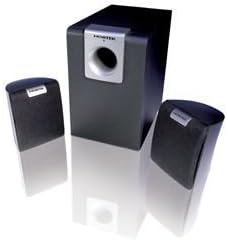
Image: The Nortek Soundream 2.1 Attive Minispeaker system, featuring a central subwoofer unit and two compact satellite speakers.
ส่วนประกอบ:
- ซับวูฟเฟอร์: The main unit containing the amplifier, bass driver, and primary controls.
- ลำโพงดาวเทียม: Two compact speakers for mid-range and high-frequency audio.
- การควบคุม: Typically located on the subwoofer, these include power on/off, master volume, and potentially bass level adjustment.
5. การตั้งค่า
Follow these steps to set up your Nortek Soundream 2.1 system:
- การจัดวาง:
- Place the subwoofer on the floor, preferably near a wall or in a corner for optimal bass response.
- Position the two satellite speakers on either side of your listening area, facing towards you. Ensure they are equidistant from your listening position for balanced stereo sound.
- เชื่อมต่อลำโพงดาวเทียม:
- Connect the cables from the satellite speakers to the corresponding output jacks on the back of the subwoofer. Ensure correct polarity if applicable (e.g., red to red, black to black).
- เชื่อมต่อแหล่งเสียง:
- Connect one end of the audio input cable (e.g., 3.5mm stereo jack) to the 'Audio In' port on the subwoofer.
- Connect the other end of the audio input cable to the audio output jack of your device (e.g., computer, smartphone, MP3 player, TV).
- เชื่อมต่อพลังงาน:
- Plug the power cable into the power input on the subwoofer.
- เสียบปลายอีกด้านหนึ่งของสายไฟเข้ากับเต้ารับไฟฟ้าที่ผนังมาตรฐาน
6. คู่มือการใช้งาน
Once the system is set up, follow these steps to operate your speakers:
- เปิดเครื่อง: Locate the power button or switch on the subwoofer and turn it to the 'ON' position. An indicator light may illuminate.
- การควบคุมระดับเสียง: Turn the master volume knob on the subwoofer to a low setting before playing audio. Gradually increase the volume to your desired listening level.
- Bass Adjustment (if available): If your subwoofer has a separate bass control knob, adjust it to achieve your preferred bass level.
- เล่นเสียง: เริ่มเล่นไฟล์เสียงจากอุปกรณ์ที่เชื่อมต่อของคุณ
- หมดแรง: When finished, turn the power switch on the subwoofer to the 'OFF' position. For extended periods of non-use, it is recommended to unplug the system from the power outlet.
7. การบำรุงรักษา
Proper maintenance ensures the longevity and performance of your speaker system:
- การทำความสะอาด: Disconnect the power before cleaning. Use a soft, dry cloth to wipe the surfaces of the speakers and subwoofer. Do not use liquid cleaners or abrasive materials.
- การระบายอากาศ : Ensure that the ventilation openings on the subwoofer are not blocked by dust or other objects.
- พื้นที่จัดเก็บ: If storing the system for an extended period, unplug it and store it in a cool, dry place away from direct sunlight and extreme temperatures.
- การดูแลสายเคเบิล: Avoid bending or crimping the audio and power cables excessively.
8 การแก้ไขปัญหา
If you encounter issues with your Nortek Soundream 2.1 system, refer to the following common problems and solutions:
- ไม่มีเสียง:
- Ensure the power cable is securely plugged into both the subwoofer and the wall outlet.
- ตรวจสอบให้แน่ใจว่าสวิตช์เปิด/ปิดของซับวูฟเฟอร์อยู่ในตำแหน่ง 'เปิด'
- Check that the audio input cable is securely connected to both the subwoofer and your audio source.
- Increase the master volume on the subwoofer and the volume on your audio source device.
- Test with a different audio source or cable to rule out a faulty source or cable.
- เสียงผิดเพี้ยน:
- Reduce the volume on both the subwoofer and your audio source.
- Ensure the audio input cable is fully inserted and not damaged.
- ตรวจสอบการรบกวนจากอุปกรณ์อิเล็กทรอนิกส์อื่นๆ
- Only One Satellite Speaker Working:
- ตรวจสอบการเชื่อมต่อของลำโพงดาวเทียมที่ไม่ทำงานเข้ากับซับวูฟเฟอร์
- Ensure the audio source is outputting stereo sound.
9. ข้อมูลจำเพาะ
- แบบอย่าง: Nortek Soundream 2.1
- การกำหนดค่า: 2.1 Channel (Subwoofer + 2 Satellite Speakers)
- Power Output (Wattagจ): 2 วัตต์
- แหล่งพลังงาน: สายไฟ
- น้ำหนักสินค้า: น้ำหนักประมาณ 1.5 กิโลกรัม (3.31 ปอนด์)
- ASIN: B000CFYA2C
- ผู้ผลิต: นอร์เท
10. การรับประกันและการสนับสนุน
For warranty information and technical support, please refer to the warranty card included with your product or visit the official Nortek webไซต์ โปรดเก็บใบเสร็จรับเงินของคุณไว้เป็นหลักฐานการซื้อสำหรับการเรียกร้องการรับประกันใดๆ


