1. บทนำ
This manual provides essential instructions for the safe and efficient operation, setup, and maintenance of your Ohaus ES50R ES Industrial Bench Scale. The Ohaus ES50R is designed for industrial weighing applications, offering a capacity of 50 kg (110 lb) with a readability of 20 g (0.05 lb). Please read this manual thoroughly before using the scale to ensure proper functionality and to prevent damage.
2. ข้อมูลด้านความปลอดภัย
ปฏิบัติตามข้อควรระวังเพื่อความปลอดภัยต่อไปนี้เสมอ:
- อย่าบรรทุกน้ำหนักเกินพิกัดของเครื่องชั่ง ซึ่งอยู่ที่ 50 กิโลกรัม (110 ปอนด์)
- Ensure the scale is placed on a stable, level surface to achieve accurate readings.
- Operate the scale only with the specified 120 V power supply.
- หลีกเลี่ยงการให้เครื่องชั่งสัมผัสกับอุณหภูมิที่สูงหรือความชื้นสูงหรือแสงแดดโดยตรง
- ห้ามจุ่มเครื่องชั่งลงในน้ำหรือของเหลวอื่นๆ
- รักษาเครื่องชั่งให้สะอาด ปราศจากฝุ่นและสิ่งสกปรก
- Only qualified personnel should perform repairs or maintenance beyond routine cleaning.
3. เนื้อหาบรรจุภัณฑ์
ตรวจสอบว่ามีส่วนประกอบทั้งหมดอยู่ครบเมื่อแกะกล่อง:
- Ohaus ES50R ES Industrial Bench Scale unit
- Power Adapter (for 120 V operation)
- คู่มือการใช้งาน (เอกสารนี้)
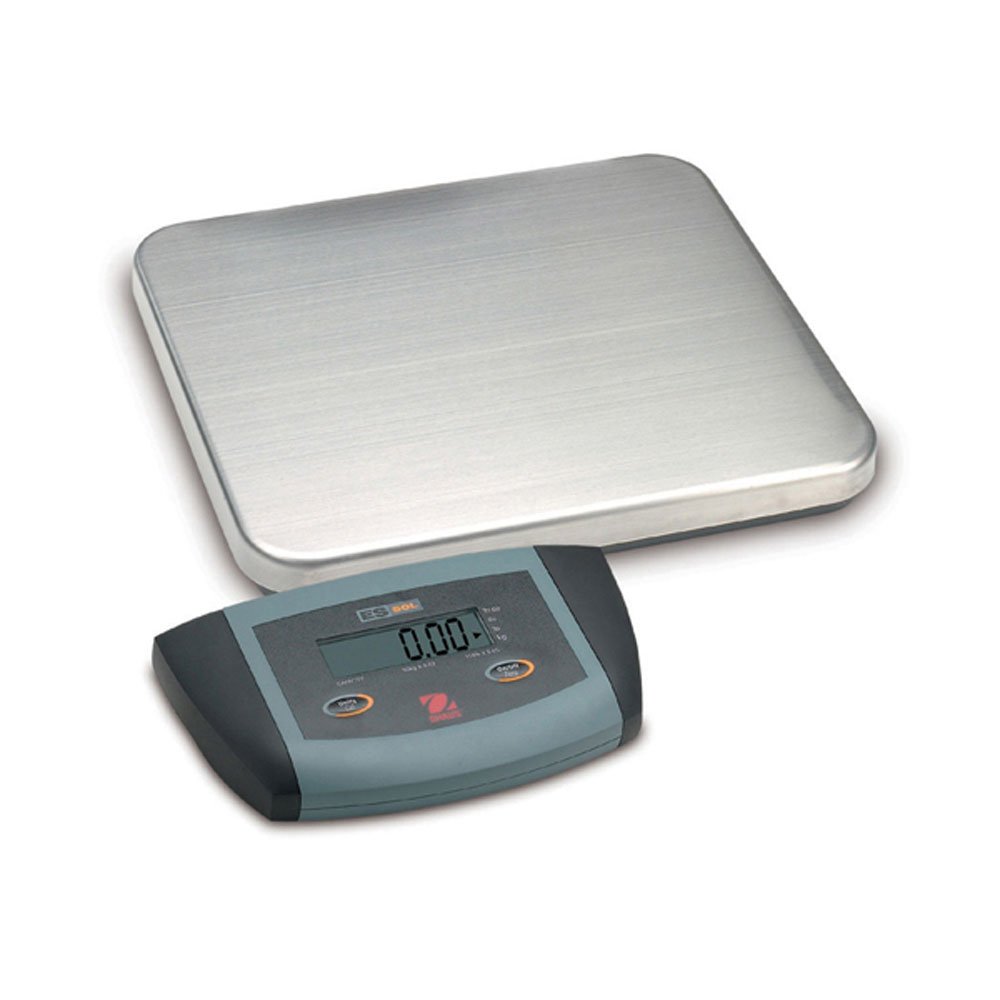
รูปที่ 1: Ohaus ES50R ES Industrial Bench Scale. This image shows the complete bench scale unit, including the weighing platform and the display unit.
4. การตั้งค่า
- การแกะกล่อง: นำส่วนประกอบทั้งหมดออกจากบรรจุภัณฑ์อย่างระมัดระวัง เก็บบรรจุภัณฑ์ไว้สำหรับการขนส่งหรือจัดเก็บในอนาคต
- การจัดวาง: Place the scale on a firm, level, and stable surface, free from vibrations, drafts, and rapid temperature changes. Ensure adequate space around the scale for safe operation.
- การเชื่อมต่อไฟฟ้า: Connect the power adapter to the scale's power input port. Plug the adapter into a standard 120 V AC power outlet.
- เปิดเครื่องครั้งแรก: กดปุ่ม เปิด/ปิด button to power on the scale. The display will perform a self-test and then show "0.00" or "0.0".
- การปรับระดับ: If your scale includes adjustable feet, rotate them until the bubble in the spirit level (if present) is centered.
5. คู่มือการใช้งาน
5.1 การชั่งน้ำหนักพื้นฐาน
- Ensure the scale is powered on and the display shows "0.00" or "0.0".
- Place the item to be weighed gently in the center of the weighing platform.
- Wait for the display to stabilize. The stable weight reading will be shown on the large LCD display.
- นำสิ่งของออกจากแท่นวาง หน้าจอควรแสดงค่าเป็นศูนย์
5.2 ฟังก์ชันทดน้ำหนัก
ฟังก์ชันการหักน้ำหนักภาชนะ (tare) ช่วยให้คุณหักน้ำหนักของภาชนะออก เพื่อให้แสดงเฉพาะน้ำหนักสุทธิของสิ่งของภายในเท่านั้น
- วางภาชนะเปล่าบนแท่นชั่งน้ำหนัก
- กดปุ่ม ทดค่า button. The display will reset to "0.00" or "0.0", indicating the container's weight has been tared.
- ใส่สิ่งของที่ต้องการชั่งน้ำหนักลงในภาชนะ หน้าจอจะแสดงน้ำหนักสุทธิของสิ่งของนั้น
- เพื่อล้างค่าภาชนะ ให้นำภาชนะออกจากแท่นวางแล้วกดปุ่ม ทดค่า ปุ่มอีกครั้ง
5.3 คุณสมบัติพิเศษ
- ปิดเครื่องอัตโนมัติ: The scale is equipped with an auto shut-off feature to conserve power. If no activity is detected for a set period, the scale will automatically turn off.
- จอแสดงผลขนาดใหญ่: The LCD display provides clear and easy-to-read weight indications.
- การปิดระบบด้วยตนเอง: To manually turn off the scale, press and hold the เปิด/ปิด จนกระทั่งจอแสดงผลดับลง
6. การบำรุงรักษา
6.1 การทำความสะอาด
To maintain accuracy and prolong the life of your scale:
- Disconnect the scale from the power supply before cleaning.
- เช็ดพื้นผิวที่เป็นคราบด้วยน้ำยาทำความสะอาดamp ผ้าและผงซักฟอกอ่อนๆ
- ห้ามใช้น้ำยาทำความสะอาดที่มีฤทธิ์กัดกร่อน ตัวทำละลาย หรือสารเคมีรุนแรง
- Ensure no liquid enters the scale's internal components.
- เช็ดคราบตะกรันให้แห้งสนิทหลังทำความสะอาด
6.2 การสอบเทียบ
Regular calibration ensures the accuracy of your scale. Refer to the full technical manual or contact Ohaus customer support for detailed calibration procedures. Calibration typically requires certified weights.
7 การแก้ไขปัญหา
| ปัญหา | สาเหตุที่เป็นไปได้ | สารละลาย |
|---|---|---|
| เครื่องชั่งน้ำหนักไม่เปิด | ไม่มีแหล่งจ่ายไฟ; อะแดปเตอร์แปลงไฟชำรุด | Check power connection and outlet. Ensure power adapter is functioning correctly. |
| การอ่านที่ไม่ถูกต้อง | Scale not level; unstable surface; overload; calibration required. | Ensure scale is level and on a stable surface. Do not exceed capacity. Perform calibration if necessary. |
| หน้าจอแสดง "Err" หรือรหัสข้อผิดพลาด | โอเวอร์โหลด; ความผิดปกติภายใน | Remove weight from platform. If error persists, power cycle the scale. If still present, contact customer support. |
| Auto shut-off too soon/not at all. | Auto shut-off settings. | Refer to the full technical manual for adjusting auto shut-off settings, if available. |
8. ข้อมูลจำเพาะ
| คุณสมบัติ | รายละเอียด |
|---|---|
| แบบอย่าง | ES50R |
| ยี่ห้อ | โอเฮาส์ |
| ความจุ | 50 กก. / 110 ปอนด์ |
| ความสามารถในการอ่านได้ | 20 กรัม / 0.05 ปอนด์ |
| ประเภทจอภาพ | LCD (Large Display) |
| คุณสมบัติพิเศษ | Auto Shut Off, Manual Shutdown |
| ฟอร์มแฟกเตอร์ | เครื่องชั่งแบบตั้งโต๊ะ |
| แหล่งจ่ายไฟ | 120 V AC (via adapter) |
| ขนาดสินค้า | 15 x 13 x 5.5 นิ้ว |
| น้ำหนักสินค้า | 9.64 ปอนด์ |
| ผู้ผลิต | โคล-พาร์เมอร์ |
9. การรับประกัน
The Ohaus ES50R ES Industrial Bench Scale comes with a รับประกัน 1 ปี from the date of purchase. This warranty covers defects in materials and workmanship under normal use. It does not cover damage resulting from misuse, accident, unauthorized modification, or operation outside the specified environmental and electrical limits. For warranty claims, please retain your proof of purchase and contact Ohaus customer support.
10. การสนับสนุนลูกค้า
For technical assistance, service, or to inquire about replacement parts, please contact Ohaus customer support. Visit the official Ohaus webเว็บไซต์นี้มีข้อมูลการติดต่อล่าสุดและแหล่งข้อมูลเพิ่มเติม
บันทึก: Always provide your product model number (ES50R) and serial number (if applicable) when contacting support.


