1. บทนำ
Thank you for choosing the Hunter 44760 Multi-Stage Heat Pump Thermostat. This device is designed to provide efficient and precise control over your home's heating and cooling system. It is compatible with single and multi-stage heat pump systems, controlling one stage of cooling and two stagความร้อน
Key features of your Hunter 44760 thermostat include:
- Auto Season Changeover: Automatically switches between heating and cooling modes.
- INDIGLO Backlit Display: ให้การมองเห็นที่ชัดเจนในสภาพแสงต่างๆ
- Pre-Programmed Temperature & Vacation Overrides: Allows temporary adjustments or extended holds.
- Energy Monitor: Tracks system usage time to help manage energy consumption.
- ตัวบ่งชี้การเปลี่ยนไส้กรอง: Reminds you when to replace your system's air filter.
- การกู้คืนอัตโนมัติ: Helps maintain comfort while optimizing energy use.
- คำเตือนแบตเตอรี่ต่ำ: แจ้งเตือนคุณเมื่อแบตเตอรี่ต้องเปลี่ยน
- แบตเตอรี่สำรอง: คงการตั้งค่าไว้ระหว่างเปิดเครื่องtag(ต้องใช้แบตเตอรี่ AAA 2 ก้อน ไม่รวมอยู่ในชุด)
2. การติดตั้ง
The Hunter 44760 thermostat is designed for easy do-it-yourself installation. Please follow these instructions carefully to ensure proper setup and operation.
2.1 ก่อนที่คุณจะเริ่มต้น
- ปิดเครื่อง to your heating and cooling system at the main circuit breaker or fuse box before beginning installation.
- Ensure you have the necessary tools: screwdriver, wire stripper/cutter, and electrical tape.
- Confirm your system is compatible with a multi-stage เทอร์โมปั๊มความร้อน
2.2 Removing Your Old Thermostat and Wiring
- ถอดฝาครอบของเทอร์โมสตัทตัวเดิมออกอย่างระมัดระวัง
- Before disconnecting any wires, label each wire with the corresponding terminal letter from your old thermostat. This is crucial for correct wiring of the new thermostat.
- ถอดสายไฟออกและถอดแผ่นผนังของเทอร์โมสตัทตัวเก่าออก
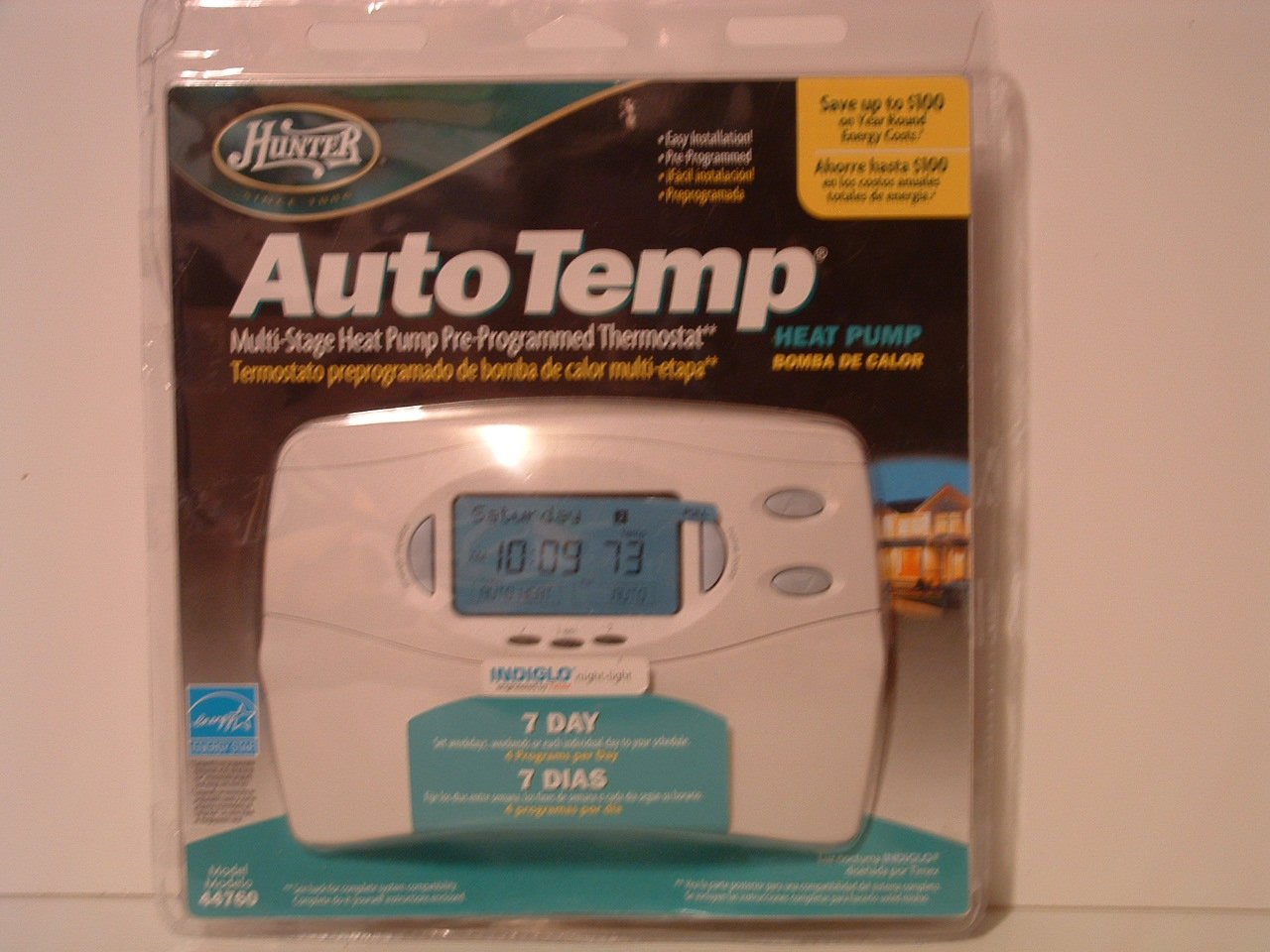
Image: Hunter 44760 Thermostat packaging illustrating key features and simplified installation steps. The top right corner shows a visual guide for removing the existing thermostat, labeling wires, installing the new wall plate, and attaching the cover.
2.3 การติดตั้งเทอร์โมสตัทใหม่
- Install the new wall plate provided with your Hunter 44760 thermostat. Secure it to the wall using the included screws.
- Connect the labeled wires to the corresponding terminals on the new wall plate. Refer to the wiring diagram in the full manual for specific connections.
- Insert 2 AAA batteries (not included) into the battery compartment.
- Attach the thermostat cover to the wall plate, ensuring it clicks securely into place.
- Restore power to your heating and cooling system at the circuit breaker.
3. การดำเนินการ
This section details how to operate your Hunter 44760 thermostat, including basic controls and programming features.
3.1 แสดงผลเกินview
The thermostat features an INDIGLO backlit display that shows the current temperature, set temperature, time, and system status. The display is designed for clear readability.
Image: Hunter 44760 Thermostat packaging showing the thermostat's front panel with its digital display (showing 10:09 and 73 degrees) and various control buttons below it.
3.2 การควบคุมขั้นพื้นฐาน
- Temperature UP/DOWN Buttons: Use these buttons to adjust the desired temperature setting.
- สวิตช์พัดลม:
- อัตโนมัติ: The fan runs only when the heating or cooling system is operating.
- บน: พัดลมจะทำงานอย่างต่อเนื่องไม่ว่าระบบทำความร้อนหรือทำความเย็นจะทำงานอยู่ก็ตาม
- สวิตช์ระบบ:
- ความร้อน: เทอร์โมสตัทควบคุมระบบทำความร้อน
- เย็น: เทอร์โมสตัทควบคุมระบบทำความเย็น
- ปิด: ระบบทำความร้อนและทำความเย็นถูกปิดแล้ว
3.3 คุณสมบัติการเขียนโปรแกรม
The Hunter 44760 offers advanced programming options for energy efficiency and comfort.
- Auto Season Changeover: This feature automatically switches between heating and cooling modes as needed, eliminating the need for manual adjustment.
- Home Today & Vacation Overrides: Use these functions for temporary temperature adjustments or to set an extended hold for vacation periods.
- Energy Monitor: เข้าถึงคุณลักษณะนี้เพื่อ view the run time of your heating and cooling system, helping you understand and manage energy usage.
- ตัวบ่งชี้การเปลี่ยนไส้กรอง: A reminder will appear on the display when it's time to check or replace your system's air filter.
- การกู้คืนอัตโนมัติ: This intelligent feature ensures your home reaches the desired temperature by the start of a programmed period, optimizing system operation.
- Permanent and Vacation Hold: These settings allow you to maintain a specific temperature indefinitely or for a set vacation duration, overriding the regular program.
- Returns to Programmed Settings: The thermostat can easily revert to your pre-programmed schedule.
4. การบำรุงรักษา
การบำรุงรักษาอย่างถูกต้องจะช่วยให้เทอร์โมสตัทของคุณมีอายุการใช้งานยาวนานและทำงานได้อย่างมีประสิทธิภาพสูงสุด
4.1 การเปลี่ยนแบตเตอรี่
The thermostat requires two AAA batteries (not included) for operation and to maintain settings during power outages. A low battery warning will appear on the display when replacement is needed.
- Gently pull the thermostat body away from the wall plate to access the battery compartment.
- Remove the old batteries and insert two new AAA alkaline batteries, ensuring correct polarity (+/-).
- Reattach the thermostat body to the wall plate.
4.2 การทำความสะอาด
ทำความสะอาดภายนอกเทอร์โมสตัทด้วยผ้านุ่มๆamp ผ้า ห้ามใช้น้ำยาทำความสะอาดที่มีฤทธิ์กัดกร่อนหรือตัวทำละลาย เพราะอาจทำให้พื้นผิวหรือส่วนประกอบภายในเสียหายได้
5 การแก้ไขปัญหา
หากคุณพบปัญหาเกี่ยวกับเทอร์โมสตัท โปรดดูปัญหาทั่วไปและวิธีแก้ไขต่อไปนี้
- Thermostat Display is Blank:
- Check if the power to your HVAC system is on at the circuit breaker.
- Replace the AAA batteries in the thermostat.
- ระบบไม่ตอบสนอง (ไม่มีการทำความร้อน/ทำความเย็น):
- Ensure the system switch is set to HEAT or COOL, not OFF.
- Verify the fan switch is set to AUTO or ON.
- ตรวจสอบว่าอุณหภูมิที่ตั้งไว้สูงกว่า (สำหรับความร้อน) หรือต่ำกว่า (สำหรับความเย็น) อุณหภูมิห้องปัจจุบันหรือไม่
- ตรวจสอบให้แน่ใจว่าการเชื่อมต่อสายไฟทั้งหมดแน่นหนาดีแล้ว
- การอ่านอุณหภูมิไม่ถูกต้อง:
- ตรวจสอบให้แน่ใจว่าเทอร์โมสตัทไม่ได้โดนแสงแดดโดยตรง ลมโกรก หรือแหล่งความร้อน
- Allow time for the thermostat to acclimate to the room temperature after installation.
- Filter Change Indicator Remains On:
- Replace your system's air filter.
- Reset the filter change indicator through the thermostat's settings menu (refer to the full manual for specific steps).
6. ข้อมูลจำเพาะ
Below are the technical specifications for the Hunter 44760 Multi-Stage Heat Pump Thermostat.
| คุณสมบัติ | ข้อมูลจำเพาะ |
|---|---|
| ยี่ห้อ | ฮันเตอร์ |
| หมายเลขรุ่น | 44760 |
| เล่มที่tage | 24 โวลต์ |
| สี | สีขาว |
| คุณสมบัติพิเศษ | Low Battery Indicator, INDIGLO Backlight, Energy Star Compliant |
| ขนาดสินค้า | 2 x 7 x 5 นิ้ว |
| น้ำหนักสินค้า | 1.1 ปอนด์ |
| แบตเตอรี่ที่จำเป็น | แบตเตอรี่ AAA จำนวน 2 ก้อน (ไม่รวม) |
| ประเภทการควบคุม | ปุ่มควบคุม |
7. ข้อมูลการรับประกัน
The Hunter 44760 Multi-Stage Heat Pump Thermostat comes with a การรับประกันแบบจำกัดหนึ่งปี from the date of purchase. This warranty covers defects in materials and workmanship under normal use. Please retain your proof of purchase for warranty claims. For full details regarding warranty terms and conditions, refer to the documentation included with your product or contact Hunter Fan Company customer support.
8. การสนับสนุนลูกค้า
If you have any questions, require technical assistance, or need further support regarding your Hunter 44760 thermostat, please contact the Hunter Fan Company customer service. Contact information can typically be found on the manufacturer's webเว็บไซต์หรือในบรรจุภัณฑ์เดิมของผลิตภัณฑ์


