1. บทนำ
The Rane RS-1 is a dedicated external power supply designed to provide reliable 120VAC power to a range of compatible Rane audio products. This manual provides essential information for the safe and correct setup, operation, and maintenance of your RS-1 power supply.
Please read this manual thoroughly before using the product to ensure proper function and to prevent damage to the unit or connected equipment.
2. ข้อมูลด้านความปลอดภัย
- แหล่งพลังงาน: Connect the RS-1 only to a 120VAC, 60Hz power outlet. Ensure the outlet is properly grounded.
- การระบายอากาศ : อย่าปิดกั้นช่องระบายอากาศใดๆ ตรวจสอบให้แน่ใจว่ามีอากาศถ่ายเทเพียงพอรอบๆ แหล่งจ่ายไฟ
- ความชื้น: Do not expose the unit to rain, moisture, or excessive humidity. Keep liquids away from the power supply.
- ความร้อน: หลีกเลี่ยงการวางเครื่องไว้ใกล้แหล่งความร้อน เช่น หม้อน้ำ เครื่องทำความร้อน เตา หรือเครื่องใช้ไฟฟ้าที่ผลิตความร้อนอื่นๆ
- สาย: ปกป้องสายไฟไม่ให้ถูกเหยียบหรือถูกหนีบ โดยเฉพาะที่ปลั๊ก เต้ารับไฟฟ้า และจุดที่สายไฟออกจากเครื่อง
- การบริการ: อย่าพยายามให้บริการผลิตภัณฑ์นี้ด้วยตนเอง ส่งต่อการบริการทั้งหมดไปยังช่างบริการที่ผ่านการรับรอง
- การตัดการเชื่อมต่อ: ถอดปลั๊กไฟออกจากเต้ารับขณะเกิดพายุฝนฟ้าคะนองหรือเมื่อไม่ได้ใช้งานเป็นเวลานาน
3. การตั้งค่า
Follow these steps to correctly set up your Rane RS-1 Power Supply:
- ตรวจสอบอุปกรณ์ที่ใช้งานร่วมกันได้: Ensure your Rane audio product requires the RS-1 power supply and has the appropriate RJ-45 style power input port.
- เชื่อมต่อกับอุปกรณ์: Carefully insert the RJ-45 style connector from the RS-1 power supply into the designated power input port on your Rane audio device. Ensure a secure connection.
- เชื่อมต่อกับเต้ารับไฟฟ้า: Plug the two-prong AC power cord of the RS-1 into a standard 120VAC, 60Hz wall outlet.
- เปิดเครื่อง: Once connected, your Rane audio device should receive power. Refer to your Rane audio device's manual for specific power-on procedures.
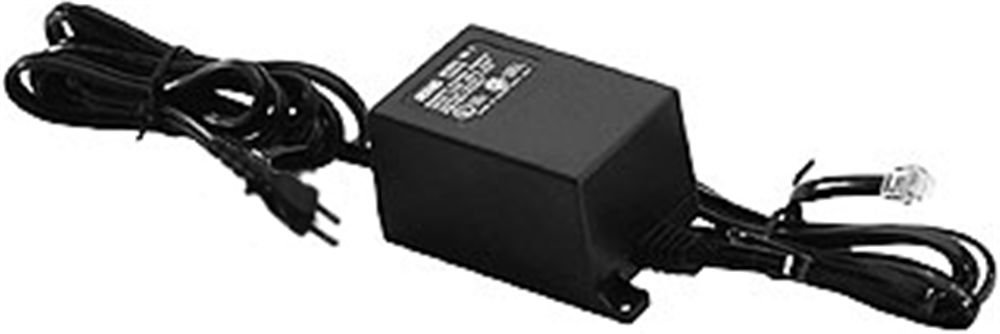
Image: Rane RS-1 Power Supply. This image displays the Rane RS-1 Power Supply, a black rectangular unit with an attached power cord featuring a two-prong North American plug on one end and an RJ-45 style connector on the other, designed to provide power to compatible Rane audio equipment.
4. คู่มือการใช้งาน
The Rane RS-1 is an external power supply that operates automatically once connected to a power source and a compatible Rane device. It does not have user-adjustable controls.
- Ensure all connections are firm before applying power.
- The power supply is designed for continuous operation within its specified voltagอีและวัตtagอีขีดจำกัด
- Always disconnect the power supply from the wall outlet before disconnecting it from the Rane audio device, especially if the device does not have its own power switch.
5. การบำรุงรักษา
The Rane RS-1 Power Supply requires minimal maintenance. Follow these guidelines to ensure longevity:
- การทำความสะอาด: Disconnect the power supply from the wall outlet before cleaning. Use a soft, dry cloth to wipe the exterior. Do not use liquid cleaners or aerosol sprays.
- การตรวจสอบ: Periodically inspect the power cord and connectors for any signs of damage, fraying, or loose connections. If damage is observed, discontinue use and seek professional servicing.
- พื้นที่จัดเก็บ: เมื่อไม่ได้ใช้งานเป็นเวลานาน ควรเก็บแหล่งจ่ายไฟไว้ในที่แห้งและเย็น หลีกเลี่ยงแสงแดดโดยตรงและอุณหภูมิที่สูงหรือต่ำเกินไป
6 การแก้ไขปัญหา
If you encounter issues with your Rane RS-1 Power Supply, refer to the following common troubleshooting steps:
| ปัญหา | สาเหตุที่เป็นไปได้ | สารละลาย |
|---|---|---|
| No power to connected Rane device. |
|
|
| กระแสไฟฟ้าสลับ |
|
|
If these steps do not resolve the issue, contact Rane customer support or a qualified service technician.
7. ข้อมูลจำเพาะ
| แบบอย่าง | อาร์เอส1 |
| ยี่ห้อ | ราเน่ |
| อินพุต Voltage | AC 120 โวลต์ |
| แหล่งพลังงาน | AC |
| วัดtage | 1000 วัตต์ |
| ประเภทปลั๊กไฟ | ชนิด A - 2 ขา (แบบอเมริกาเหนือ) |
| น้ำหนักสินค้า | 1.3 ปอนด์ (0.59 กก.) |
| ขนาด | (Not specified in data) |
| ยูพีซี | 687499101045 |
| ASIN | B0002IU02S |
8. Compatible Rane Devices
The Rane RS-1 Power Supply is compatible with the following Rane audio products:
- เอซี 22B
- เอซี 23B
- AD 22d
- เอพี 13
- AVA 22d
- ซีพี 52
- ซีพี 64
- DA 216a
- ดา 26
- 24 DC
- ดีเอ็มเอส 22
- จีอี 130
- จีอี 215
- จีอี 30
- HC 4
- HC 6
- เอ็มแอลเอ็ม 42
- MLM 82a
- MM 8z
- MP 2
- MP 22z
- MP 24z
- MP 2016
- หมายเลข MS 1b
- พ.ศ.17
- พีเอส 1
- รา.30
- ส.ม.26บี
- เอสเอ็มฮิต
- เอสอาร์เอ็ม 66
- ทิศตะวันตกเฉียงใต้ 35
- ขอบคุณ 22
- ขอบคุณ 44
- TTM 54i
- ทีทีเอ็ม 56
- VP 12
9. การรับประกันและการสนับสนุน
For information regarding warranty coverage, product registration, or technical support, please refer to the official Rane website or contact Rane customer service directly. Keep your purchase receipt as proof of purchase for warranty claims.
Rane Official Webเว็บไซต์: www.rane.com


