การแนะนำ
This manual provides essential instructions for the safe and efficient operation of your NEC VT670 Value LCD Video Projector. Please read this manual thoroughly before using the projector and keep it for future reference. The NEC VT670 is designed for clear image projection with a native resolution of 1024 x 768 and a brightness of up to 2,100 ANSI lumens.
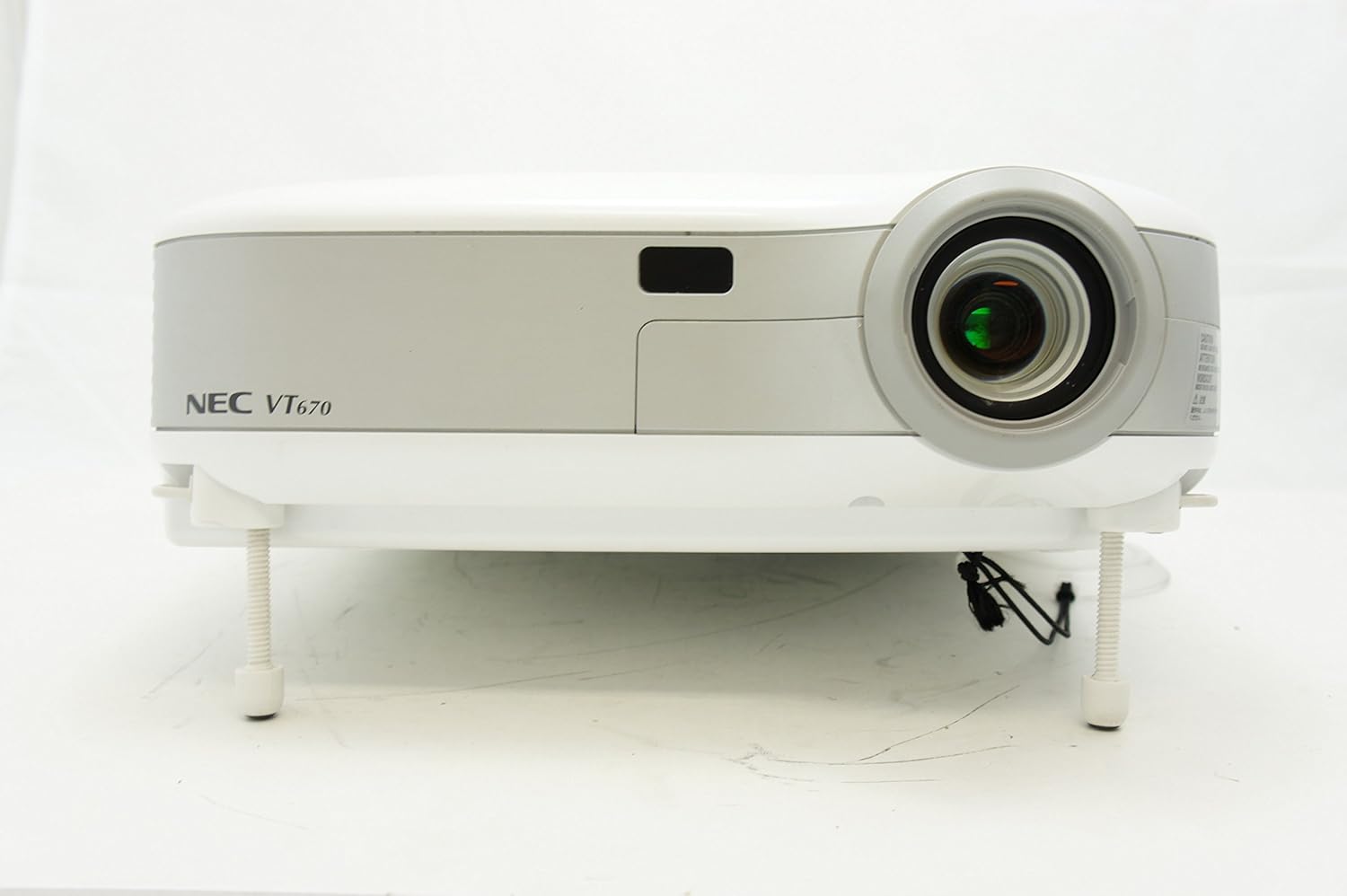
รูปที่ 1: ด้านหน้า view of the NEC VT670 projector, showing the lens and front panel.
การตั้งค่า
Follow these steps to set up your NEC VT670 projector:
- การจัดวาง: Position the projector on a stable, flat surface or mount it according to the instructions for your specific mounting solution. Ensure adequate ventilation around the unit. The projector is designed for tabletop mounting.
- การเชื่อมต่อไฟฟ้า: Connect the power cord to the projector's power inlet and then to a grounded electrical outlet.
- การเชื่อมต่อแหล่งที่มา: Connect your video source (e.g., computer, DVD player) to the appropriate input port on the projector. The VT670 supports VGA (D-Sub), S-Video, and composite video inputs. Use the color-coded connections for ease of setup.
- การเชื่อมต่อสายเคเบิล: Ensure all necessary cables, such as the VGA cable for computer input, are securely connected to both the projector and the source device.
- การเชื่อมต่อเสียง: If your source provides audio, connect it to the projector's audio input ports. The projector features built-in speakers.
- เปิดเครื่องครั้งแรก: กดปุ่มเปิด/ปิดบนโปรเจคเตอร์หรือรีโมทคอนโทรลเพื่อเปิดเครื่อง

รูปที่ 2: Rear panel of the NEC VT670 projector, illustrating various input and output ports including VGA, S-Video, and audio connections.

รูปที่ 3: Example of a VGA cable (left) and a power cable (right) used for connecting the projector.
คำแนะนำการใช้งาน
This section details the basic operation of your projector.
เปิด/ปิดเครื่อง
- ในการเปิดเครื่อง ให้กด พลัง button once. The power indicator will illuminate.
- หากต้องการปิด ให้กดปุ่ม พลัง button twice. The projector will enter a cooling cycle before shutting down completely.
การเลือกแหล่งที่มาของข้อมูล
- ใช้ ป้อนข้อมูล or dedicated source buttons (e.g., คอมพิวเตอร์ 1, วีดีโอ) บนแผงควบคุมหรือรีโมทเพื่อเลือกแหล่งสัญญาณเข้าที่มีอยู่

รูปที่ 4: Top control panel of the NEC VT670 projector, showing power, input selection, and navigation buttons.
การปรับโฟกัสและซูม
- ปรับแต่ง จุดสนใจ หมุนวงแหวนบนเลนส์จนกว่าภาพจะคมชัด
- ใช้ ซูม lever on the lens to adjust the image size to fit your screen.
การนำทางเมนู
- กดปุ่ม เมนู button to access the on-screen display (OSD) menu.
- ใช้ปุ่มลูกศร (UP, ลง, ซ้าย, ขวา) เพื่อเลื่อนดูตัวเลือกในเมนู
- กด เข้า or เลือก เพื่อยืนยันการเลือก
- กด EXIT or เมนู again to close the OSD menu.
การซ่อมบำรุง
การบำรุงรักษาอย่างสม่ำเสมอจะช่วยให้โปรเจคเตอร์ทำงานได้อย่างมีประสิทธิภาพสูงสุดและยืดอายุการใช้งาน
Lamp การทดแทน
โปรเจ็กเตอร์ lamp มีอายุการใช้งานจำกัด เมื่อ lamp indicator lights up or the image becomes dim, the lamp อาจต้องเปลี่ยนชิ้นส่วน โปรดดูรายละเอียดเพิ่มเติมในคู่มือการบริการฉบับเต็มamp ขั้นตอนการเปลี่ยนชิ้นส่วน โปรดรอให้โปรเจคเตอร์เย็นลงอย่างสมบูรณ์ก่อนทำการเปลี่ยนทุกครั้งamp การทดแทน
การทำความสะอาดตัวกรองอากาศ
Dust accumulation on the air filter can reduce cooling efficiency and affect projector performance. Clean the air filter regularly (e.g., every 100 hours of operation) by removing it and gently brushing off dust or using a vacuum cleaner. Replace the filter if it is damaged.
การทำความสะอาดเลนส์
เช็ดเลนส์โปรเจ็กเตอร์เบาๆ ด้วยผ้าเนื้อนุ่มปราศจากขนที่ออกแบบมาสำหรับพื้นผิวเลนส์โดยเฉพาะ ห้ามใช้สารทำความสะอาดที่มีฤทธิ์กัดกร่อนหรือออกแรงมากเกินไป
การแก้ไขปัญหา
หัวข้อนี้ให้แนวทางแก้ไขปัญหาทั่วไปที่คุณอาจพบเจอ
| ปัญหา | สาเหตุที่เป็นไปได้ | สารละลาย |
|---|---|---|
| ไม่มีภาพแสดง |
|
|
| ภาพเบลอ |
|
|
| ไม่มีเสียง |
|
|
ข้อมูลจำเพาะ
Key technical specifications for the NEC VT670 Value LCD Video Projector:
- ชื่อรุ่น : VT670
- ประเภทจอภาพ: จอแอลซีดี
- ความละเอียดดั้งเดิม: 1024 x 768 (XGA)
- ความสว่างสูงสุด: 2,100 ANSI lumens
- อัตราส่วนคอนทราสต์: 400:1 น.
- เทคโนโลยีการเชื่อมต่อ: VGA (D-Sub), S-Video, Composite Video
- การเชื่อมต่อฮาร์ดแวร์: D-Sub, VGA
- ขนาดภาพสูงสุด: 300 นิ้ว
- ฟอร์มแฟกเตอร์: พกพาได้
- ประเภทการติดตั้ง: ที่วางบนโต๊ะ
- ประเภทตัวควบคุม: ปุ่มควบคุม
- น้ำหนักสินค้า: 9.2 ปอนด์
- คุณสมบัติเพิ่มเติม: ลำโพงในตัว
- สัญญาณที่รองรับ: PC, NTSC, PAL, SECAM, HDTV
ข้อมูลการรับประกัน
The NEC VT670 Value LCD Video Projector comes with a รับประกัน 2 ปี. This warranty covers defects in materials and workmanship under normal use. For specific terms and conditions, please refer to the warranty card included with your product or contact NEC customer support.
สนับสนุน
For further assistance, technical support, or service inquiries regarding your NEC VT670 projector, please visit the official NEC website or contact their customer service department. Keep your product model number (VT670) and serial number ready when contacting support.
แหล่งข้อมูลออนไลน์: www.nec.com


