การแนะนำ
ขอบคุณสำหรับการซื้อasing the Nyko AirFlo EX Controller for PlayStation 2. This controller is designed to enhance your gaming experience with its unique airflow feature, providing comfort during extended gameplay sessions. Please read this manual thoroughly before use to ensure proper setup and operation.
เนื้อหาแพ็คเกจ
- Nyko AirFlo EX Controller for PlayStation 2
- คู่มือการใช้งาน (เอกสารนี้)
คุณสมบัติของคอนโทรลเลอร์
The Nyko AirFlo EX Controller integrates several features for an optimized gaming experience:
- AirFlo Cooling System: An integrated fan provides airflow to help keep hands dry and comfortable during intense gaming.
- การออกแบบตามหลักสรีรศาสตร์: Shaped for comfortable grip and extended play.
- Standard PlayStation 2 Controls: Includes directional pad, action buttons (Triangle, Circle, Cross, Square), L1/R1/L2/R2 shoulder buttons, START, SELECT, and analog sticks (L3/R3 functionality).
- ข้อเสนอแนะการสั่นสะเทือน: Supports in-game vibration effects for enhanced immersion.
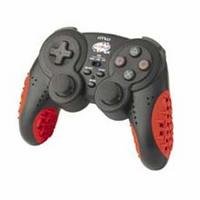
Image: Nyko AirFlo EX Controller for PlayStation 2. This image displays the front view of the controller, highlighting its button layout and ergonomic shape.
การตั้งค่า
- เชื่อมต่อกับ PlayStation 2: Locate an available controller port on your PlayStation 2 console.
- ใส่ขั้วต่อ: Firmly insert the controller's connector cable into the chosen port. Ensure it is fully seated.
- เปิดเครื่องคอนโซล: เปิดเครื่อง PlayStation 2 ของคุณ ตัวควบคุมควรจะถูกตรวจจับโดยอัตโนมัติ
- ทดสอบฟังก์ชันการทำงาน: Navigate the PlayStation 2 menu or start a game to confirm all buttons and analog sticks are responsive.
คำแนะนำการใช้งาน
The Nyko AirFlo EX Controller operates similarly to standard PlayStation 2 controllers, with the added AirFlo feature.
- การควบคุมพื้นฐาน: Use the directional pad or left analog stick for movement, and the action buttons (Triangle, Circle, Cross, Square) for in-game actions.
- Analog Stick Functionality: Pressing the analog sticks down activates L3 and R3 functions, if supported by the game.
- AirFlo Fan Activation: The AirFlo fan is typically activated by a switch or button on the controller itself. Refer to the controller's physical layout for the exact location of the fan control. Toggle this control to turn the fan on or off.
- ข้อเสนอแนะการสั่นสะเทือน: Vibration effects will automatically engage during gameplay when supported by the software.
การซ่อมบำรุง
- การทำความสะอาด: ใช้ผ้าแห้งนุ่มๆ เช็ดทำความสะอาดพื้นผิวของตัวควบคุม สำหรับคราบสกปรกที่ติดแน่น ให้ใช้ผ้าชุบน้ำหมาดๆ เช็ดเบาๆamp สามารถใช้ผ้าเช็ดทำความสะอาดได้ โดยต้องแน่ใจว่าไม่มีความชื้นเข้าไปในช่องเปิด ห้ามใช้สารเคมีรุนแรงหรือน้ำยาทำความสะอาดที่มีฤทธิ์กัดกร่อน
- พื้นที่จัดเก็บ: Store the controller in a cool, dry place away from direct sunlight and extreme temperatures. Avoid wrapping the cable tightly around the controller to prevent damage.
- หลีกเลี่ยงการหยด: ปกป้องตัวควบคุมจากการตกหล่นและแรงกระแทกซึ่งอาจทำให้ส่วนประกอบภายในเสียหายได้
การแก้ไขปัญหา
| ปัญหา | วิธีแก้ปัญหาที่เป็นไปได้ |
|---|---|
| ตัวควบคุมไม่ตอบสนอง |
|
| AirFlo fan not working. |
|
| Buttons or analog sticks are unresponsive or stiff. |
|
ข้อมูลจำเพาะ
- แบบอย่าง: AirFlo EX
- ความเข้ากันได้: เพลย์สเตชั่น 2
- น้ำหนักสินค้า: 9.6 ออนซ์ (ประมาณ 272 กรัม)
- ขนาดแพ็คเกจ: 6 x 4.8 x 2.7 นิ้ว (ประมาณ 15.2 x 12.2 x 6.9 ซม.)
- การเชื่อมต่อ: มีสาย
- คุณสมบัติพิเศษ: Integrated AirFlo cooling fan
การรับประกันและการสนับสนุน
For warranty information, technical support, or service inquiries regarding your Nyko AirFlo EX Controller, please contact Nyko customer support directly. Details can typically be found on the official Nyko webบรรจุภัณฑ์ไซต์หรือผลิตภัณฑ์
Nyko Official Webเว็บไซต์: www.nyko.com (หมายเหตุ: นี่เป็นเพียงตัวอย่างชั่วคราว URL. Please refer to your product packaging or official Nyko documentation for the most current support information.)


