1. บทนำ
The NETGEAR FSM726 is a 24-port managed switch designed to accommodate expanding business network needs. It features 24 10/100 ports and 2 Gigabit Ethernet ports, which can utilize either built-in copper or GBIC slots. This Layer 2 switch offers two management interface options: an easy-to-use, browser-based interface and a command line interface, making it an ideal solution for users new to managed switching. All ports are auto-negotiating and support Auto Uplink technology for simplified connectivity.
2. ข้อมูลด้านความปลอดภัย
Please read all safety warnings and instructions before installing or operating this device. Failure to do so may result in injury or damage to the equipment.
- แหล่งพลังงาน: ใช้เฉพาะอะแดปเตอร์แปลงไฟที่มาพร้อมกับอุปกรณ์เท่านั้น ตรวจสอบให้แน่ใจว่าเต้ารับไฟฟ้ามีการต่อสายดินอย่างถูกต้อง
- การระบายอากาศ : อย่าปิดกั้นช่องระบายอากาศใดๆ ตรวจสอบให้แน่ใจว่ามีอากาศถ่ายเทเพียงพอรอบๆ อุปกรณ์เพื่อป้องกันความร้อนสูงเกินไป
- ที่ตั้ง: Install the device in a stable, dry location away from direct sunlight, heat sources, and moisture.
- การบริการ: อย่าพยายามให้บริการผลิตภัณฑ์นี้ด้วยตนเอง ส่งต่อการบริการทั้งหมดไปยังช่างบริการที่ผ่านการรับรอง
3. เนื้อหาบรรจุภัณฑ์
ตรวจสอบว่าแพ็คเกจของคุณมีรายการต่อไปนี้:
- NETGEAR FSM726 24-Port Managed Switch
- อะแดปเตอร์แปลงไฟ/สายไฟ
- ชุดติดตั้งบนแร็ค (ถ้ามี)
- Resource CD (with documentation and utility software)
- คู่มือการติดตั้ง
If any items are missing or damaged, please contact your NETGEAR reseller or customer support.
4. การตั้งค่า
Follow these steps to set up your NETGEAR FSM726 switch:
- แกะสวิตช์: ถอดสวิตช์และอุปกรณ์เสริมทั้งหมดออกจากบรรจุภัณฑ์อย่างระมัดระวัง
- การติดตั้ง (ทางเลือก): หากติดตั้งแบบแร็ค ให้ติดขายึดแร็คที่ให้มากับด้านข้างของสวิตช์โดยใช้สกรูที่ให้มาด้วย จากนั้นยึดสวิตช์เข้ากับแร็คอุปกรณ์มาตรฐานขนาด 19 นิ้ว
- เชื่อมต่ออุปกรณ์เครือข่าย: Connect your network devices (computers, servers, other switches) to the 10/100 Ethernet ports on the front panel using standard Ethernet cables. The ports are auto-negotiating and support Auto Uplink.
- Connect Gigabit Ports: Utilize the two Gigabit Ethernet ports for high-speed connections to backbone devices or servers. These ports support either copper connections or GBIC modules (sold separately) for fiber optic links.
- เชื่อมต่อพลังงาน: Plug the power cord into the switch's power receptacle and then into a grounded electrical outlet. The power LED on the front panel should illuminate.
- การกำหนดค่าเริ่มต้น: Refer to the included Resource CD for detailed instructions on accessing the browser-based management interface or the command line interface for initial configuration. The default IP address and login credentials will be provided in the documentation.
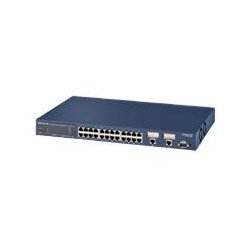
ภาพ: ด้านหน้า view of the NETGEAR FSM726 24-Port Managed Switch, showing the 10/100 Ethernet ports, Gigabit ports, and status indicators.
5. การใช้งานสวิตช์
Once the switch is powered on and connected, it will begin forwarding network traffic. As a managed switch, the FSM726 offers advanced configuration options through its management interfaces.
- การเข้าถึงอินเทอร์เฟซการจัดการ: เปิด web browser on a computer connected to the same network segment as the switch. Enter the switch's IP address (default or configured) into the browser's address bar. Log in using the provided credentials.
- ตัวเลือกการกำหนดค่า: การ web interface allows you to configure various Layer 2 features such as VLANs, Quality of Service (QoS), port mirroring, link aggregation, and security settings.
- อินเทอร์เฟซบรรทัดคำสั่ง (CLI): For advanced users, the CLI provides granular control over the switch's functions. Access the CLI via Telnet or a serial console connection.
- การติดตาม: The management interface also provides tools to monitor port status, traffic statistics, and system logs to ensure optimal network performance.
6. การบำรุงรักษา
Regular maintenance helps ensure the longevity and optimal performance of your NETGEAR FSM726 switch.
- การทำความสะอาด: Keep the switch clean and free of dust. Use a soft, dry cloth to wipe the exterior. Do not use liquid or aerosol cleaners.
- อัพเดตเฟิร์มแวร์: ตรวจสอบกับฝ่ายสนับสนุนของ NETGEAR เป็นระยะ website for firmware updates. Firmware updates can provide new features, performance improvements, and security enhancements. Follow the instructions provided with the firmware update carefully.
- สภาพแวดล้อม : Ensure the operating environment remains within the specified temperature and humidity ranges to prevent hardware failure.
- การจัดการสายเคเบิล: เก็บสายเคเบิลเครือข่ายให้เป็นระเบียบและยึดให้เหมาะสมเพื่อป้องกันการตัดการเชื่อมต่อโดยไม่ได้ตั้งใจหรือความเสียหาย
7 การแก้ไขปัญหา
If you encounter issues with your NETGEAR FSM726 switch, refer to the following common troubleshooting steps:
- ไม่มีไฟฟ้า:
- ตรวจสอบให้แน่ใจว่าสายไฟเชื่อมต่อกับสวิตช์และเต้ารับไฟฟ้าที่ใช้งานได้แน่นหนา
- ตรวจสอบว่าปลั๊กไฟใช้งานได้หรือไม่ โดยลองเสียบอุปกรณ์อื่นเข้าไป
- ไม่มีไฟลิงค์:
- Check the Ethernet cable connection between the switch port and the connected device. Try a different cable.
- ตรวจสอบให้แน่ใจว่าอุปกรณ์ที่เชื่อมต่อเปิดอยู่และทำงานอย่างถูกต้อง
- Verify the port on the connected device is enabled.
- ไม่สามารถเข้าถึงอินเทอร์เฟซการจัดการได้:
- Confirm your computer is on the same IP subnet as the switch.
- Verify the switch's IP address. If unknown, you may need to reset the switch to factory defaults (refer to the full manual for instructions).
- ปิดใช้งานไฟร์วอลล์หรือโปรแกรมป้องกันไวรัสใดๆ บนคอมพิวเตอร์ของคุณชั่วคราว เพื่อป้องกันการรบกวน
- ประสิทธิภาพเครือข่ายช้า:
- ตรวจสอบปริมาณการใช้งานเครือข่ายที่มากเกินไปหรือพายุการออกอากาศ
- ตรวจสอบให้แน่ใจว่าสายเคเบิลทั้งหมดอยู่ในสภาพดีและเชื่อมต่ออย่างถูกต้อง
- Verify duplex settings on the switch ports and connected devices.
For more detailed troubleshooting, consult the comprehensive user manual on the NETGEAR support webเว็บไซต์.
8. ข้อมูลจำเพาะ
| ยี่ห้อ | เน็ตเกียร์ |
| หมายเลขรุ่น | FSM726NA |
| จำนวนพอร์ต | 24 x 10/100 Mbps, 2 x Gigabit (Copper/GBIC) |
| ขนาดสินค้า | 20.7 x 12.6 x 4.4 นิ้ว |
| น้ำหนักสินค้า | 7.75 ปอนด์ |
| อุปกรณ์ที่รองรับ | คอมพิวเตอร์ตั้งโต๊ะ, เซิร์ฟเวอร์, อุปกรณ์เครือข่าย |
| การจัดการ | Managed (Browser-based GUI, CLI) |
| ยูพีซี | 606449026856 |
9. ข้อมูลการรับประกัน
NETGEAR products are covered by a limited warranty. The specific terms and duration of the warranty may vary by region and product type. Please refer to the warranty card included with your product or visit the official NETGEAR webเข้าชมเว็บไซต์เพื่อดูข้อมูลการรับประกันโดยละเอียดและขั้นตอนการลงทะเบียน โปรดเก็บหลักฐานการซื้อไว้เพื่อใช้ในการเคลมประกัน
10. การสนับสนุนด้านเทคนิค
หากต้องการความช่วยเหลือด้านเทคนิค การลงทะเบียนผลิตภัณฑ์ หรือดาวน์โหลดไดรเวอร์และเฟิร์มแวร์เวอร์ชั่นล่าสุด โปรดเยี่ยมชมเว็บไซต์สนับสนุนอย่างเป็นทางการของ NETGEAR webเว็บไซต์:
You may also find helpful resources, FAQs, and community forums on the support site. When contacting support, please have your product model number (FSM726NA) and serial number ready.