การแนะนำ
This manual provides essential instructions for the safe and efficient operation of your Sharper Image SO226 Compact CD Stereo with AM/FM Digital Tuner. Please read this manual thoroughly before using the unit and retain it for future reference.
คำแนะนำด้านความปลอดภัยที่สำคัญ
- อ่านคำแนะนำทั้งหมดก่อนใช้งานเครื่อง
- เก็บคู่มือนี้ไว้เพื่อใช้อ้างอิงในอนาคต
- ห้ามใช้อุปกรณ์นี้ใกล้น้ำ
- ทำความสะอาดด้วยผ้าแห้งเท่านั้น
- อย่าปิดกั้นช่องระบายอากาศใดๆ ติดตั้งตามคำแนะนำของผู้ผลิต
- ห้ามติดตั้งใกล้แหล่งความร้อน เช่น หม้อน้ำ เครื่องทำความร้อน เตา หรืออุปกรณ์อื่น ๆ (รวมถึง ampเครื่องให้ความร้อน) ที่ผลิตความร้อน
- ปกป้องสายไฟไม่ให้ถูกเหยียบหรือถูกหนีบ โดยเฉพาะที่ปลั๊ก เต้ารับไฟฟ้า และจุดที่สายไฟออกจากเครื่อง
- ใช้เฉพาะอุปกรณ์เสริม/สิ่งที่แนบตามที่ผู้ผลิตกำหนดเท่านั้น
- ส่งต่อการบริการทั้งหมดไปยังช่างบริการที่ผ่านการรับรอง จำเป็นต้องเข้ารับบริการเมื่ออุปกรณ์ได้รับความเสียหายแต่อย่างใด
เนื้อหาแพ็คเกจ
ตรวจสอบว่ามีสิ่งของทั้งหมดอยู่ครบเมื่อแกะกล่อง:
- Sharper Image SO226 Compact CD Stereo Unit
- AC Power Adapter (if applicable, check packaging)
- คู่มือการใช้งาน (เอกสารนี้)
สินค้าเกินview
Familiarize yourself with the components and controls of your SO226 unit.
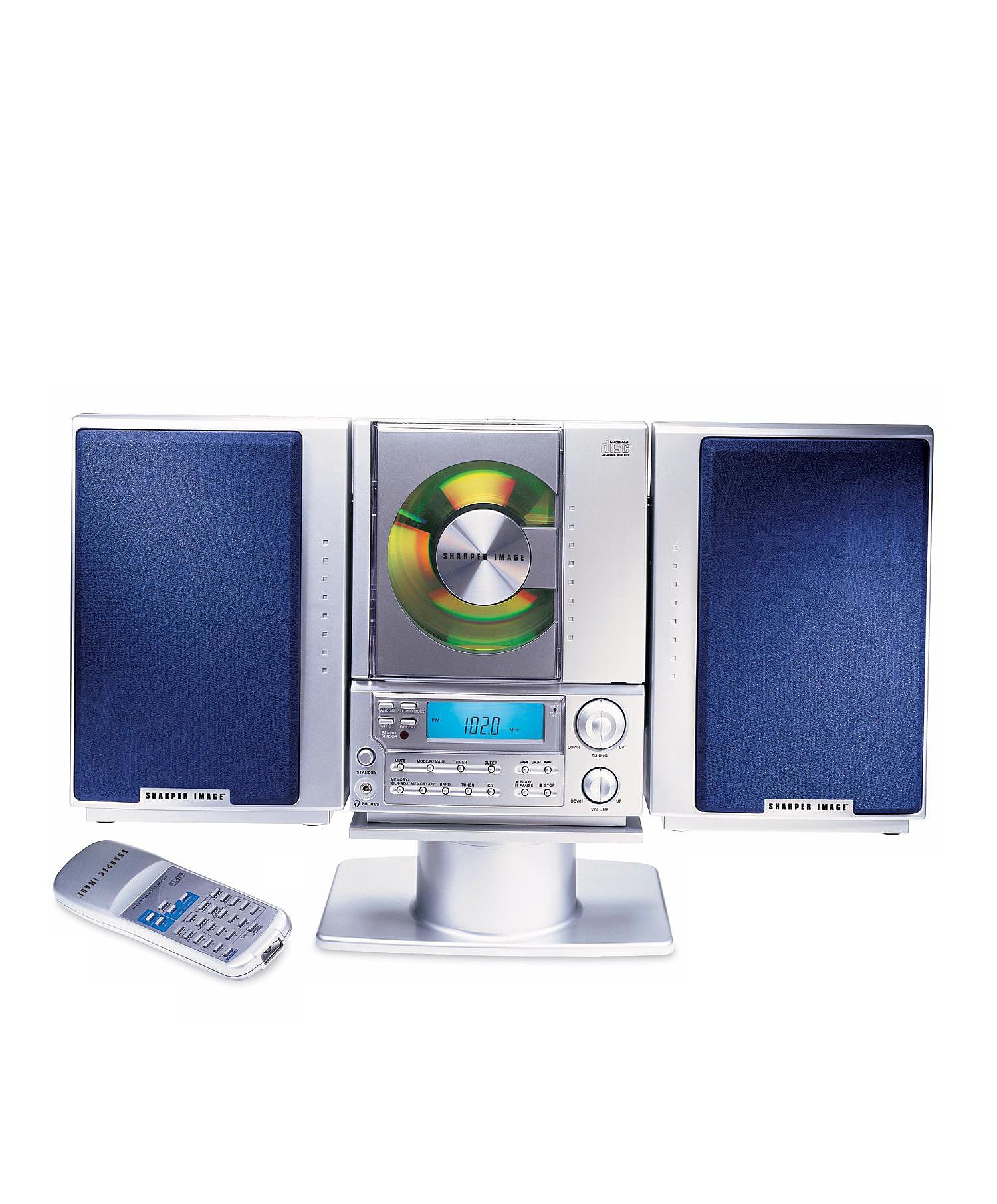
This image displays the front panel of the Sharper Image SO226 Compact CD Stereo. Visible features include the top-loading CD compartment, the digital display for radio frequencies and CD track information, and various control buttons for power, volume, CD playback, and radio tuning.
Control Panel (Typical Layout)
- ปุ่มเพาเวอร์: เปิดหรือปิดเครื่อง
- ปุ่มฟังก์ชั่น/โหมด: Switches between CD, AM, and FM modes.
- ปุ่มปรับระดับเสียง +/-: ปรับระดับเอาต์พุตเสียง
- ปุ่มเล่น/หยุดชั่วคราว: เริ่มหรือหยุดการเล่นซีดี
- ปุ่มหยุด: หยุดเล่นซีดี
- ปุ่มข้าม/ค้นหา (◀◀ / ▶▶): Skips tracks on CD or tunes radio frequencies.
- ปุ่มโปรแกรม: ใช้สำหรับตั้งโปรแกรมแทร็กในแผ่นซีดี
- ปุ่มสลีป: เปิดใช้งานฟังก์ชั่นตั้งเวลาปิดเครื่อง
- ปุ่มปรับ +/-: ปรับจูนความถี่วิทยุให้แม่นยำยิ่งขึ้น
- PRESET Buttons: จัดเก็บและเรียกคืนสถานีวิทยุโปรด
- จอแสดงผล LCD: Shows current mode, track number, frequency, and time.
การตั้งค่า
การเชื่อมต่อไฟฟ้า
- ตรวจสอบให้แน่ใจว่าวางเครื่องไว้บนพื้นผิวที่มั่นคงและเรียบ
- If using batteries (not included), open the battery compartment on the bottom or back of the unit and insert the required batteries, observing correct polarity.
- Alternatively, connect the AC power adapter (if supplied) to the DC IN jack on the unit and then plug the adapter into a standard wall outlet.
การตั้งค่าเสาอากาศ
- For FM reception, extend the telescopic antenna fully. Adjust its position for optimal reception.
- For AM reception, the unit has a built-in ferrite bar antenna. Rotate the entire unit for best AM reception.
คำแนะนำการใช้งาน
การทำงานของเครื่องเล่นซีดี
- กดปุ่ม พลัง ปุ่มเพื่อเปิดเครื่อง
- กดปุ่ม ฟังก์ชั่น/โหมด กดปุ่มซ้ำๆ จนกระทั่งคำว่า 'CD' ปรากฏบนจอแสดงผล
- เปิดฝาช่องใส่ซีดี
- Place a CD with the label side facing up into the compartment.
- Close the CD compartment cover. The unit will read the CD, and the total number of tracks will be displayed.
- กดปุ่ม เล่น/หยุดชั่วคราว ปุ่มเพื่อเริ่มเล่น
- หากต้องการหยุดชั่วคราว ให้กด เล่น/หยุดชั่วคราว กดอีกครั้งเพื่อดำเนินการต่อ
- หากต้องการหยุดเล่นให้กดปุ่ม หยุด ปุ่ม.
- ในการข้ามไปยังแทร็คถัดไป ให้กด SKIP/SEARCH ▶▶ ปุ่ม.
- หากต้องการกลับไปยังจุดเริ่มต้นของแทร็กปัจจุบันหรือแทร็กก่อนหน้า ให้กดปุ่ม SKIP/SEARCH ◀◀ ปุ่ม.
- To fast forward or rewind within a track, press and hold the SKIP/SEARCH ▶▶ or ◀◀ ปุ่มระหว่างการเล่น
การทำงานของวิทยุ AM/FM
- กดปุ่ม พลัง ปุ่มเพื่อเปิดเครื่อง
- กดปุ่ม ฟังก์ชั่น/โหมด กดปุ่มซ้ำๆ จนกว่า 'AM' หรือ 'FM' จะปรากฏบนหน้าจอแสดงผล
- การปรับด้วยตนเอง: กดปุ่ม การปรับแต่ง +/- ปุ่มสำหรับปรับความถี่ทีละขั้น
- การสแกนอัตโนมัติ: กดปุ่มค้างไว้ การปรับแต่ง +/- buttons for a few seconds. The tuner will scan and stop at the next strong station.
- การจัดเก็บค่าที่ตั้งไว้ล่วงหน้า: ปรับไปที่สถานีที่คุณต้องการ กดปุ่ม โปรแกรม button. The preset number will flash. Use the ข้าม/ค้นหา กดปุ่มเพื่อเลือกหมายเลขที่ตั้งไว้ล่วงหน้า จากนั้นกด โปรแกรม เพื่อยืนยันอีกครั้ง
- การเรียกคืนค่าที่ตั้งไว้ล่วงหน้า: ในโหมดวิทยุให้กดปุ่ม พรีเซ็ต ปุ่มสำหรับสลับไปมาระหว่างสถานีที่คุณบันทึกไว้
นอนฟังก์ชั่นจับเวลา
The unit features a convenient sleep timer that automatically turns off the sound after a set period.
- ขณะที่เครื่องกำลังเล่น (ซีดีหรือวิทยุ) ให้กดปุ่ม นอน ปุ่ม.
- การกดแต่ละครั้งของ นอน button will cycle through available sleep times (e.g., 10, 20, 30, 60, 90 minutes, or OFF).
- Select your desired sleep duration. The unit will automatically power off after the selected time has elapsed.
การซ่อมบำรุง
- การทำความสะอาดหน่วย: เช็ดภายนอกตัวเครื่องด้วยผ้านุ่มและแห้ง ห้ามใช้น้ำยาทำความสะอาดที่มีฤทธิ์กัดกร่อนหรือตัวทำละลาย
- การดูแลรักษาซีดี: Handle CDs by their edges. Keep them clean and free of scratches. If a CD is dirty, wipe it gently with a soft, lint-free cloth from the center outwards.
- พื้นที่จัดเก็บ: When not in use for extended periods, disconnect the power adapter and remove batteries. Store the unit in a cool, dry place.
การแก้ไขปัญหา
หากคุณพบปัญหา โปรดดูปัญหาทั่วไปและวิธีแก้ไขต่อไปนี้:
- ไม่มีไฟฟ้า:
- Ensure the AC power adapter is securely plugged into both the unit and a working wall outlet.
- If using batteries, check if they are inserted correctly and are not depleted. - ไม่มีเสียง:
- Check the volume level and increase it if necessary.
- Ensure the correct function mode (CD/AM/FM) is selected. - CD Not Playing / Skipping:
- Ensure the CD is inserted correctly with the label side up.
- Clean the CD for any dirt or scratches.
- Try a different CD to rule out a faulty disc.
- Ensure the CD compartment cover is fully closed. - การรับสัญญาณวิทยุไม่ดี:
- For FM, fully extend and adjust the telescopic antenna.
- For AM, rotate the entire unit for better signal.
- Move the unit away from other electronic devices that may cause interference. - ปุ่มไม่ตอบสนอง:
- Try turning the unit off and on again.
- Disconnect power for a few minutes, then reconnect.
ข้อมูลจำเพาะ
| หมายเลขรุ่น | เอสโอทู |
| ขนาดสินค้า (กว้าง x ยาว x สูง) | 1.3 x 19 x 5.5 นิ้ว (3.3 x 48.3 x 14 ซม.) |
| น้ำหนักสินค้า | 5 ปอนด์ (2.27 กก.) |
| ประเภทลำโพง | สเตอริโอ |
| แหล่งพลังงาน | Battery Powered (AC adapter typically included or sold separately) |
| Color (as per specific variant) | สีฟ้า |
การรับประกันและการสนับสนุน
สำหรับข้อมูลการรับประกันและการบริการลูกค้า โปรดดูเอกสารที่แนบมากับสินค้าที่ซื้อ หรือเยี่ยมชมเว็บไซต์อย่างเป็นทางการของ Sharper Image webไซต์นี้ โปรดเก็บหลักฐานการซื้อไว้เพื่อใช้ยืนยันการรับประกัน


