การแนะนำ
This manual provides detailed instructions for the proper use and care of your Audiovox CE-145G Personal CD Player. Please read this manual thoroughly before operating the device to ensure optimal performance and longevity.
คุณสมบัติผลิตภัณฑ์
- 40-Second Anti-Skip Protection: Ensures continuous audio playback even during movement, utilizing a digital buffer.
- Multi-Directional Anti-Roll Sensors: Provides additional protection against playback interruption from various movements.
- 22-Track Programmable Memory: Allows customization of CD playback order.
- Bass Boost System: ปรับปรุงเอาต์พุตเสียงความถี่ต่ำ
- 3-Beam Laser Pickup: Designed for accurate CD tracking and clear sound reproduction.
- โหมดการเล่นหลายโหมด: Includes random play and various repeat functions.
- สวิตช์ค้าง: Prevents accidental button presses and program changes.
- ปิดอัตโนมัติ: Conserves battery life by automatically shutting down the player when not in use.
- Line-Out Jack: For connecting to external audio systems or power adapters.
- Built-in Rechargeable Circuitry: Supports the use of rechargeable Ni-Cad batteries (not included).
- หูฟังแบบสเตอริโอ: Included for immediate listening.
การตั้งค่า
1. การติดตั้งแบตเตอรี่
The Audiovox CE-145G operates on two (2) AA batteries (not included) or an optional AC/car adapter (not included) connected via the line-out jack. For rechargeable Ni-Cad batteries, the unit features built-in charging circuitry.
- หาช่องใส่แบตเตอรี่ที่อยู่ด้านล่างของเครื่องเล่นซีดี
- เลื่อนฝาครอบช่องใส่แบตเตอรี่เปิดออก
- ใส่แบตเตอรี่ AA สอง (2) ก้อน โดยตรวจสอบให้แน่ใจว่าขั้วถูกต้อง (+/-) ตามที่ระบุไว้ภายในช่องใส่แบตเตอรี่
- ปิดฝาช่องใส่แบตเตอรี่ให้แน่น

Image: The Audiovox CE-145G Personal CD Player in translucent green, shown with included stereo headphones. This image illustrates the overall product design and the headphones that come with the unit.
2. การเชื่อมต่อหูฟัง
Insert the stereo headphone plug into the headphone jack located on the side of the CD player.

Image: A close-up of the stereo headphones included with the Audiovox CE-145G CD player, showing the earcups and the 3.5mm audio jack.
คำแนะนำการใช้งาน
1. Basic CD Playback
- Open the CD compartment lid by pressing the "OPEN" button or sliding the latch.
- Place a CD onto the center spindle with the label side facing up.
- ปิดฝาช่องใส่ซีดีให้แน่นจนกระทั่งมีเสียงคลิก
- กดปุ่ม เล่น/หยุดชั่วคราว button to begin playback. The track number and elapsed time will display.
- หากต้องการหยุดเล่นชั่วคราว ให้กด เล่น/หยุดชั่วคราว กดอีกครั้งเพื่อดำเนินการต่อ
- หากต้องการหยุดเล่นให้กดปุ่ม หยุด ปุ่ม.
- ในการข้ามไปยังแทร็คถัดไป ให้กด ข้ามไปข้างหน้า ปุ่ม (|).
- To return to the beginning of the current track or go to the previous track, press the ข้ามย้อนกลับ ปุ่ม (|).
- To fast forward or rewind within a track, press and hold the ข้ามไปข้างหน้า or ข้ามย้อนกลับ ปุ่มตามลำดับ
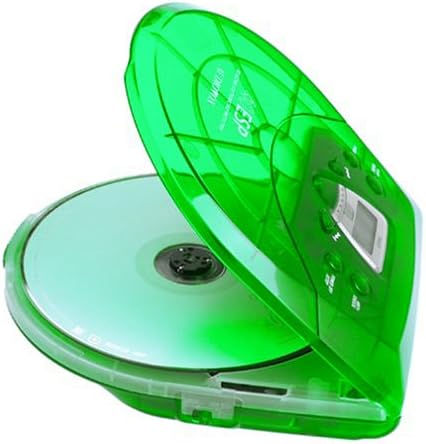
Image: The Audiovox CE-145G Personal CD Player with its translucent green lid open, revealing a compact disc placed inside the compartment.
2. Anti-Skip Protection (ESP)
The CE-145G features a 40-second Electronic Skip Protection (ESP) buffer. This system stores up to 40 seconds of audio data, allowing for uninterrupted playback even if the player experiences minor shocks or vibrations. This feature is automatically active during playback.
3. Programmable Memory (22 Tracks)
You can program up to 22 tracks to play in a specific order.
- ในโหมด STOP ให้กดปุ่ม โปรแกรม กดปุ่ม หน้าจอจะแสดง "PROG" และ "01"
- ใช้ ข้ามไปข้างหน้า or ข้ามย้อนกลับ buttons to select the desired first track.
- กด โปรแกรม again to confirm the track. The display will show "02".
- Repeat steps 2 and 3 to add up to 22 tracks to your program.
- After programming the last track, press เล่น/หยุดชั่วคราว to start playback of your programmed sequence.
- หากต้องการล้างโปรแกรม ให้กดปุ่ม หยุด กดสองครั้ง
4. เบสบูสต์
To enhance the bass frequencies, locate the บูสต์เบส switch (or button) on the unit and activate it. Deactivate it to return to standard audio output.
5. ฟังก์ชั่น Hold
การ ถือ switch prevents accidental button presses. Slide the ถือ switch to the "ON" position to disable all control buttons. Slide it to "OFF" to re-enable controls.
6. ปิดเครื่องอัตโนมัติ
To conserve battery life, the CD player will automatically power off after a period of inactivity (e.g., when a CD finishes playing and no buttons are pressed). To restart, press the เล่น/หยุดชั่วคราว ปุ่ม.
การซ่อมบำรุง
- การทำความสะอาดหน่วย: Wipe the exterior of the player with a soft, damp ผ้า ห้ามใช้สารทำความสะอาดที่มีฤทธิ์กัดกร่อนหรือตัวทำละลาย
- การทำความสะอาดเลนส์ CD: If playback issues occur due to a dirty lens, use a specialized CD lens cleaning kit. Do not touch the lens directly.
- การดูแลรักษาซีดี: จับแผ่นซีดีที่ขอบ รักษาความสะอาดและป้องกันรอยขีดข่วน เก็บไว้ในกล่องเมื่อไม่ใช้งาน
- การดูแลแบตเตอรี่ ถอดแบตเตอรี่ออกหากจะไม่ได้ใช้งานเครื่องเป็นเวลานานเพื่อป้องกันการรั่วไหล
การแก้ไขปัญหา
| ปัญหา | สาเหตุที่เป็นไปได้ | สารละลาย |
|---|---|---|
| ไม่มีไฟฟ้า | แบตเตอรี่หมดหรือใส่ไม่ถูกต้อง อะแดปเตอร์ไฟไม่ได้เชื่อมต่อหรือชำรุด | Replace batteries, check polarity, or ensure AC adapter is properly connected and functional. |
| แผ่นซีดีกระโดดหรือหยุดเล่น | CD is dirty or scratched; unit is subjected to excessive shock; lens is dirty. | Clean CD, use a different CD, avoid strong impacts, clean the CD lens. |
| ไม่มีเสียง | Headphones not connected properly; volume too low; headphones faulty. | Ensure headphones are fully plugged in, increase volume, try different headphones. |
| ปุ่มไม่ตอบสนอง | สวิตช์ HOLD ถูกกดอยู่ | Slide the HOLD switch to the "OFF" position. |
ข้อมูลจำเพาะ
- แบบอย่าง: CE-145G
- ยี่ห้อ: ออดิโอว็อกซ์
- การป้องกันการข้าม: 40 วินาที (ระบบป้องกันการข้ามสัญญาณอิเล็กทรอนิกส์)
- แทร็กที่ตั้งโปรแกรมได้: 22
- แหล่งพลังงาน: 2 x AA batteries (not included) or optional AC/car adapter
- เอาต์พุตเสียง: 3.5mm headphone jack, Line-out jack
- ขนาด (ประมาณ): 11.8 x 8.3 x 2.6 นิ้ว (ขนาดบรรจุภัณฑ์)
- น้ำหนัก (โดยประมาณ): 1.35 ปอนด์ (น้ำหนักรายการ)
- สี: Translucent Green
การรับประกันและการสนับสนุน
The Audiovox CE-145G Personal CD Player is backed by a 90-day parts-and-labor warranty นับจากวันที่ซื้อ โปรดเก็บหลักฐานการซื้อไว้เพื่อใช้ในการเคลมประกัน
For technical support or warranty service, please refer to the contact information provided with your product packaging or visit the official Audiovox webเว็บไซต์.


