การแนะนำ
Welcome to the world of Kirby 64: The Crystal Shards. This manual provides essential information to help you navigate Kirby's adventure on the Nintendo 64 console. Prepare to explore diverse planets, utilize unique abilities, and recover the scattered Crystal Shards.
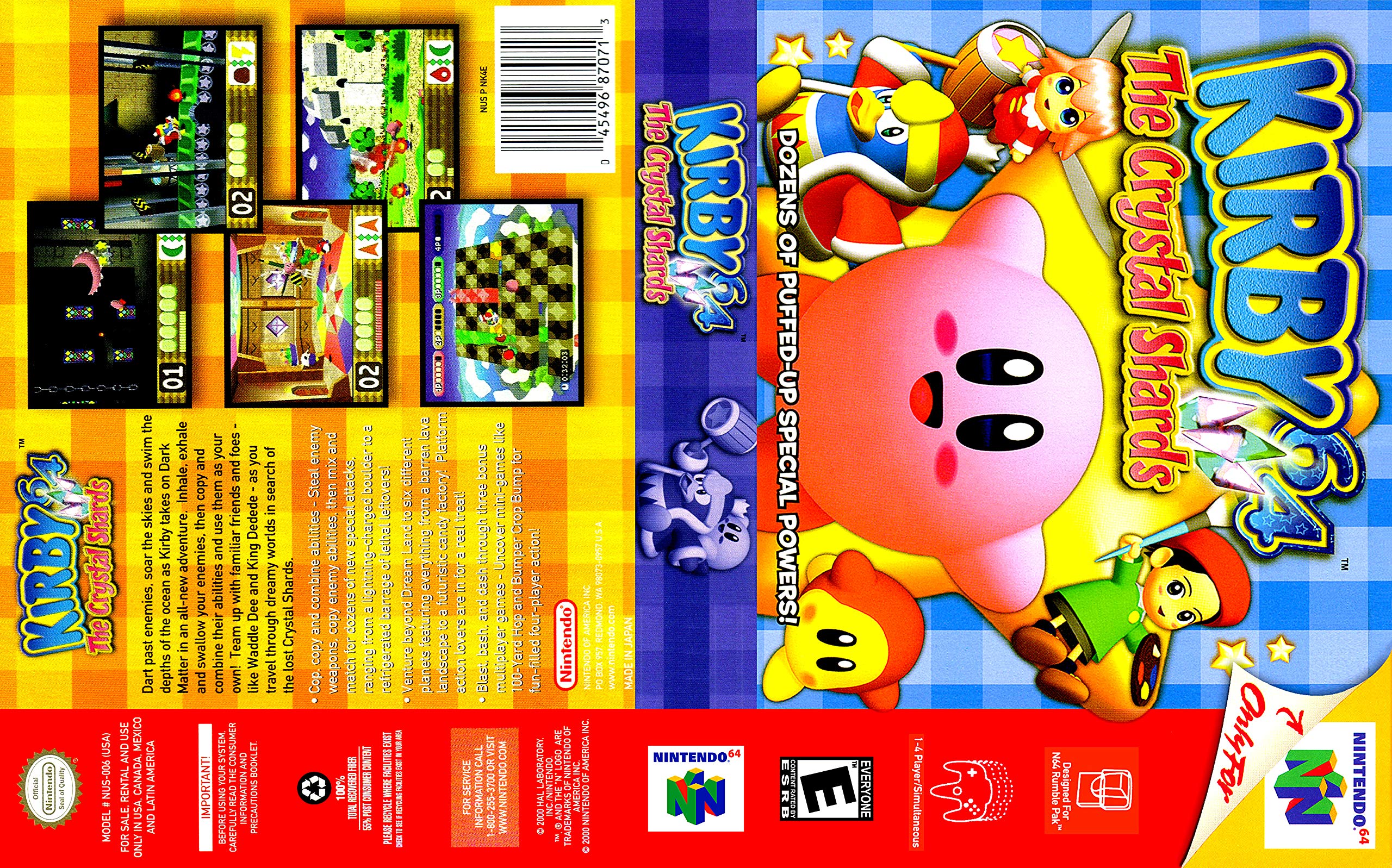
The image displays the game cartridge for Kirby 64: The Crystal Shards, along with its colorful box art featuring Kirby and other characters.
วิดีโออย่างเป็นทางการแสดงasing gameplay from Kirby 64: The Crystal Shards, demonstrating Kirby's various abilities and interactions within the game world.
การตั้งค่า
- Ensure your Nintendo 64 console is properly connected to your television and power supply.
- Insert the Kirby 64: The Crystal Shards game cartridge firmly into the cartridge slot on the top of your Nintendo 64 console.
- Connect a Nintendo 64 controller to one of the controller ports on the front of the console.
- Turn on your television and select the correct input channel for your Nintendo 64 console.
- Power on the Nintendo 64 console. The game should start automatically.
คำแนะนำการใช้งาน
การควบคุมพื้นฐาน
- Control Stick: Move Kirby.
- ปุ่ม: Jump, Inhale.
- ปุ่ม B: Exhale, use copied ability.
- Z Button: อารักขา.
- ปุ่ม C: Camera control (if applicable), some abilities.
- ปุ่มเริ่มต้น: หยุดเกมชั่วคราว เข้าสู่เมนู
Kirby's Abilities
Kirby possesses the unique ability to inhale enemies and objects. After inhaling, he can either exhale them as projectiles or swallow them to copy their powers. A key feature in Kirby 64 is the ability to combine two different copied powers to create new, more potent attacks. Experiment with various combinations to discover dozens of unique special attacks, from a lightning-charged boulder to a refrigerated barrage of lethal leftovers.
วัตถุประสงค์ของเกม
Your primary goal is to help Kirby recover the lost Crystal Shards scattered across six different planets. Each planet presents unique environments, from barren lava landscapes to futuristic candy factories, requiring Kirby to utilize his diverse abilities to overcome obstacles and defeat enemies.
Multiplayer Mini-Games
In addition to the main adventure, Kirby 64 includes three bonus multiplayer mini-games for up to four players. These include the 100-Yard Hop and Bumper Crop Bump, offering fun-filled competitive action.
การซ่อมบำรุง
- Keep the game cartridge clean and free from dust. Store it in its original case or a protective sleeve when not in use.
- Avoid touching the metal connectors on the bottom of the cartridge. If cleaning is necessary, use a cotton swab lightly dampเคลือบด้วยแอลกอฮอล์ไอโซโพรพิล
- Do not expose the cartridge to extreme temperatures, direct sunlight, or moisture.
การแก้ไขปัญหา
- เกมไม่เริ่ม: Ensure the cartridge is fully inserted into the console. Try removing and reinserting it. Clean the cartridge connectors if necessary.
- Graphics or Sound Glitches: This may indicate a dirty cartridge or console slot. Clean the cartridge connectors and ensure the console is well-ventilated.
- Game Not Saving Progress: Kirby 64 utilizes internal battery-backed memory for saving. If the game is not saving, the internal battery may be depleted. This typically requires professional service to replace the battery.
ข้อมูลจำเพาะ
- ประเภทสินค้า : วิดีโอเกม
- แพลตฟอร์ม: นินเทนโด 64
- หมายเลขรุ่น: NUS-006 (USA)
- ยูพีซี: 045496870713
- วันที่วางจำหน่าย: วันที่ 27 มิถุนายน 2000
- ภาษา: ภาษาอังกฤษ
- คะแนน: ทุกคน (E)
- ขนาด : 4.7 x 3.1 x 0.6 นิ้ว
- น้ำหนักสินค้า: 0.67 ออนซ์
การรับประกันและการสนับสนุน
For service information or support regarding your Nintendo product, please contact Nintendo of America Inc. at the following:
- โทรศัพท์: 1-800-255-3700
- Webเว็บไซต์: www.nintendo.com
© 2000 HAL LABORATORY, INC./NINTENDO. TM AND THE "N" LOGO ARE TRADEMARKS OF NINTENDO OF AMERICA INC. © 2000 NINTENDO OF AMERICA INC.


