1. บทนำ
ขอบคุณสำหรับการซื้อasing the Billboard BL-ANC002 Wireless Bluetooth 5.3 Noise Cancelling Earbuds. These earbuds are designed to provide a superior audio experience with Active Noise Cancelling (ANC), high-performance microphone, and convenient touch controls. Please read this manual carefully before use to ensure optimal performance and longevity of your device.

2. เนื้อหาบรรจุภัณฑ์
ตรวจสอบให้แน่ใจว่ามีสินค้าทั้งหมดอยู่ในแพ็คเกจของคุณ:
- Billboard BL-ANC002 Wireless Earbuds (Left and Right)
- เคสชาร์จไฟ
- สายชาร์จ USB
- คู่มือการใช้งาน
- จุกหูฟังมีหลายขนาด (โดยทั่วไปคือ S, M, L)
3. การตั้งค่าและการใช้งานครั้งแรก
3.1 การชาร์จหูฟังและเคส
ก่อนใช้งานครั้งแรก ควรชาร์จหูฟังและกล่องชาร์จให้เต็ม
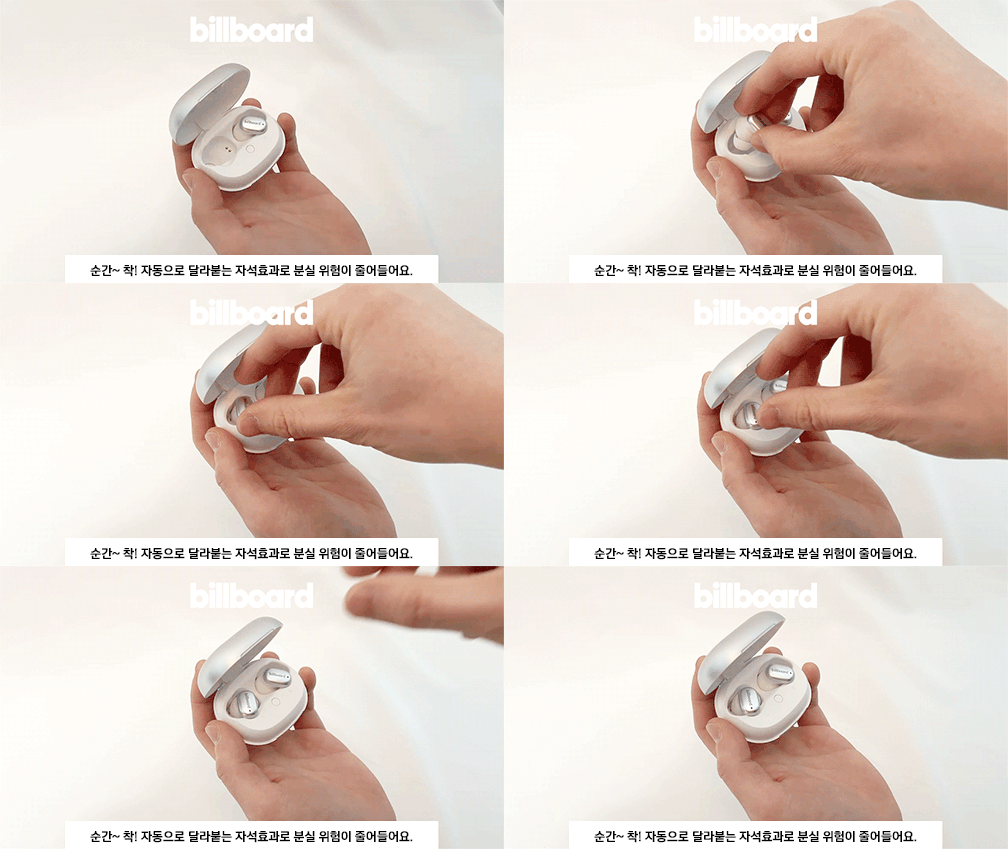
- Place the earbuds into the charging case. The magnetic design ensures they snap into place correctly.
- เชื่อมต่อสายชาร์จ USB เข้ากับพอร์ตชาร์จบนเคสและแหล่งจ่ายไฟ
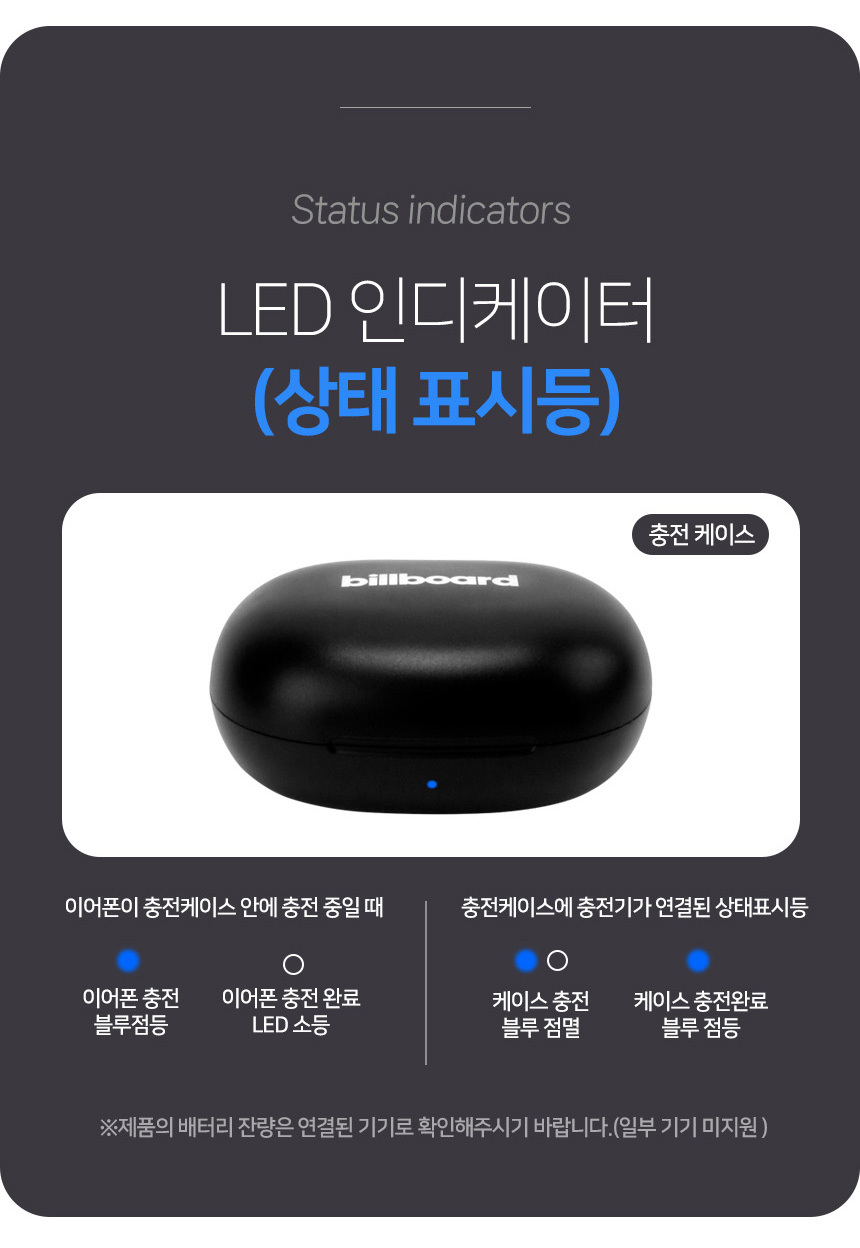
- Observe the LED indicators for charging status:
- การชาร์จหูฟัง: ไฟสีน้ำเงินกะพริบ
- Earphone charging complete: ไฟ LED ปิด
- การชาร์จเคส: ไฟสีน้ำเงินกะพริบ
- Case charging complete: เปิดไฟสีฟ้า.

3.2 การจับคู่บลูทูธ
วิธีเชื่อมต่อหูฟังของคุณกับอุปกรณ์:
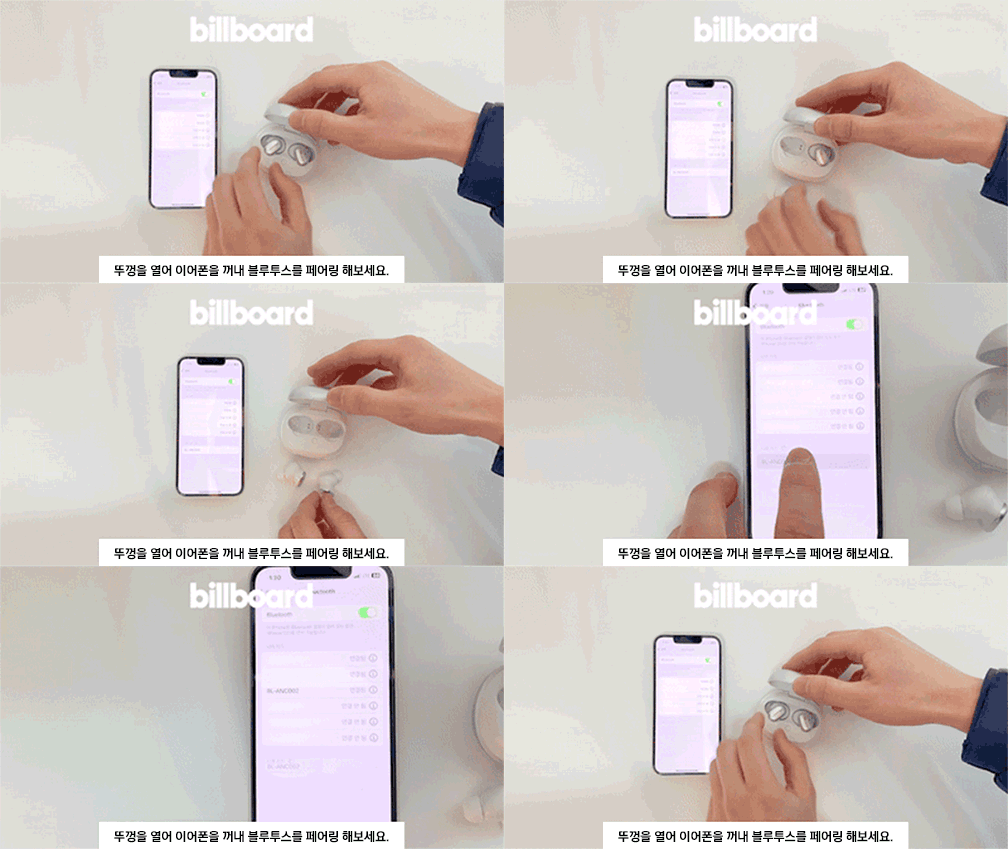
- เปิดฝากล่องชาร์จ
- Take out both earbuds. They will automatically enter pairing mode.
- บนอุปกรณ์ของคุณ (สมาร์ทโฟน แท็บเล็ต ฯลฯ) ไปที่การตั้งค่าบลูทูธและค้นหาอุปกรณ์ที่พร้อมใช้งาน
- Select "BL-ANC002" from the list to connect.
- Once connected, you will hear a confirmation tone, and the LED indicator on the earbuds will change.
3.3 การสวมหูฟัง
Choose the ear tips that provide the best fit and seal for optimal sound quality and noise cancellation. Insert the earbuds into your ears and gently twist them to secure a comfortable and snug fit.
4. คู่มือการใช้งาน
4.1 ระบบควบคุมแบบสัมผัส
The BL-ANC002 earbuds feature intuitive touch controls for various functions:
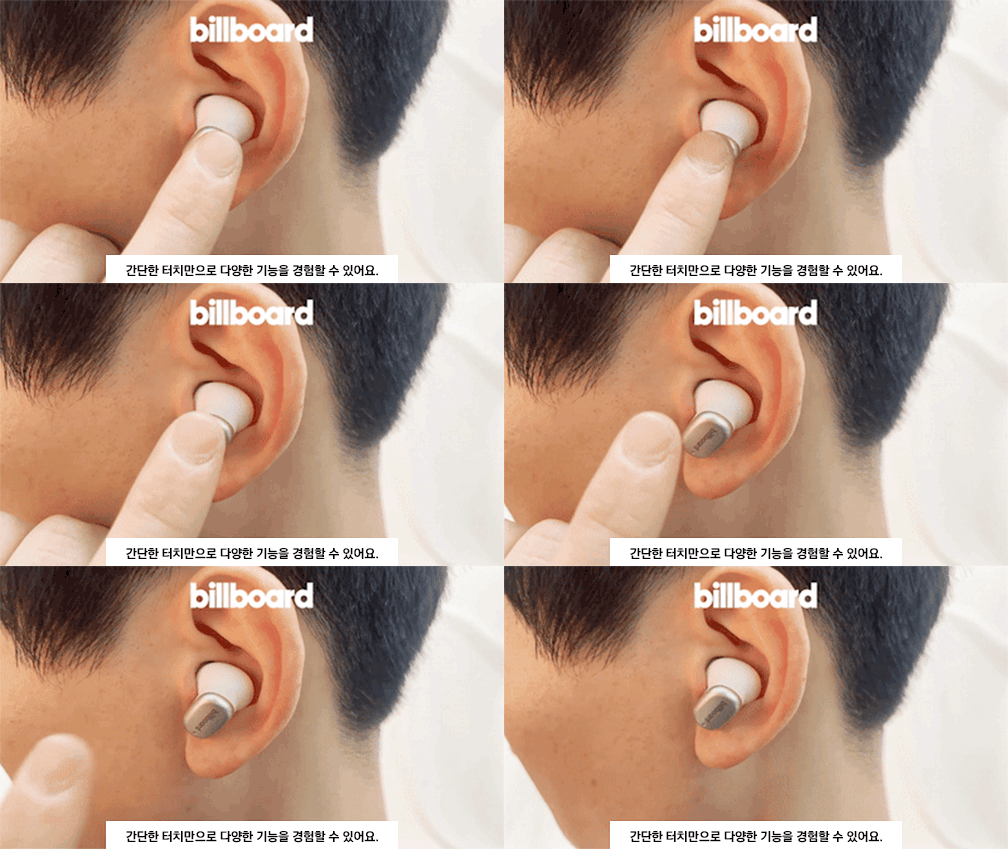
- เล่น/หยุดชั่วคราว: แตะที่หูฟังข้างใดข้างหนึ่งเพียงครั้งเดียว
- เพลงถัดไป: แตะสองครั้งที่หูฟังด้านขวา
- แทร็กก่อนหน้า: แตะสองครั้งที่หูฟังด้านซ้าย
- รับ/วางสาย: แตะที่หูฟังข้างใดข้างหนึ่งเพียงครั้งเดียว
- ปฏิเสธสาย: กดเอียร์บัดข้างใดข้างหนึ่งค้างไว้ 2 วินาที
- เปิดใช้งาน Voice Assistant: แตะสามครั้งที่หูฟังข้างใดข้างหนึ่ง
- ANC On/Off/Transparency Mode: Press and hold the touch area for 2-3 seconds on either earbud to cycle through modes.
4.2 ระบบตัดเสียงรบกวนแบบแอคทีฟ (ANC)
The ANC feature reduces ambient noise, allowing you to focus on your audio. Cycle through ANC On, ANC Off, and Transparency Mode using the touch controls. Transparency Mode allows you to hear your surroundings while still enjoying your audio.
4.3 High-Performance Microphone
The integrated high-performance microphone ensures clear voice pickup for calls and voice commands.
5. การบำรุงรักษาและการดูแล
5.1 การทำความสะอาด
ควรทำความสะอาดหูฟังและเคสชาร์จเป็นประจำเพื่อรักษาความสะอาดและประสิทธิภาพการใช้งาน
- ใช้ผ้าแห้งนุ่มๆ ที่ไม่มีขนเช็ดทำความสะอาดหูฟังและเคส
- สำหรับจุกหูฟัง ให้ถอดออกจากหูฟังแล้วล้างด้วยสบู่และน้ำอ่อนๆ จากนั้นเช็ดให้แห้งสนิทก่อนใส่กลับเข้าไปใหม่
- อย่าใช้สารเคมีที่รุนแรงหรือวัสดุที่มีฤทธิ์กัดกร่อน
5.2 ความต้านทานต่อน้ำ
The BL-ANC002 earbuds feature a life waterproof function, protecting them from sweat and light splashes. They are not designed for submersion in water or use during swimming. Ensure the earbuds are dry before placing them back in the charging case to prevent damage.
5.3 พื้นที่จัดเก็บ
When not in use, always store the earbuds in their charging case. The magnetic attachment helps secure them and reduces the risk of loss.

6 การแก้ไขปัญหา
- หูฟังไม่เปิดใช้งาน: ตรวจสอบให้แน่ใจว่าหูฟังและกล่องชาร์จชาร์จเต็มแล้ว
- หูฟังไม่จับคู่: Make sure Bluetooth is enabled on your device. Place earbuds back in the case, close the lid, wait a few seconds, then open and try pairing again. If issues persist, try forgetting the device in your phone's Bluetooth settings and re-pairing.
- ไม่มีเสียงจากหูฟังข้างหนึ่ง: Try placing both earbuds back in the case, closing the lid, and then taking them out again. Ensure both are charged.
- ANC ไม่มีประสิทธิภาพ: Ensure the earbuds are properly seated in your ears with a good seal. Try different sized ear tips for a better fit.
- การควบคุมแบบสัมผัสไม่ตอบสนอง: ตรวจสอบให้แน่ใจว่านิ้วของคุณสะอาดและแห้ง ลองรีสตาร์ทหูฟังโดยใส่หูฟังลงในกล่องแล้วนำออกมาอีกครั้ง
7. ข้อมูลจำเพาะ
| คุณสมบัติ | ข้อมูลจำเพาะ |
|---|---|
| แบบอย่าง | BL-ANC002 |
| วัสดุ | พลาสติก |
| หมวดหมู่ | หูฟัง & ชุดหูฟัง |
| เวอร์ชันบลูทูธ | 5.3 |
| ประเภทไร้สาย | บลูทูธ |
| สไตล์ | อินเอียร์ |
| ต้นทาง | จีนแผ่นดินใหญ่ |
| อายุการใช้งานแบตเตอรี่ (พร้อมเคส) | นานถึง 24 ชั่วโมง |
| เคสชาร์จแบตเตอรี่ | 500mAh |
| น้ำหนักเอียร์บัด | Approx. 46g (total for both earbuds and case) |
| ความต้านทานต่อน้ำ | Life Waterproof (sweat and splash resistant) |
| คุณสมบัติ | Active Noise Cancelling (ANC), Touch Control, High-performance Microphone |
8. การรับประกันและการสนับสนุน
8.1 ข้อมูลการรับประกัน
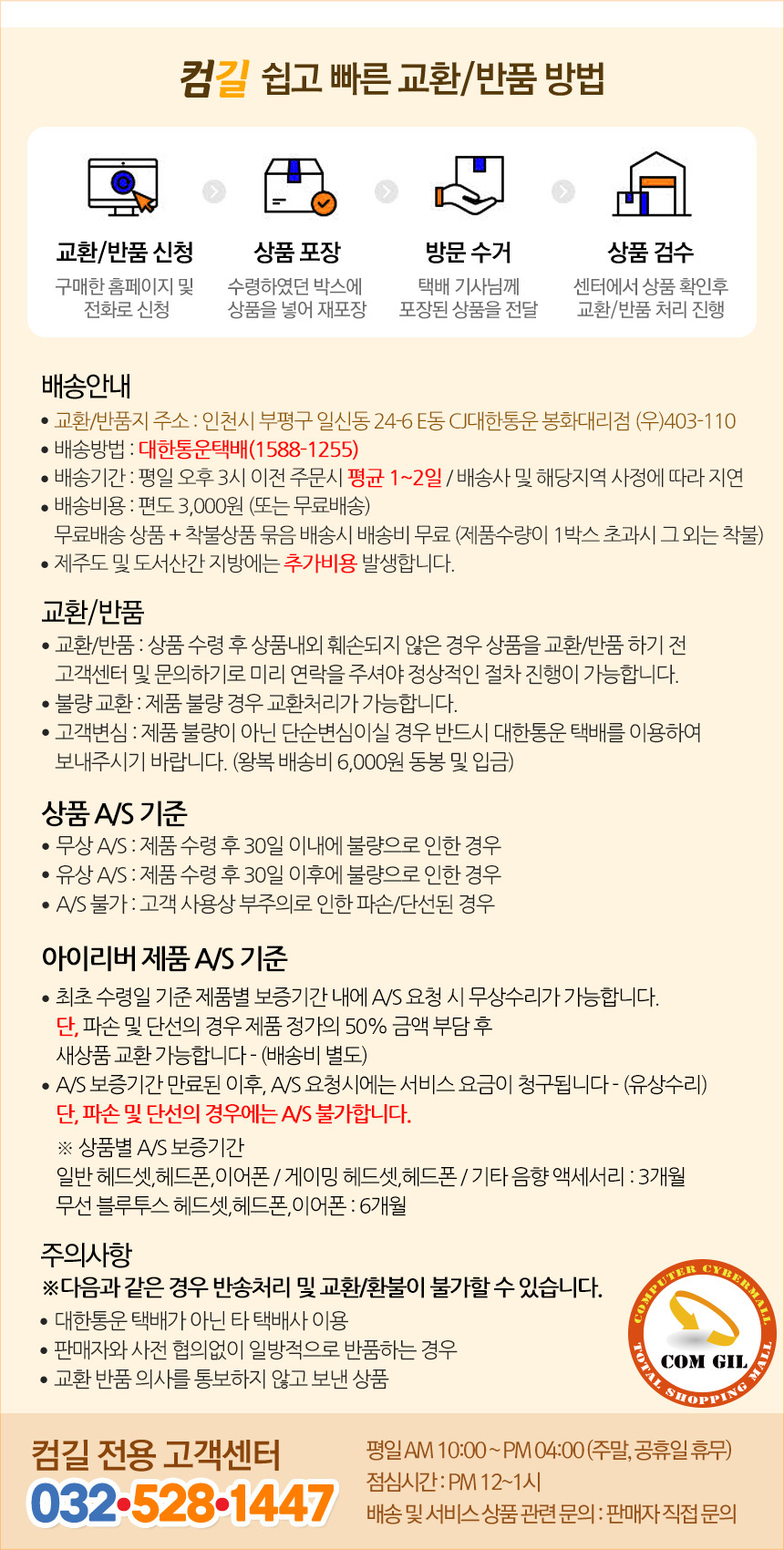
The Billboard BL-ANC002 earbuds come with a limited warranty. Please refer to the following conditions:
- ระยะเวลารับประกัน: 6 months for general Bluetooth headsets, headphones, and earphones.
- Free A/S (Warranty Service) Conditions:
- If the product is found to be defective within 30 days of receipt.
- If the product is found to be defective after 30 days of receipt (within the warranty period).
- Cases Not Covered by A/S:
- Damage or disconnection caused by customer's negligence or misuse.
- Paid A/S (Out-of-Warranty Service):
- Service fees will be charged for A/S requests made after the warranty period has expired.
8.2 การสนับสนุนลูกค้า
For technical support or warranty inquiries, please contact the Comgill Customer Center:
- โทรศัพท์: 032-528-1447
- เวลาทำการ : Weekdays 10:00 AM - 4:00 PM (Lunch break: 12:00 PM - 1:00 PM). Closed on weekends and public holidays.
9. เคล็ดลับผู้ใช้
- ความพอดีที่เหมาะสมที่สุด: ลองใช้จุกหูฟังขนาดต่างๆ เพื่อหาขนาดที่พอดีกับหูของคุณ การแนบสนิทกับหูเป็นสิ่งสำคัญอย่างยิ่งต่อการลดเสียงรบกวนและคุณภาพเสียงที่ดี
- การชาร์จปกติ: For consistent performance, make a habit of placing your earbuds back in the charging case when not in use. This keeps them charged and ready.
- รายชื่อผู้ติดต่อที่สะอาด: หากคุณพบปัญหาในการชาร์จไฟ ให้ทำความสะอาดหน้าสัมผัสการชาร์จบนหูฟังทั้งสองข้างและภายในเคสอย่างเบามือด้วยสำลีแห้ง
- ระบบรักษาความปลอดภัยด้วยแม่เหล็ก: The magnetic design of the charging case helps prevent accidental loss of earbuds. Ensure they snap securely into place.


