1. บทนำ
The LOFREE TOUCH Mechanical Keyboard is a versatile input device designed for enhanced typing experience and personalization. It features triple-mode connectivity, hot-swappable switches, and compatibility with multiple operating systems. This manual provides essential information for setting up, operating, and maintaining your keyboard.

Figure 1: LOFREE TOUCH 68-key Mechanical Keyboard
2. เนื้อหาบรรจุภัณฑ์
กรุณาทำเครื่องหมายในช่องสำหรับรายการต่อไปนี้:
- LOFREE TOUCH Keyboard (68-key or 100-key) x 1
- คู่มือการใช้งาน x 1
- ใบรับประกัน x 1
- เครื่องรับสัญญาณไร้สาย 2.4G x 1
- AAA Battery x 3 (pre-installed or included separately)
- สายเคเบิลชนิด C x 1
- กล่องอุปกรณ์เสริม x 1
- ที่ดึงปุ่มกด x 1
- Holder x 1 (for figurines/extra keycaps)

Figure 2: Battery compartment and 2.4G receiver storage
3. การตั้งค่า
3.1. การเปิดเครื่องและการติดตั้งแบตเตอรี่
- ค้นหาช่องใส่แบตเตอรี่ที่ด้านล่างของแป้นพิมพ์
- ใส่ถ่าน AAA 3 ก้อน ตรวจดูขั้วให้ถูกต้อง
- The keyboard can also be powered via the Type-C cable for wired mode and charging (if rechargeable batteries are used).
3.2. การเชื่อมต่อคีย์บอร์ดของคุณ
The LOFREE TOUCH keyboard supports three connection modes: Bluetooth 5.0, 2.4G Wireless, and Wired (Type-C).

รูปที่ 3: ตัวเลือกการเชื่อมต่อ
3.2.1. การเชื่อมต่อไร้สาย 2.4G
- Locate the 2.4G wireless receiver, usually stored in the battery compartment or a dedicated slot on the keyboard.
- เสียบตัวรับสัญญาณ 2.4G เข้ากับพอร์ต USB ที่ว่างอยู่บนคอมพิวเตอร์ของคุณ
- Slide the mode switch on the keyboard to the '2.4G' position. The keyboard should connect automatically.
3.2.2. การเชื่อมต่อบลูทูธ 5.0
- เลื่อนสวิตช์โหมดบนแป้นพิมพ์ไปที่ตำแหน่ง 'บลูทูธ'
- บนอุปกรณ์ของคุณ (คอมพิวเตอร์ แท็บเล็ต โทรศัพท์) ไปที่การตั้งค่าบลูทูธ แล้วเปิดใช้งานบลูทูธ
- The keyboard can store up to 3 Bluetooth device pairings. To pair with a new device, press and hold Fn + 1, Fn + 2, or Fn + 3 until the indicator light flashes, indicating pairing mode.
- Select "LOFREE TOUCH" from the list of available Bluetooth devices on your device.
- Once paired, the indicator light will stop flashing. You can switch between paired devices by pressing Fn + 1, Fn + 2, or Fn + 3.
3.2.3. Wired (Type-C) Connection
- Connect one end of the provided Type-C cable to the keyboard's Type-C port.
- เชื่อมต่อปลายอีกด้านของสายเคเบิลเข้ากับพอร์ต USB ที่มีอยู่ในคอมพิวเตอร์ของคุณ
- The keyboard will automatically switch to wired mode. This mode also charges the batteries if they are rechargeable.
4. การใช้งานแป้นพิมพ์ของคุณ
4.1. ความเข้ากันได้กับหลายระบบ
The LOFREE TOUCH keyboard is compatible with Windows, macOS/iOS, and Android operating systems. It features dedicated media keys for both Mac and Windows layouts.
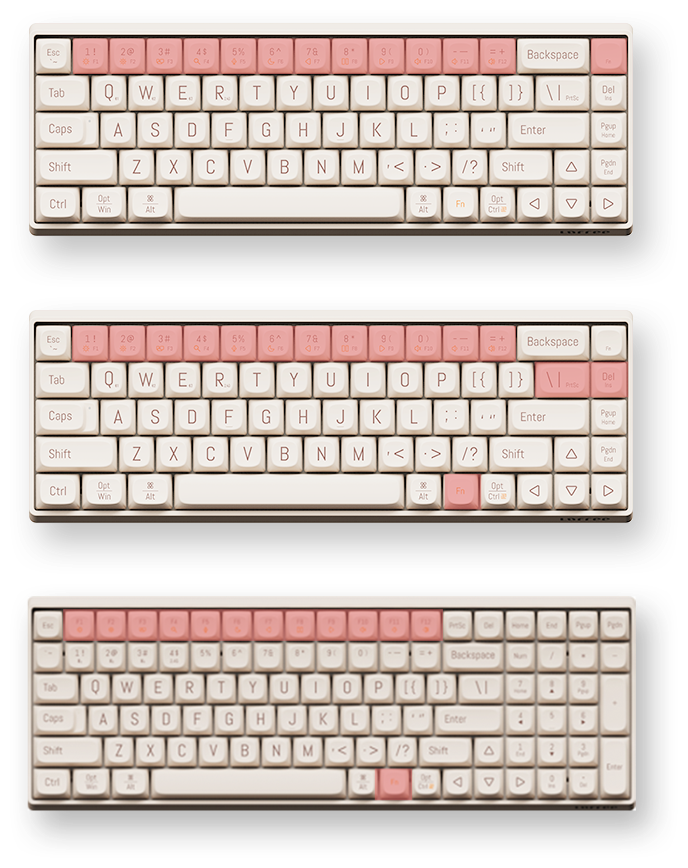
Figure 4: Mac and Windows Layouts
4.1.1. Switching Layouts
To switch between Mac and Windows functional key layouts, press Fn + เอ็น (สำหรับ Mac) หรือ fn+ม (for Windows).
4.2. ปุ่มฟังก์ชัน (การกดปุ่ม Fn ร่วมกับปุ่มอื่นๆ)
The keyboard utilizes an Fn key for accessing secondary functions printed on the keycaps. Common functions include:
- Fn + F1-F12: Media controls (play/pause, volume, mute, etc.), screen brightness, search, task switch, etc. (functions may vary slightly between 68-key and 100-key models).
- Fn + 1/2/3: Switch between paired Bluetooth devices.
- Fn + ถาม/W/E: (Specific to some models) Switch between 2.4G and Bluetooth modes or specific Bluetooth channels.
4.3. การหมุนปุ่ม N-Key (NKRO)
The LOFREE TOUCH keyboard supports N-Key Rollover (NKRO), ensuring that every key press is registered, even when multiple keys are pressed simultaneously. This is beneficial for fast typists and gamers.
5. การบำรุงรักษา
5.1. สวิตช์แบบ Hot-Swappable
The keyboard features hot-swappable sockets, allowing you to change mechanical switches without soldering. It is compatible with standard 3-pin and 5-pin mechanical switches.
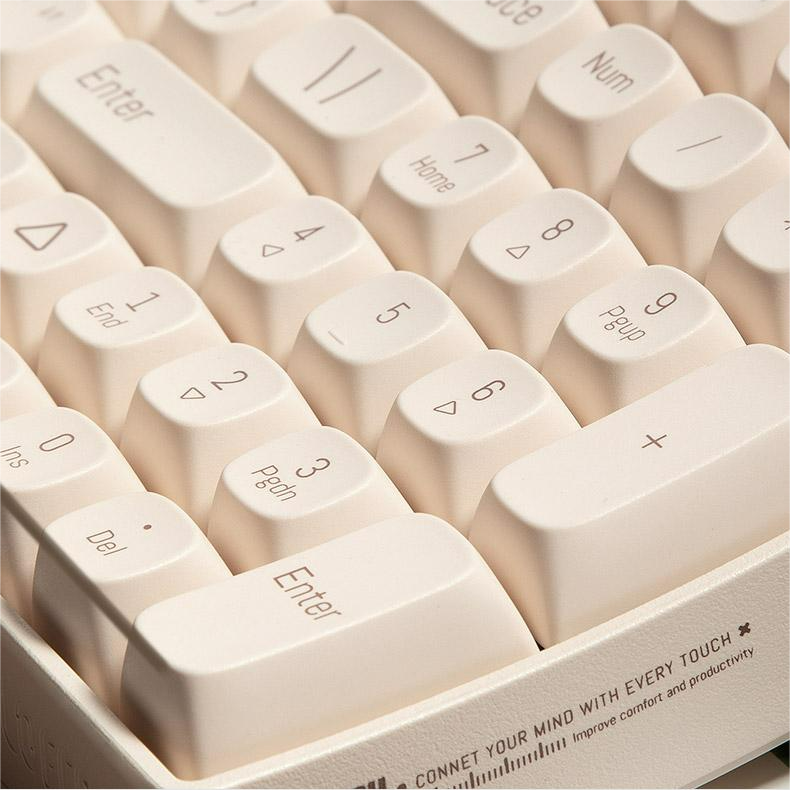
Figure 5: Hot-swappable switches with keycap and switch pullers
5.1.1. การเปลี่ยนสวิตช์
- ใช้ที่ดึงปุ่มที่ให้มาดึงปุ่มที่ต้องการออกอย่างเบามือ
- Using a switch puller (often included in the accessory box), carefully grip the switch and pull it straight up to remove it from the PCB.
- Align the pins of the new switch with the holes on the PCB and press it firmly until it clicks into place. Ensure the pins are not bent.
- เปลี่ยนปุ่มคีย์แคป
5.2. ปุ่มกด
The keyboard comes with durable Dye-Sub PBT keycaps, which are resistant to shine and wear over time. You can customize your keyboard with various PBT keycap sets available from LOFREE.
5.3. การทำความสะอาด
- ใช้แปรงขนนุ่มหรือลมอัดเพื่อขจัดฝุ่นและเศษต่างๆ ออกจากระหว่างปุ่มต่างๆ
- For deeper cleaning, remove the keycaps using the keycap puller and clean them with a mild soap solution and a soft cloth. Ensure they are completely dry before reattaching.
- Wipe the keyboard surface with a dampใช้ผ้าที่ไม่เป็นขุย หลีกเลี่ยงสารเคมีรุนแรง
6. ข้อมูลจำเพาะ
6.1. ข้อกำหนดทั่วไป
- ยี่ห้อ: โลฟรี
- รูปแบบการทำงาน: เครื่องจักรกล
- สวิตช์: Gateron G Pro (Red), Linear, Pre-lubed
- Switches Hot Swap: Yes (Standard 3-pin and 5-pin compatible)
- วัสดุปุ่มกด: ย้อม-ซับ พีบีที
- ประเภทอินเทอร์เฟซ: ยูเอสบี (Type C)
- การเชื่อมต่อ: บลูทูธ 5.0, ไร้สาย 2.4G, แบบมีสาย Type-C
- แอปพลิเคชัน: เดสก์ท็อป, แล็ปท็อป, แท็บเล็ต
- ภาษา: ภาษาอังกฤษ
- พลัง: แบตเตอรี่ AAA 3 ก้อน
- อายุการใช้งานแบตเตอรี่: Approximately 30 days of typing
- ระบบปฏิบัติการ: Windows, macOS/iOS, Android
- N-Key Rollover (NKRO): ใช่
- ศาสตร์: 9° Curved Shape for reduced finger fatigue
6.2. 68-Key Model (OE902)
- มาตรฐานแป้นพิมพ์: 68 คีย์
- ขนาด : 310 x 109 x 51.5 มม.
- น้ำหนักคีย์บอร์ด: 720กรัม
6.3. 100-Key Model (OE903)
- มาตรฐานแป้นพิมพ์: 100 คีย์
- ขนาด : 367 x 129 x 54.5 มม.
- น้ำหนักคีย์บอร์ด: 1010กรัม

Figure 6: 68-key vs. 100-key models
7 การแก้ไขปัญหา
| ปัญหา | สาเหตุที่เป็นไปได้ | สารละลาย |
|---|---|---|
| แป้นพิมพ์ไม่ตอบสนอง | Low battery, incorrect connection mode, Bluetooth not paired, 2.4G receiver not plugged in. | Check/replace batteries. Ensure mode switch is set correctly (BT, 2.4G, or Wired). Re-pair Bluetooth or re-insert 2.4G receiver. Try wired connection. |
| กุญแจไม่ลงทะเบียน | สวิตช์ชำรุด มีเศษสิ่งสกปรกอยู่ใต้ปุ่มกด | Remove keycap and clean. If hot-swappable, try replacing the switch. |
| การเชื่อมต่อบลูทูธไม่เสถียร | Interference, distance from device, low keyboard battery. | Move closer to the device. Ensure no other devices are causing interference. Check battery level. Re-pair the Bluetooth connection. |
| Keyboard not recognized by OS | Driver issue, OS compatibility. | Ensure OS is supported. Try a different USB port or cable. Restart computer. |
8. เคล็ดลับผู้ใช้
- Personalize Your Keyboard: รับล่วงหน้าtage of the hot-swappable switches and PBT keycaps to customize the feel and look of your keyboard. Experiment with different switch types for a unique typing experience.
- เพิ่มประสิทธิภาพการเชื่อมต่อให้สูงสุด: Utilize the triple-mode connectivity to seamlessly switch between your desktop, laptop, and tablet. Remember to pair your devices to different Bluetooth channels (Fn+1, Fn+2, Fn+3) for quick switching.
- ความสะดวกสบายตามหลักสรีรศาสตร์: The 9° curved shape is designed for comfort. Ensure proper wrist posture to further enhance your typing experience and reduce strain.
- Decorative Holder: Use the included holder plate to display your favorite figurines, extra keycaps, or LOFREE's IP mascot, LONELY, adding a personal touch to your workspace.
9. การรับประกันและการสนับสนุน
Your LOFREE TOUCH Mechanical Keyboard comes with a manufacturer's warranty. Please refer to the included Warranty Card for details regarding warranty coverage, terms, and conditions. For technical support, product inquiries, or service requests, please visit the official LOFREE webเว็บไซต์หรือติดต่อฝ่ายบริการลูกค้าของพวกเขา
10. วิดีโอสาธิตผลิตภัณฑ์
Video: Demonstration of the LOFREE TOUCH keyboard in use, showcasing typing and design elements.


