1. บทนำ
This manual provides comprehensive instructions for the safe installation, optimal operation, and proper maintenance of your High-Power LED Projector Light Source Module. Designed for use in HD projectors and various DIY lighting applications, this module offers a powerful and efficient light source. Please read this manual thoroughly before installation and use to ensure correct setup and to maximize the lifespan and performance of the product.
2. ข้อมูลด้านความปลอดภัย
คำเตือน: Improper handling or installation can lead to electric shock, fire, or damage to the product and connected equipment. Always follow these safety guidelines:
- ตรวจสอบให้แน่ใจว่าตัดการเชื่อมต่อไฟฟ้าทั้งหมดก่อนการติดตั้งหรือการบำรุงรักษา
- ผลิตภัณฑ์นี้ทำงานที่ปริมาณสูงtage and temperature. Handle with care.
- Do not look directly into the LED light when it is operating, as it can cause eye damage.
- Ensure adequate heat dissipation. Overheating will significantly reduce the lifespan of the LED module.
- Only use with compatible power supplies that meet the specified voltagและข้อกำหนดปัจจุบัน
- เก็บให้พ้นจากมือเด็ก
- Do not modify the module. Any modifications will void the warranty and may create safety hazards.
3. ข้อมูลจำเพาะ
The following table details the technical specifications for the High-Power LED Projector Light Source Module (RD-806 Series). Note that specific configurations may vary.
| คุณสมบัติ | ข้อมูลจำเพาะ |
|---|---|
| ชื่อสินค้า | High-Power LED Projector Light Source |
| ซีรี่ส์ซีรี่ย์ | RD-806 Series (e.g., MT-CA4334-03, MT-CM3834-03, MT-CM3834-02) |
| อัตราพลังงาน | 120W (typical for 10 series 7 parallel configuration) |
| Number of Chips | 70 chips (typical) |
| ฟลักซ์แสง | 120 ลูเมนต่อวัตต์ |
| Chip Usage | 35*35mil chip |
| อุณหภูมิสี | 8500K (แสงสีขาว) |
| ปฏิบัติการฉบับที่tage | 32-36V (for 10 series configuration) |
| โครงรองรับ | 4046 รองรับ |
| Encapsulation Glue | US Dow Corning |
| อายุการใช้งานโดยประมาณ | 40,000 hours (maintaining 80% brightness) |
| LED Chip Luminous Area | 17mm x 12mm (for 70-chip configuration) |
| น้ำหนักแพ็คเกจ | 0.5 กก. |
| ขนาดบรรจุภัณฑ์ (ยาว x กว้าง x สูง) | 10 ซม. x 10 ซม. x 10 ซม. |
Note: "Series" refers to the number of LEDs connected in series, and "Parallel" refers to the number of such series connected in parallel. For example, "10 series 7 parallel" means 10 LEDs in series, with 7 such strings connected in parallel.
4. การติดตั้ง
Proper installation is crucial for the performance and longevity of your LED module. Please follow these steps carefully:
- เตรียมพื้นผิวการติดตั้ง: Ensure the surface where the LED module will be mounted is clean, flat, and capable of dissipating heat effectively. A heatsink is mandatory for high-power LEDs.
- Apply Thermal Paste/Pad: Apply a thin, even layer of high-quality thermal paste or attach a thermal pad to the back of the LED module or the heatsink. This ensures efficient heat transfer.
- Mount the LED Module: Securely attach the LED module to the heatsink using appropriate screws or clamps. Ensure firm contact between the module and the heatsink.
- การเชื่อมต่อสายไฟ:
- Identify the positive (+) and negative (-) terminals on the LED module. These are typically marked on the module itself.
- Connect the positive (+) output from your constant current LED driver to the positive (+) terminal on the LED module.
- Connect the negative (-) output from your constant current LED driver to the negative (-) terminal on the LED module.
- ตรวจสอบให้แน่ใจว่าการเชื่อมต่อทั้งหมดมีความปลอดภัยและมีฉนวนเพื่อป้องกันไฟฟ้าลัดวงจร

Figure 1: LED module (MT-CA4334-03) showing positive (+) and negative (-) terminals for electrical connection. 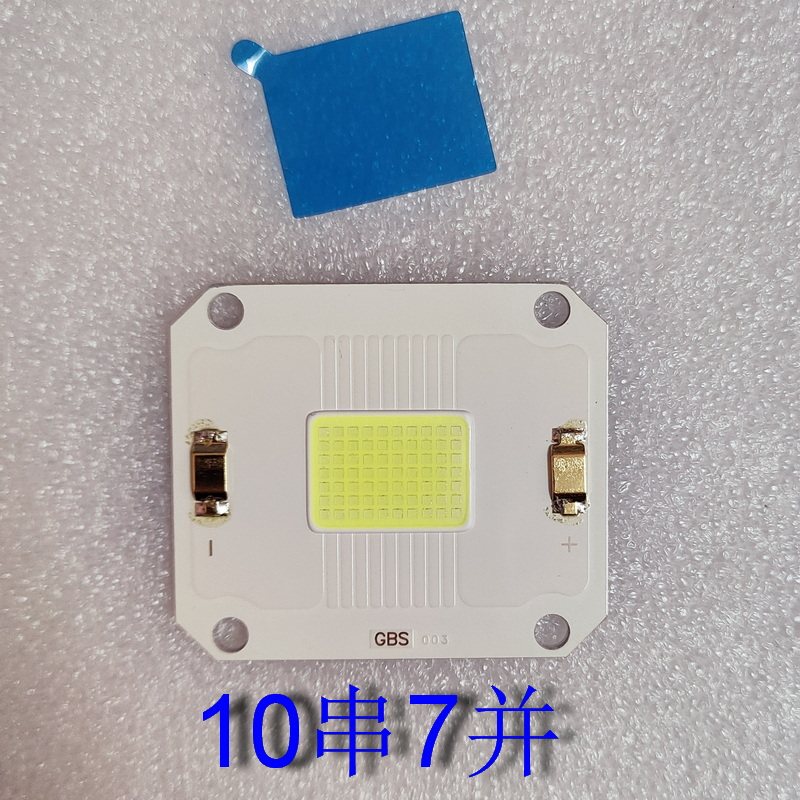
Figure 2: Another LED module variant (MT-CM3834-03) with R+ and R- terminals, also indicating polarity. - ความเข้ากันได้ของแหล่งจ่ายไฟ: Verify that your LED driver provides the correct voltage (32-36V for 10 series) and current for the specific configuration of your LED module (e.g., 10 series 7 parallel). Incorrect power supply can damage the LED.
- ทดสอบการติดตั้ง: Before final assembly, briefly power on the LED module to confirm it illuminates correctly. Observe for any flickering or unusual behavior.
Understanding LED Configurations:
- 10 Series 7 Parallel (10串7并): This configuration uses 70 chips, with 10 chips connected in series to form a string, and 7 such strings connected in parallel. This is a common configuration for 120W modules.
- 8 Series 12 Parallel (8串12): Another possible configuration, using 96 chips (8 chips in series, 12 strings in parallel). This would require a different operating voltagอีและปัจจุบัน
- Detailed Chip Information: The luminous area of the LED chip package is approximately 17mm x 12mm.


5. การดำเนินการ
Once properly installed and connected to a compatible constant current LED driver, the module is ready for operation.
- เปิดเครื่อง: Activate the power supply connected to the LED driver. The LED module should illuminate instantly.
- การติดตาม: During operation, ensure the heatsink remains within acceptable temperature limits. Excessive heat can degrade performance and shorten lifespan.
- เอาท์พุตแสง: The module provides a high-intensity white light (8500K). Avoid direct eye exposure.
6. การบำรุงรักษา
Minimal maintenance is required for this LED module, but adhering to these guidelines will help ensure its longevity:
- การทำความสะอาด: Periodically, gently clean the surface of the LED module and heatsink to remove dust and debris. Use a soft, dry cloth. For stubborn dirt, a slightly damp cloth can be used, ensuring no moisture enters the electrical connections. Always disconnect power before cleaning.
- การจัดการความร้อน: Regularly check that the heatsink is free from obstructions and that airflow (if applicable, e.g., with a fan) is not impeded.
- ตรวจสอบการเชื่อมต่อ: Occasionally inspect wiring connections for any signs of wear, corrosion, or loosening.
7 การแก้ไขปัญหา
| ปัญหา | สาเหตุที่เป็นไปได้ | สารละลาย |
|---|---|---|
| ไฟ LED ไม่สว่างขึ้น | No power; incorrect wiring; faulty LED driver; damaged LED module. | Check power supply. Verify positive/negative wiring. Test LED driver. Replace LED module if damaged. |
| ไฟ LED กระพริบหรือหรี่ลง | Unstable power supply; incorrect current/voltage from driver; poor connection; overheating. | Ensure stable power. Verify driver output matches LED specs. Check all connections. Improve heat dissipation. |
| LED overheats quickly | Insufficient heatsink; poor thermal paste application; inadequate airflow. | Ensure heatsink is adequately sized. Reapply thermal paste. Improve ventilation around the heatsink. |
| ความสว่างลดลงตามกาลเวลา | Normal aging; prolonged overheating; operating outside specified parameters. | Ensure proper thermal management. Verify operating parameters. Consider replacement if lifespan is exceeded. |
8. เคล็ดลับผู้ใช้
- การตรวจสอบความเข้ากันได้: ก่อนการซื้อasing or installing, always verify the specific part number and electrical specifications (voltage, current, series/parallel configuration) of your existing projector's light source to ensure compatibility with this LED module. For example, if replacing a "MT-CM6040-01" in a "Jifar T6" projector, confirm the voltagอีและวัตtagข้อกำหนดอี
- การจับคู่แหล่งจ่ายไฟ: Ensure your LED driver's output voltage and current precisely match the requirements of the LED module's configuration (e.g., 12 series 24 parallel will have different voltagE/WATtage needs than 10 series 7 parallel).
- Thermal Management is Key: High-power LEDs generate significant heat. A robust heatsink and, if necessary, active cooling (fan) are essential to prevent premature failure and maintain brightness.
9. การรับประกันและการสนับสนุน
For any technical assistance, troubleshooting beyond this manual, or warranty inquiries, please contact your point of purchase or the manufacturer's customer support. Keep your purchase receipt as proof of purchase.