
1. บทนำ
Thank you for choosing the Thomson 24HQG3S15C Smart TV. This manual provides essential information for the safe and efficient operation of your new television. Please read these instructions thoroughly before using the product and retain them for future reference.
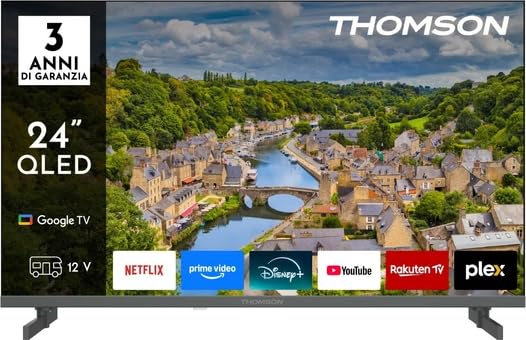
รูปที่ 1 : ด้านหน้า view of the Thomson 24HQG3S15C Smart TV.
2. ข้อมูลด้านความปลอดภัย
โปรดปฏิบัติตามข้อควรระวังด้านความปลอดภัยต่อไปนี้เสมอ เพื่อหลีกเลี่ยงไฟฟ้าช็อต ไฟไหม้ หรือความเสียหายต่อโทรทัศน์
- แหล่งพลังงาน: ตรวจสอบแหล่งจ่ายไฟ voltage ตรงกับฉลากเรตติ้งบนทีวี
- การระบายอากาศ : อย่าปิดกั้นช่องระบายอากาศ ควรเว้นพื้นที่รอบทีวีให้เพียงพอเพื่อให้อากาศถ่ายเทได้สะดวก
- น้ำและความชื้น: อย่าให้ทีวีโดนฝนหรือความชื้น อย่าวางสิ่งของที่บรรจุของเหลว เช่น แจกัน บนทีวี
- การทำความสะอาด: ถอดปลั๊กทีวีก่อนทำความสะอาด ใช้ผ้านุ่มและแห้ง ห้ามใช้น้ำยาทำความสะอาดชนิดน้ำหรือสเปรย์ทำความสะอาด
- การจัดวาง: วางทีวีบนพื้นผิวที่มั่นคงและเรียบ หลีกเลี่ยงการวางทีวีไว้กลางแดดหรือใกล้แหล่งความร้อน
- เด็ก: ดูแลเด็กๆ ให้แน่ใจว่าพวกเขาไม่ปีนป่ายหรือเล่นทีวี
- การบริการ: อย่าพยายามซ่อมแซมทีวีด้วยตนเอง แนะนำให้ซ่อมแซมทั้งหมดโดยช่างผู้ชำนาญการ
3. เนื้อหาบรรจุภัณฑ์
Carefully unpack your Thomson 24HQG3S15C Smart TV and check that all the following items are included:
- Thomson 24HQG3S15C Smart TV
- รีโมทคอนโทรล
- สายไฟ
- คู่มือการใช้งาน (เอกสารนี้)
- TV Stand (if applicable, check packaging)
- สกรูสำหรับขาตั้งทีวี (ถ้ามี)
หากมีสินค้าใดขาดหายหรือเสียหาย โปรดติดต่อผู้ค้าปลีกของคุณทันที
4. การตั้งค่า
4.1 การติดตั้งขาตั้ง (ไม่บังคับ)
If you are not wall-mounting the TV, you will need to attach the included stand. Follow these steps:
- วางทีวีคว่ำหน้าลงบนพื้นผิวที่นุ่มและสะอาด เพื่อป้องกันหน้าจอเสียหาย
- จัดวางขาตั้งให้ตรงกับรูยึดที่ด้านล่างของทีวี
- ยึดขาตั้งให้แน่นโดยใช้สกรูที่ให้มา ตรวจสอบให้แน่ใจว่าขันแน่นสนิทดีแล้ว
4.2 การติดตั้งบนผนัง (ทางเลือก)
The TV supports VESA standard mounting (100 x 100 mm). Use a compatible wall-mount bracket (not included) and follow the instructions provided with the bracket. Ensure the wall can support the weight of the TV.
Note: Remove the stand before wall mounting.
4.3 การเชื่อมต่ออุปกรณ์ภายนอก
Refer to the following connection options:
- HDMI (x3): Connect Blu-ray players, game consoles, or set-top boxes. The TV supports HDMI 1.4 and Audio Return Channel (ARC) on one port.
- พอร์ต USB2.0 (x2): เชื่อมต่ออุปกรณ์จัดเก็บข้อมูล USB สำหรับการเล่นสื่อ
- อินพุตเสาอากาศ/สายเคเบิล: Connect an antenna for DVB-T/T2 or a cable for DVB-C.
- อินพุตดาวเทียม: Connect a satellite dish for DVB-S/S2.
- อีเธอร์เน็ต (LAN): เชื่อมต่อสายเคเบิลอีเทอร์เน็ตสำหรับการเชื่อมต่ออินเทอร์เน็ตแบบใช้สาย
- สล็อต CI+: Insert a Common Interface Plus module for encrypted channels.
4.4 การเปิดเครื่องครั้งแรกและการตั้งค่าครั้งแรก
- เชื่อมต่อสายไฟเข้ากับทีวีแล้วจึงเสียบเข้ากับเต้ารับไฟฟ้า
- กดปุ่มเปิดปิดบนรีโมทคอนโทรลหรือบนทีวี
- The TV will guide you through the initial setup process, including language selection, network connection (Wi-Fi or Ethernet), channel scanning, and Google TV account setup.
5. การใช้งานสมาร์ททีวีของคุณ
5.1 การควบคุมระยะไกลจบลงview
The included remote control allows you to access all functions of your TV. Familiarize yourself with the buttons for power, volume, channel, input selection, and Smart TV navigation.
Note: Insert two AAA batteries (not included) into the remote control, observing polarity.
5.2 ฟังก์ชั่นทีวีพื้นฐาน
- เปิด/ปิดเครื่อง: กดปุ่ม พลัง ปุ่ม.
- การควบคุมระดับเสียง: ใช้ ฉบับ +/- ปุ่ม
- การเลือกช่อง: ใช้ ช +/- ปุ่มกดหรือแป้นตัวเลข
- แหล่งสัญญาณเข้า: กดปุ่ม แหล่งที่มา ปุ่มสำหรับสลับระหว่าง HDMI, TV, USB เป็นต้น
- เมนู: เข้าสู่เมนูการตั้งค่าทีวี
5.3 ฟีเจอร์สมาร์ททีวี (Google TV)
Your Thomson 24HQG3S15C runs on Google TV, offering a personalized entertainment experience.
- หน้าจอหลัก: Access recommended content, installed apps (e.g., Disney+), and settings.
- การควบคุมด้วยเสียง: Use the Google Assistant feature (if available on your remote) to search for content, control smart home devices, and more.
- แอปสโตร์: ดาวน์โหลดแอปเพิ่มเติมจาก Google Play Store
- เอชบีบีทีวี: Access interactive services from broadcasters (if supported in your region).
- โหมดอัจฉริยะ: Select from various picture and sound modes like Energy Saving, Game, Movie, Sport, Standard, and Vivid.
6. การเชื่อมต่อ
The TV offers various connectivity options for seamless integration with your home network and devices.
- ไวไฟ : Built-in Wi-Fi allows wireless connection to your home network for internet access and streaming.
- Bluetooth 5.1: เชื่อมต่อหูฟังไร้สาย ซาวด์บาร์ หรืออุปกรณ์อื่นๆ ที่เปิดใช้งาน Bluetooth
- อีเธอร์เน็ต LAN: ให้การเชื่อมต่ออินเตอร์เน็ตแบบมีสายที่เสถียร
- HDMI (x3): High-Definition Multimedia Interface for digital audio and video. One port supports ARC (Audio Return Channel) for simplified audio connections to compatible sound systems.
- พอร์ต USB2.0 (x2): Universal Serial Bus ports for connecting external storage devices to play media files (3GP, AVI, FLV, MKV, MOV, MP4, MPG, WEBM for video; AAC, FLAC, MP3, WAV for audio; BMP, GIF, JPG, PNG for images).
- Digital Tuners: Supports DVB-C, DVB-S, DVB-S2, DVB-T, DVB-T2 for various digital broadcast standards.
7. การบำรุงรักษา
7.1 การทำความสะอาดทีวี
- หน้าจอ: เช็ดหน้าจอเบาๆ ด้วยผ้านุ่มที่ไม่เป็นขุย สำหรับรอยฝังแน่น ให้เช็ดเบาๆampเทน้ำหรือน้ำยาทำความสะอาดหน้าจอชนิดพิเศษลงบนผ้า (อย่าฉีดลงบนหน้าจอโดยตรง)
- คณะรัฐมนตรี: ใช้ผ้าแห้งนุ่มๆ เช็ดทำความสะอาดตู้ทีวี
- ห้ามใช้: Abrasive cleaners, waxes, or solvents like alcohol, benzene, or thinners, as these can damage the TV's finish or screen.
- ควรถอดปลั๊กทีวีทุกครั้งก่อนทำความสะอาด
7.2 การอัปเดตซอฟต์แวร์
Your Smart TV may receive software updates to improve performance and add new features. Ensure your TV is connected to the internet. Updates can usually be checked and installed via the TV's settings menu (System > About > System update).
8 การแก้ไขปัญหา
If you encounter problems with your TV, refer to the following common issues and solutions:
| ปัญหา | สาเหตุที่เป็นไปได้ / วิธีแก้ไข |
|---|---|
| ไม่มีไฟฟ้า |
|
| ไม่มีภาพแต่มีเสียง |
|
| ไม่มีเสียงแต่มีภาพ |
|
| รีโมตคอนโทรลไม่ทำงาน |
|
| ไม่สามารถเชื่อมต่อ Wi-Fi ได้ |
|
หากปัญหายังคงมีอยู่ โปรดติดต่อฝ่ายสนับสนุนลูกค้า
9. ข้อมูลจำเพาะ
| คุณสมบัติ | รายละเอียด |
|---|---|
| แบบอย่าง | Thomson 24HQG3S15C |
| ขนาดจอแสดงผล | 24 นิ้ว (61 ซม. เส้นทแยงมุม) |
| ปณิธาน | 1366 x 768 พิกเซล (HD) |
| เทคโนโลยีการแสดงผล | คิวแอลอีดี |
| อัตราการรีเฟรช | 60 เฮิรตซ์ |
| แพลตฟอร์มสมาร์ททีวี | กูเกิลทีวี |
| จูนเนอร์ดิจิตอล | DVB-C, DVB-S, DVB-S2, DVB-T, DVB-T2 |
| ไวไฟ | ใช่ |
| บลูทูธ | เวอร์ชัน 5.1 |
| แลนอีเทอร์เน็ต | ใช่ |
| พอร์ต HDMI | 3 (HDMI 1.4, one with ARC) |
| พอร์ต USB 2.0 | 2 |
| เอาต์พุตเสียง (RMS) | 6 วัตต์ (2 ลำโพง) |
| รองรับ HDR | HDR10 |
| การติดตั้ง VESA | 100 x 100 มม. |
| ขนาด (รวมขาตั้ง) | 53.5 ซม. (ก) x 15.1 ซม. (ล) x 35.3 ซม. (ส) |
| น้ำหนัก (รวมขาตั้ง) | 2.4 กก. |
| ระดับประสิทธิภาพพลังงาน (SDR) | E |
| การใช้พลังงาน (SDR) | 17 กิโลวัตต์ชั่วโมง/1000 ชม. |
10. การรับประกันและการสนับสนุน
For warranty information, please refer to the warranty card included in your product packaging or contact your retailer. Thomson provides customer support for technical assistance and service inquiries.
Please visit the official Thomson website or refer to your purchase documentation for contact details and further support resources.


