
1. บทนำ
The Monster TVLink 300 wireless TV headphones are designed to provide a personal audio experience for television viewing. This system includes comfortable over-ear headphones and a transmitter charging base, allowing for clear, synchronized sound without disturbing others. The headphones feature Bluetooth 5.3 for stable connectivity and a long battery life for extended listening sessions.
2. เนื้อหาบรรจุภัณฑ์
โปรดตรวจสอบว่าสินค้าทั้งหมดมีอยู่ในแพ็คเกจของคุณ:
- Monster TVLink 300 Wireless Headphones
- แท่นชาร์จเครื่องส่งสัญญาณ
- สายสัญญาณเสียง
- สายสัญญาณเสียง AUX 3.5 มม.
- สายแปลง RCA
- สายชาร์จ USB-C
- คู่มือการใช้งาน

Image: Components of the Monster TVLink 300 system, including headphones, charging base, and various audio cables.
3. สินค้าหมดview
Familiarize yourself with the main components and controls of your Monster TVLink 300 headphones and transmitter base.
Image: Labeled diagram of the headphones and transmitter base, indicating buttons, ports, and indicator lights.
หูฟัง
- ปุ่มเปิด/ปิด: เปิดหรือปิดหูฟัง
- ปุ่มเพิ่มระดับเสียง: Increases audio volume. Also functions as 'previous song' in Bluetooth mode.
- ปุ่มลดระดับเสียง: Decreases audio volume. Also functions as 'next song' in Bluetooth mode.
- Multi-function button (MFB): Controls playback (play/pause), answers/ends calls.
- พอร์ตชาร์จ USB-C: For direct charging of headphones.
- ไฟแสดงสถานะ : แสดงสถานะพลังงานและการเชื่อมต่อ
- ไมค์: ไมโครโฟนในตัวสำหรับการโทร
แท่นชาร์จเครื่องส่งสัญญาณ
- พอร์ตชาร์จ USB-C: Powers the transmitter base.
- อินพุตออปติคอล: Connects to TV via optical cable.
- Aux-in port: Connects to TV via 3.5mm AUX cable.
- ไฟแสดงสถานะ LED: Shows connection status and charging status.
- อินเทอร์เฟซการชาร์จ: For automatic charging of headphones when placed on the base.
4. คำแนะนำในการตั้งค่า
Follow these steps to set up your Monster TVLink 300 system:
- Power the Transmitter Base: Connect the USB-C charging cable to the transmitter base and plug the other end into a power adapter (not included) or a USB port on your TV. The LED indicator on the base will light up.
- เชื่อมต่อกับทีวีของคุณ: เลือกวิธีการเชื่อมต่อเสียงอย่างใดอย่างหนึ่งต่อไปนี้:
- Optical (Recommended): Connect the optical audio cable from the transmitter's optical input to your TV's optical audio output (often labeled 'Digital Audio Out' or 'Optical Out'). Ensure your TV's audio output is set to 'PCM' format if necessary.
- ช่องเสริม: Connect the 3.5mm AUX audio cable from the transmitter's Aux-in port to your TV's 3.5mm audio output (headphone jack).
- อาร์ซีเอ: If your TV has RCA audio outputs (red and white ports), use the RCA adapter cable with the 3.5mm AUX cable to connect to the transmitter's Aux-in port.
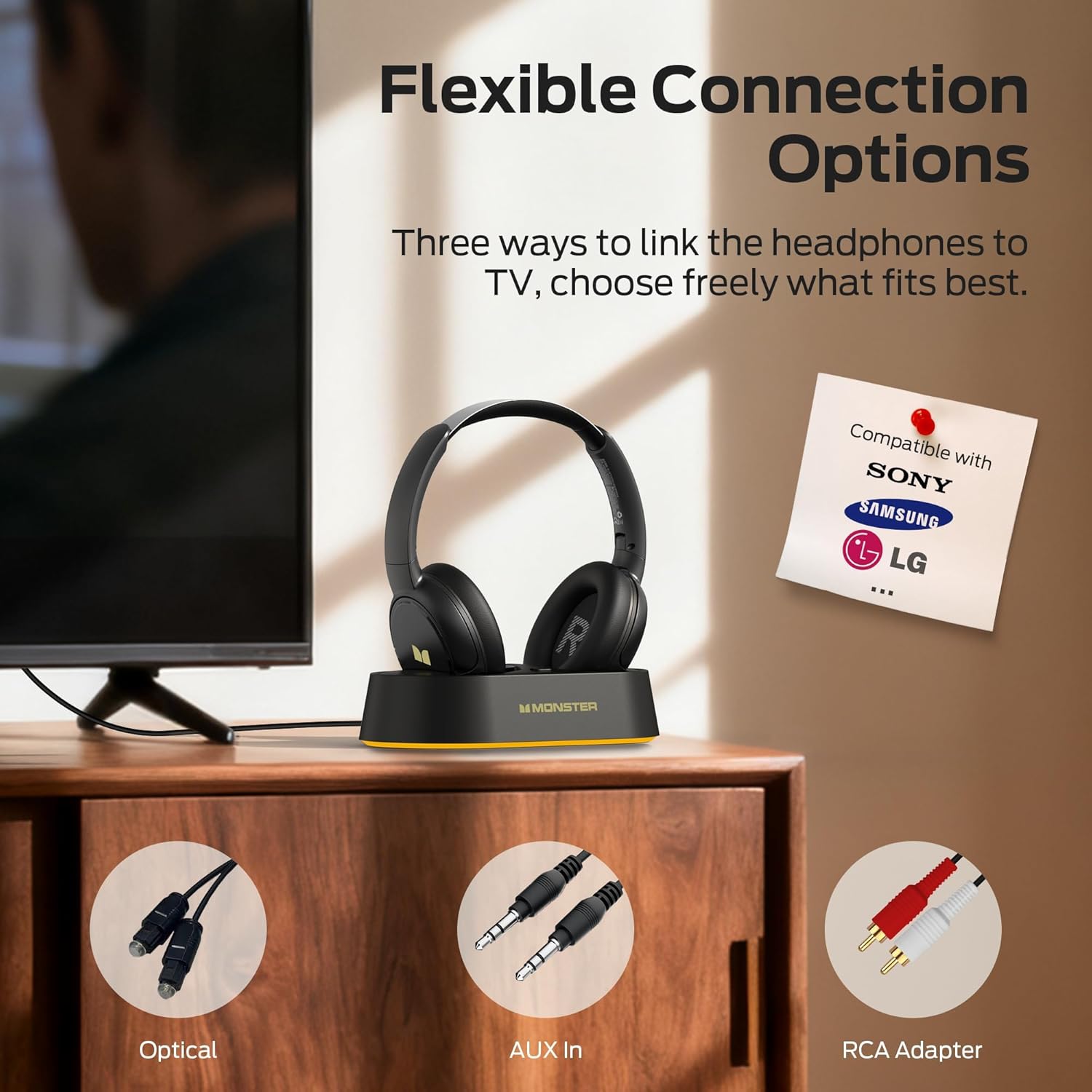
Image: Flexible connection options for the transmitter base, including Optical, AUX, and RCA.
- ชาร์จหูฟัง: Place the headphones onto the transmitter charging base. Ensure the charging contacts align. The headphone indicator light will show charging status. A full charge provides up to 45 hours of playback.
- เปิดใช้งานหูฟัง: Press and hold the On/Off button on the headphones until the indicator light illuminates. The headphones will automatically connect to the transmitter base.
Once connected, audio from your TV will be transmitted wirelessly to your headphones.
5. คู่มือการใช้งาน
5.1 การทำงานพื้นฐาน
- เปิด/ปิดเครื่อง: Press and hold the On/Off button on the headphones for approximately 3 seconds.
- การควบคุมระดับเสียง: Use the Volume Up (+) and Volume Down (-) buttons on the headphones to adjust the listening volume.
- การเชื่อมต่ออัตโนมัติ: After initial setup, the headphones will automatically connect to the transmitter base when powered on and within range.
5.2 การชาร์จ
To charge the headphones, simply place them onto the transmitter charging base. The headphones will begin charging automatically. The indicator light on the headphones will show charging status (e.g., red for charging, off or blue for fully charged, refer to specific LED behavior in the quick start guide if available). You can also charge the headphones directly using a USB-C cable connected to their USB-C port.
5.3 Bluetooth Mode (Independent Use)
The headphones can also be used independently via Bluetooth 5.3 with other devices like smartphones or tablets.
- การจับคู่: With the headphones powered off, press and hold the On/Off button for approximately 5-7 seconds until the indicator light flashes rapidly (indicating pairing mode).
- เชื่อมต่อ: On your device, enable Bluetooth and select "Monster TVLink 300" from the list of available devices.
- การควบคุมการเล่น: Use the Multi-function button (MFB) for play/pause, and the Volume Up/Down buttons for next/previous track.

Image: The Monster TVLink 300 system demonstrating compatibility with various devices including TV, laptop, and smartphone.
6. การบำรุงรักษา
การดูแลรักษาอย่างถูกวิธีจะช่วยให้หูฟังของคุณใช้งานได้ยาวนานและมีประสิทธิภาพดี:
- การทำความสะอาด: Use a soft, dry cloth to clean the headphones and transmitter base. Do not use abrasive cleaners or solvents.
- พื้นที่จัดเก็บ: When not in use, store the headphones on the charging base or in a cool, dry place. The foldable design allows for compact storage.
- การดูแลแบตเตอรี่ To maintain battery health, avoid fully discharging the headphones frequently. Charge them regularly, even if not used for extended periods.
- หลีกเลี่ยงความชื้น: ควรเก็บอุปกรณ์ให้ห่างจากน้ำและความชื้นสูง
7 การแก้ไขปัญหา
หากคุณพบปัญหา โปรดดูวิธีแก้ไขทั่วไปต่อไปนี้:
| ปัญหา | สาเหตุที่เป็นไปได้ | สารละลาย |
|---|---|---|
| ไม่มีเสียงจากหูฟัง | Headphones not powered on or not connected. TV audio output settings incorrect. Cables loose or incorrect. | Ensure headphones are powered on and charged. Check that the transmitter base is powered and connected to the TV. Verify TV audio output is set to the correct source (e.g., PCM for optical). Re-seat all audio cables. |
| Audio lag or delay. | Interference or distance from transmitter. | Ensure headphones are within optimal range of the transmitter. Minimize obstacles between headphones and transmitter. |
| Headphones not charging on base. | Improper placement on base. Base not powered. Dirty charging contacts. | Ensure headphones are correctly seated on the base and contacts align. Verify the transmitter base is powered. Clean charging contacts on both headphones and base with a dry cloth. |
| Cannot pair headphones via Bluetooth. | Headphones not in pairing mode. Device Bluetooth off. | Ensure headphones are powered off, then press and hold the On/Off button for 5-7 seconds to enter pairing mode. Verify Bluetooth is enabled on your device. |
8. ข้อมูลจำเพาะ
| คุณสมบัติ | รายละเอียด |
|---|---|
| ชื่อรุ่น | Monster TVLink 300 |
| เทคโนโลยีการเชื่อมต่อ | ไร้สาย (Bluetooth) |
| เวอร์ชันบลูทูธ | 5.3 |
| การวางตำแหน่งหู | ครอบหู |
| ฟอร์มแฟกเตอร์ | ครอบหู |
| อายุการใช้งานแบตเตอรี่ | นานถึง 45 ชั่วโมง |
| อุปกรณ์ที่รองรับ | โทรทัศน์ |
| คุณสมบัติเพิ่มเติม | พับได้ |
| แจ็คหูฟัง | ไม่มีแจ็ค |
| สี | สีดำ |
| ผู้ผลิต | มอนสเตอร์ |
| ขนาดพัสดุ | 21.3 x 19.8 x 8.4 ซม.; 680 กรัม |
9. การรับประกันและการสนับสนุน
สำหรับข้อมูลการรับประกันและการบริการลูกค้า โปรดดูบัตรรับประกันที่อยู่ในบรรจุภัณฑ์ของผลิตภัณฑ์ หรือเยี่ยมชมเว็บไซต์อย่างเป็นทางการของ Monster webไซต์นี้ โปรดเก็บใบเสร็จรับเงินที่ซื้อไว้เพื่อใช้เรียกร้องการรับประกัน