
การแนะนำ
This manual provides essential information for setting up, operating, maintaining, and troubleshooting your new OPPO A6 5G smartphone. Please read this guide carefully to ensure optimal performance and longevity of your device.
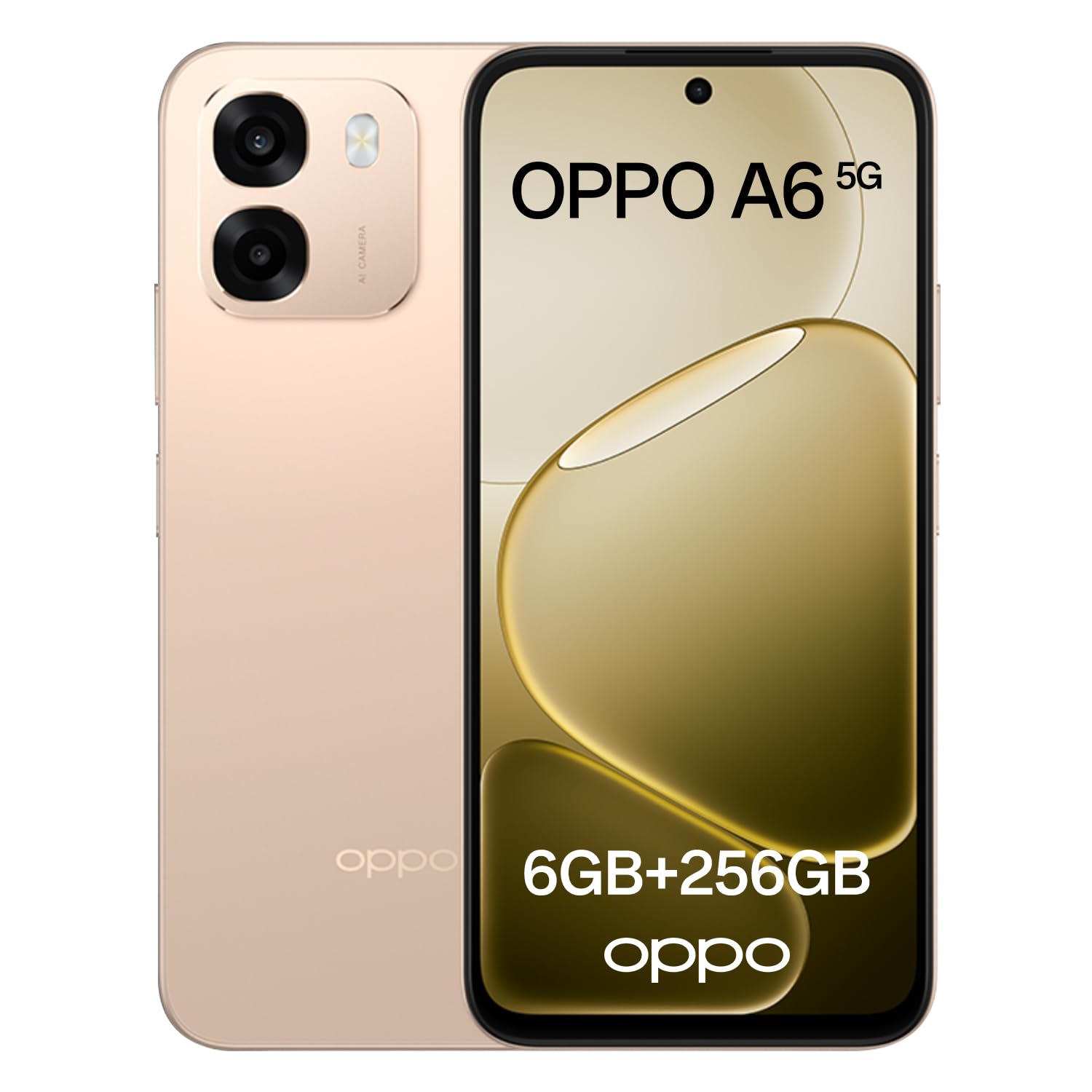
Image: The OPPO A6 5G smartphone in Aurora Gold, showcasing การออกแบบที่เพรียวบาง
มีอะไรอยู่ในกล่อง
ตรวจสอบว่ามีรายการทั้งหมดอยู่ในแพ็คเกจ:
- สมาร์ทโฟน OPPO A6 5G
- สาย USB
- คู่มือเริ่มต้นใช้งานฉบับย่อ (อาจแตกต่างกันไปตามแต่ละภูมิภาค)
- ข้อมูลด้านความปลอดภัย (อาจแตกต่างกันไปตามแต่ละภูมิภาค)
การตั้งค่า
1. ค่าธรรมเนียมเริ่มต้น
Before first use, fully charge your OPPO A6 5G. Connect the provided USB cable to the phone's USB-C port and the other end to a compatible power adapter (sold separately) or a computer's USB port. The device supports 45W SUPERVOOC Flash Charge for rapid charging.

Image: The OPPO A6 5G display showing 100% charge with the 45W SUPERVOOC Flash Charge indicator.
2. การติดตั้งซิมการ์ด
Locate the SIM card tray on the side of your device. Use the SIM ejector tool (if provided) to open the tray. Insert your Nano-SIM card(s) and/or microSD card (if applicable) into the tray with the gold contacts facing down. Carefully reinsert the tray into the phone.
3. เปิด/ปิดเครื่อง
- การเปิดเครื่อง: กดปุ่มเปิด/ปิดค้างไว้จนกว่าโลโก้ OPPO จะปรากฏขึ้น
- วิธีปิดเครื่อง: Press and hold the Power button, then select 'Power off' on the screen.
- ในการรีสตาร์ท: Press and hold the Power button, then select 'Restart' on the screen.
4. การกำหนดค่าเริ่มต้น
Upon first power-on, follow the on-screen instructions to set up your device. This includes selecting your language, connecting to Wi-Fi, setting up your Google account, and configuring security features like fingerprint or face unlock.
Operating Your OPPO A6 5G
1. การแสดงผลและการนำทาง
The OPPO A6 5G features a 6.75-inch 120Hz Ultra Bright LCD display. This high refresh rate ensures smooth scrolling and fluid visuals. The display offers up to 1125 nits of brightness for clear visibility even in direct sunlight.

Image: The OPPO A6 5G display highlighting its 120Hz refresh rate, 6.75-inch size, and 1125 nit brightness.
Outdoor Mode 2.0 + GloveTouch: Outdoor Mode automatically increases screen brightness for better visibility outdoors. GloveTouch allows for screen interaction even when wearing gloves, useful in cold weather or specific work environments.
2. คุณสมบัติของกล้อง
The device is equipped with a 50MP AI Dual Camera system, designed to capture clear and detailed photos in various conditions.

ภาพ: ด้านหลัง view of the OPPO A6 5G, detailing its camera specifications: 8MP front, 50MP wide, and 2MP monochrome lenses.
- AI Night Mode: Enhances low-light photos, improving brightness, shadows, and clarity.
- โหมดถ่ายภาพใต้น้ำ: Capture clear photos and videos underwater by using the volume keys as shutter buttons.
- AI Perfect Shot: Corrects imperfect expressions in photos using AI.
- AI Eraser 2.0: Removes unwanted objects or people from your photos and fills the background seamlessly.

Image: A collage demonstrating the AI Perfect Shot and AI Eraser 2.0 features, showing before and after comparisons of photo edits.
3. การจัดการแบตเตอรี่
The OPPO A6 5G is equipped with a large 6550mAh battery, providing extended usage time. The 45W SUPERVOOC Flash Charge technology allows for quick recharging.

ภาพ: ภายใน view of the OPPO A6 5G, highlighting the 6550mAh battery and its 5-year durability claim.
4. การปฏิบัติงาน
Powered by the MediaTek Dimensity 6300 processor and 6GB of RAM, the OPPO A6 5G delivers smooth multitasking and efficient performance. It comes with 256GB of internal storage for your apps, photos, and files.

Image: A close-up of the MediaTek Dimensity 6300 chip, alongside 256GB ROM and 6GB RAM components within the smartphone.
5. เสียง
The device features dual stereo speakers, offering an immersive and detailed audio experience for gaming, movies, and music.
6. ความทนทาน
The OPPO A6 5G boasts IP69 water and dust protection, making it resistant to splashes, rain, and even hot water jets up to 80°C. It can withstand immersion in water up to 1.5 meters for 30 minutes.

Image: The OPPO A6 5G demonstrating its IP69 rating against water and dust, along with an illustration of the internal SuperCool VC System.
Water Ejection Function: Micro-vibrations expel water and dust, protecting speakers and ports and maintaining clear audio.
7. ซอฟต์แวร์
The OPPO A6 5G runs on ColorOS 15, offering a smart and smooth user experience. Key features include:
- Trinity Engine: Optimizes system fluidity for today and tomorrow.
- Luminous Rendering Engine: Ensures smooth movements and transitions.
- 60-Month Fluidity Protection: Guarantees consistent smooth performance over five years.
- ระบบป้องกันการโจรกรรม: Provides security features to protect your device and data in case of loss or theft.

Image: A visual representation of ColorOS 15 features, including Trinity Engine, Luminous Rendering Engine, 60-month fluidity protection, and anti-theft protection.
การซ่อมบำรุง
1. การทำความสะอาดอุปกรณ์ของคุณ
Use a soft, lint-free cloth to gently wipe the screen and body of your phone. Avoid using harsh chemicals or abrasive materials, as these can damage the screen or finish. For stubborn smudges, slightly dampเทน้ำหรือน้ำยาทำความสะอาดหน้าจอที่ออกแบบมาสำหรับอุปกรณ์อิเล็กทรอนิกส์ลงบนผ้า
2. การอัปเดตซอฟต์แวร์
Regularly check for and install software updates to ensure your device has the latest features, security patches, and performance improvements. You can usually find this option in your phone's Settings menu under 'About phone' or 'Software update'.
3. การดูแลแบตเตอรี่
To prolong battery life, avoid exposing your phone to extreme temperatures. It is recommended to keep the battery charge between 20% and 80% for daily use. While the device supports fast charging, occasional slower charging can also benefit battery health.
การแก้ไขปัญหา
If you encounter issues with your OPPO A6 5G, try the following common troubleshooting steps:
| ปัญหา | สารละลาย |
|---|---|
| อุปกรณ์ไม่สามารถเปิดได้ | ตรวจสอบให้แน่ใจว่าแบตเตอรี่ชาร์จเต็มแล้ว กดปุ่มเปิด/ปิดค้างไว้อย่างน้อย 10 วินาทีเพื่อบังคับให้รีสตาร์ท |
| แอปขัดข้องหรือค้าง | ล้างแคชของแอปที่มีปัญหา (การตั้งค่า > แอป > [ชื่อแอป] > พื้นที่เก็บข้อมูล > ล้างแคช) หากปัญหายังคงอยู่ ให้ถอนการติดตั้งและติดตั้งแอปใหม่ |
| อายุการใช้งานแบตเตอรี่ต่ำ | ตรวจสอบการใช้งานแบตเตอรี่ในการตั้งค่าเพื่อระบุแอปที่กินไฟมาก ลดความสว่างหน้าจอ ปิดฟีเจอร์ที่ไม่จำเป็น เช่น GPS หรือ Bluetooth เมื่อไม่ได้ใช้งาน |
| ไม่สามารถเชื่อมต่อ Wi-Fi/ข้อมูลมือถือได้ | Toggle Wi-Fi/Mobile Data off and on. Restart your phone. For Wi-Fi, restart your router. For mobile data, ensure your SIM card is properly inserted and your plan is active. |
| หน้าจอไม่ตอบสนอง | Force restart the device by holding the Power button. If the issue continues, consider a factory reset (back up your data first). |
If these steps do not resolve your issue, please contact OPPO customer support for further assistance.
ข้อมูลจำเพาะ
Key technical specifications for the OPPO A6 5G:
| คุณสมบัติ | รายละเอียด |
|---|---|
| ยี่ห้อ | ออปโป้ |
| ชื่อรุ่น | A6 5จี |
| ระบบปฏิบัติการ | แอนดรอยด์ |
| ความจุหน่วยความจำ | 256GB |
| เทคโนโลยีเซลลูล่าร์ | 5G |
| สี | Aurora Gold |
| ฟอร์มแฟกเตอร์ | บาร์ |
| ประเภทจอภาพ | จอแอลซีดี |
| ความจุของแบตเตอรี่ | 6550 มิลลิแอมป์ |
| ส่วนประกอบที่รวมอยู่ | สาย USB |
| Analog RGB Input | ยูเอสบี-ซี |
การรับประกันและการสนับสนุน
Your OPPO A6 5G smartphone comes with a standard manufacturer's warranty. Please refer to the warranty card included in your product packaging or visit the official OPPO webเว็บไซต์สำหรับข้อกำหนดและเงื่อนไขการรับประกันโดยละเอียดที่เฉพาะเจาะจงกับภูมิภาคของคุณ
For technical support, service, or further inquiries, please contact OPPO customer service through their official website or the contact information provided in your product documentation. Ensure you have your device's model number and serial number ready when contacting support.