
1. บทนำ
This manual provides instructions for the DORHEA DC-DC Buck Boost Converter Module, model DAD12748-1. This versatile module functions as an adjustable step-up/down voltage regulator, capable of both boosting and bucking input voltage to achieve a desired output. It features an integrated LCD digital voltmeter and ammeter for real-time monitoring of input/output voltage, current, and power. Designed for various applications requiring precise voltage and current control, this module offers stable and reliable performance.
2. ข้อมูลด้านความปลอดภัย
WARNING: Electrical Shock Hazard. Improper use can result in serious injury or death.
- Always ensure power is disconnected before making any connections or adjustments to the module.
- ไม่เกินปริมาณอินพุตที่ระบุtage, ปริมาณการส่งออกtage, or current limits.
- Ensure proper heat dissipation, especially when operating at higher currents or power levels.
- Avoid short circuits. Although the module has short-circuit protection, repeated or prolonged short circuits can damage the device.
- ควรเก็บโมดูลให้ห่างจากความชื้น ฝุ่น และอุณหภูมิที่สูงหรือต่ำเกินไป
- This module is intended for use by individuals with adequate knowledge of electronics and electrical safety.
3. สินค้าหมดview
The DORHEA DC-DC Buck Boost Converter Module is built with a boost and buck chip as the main controller, external 60V 75A MOS tube, and double 60V 5A SS56 Schottky rectifiers for enhanced stability. It features an LCD display for clear readings and user-friendly buttons for control.
คุณสมบัติหลัก:
- Adjustable input voltagช่วงอี: DC 5.5-30V
- เอาท์พุทที่ปรับได้ voltagช่วงอี: DC 0.5-30V
- Adjustable output current: 0-4A (with enhanced heat dissipation)
- Maximum output power: 35W (50W with enhanced heat dissipation)
- Integrated LCD display for voltage, current, and power monitoring
- Button controls for display switching and output ON/OFF
- เล่มที่tage display resolution: 0.05V
- Current display resolution: 0.005A
- Safety protections: Soft Start, Input Reverse Protection, Output Anti-Backflow, Short Circuit Protection, Low-Voltagการป้องกันอี
การระบุส่วนประกอบ:
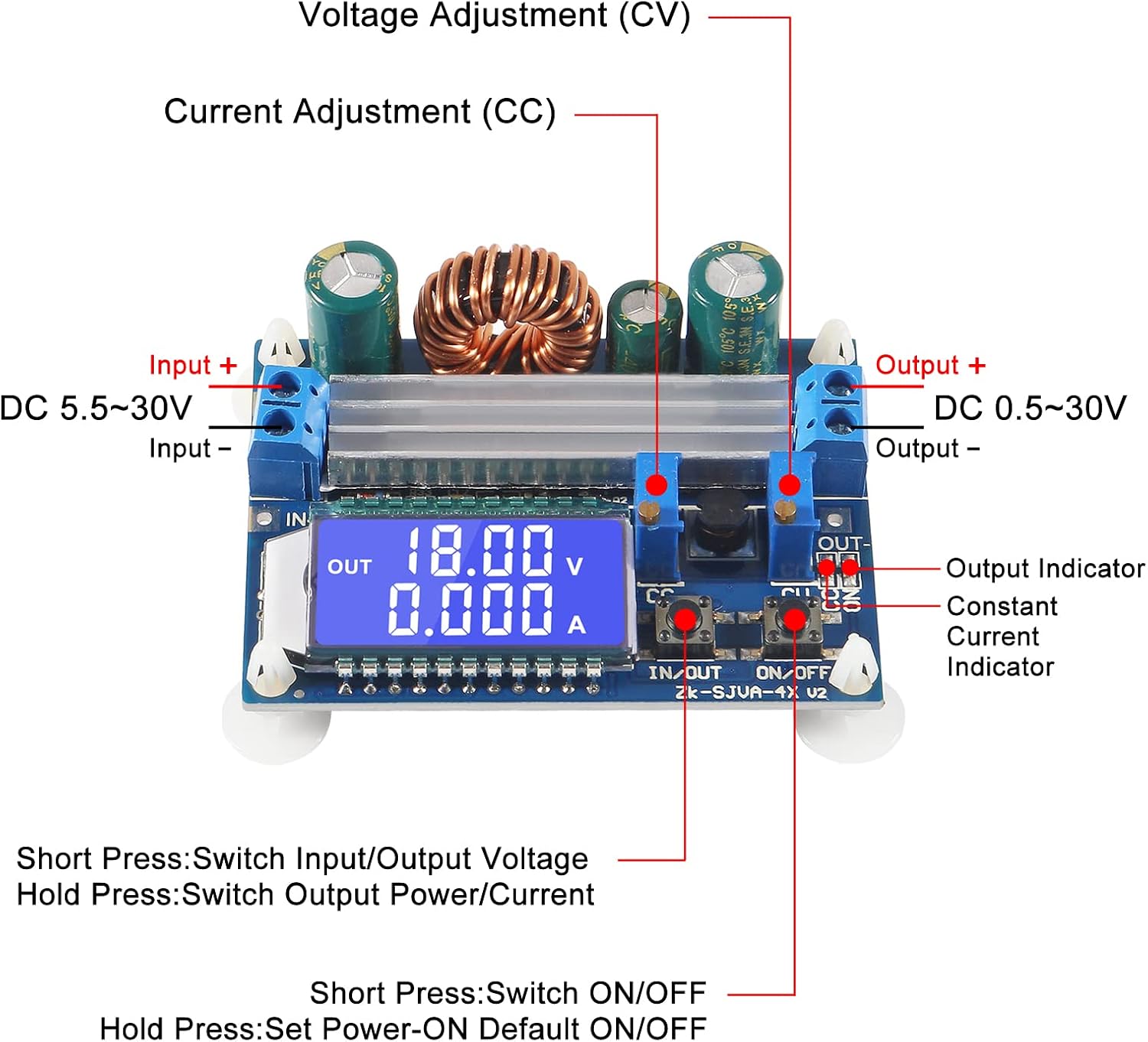
Figure 3.1: Labeled diagram of the module's main components.
This image illustrates the key connection points and controls on the module. Observe the "Input +" and "Input -" terminals for power input, and "Output +" and "Output -" for power output. The "CV" (Constant Voltage) and "CC" (Constant Current) potentiometers are used for adjustment. The "IN/OUT" and "ON/OFF" buttons control display and output respectively. The LCD screen displays operational parameters.

รูปที่ 3.2 : ด้านหน้า view of the module with LCD display.
นี้ view provides a clear look at the module's front, highlighting the LCD display which shows the output voltage and current. The input and output terminals are visible on the left and right sides, respectively. The two control buttons are located below the LCD screen.
4. ข้อมูลจำเพาะ
| พารามิเตอร์ | ค่า |
|---|---|
| อินพุต Voltagอี เรนจ์ | DC 5.5V - 30V (Note: Input voltage below 4.7V triggers low-voltagการป้องกันอี) |
| ปริมาณการส่งออกtagอี เรนจ์ | แรงดันไฟฟ้ากระแสตรง 0.5V - 30V (ปรับได้) |
| กระแสไฟขาออก | 3A (stable long-term), up to 4A (with enhanced heat dissipation) |
| กำลังขับ | 35W (natural heat dissipation), up to 50W (with enhanced heat dissipation) |
| เล่มที่tage ความละเอียดการแสดงผล | 0.05โวลต์ |
| ความละเอียดหน้าจอปัจจุบัน | 0.005เอ |
| ประสิทธิภาพการถ่ายโอน | ประมาณ. 88% |
| ความถี่ในการใช้งาน | 180กิโลเฮิรตซ์ |
| ขนาด (กxยxส) | 66มม. x 48มม. x 21มม. |
| เส้นผ่านศูนย์กลางของรูยึด | 4มม. |
| การเริ่มต้นอย่างนุ่มนวล | Yes (Note: High power load module may fail when started without soft start) |
| ป้องกันการป้อนข้อมูลย้อนกลับ | ใช่ |
| เอาต์พุตป้องกันการไหลย้อนกลับ | Yes (No additional anti-backflow diode required for battery charging) |
| ระบบป้องกันไฟฟ้าลัดวงจร | Yes (Module automatically shuts down output, restored after re-energizing) |
| ปริมาณต่ำtagการป้องกันอี | Default approx. 4.7V (Output disconnected if input is less than 4.7V) |
5. การตั้งค่า
Follow these steps to set up your DC-DC Buck Boost Converter Module:
- เตรียมการเชื่อมต่อ: Ensure all power sources are disconnected before making any wiring.
- การเชื่อมต่ออินพุต: Connect your DC power source to the "Input +" and "Input -" terminals. Observe polarity: positive to "Input +" and negative to "Input -". The module has input reverse protection, but correct connection is always recommended.
- การเชื่อมต่อเอาท์พุต: Connect your load or device to the "Output +" and "Output -" terminals. Observe polarity: positive to "Output +" and negative to "Output -".
- การเพิ่มพลังเริ่มต้น: Once all connections are secure, apply power to the input terminals. The LCD display should illuminate, showing the current input or output voltage.
- การกระจายความร้อน: For continuous operation at higher currents (above 3A) or power (above 35W), ensure adequate heat dissipation. This may involve attaching the included heatsink or providing active cooling.

Figure 5.1: Module with heatsink for enhanced heat dissipation.
This image shows the module alongside an aluminum heatsink. For operations requiring higher current or power, attaching this heatsink to the main power components on the module is recommended to prevent overheating and ensure stable performance.
6. คู่มือการใช้งาน
The module features two buttons and two potentiometers for control and adjustment.
ปุ่มฟังก์ชั่น:
- ปุ่มเข้า/ออก:
- ข่าวสารแบบสั้น: Switches the LCD display between input voltage และเอาท์พุท voltage.
- กดแบบยาว: Switches the LCD display between output current and output power.
- ปุ่มเปิด/ปิด:
- ข่าวสารแบบสั้น: Toggles the output ON or OFF.
- กดแบบยาว: Sets the default output state (ON or OFF) for the next power-up. The setting is saved.
Potentiometer Adjustments:

Figure 6.1: Close-up of adjustment potentiometers and LCD.
ภาพนี้ให้รายละเอียด view of the two potentiometers, labeled "CV" and "CC", located near the output terminals. These are used for fine-tuning the output voltage และขีดจำกัดปัจจุบัน
- CV (ค่าคงที่Voltage) โพเทนชิโอมิเตอร์:
- Rotate clockwise to increase the output voltage.
- Rotate counter-clockwise to decrease the output voltage.
- Adjust this to set your desired output voltage.
- โพเทนชิออมิเตอร์แบบกระแสคงที่ (CC Potentiometer):
- Rotate clockwise to increase the current limit.
- Rotate counter-clockwise to decrease the current limit.
- When the load current reaches the set current, the module enters constant current (CC) mode, and the red "CC" indicator light will illuminate. This protects the load and the module from overcurrent.
สำคัญ: Always adjust the CV potentiometer first to set the desired voltage, then adjust the CC potentiometer to set the maximum current limit for your application. If charging a battery, set the voltage slightly higher than the battery's full charge voltage and the current to the desired charging current. The module will automatically switch to constant voltage mode when the battery is nearly full.
7. การบำรุงรักษา
- การทำความสะอาด: Keep the module clean and free from dust. Use a soft, dry cloth to wipe the surface. Do not use liquids or abrasive cleaners.
- การกระจายความร้อน: Regularly check that the heatsink (if installed) is free from dust and debris to ensure efficient cooling. Ensure adequate airflow around the module, especially during high-power operation.
- การเชื่อมต่อ: ตรวจสอบการเชื่อมต่อสายไฟทั้งหมดเป็นระยะเพื่อให้แน่ใจว่ามีความปลอดภัยและไม่มีการกัดกร่อน
- พื้นที่จัดเก็บ: When not in use, store the module in a dry, cool environment, away from direct sunlight and extreme temperatures.
8 การแก้ไขปัญหา
| ปัญหา | สาเหตุที่เป็นไปได้ | สารละลาย |
|---|---|---|
| No display/No output | No input power, incorrect wiring, input voltagอีต่ำเกินไป | Check input power supply. Verify input wiring polarity. Ensure input voltage is within 5.5V-30V range. Check if low-voltage protection is active (input below 4.7V). |
| Output shuts down unexpectedly | Short circuit, overcurrent, low-voltage เปิดใช้งานการป้องกัน | Check for short circuits in the output. Reduce load to stay within current limits. Re-energize the module after clearing a short circuit. Ensure input voltage is stable and above 4.7V. |
| ปริมาณการส่งออกtagกระแสไฟฟ้าไม่สามารถปรับได้ | Potentiometers at limit, faulty potentiometer. | Rotate potentiometers fully in both directions to check range. Ensure the module is powered on and not in a protection state. |
| ฉบับไม่ถูกต้องtagค่าการอ่านปัจจุบัน | ปริมาณอินพุตtage too low (for input measurement), calibration issue. | ให้แน่ใจว่าปริมาณอินพุตtage is above 5V for accurate input measurement. If persistent, compare with an external multimeter. |
| Module gets hot during operation | Operating at high current/power without sufficient heat dissipation. | Install the provided heatsink. Ensure adequate airflow. Reduce load if necessary. |
| High power load module may fail when started | Sudden high current draw during startup. | The module has a soft start feature. If issues persist with very high inductive or capacitive loads, consider adding an external soft-start circuit or gradually increasinก. โหลด |
9. การรับประกันและการสนับสนุน
For warranty information and technical support, please refer to the product's purchase documentation or contact the seller/manufacturer directly. Keep your purchase receipt as proof of purchase.
ผู้ผลิต: DORHEA
หมายเลขรุ่น: DAD12748-1