
1. บทนำ
The Baseus Bowie MC2 Open Ear Clip-On Earbuds are designed for comfortable, all-day listening while maintaining environmental awareness. Featuring CloudComfort 2.0 design, LDAC Hi-Res Audio, Bluetooth 6.0, and IP67 waterproofing, these earbuds are suitable for various activities.
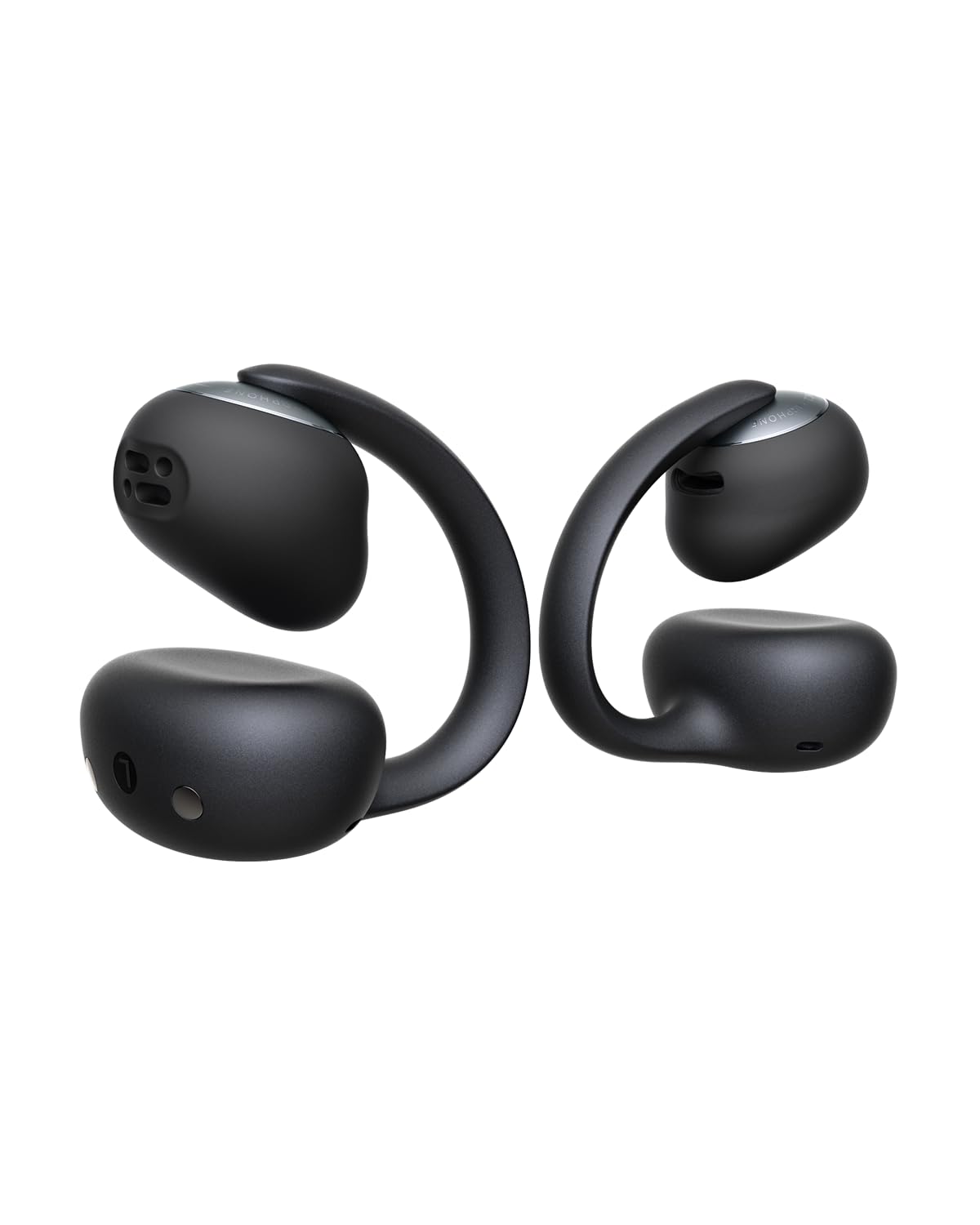
Image: Baseus Bowie MC2 Earbuds and their charging case.
วิดีโอ: จบแล้วview of Baseus Bowie MC2 Clip-On Comfortable Earbuds. This video demonstrates the design and comfort features of the earbuds.
2. เนื้อหาบรรจุภัณฑ์
ตรวจสอบว่ามีรายการทั้งหมดอยู่ในแพ็คเกจของคุณ:
- Baseus Bowie MC2 Earbuds
- M/L/XL Ear Cushions
- สาย USB-C

Image: Contents of the Baseus Bowie MC2 package.
3. คู่มือการติดตั้ง
3.1 การชาร์จหูฟังและเคส
ก่อนใช้งานครั้งแรก โปรดชาร์จหูฟังและเคสชาร์จให้เต็มก่อน เชื่อมต่อสาย USB-C ที่ให้มากับพอร์ตชาร์จบนเคสและแหล่งจ่ายไฟ ไฟแสดงสถานะบนเคสจะแสดงสถานะการชาร์จ

Image: Baseus Bowie MC2 earbuds in their charging case.
3.2 Ear Cushion Installation
The Bowie MC2 earbuds come with M, L, and XL ear cushions. Choose the size that provides a secure and comfortable fit. To install or replace:
- Select the appropriate cushion size.
- Gently remove the existing cushion if present.
- Align the opening of the new cushion with the sound unit and stretch it over the earbud. Lightly rotate to ensure it is properly seated.

Image: Step-by-step guide for installing ear cushions.
Video: Instructions on how to replace ear cushions.
3.3 การสวมหูฟัง
Place the left and right earbuds in the correct ears. Position the speaker outlet toward your ear canal and ensure the button faces upward. The ergonomic C-ring design provides a stable fit.

Image: Proper wearing instructions for the earbuds.

Image: Earbuds providing a stable fit during movement.
3.4 การจับคู่บลูทูธ
วิธีจับคู่เอียร์บัดของคุณกับอุปกรณ์:
- เปิดกล่องชาร์จ หูฟังจะเข้าสู่โหมดจับคู่
- เปิดใช้งาน Bluetooth บนอุปกรณ์ของคุณ (สมาร์ทโฟน แท็บเล็ต ฯลฯ)
- ค้นหา "Baseus Bowie MC2" in the list of available devices and select it to connect.

Image: Bluetooth 6.0 connectivity for quick pairing.
3.5 การติดตั้งแอป Baseus
Download the free Baseus App (available for iOS & Android) to unlock additional features and customization options. The app allows for EQ adjustments, firmware updates, and more.

Image: Smart App Control interface for customizing settings.
4. คู่มือการใช้งาน
4.1 ปุ่มควบคุม
The earbuds feature physical buttons for precise control:
| การทำงาน | การกระทำ |
|---|---|
| เล่น/หยุดชั่วคราว | กดครั้งเดียว |
| เพลงถัดไป | กดสองครั้ง |
| เพลงก่อนหน้า | กดสามครั้ง |
| เพิ่มระดับเสียง | กดค้างไว้ 1.5 วินาที |
| ลดระดับเสียง | กดค้างไว้ 1.5 วินาที |
| รับสายหรือวางสาย | กดครั้งเดียว |
| ปฏิเสธการรับสาย | กดค้างไว้ 1.5 วินาที |

ภาพ: รายละเอียดฟังก์ชันการควบคุมปุ่มต่างๆ
4.2 คุณสมบัติด้านเสียง
The Bowie MC2 earbuds support LDAC Hi-Res Audio, delivering up to three times the audio detail compared to the SBC codec. Custom-sized 11mm tri-magnet dynamic drivers provide rich sound. SuperBass 3.0 enhances bass, and BISA spatial audio creates a multi-layered soundstage.

Image: High-resolution audio support with LDAC.

Image: Internal components of the earbud driver for deep bass and pristine detail.

Image: BISA spatial audio for an immersive listening experience.
Video: Grammy Winner Recommended Audio, highlighting the sound quality.
4.3 คุณสมบัติการโทร
The earbuds are equipped with four directional beamforming microphones and AI-enhanced technology to focus on your voice and reduce background noise, ensuring clear calls even in noisy environments.

Image: 4-Mic AI Clear Call technology for enhanced voice clarity.
4.4 การรับรู้โดยการเปิดหู
The open-ear design allows you to enjoy your audio while remaining aware of your surroundings. This feature is ideal for commuting, outdoor activities, and situations where situational awareness is important.

Image: User maintaining awareness of surroundings while listening to audio.
4.5 การเชื่อมต่อหลายจุด
Bluetooth 6.0 with Baseus Smart-Connect (BSC) technology enables seamless switching between two connected devices, such as a smartphone and a laptop.

Image: Instant Multipoint Connection for seamless device switching.
4.6 Find Your Earbuds Feature
If your earbuds are misplaced, use the Baseus App to locate them. This feature provides peace of mind by helping you find your earbuds quickly.

Image: The 'Find Your Earbuds' feature in the Baseus App.
5. อายุการใช้งานแบตเตอรี่และการชาร์จ
The earbuds offer up to 11.5 hours of playtime per charge and up to 55 hours with the charging case (with SuperBass 3.0 on). A 10-minute quick charge provides approximately 3 hours of playtime.

Image: Battery life details for the earbuds and charging case.
6. การบำรุงรักษา
6.1 ความต้านทานต่อน้ำ
The earbuds are IP67 waterproof, making them resistant to sweat, rain, dust, and splashes. This ensures reliable performance during workouts and everyday use.

Image: IP67 waterproof rating for durability.
6.2 การทำความสะอาด
Regularly clean your earbuds and charging case with a soft, dry cloth. For the ear cushions, you may gently wipe them with a damp cloth and mild soap, ensuring they are completely dry before reattaching. Avoid using harsh chemicals or abrasive materials.
7 การแก้ไขปัญหา
Here are answers to common questions:
- Q: How to ensure clear calls on my Baseus Bowie MC2?
- A: Wear earbuds on the correct L/R sides with buttons always facing upward. Keep mic ports clean and free of debris. For clearest call quality, use in quieter environments. Call clarity may also vary slightly depending on your connected device. Enabling the Call Enhancement function in the Baseus App is also recommended.
- Q: How can I increase the volume on my Baseus Bowie MC2?
- A: For iPhone: Disable Reduce Loud Audio in Settings > Sounds & Haptics > Headphone Safety. For Samsung: Disable Media Volume Limit in Settings > Sounds & Vibration > Volume > More. For Android: In Bluetooth Settings, enable Absolute Volume. Alternatively, enable the app's Powerful Bass EQ Mode. Ensure earbuds are worn correctly as instructed in the manual: place left and right earbuds with buttons upward, sound outlets aligned with ear canal openings, and fit them closely to your ears.
- Q: How to upgrade OTA/software?
- A: Simply download the free Baseus App (iOS & Android), connect your earbuds, then go to App Homepage > Settings (top right) > Version to check and install the latest firmware update. The app can be used normally without registering or logging into an account.

Image: Frequently Asked Questions for troubleshooting.
8. ข้อมูลจำเพาะ
| คุณสมบัติ | รายละเอียด |
|---|---|
| ยี่ห้อ | เบสอุส |
| ชื่อรุ่น | เบสอัส โบวี่ MC2 |
| หมายเลขรุ่น | A0102F |
| การวางตำแหน่งหู | หูเปิด |
| ฟอร์มแฟกเตอร์ | ทรูไวร์เลส |
| เทคโนโลยีการเชื่อมต่อ | ไร้สาย (Bluetooth) |
| เวอร์ชันบลูทูธ | 6.0 |
| ช่วงบลูทูธ | 10 เมตร |
| ประเภทการควบคุม | ปุ่มควบคุม |
| อายุการใช้งานแบตเตอรี่โดยเฉลี่ย | 55 ชั่วโมง (พร้อมเคสชาร์จ) |
| เวลาในการชาร์จแบตเตอรี่ | 2 ชั่วโมง |
| ระดับความต้านทานต่อน้ำ | กันน้ำระดับ IP67 |
| ประเภทไดร์เวอร์เสียง | ไดร์เวอร์แบบไดนามิก |
| ขนาดไดร์เวอร์เสียง | 11 มิลลิเมตร |
| เวลาแฝงของเสียง | 38 มิลลิวินาที |
| อิมพีแดนซ์ | 16 โอห์ม |
| การตอบสนองความถี่ | ความถี่ 20 กิโลเฮิรตซ์ |
| น้ำหนักสินค้า | 105 กรัม |
| น้ำหนักของกระเป๋าใส่ | 43 กรัม |
| วัสดุ | อะคริโลไนไตรล์ บิวทาไดอีน สไตรีน (ABS), โพลีคาร์บอเนต (PC) |
| คุณสมบัติเพิ่มเติม | 4-Mic AI Clear Calls, Hi-Res Wireless & LDAC, Super Bass 3.0, Wrap-Around CloudComfort 2.0 |
9. การรับประกันและการสนับสนุน
9.1 ข้อมูลการรับประกัน
The Baseus Bowie MC2 Open Ear Clip-On Earbuds come with a 2-Year Manufacturer Warranty. Please retain your proof of purchase for warranty claims.
9.2 การสนับสนุนลูกค้า
For further assistance, technical support, or to access additional resources, please refer to the Baseus App or visit the official Baseus website. The app provides access to firmware updates and personalized settings.