
1. สูงกว่าview
The Philips TAZ2200 is a versatile portable sound machine designed for enjoying various audio formats. It features a top-loading CD player, a front-loading cassette player, FM radio, Bluetooth 6.0 connectivity, USB playback, and a 3.5mm audio input. Equipped with dynamic bass boost and 6W stereo speakers, it delivers rich sound. The unit can be powered by AC mains or batteries and includes a carrying handle for portability.
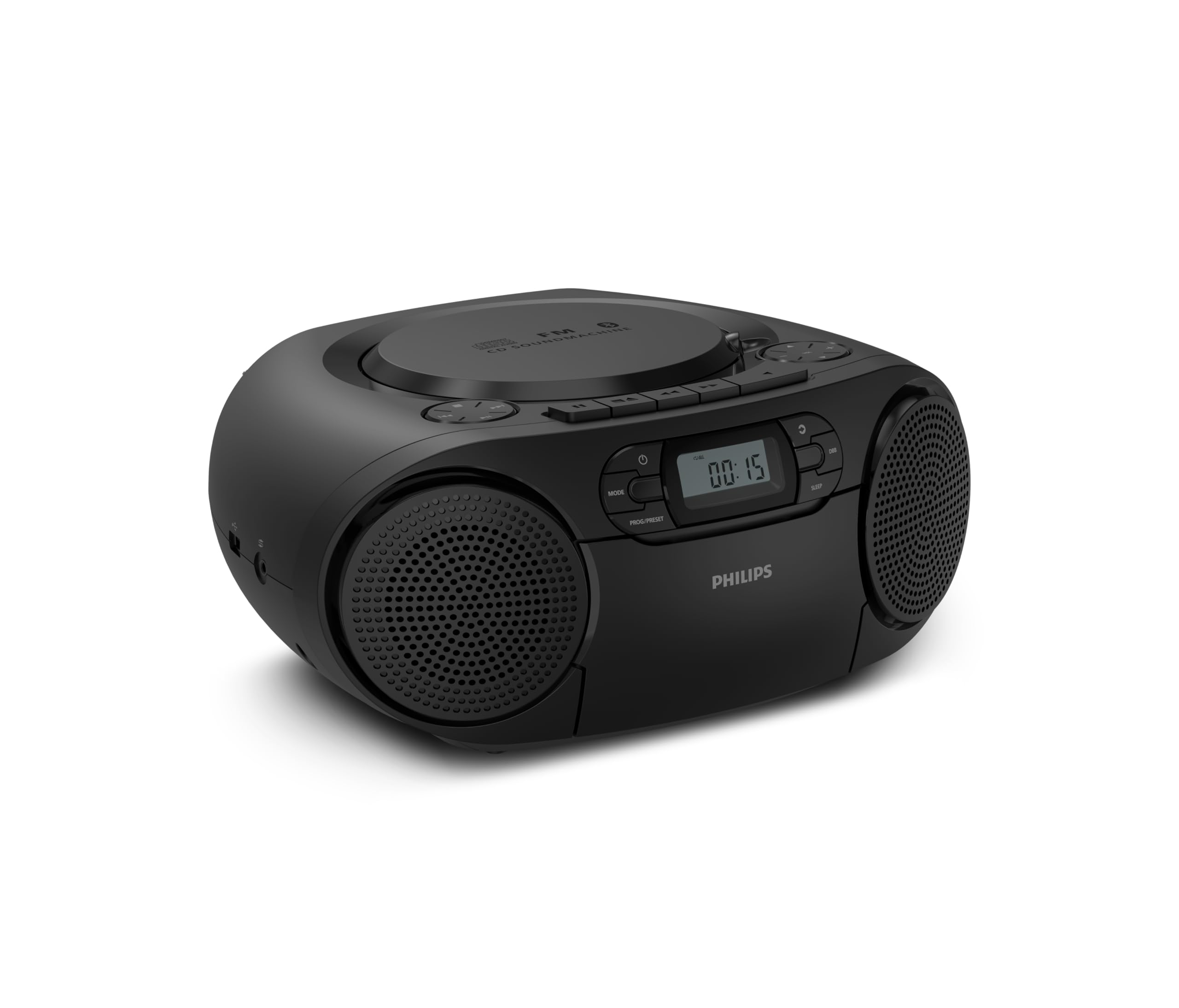
ด้านหน้า view of the Philips TAZ2200 CD Soundmachine, showing the main display and control buttons.
2. ข้อมูลด้านความปลอดภัย
Please read these safety instructions carefully before using your device and keep them for future reference. Incorrect use may result in hazards.
- แหล่งพลังงาน: ใช้เฉพาะอะแดปเตอร์แปลงไฟหรือแบตเตอรี่ที่ระบุไว้เท่านั้น ตรวจสอบให้แน่ใจว่าได้ปรับแรงดันไฟฟ้าให้เหมาะสมแล้วtagตรงตามข้อกำหนดของหน่วยงาน
- น้ำและความชื้น: อย่าให้ตัวเครื่องโดนฝน ความชื้น น้ำหยด หรือน้ำกระเซ็น อย่าวางสิ่งของที่บรรจุของเหลว เช่น แจกัน ไว้บนตัวเครื่อง
- การระบายอากาศ : Ensure adequate ventilation. Do not block any ventilation openings. Maintain a minimum distance around the unit for sufficient ventilation.
- ความร้อน: ห้ามวางเครื่องไว้ใกล้แหล่งความร้อน เช่น หม้อน้ำ เครื่องทำความร้อน เตา หรืออุปกรณ์อื่นๆ (รวมถึง ampเครื่องให้ความร้อน) ที่ผลิตความร้อน
- แบตเตอรี่: Follow correct polarity when inserting batteries. Do not mix old and new batteries, or different types of batteries. Remove batteries if the unit is not used for a long period.
- การทำความสะอาด: ถอดปลั๊กเครื่องออกจากเต้าเสียบก่อนทำความสะอาด ใช้ผ้านุ่มและแห้ง ห้ามใช้น้ำยาทำความสะอาดชนิดน้ำหรือสเปรย์ทำความสะอาด
- การบริการ: อย่าพยายามให้บริการผลิตภัณฑ์นี้ด้วยตนเอง ส่งต่อการบริการทั้งหมดไปยังช่างบริการที่ผ่านการรับรอง
3. อะไรอยู่ในกล่อง
เมื่อแกะกล่องแล้ว โปรดตรวจสอบให้แน่ใจว่ามีสิ่งของทั้งหมดที่ระบุไว้ด้านล่างนี้ครบถ้วน:
- Philips TAZ2200 CD Soundmachine
- สายไฟ
- คู่มือเริ่มต้นอย่างรวดเร็ว
- คู่มือการรับประกัน
- เอกสารความปลอดภัย
4. การควบคุมและการเชื่อมต่อ
แผงควบคุมด้านหน้า
The front panel features the main display, power button, mode selection, program/preset buttons, and dynamic bass boost (DBB) control. Playback controls for CD and USB are also located here.

ด้านหน้าแบบละเอียด view showing the display, power, mode, program/preset, and DBB buttons.
Side and Rear Connections
The side of the unit provides a USB port for digital audio playback and a 3.5mm audio input jack for connecting external devices.

ด้านข้าง view illustrating the USB port and Audio Input jack.
The top of the unit houses the CD compartment and additional playback controls, while the rear features the AC power input and the FM antenna.

สูงสุด view showing the CD compartment and associated controls.

หลัง view displaying the AC power input and the telescopic FM antenna.
5. การตั้งค่า
5.1 แหล่งจ่ายไฟ
ไฟฟ้ากระแสสลับ
- ตรวจสอบให้แน่ใจว่าปิดเครื่องแล้ว
- Connect the supplied power cable to the AC IN socket on the rear of the sound machine.
- Plug the other end of the power cable into a wall power outlet.
พลังงานแบตเตอรี่
For portable use, the unit can operate on 6 x C-type batteries (not included).
- เปิดฝาปิดช่องใส่แบตเตอรี่ที่ด้านล่างของตัวเครื่อง
- Insert 6 C-type batteries, ensuring correct polarity (+/-) as indicated inside the compartment.
- ปิดฝาช่องใส่แบตเตอรี่ให้แน่น
5.2 การปรับเสาอากาศ
For optimal FM radio reception, fully extend the telescopic antenna located at the rear of the unit. Adjust its position and angle to achieve the clearest signal.
6. คู่มือการใช้งาน
6.1. การดำเนินการทั่วไป
- เปิด/ปิดเครื่อง: กดปุ่ม พลัง ปุ่มเพื่อเปิดหรือปิดเครื่อง
- การควบคุมระดับเสียง: ใช้ โวล+ or เล่ม - ปุ่มเพื่อปรับระดับเสียง
- ระบบเพิ่มเสียงเบสแบบไดนามิก (DBB): กดปุ่ม DBB button to activate or deactivate the dynamic bass boost feature for enhanced bass sound.
- การเลือกโหมด: กดปุ่ม โหมด button repeatedly to switch between CD, Cassette, FM Radio, Bluetooth, USB, and Audio Input modes.
6.2 การเล่นแผ่นซีดี
- เปิดฝาช่องใส่ซีดีที่อยู่ด้านบนของเครื่อง
- Place a CD (CD, CD-R, or CD-RW) with the label side facing up onto the spindle.
- ปิดฝาปิดช่องใส่ซีดี
- กดปุ่ม โหมด ปุ่มเพื่อเลือกโหมดซีดี
- กดปุ่ม เล่น/หยุดชั่วคราว ปุ่มเพื่อเริ่มเล่น
- ใช้ ข้าม ปุ่ม (- or >>|) เพื่อข้ามแทร็ก
- กดค้างไว้ - or >>| to search within a track.
- กดปุ่ม หยุด ปุ่มเพื่อหยุดเล่น
6.3 การเล่นเทปคาสเซ็ท
- Open the cassette compartment door on the front of the unit.
- ใส่เทปคาสเซ็ตโดยให้ด้านที่เปิดอยู่หันขึ้นด้านบน
- ปิดฝาช่องใส่เทปคาสเซ็ต
- กดปุ่ม โหมด button to select Cassette mode.
- กดปุ่ม เล่น ปุ่มเพื่อเริ่มเล่น
- ใช้ ก้าวไปข้างหน้าอย่างรวดเร็ว or ย้อนกลับ ปุ่มสำหรับเลื่อนเทปไปข้างหน้าหรือย้อนกลับอย่างรวดเร็ว
- กดปุ่ม หยุด ปุ่มเพื่อหยุดเล่น
6.4 วิทยุ FM
- กดปุ่ม โหมด ปุ่มสำหรับเลือกโหมดวิทยุ FM
- สแกนอัตโนมัติ: กดปุ่มค้างไว้ PROG/PRESET ปุ่มสำหรับสแกนและบันทึกสถานีวิทยุ FM ที่ใช้งานได้โดยอัตโนมัติ
- การปรับด้วยตนเอง: กดปุ่ม การปรับแต่ง ปุ่ม (- or >>|) to manually tune to a desired frequency.
- การบันทึกค่าที่ตั้งล่วงหน้า: After tuning to a station, press PROG/PRESET once, then use - or >>| เพื่อเลือกหมายเลขที่กำหนดไว้ล่วงหน้า แล้วกด PROG/PRESET เพื่อยืนยันอีกครั้ง
- การเรียกคืนค่าที่ตั้งไว้ล่วงหน้า: ในโหมด FM ให้กด PROG/PRESET repeatedly to cycle through saved preset stations.
6.5 การเล่นบลูทูธ
- กดปุ่ม โหมด button to select Bluetooth mode. The display will show 'BT' and flash, indicating it's in pairing mode.
- บนอุปกรณ์ที่รองรับบลูทูธ (สมาร์ทโฟน แท็บเล็ต) ให้เปิดใช้งานบลูทูธและค้นหาอุปกรณ์ที่ใช้งานได้
- Select "Philips TAZ2200" from the list of devices.
- Once paired, the unit will emit a confirmation sound, and 'BT' will stop flashing.
- Start playing audio on your connected device. The sound will be streamed to the sound machine.
6.6 การเล่น USB
- เสียบแฟลชไดรฟ์ USB เข้ากับพอร์ต USB ด้านข้างของตัวเครื่อง
- กดปุ่ม โหมด ปุ่มเพื่อเลือกโหมด USB
- หน่วยจะตรวจจับและเริ่มเล่นเสียงที่เข้ากันได้โดยอัตโนมัติ fileไฟล์ (MP3, WAV, WMA)
- ใช้ปุ่มควบคุมการเล่น (เล่น/หยุดชั่วคราว, ข้าม, หยุด) as you would for CD playback.
6.7 ช่องเสียบสัญญาณเสียงเข้า (AUX)
- Connect one end of a 3.5mm audio cable (not included) to the AUDIO IN jack on the side of the sound machine.
- Connect the other end of the audio cable to the headphone jack or audio output of your external device (e.g., MP3 player, turntable).
- กดปุ่ม โหมด button to select Audio Input mode.
- Start playing audio on your external device. The sound will be played through the sound machine.
7. การบำรุงรักษา
- การทำความสะอาดหน่วย: เช็ดทำความสะอาดภายนอกตัวเครื่องด้วยผ้าเนื้อนุ่มที่ชุบน้ำยาเล็กน้อยamp ผ้า ห้ามใช้สารทำความสะอาดที่มีฤทธิ์กัดกร่อนหรือตัวทำละลาย
- การดูแลรักษาเครื่องเล่นซีดี: Keep the CD compartment clean. If the lens is dirty, use a specialized CD lens cleaner. Avoid touching the lens.
- การดูแลเครื่องเล่นเทป: ทำความสะอาดหัวเทปและลูกกลิ้งบีบเป็นระยะด้วยสำลีเบาๆampเคลือบด้วยแอลกอฮอล์ไอโซโพรพิล
- การเปลี่ยนแบตเตอรี่: If using batteries, replace all 6 C-type batteries when the unit's performance diminishes or if the unit will not be used for an extended period.
- พื้นที่จัดเก็บ: เมื่อไม่ใช้งาน ควรเก็บเครื่องไว้ในที่สะอาดและแห้ง หลีกเลี่ยงแสงแดดโดยตรงและอุณหภูมิที่สูงหรือต่ำเกินไป
8 การแก้ไขปัญหา
If you encounter any issues with your Philips TAZ2200, please refer to the table below for common problems and solutions.
| ปัญหา | สาเหตุที่เป็นไปได้ | สารละลาย |
|---|---|---|
| ไม่มีไฟฟ้า | ไม่ได้เชื่อมต่อสายไฟ แบตเตอรี่หมดหรือใส่ไม่ถูกต้อง | ตรวจสอบการเชื่อมต่อไฟ AC; เปลี่ยนแบตเตอรี่หรือตรวจสอบให้แน่ใจว่าขั้วถูกต้อง |
| ไม่มีเสียง | ระดับเสียงต่ำเกินไป เลือกโหมดไม่ถูกต้อง เชื่อมต่อหูฟังแล้ว | Increase volume; Select the correct source mode (CD, FM, BT, etc.); Disconnect headphones. |
| ซีดีไม่เล่น | ใส่แผ่นซีดีไม่ถูกต้อง; แผ่นซีดีสกปรกหรือมีรอยขีดข่วน; รูปแบบแผ่นซีดีไม่รองรับ | Insert CD with label side up; Clean or replace CD; Ensure CD is CD-R/RW compatible. |
| เทปคาสเซ็ตไม่เล่น | Cassette inserted incorrectly; Tape is damaged. | Insert cassette correctly; Try a different cassette. |
| การรับสัญญาณ FM ไม่ดี | เสาอากาศไม่ได้ยืดออกหรืออยู่ในตำแหน่งที่ถูกต้อง สัญญาณอ่อน | ยืดและปรับเสาอากาศแบบยืดหดได้จนสุด ลองย้ายเครื่องไปยังตำแหน่งอื่นดู |
| บลูทูธไม่เชื่อมต่อ | Unit not in pairing mode; Bluetooth device too far; Device already paired with another unit. | Ensure unit is in Bluetooth mode and flashing; Move device closer; Disconnect from other devices. |
| ปัญหาการเล่นไฟล์ผ่าน USB | ไม่ได้เสียบไดรฟ์ USB อย่างถูกต้อง ไม่เข้ากัน file ฟอร์แมตแล้ว; ไดรฟ์ USB เสียหาย | ใส่ไดรฟ์ USB กลับเข้าไปใหม่ ตรวจสอบให้แน่ใจว่า files are MP3, WAV, or WMA; Try a different USB drive. |
9. ข้อมูลจำเพาะ
| คุณสมบัติ | ข้อมูลจำเพาะ |
|---|---|
| ยี่ห้อ | ฟิลิปส์ |
| หมายเลขรุ่น | TAZ2200/10 |
| เทคโนโลยีการเชื่อมต่อ | Bluetooth 6.0, USB, Audio Input (3.5mm) |
| ประเภทลำโพง | Stereo (2 speakers) |
| กำลังขับ | 6 วัตต์ (สูงสุด) |
| สื่อที่รองรับ | CD, CD-R, CD-RW, Cassette, USB (MP3, WAV, WMA) |
| เครื่องรับวิทยุ | Digital FM with 20 presets |
| แหล่งพลังงาน | AC (wired), 6 x C-type batteries (not included) |
| ขนาด (กxยxส) | 24.5 x 28.5 x 12.5 ซม. |
| น้ำหนัก | 1.35 กิโลกรัม |
| สี | เงิน |
10. การรับประกันและการสนับสนุน
10.1 การรับประกันสินค้า
This Philips TAZ2200 CD Soundmachine comes with a รับประกัน 2 ปี นับจากวันที่ซื้อ โปรดเก็บหลักฐานการซื้อไว้เพื่อใช้ในการเคลมประกัน การรับประกันครอบคลุมถึงข้อบกพร่องจากการผลิตและการทำงานผิดปกติภายใต้สภาวะการใช้งานปกติ
10.2 การสนับสนุนลูกค้า
For technical assistance, troubleshooting beyond this manual, or warranty service, please refer to the contact information provided in the warranty booklet included with your product. You can also visit the official Philips support website for your region for further assistance and FAQs.