
1. บทนำ
This manual provides essential instructions for setting up, operating, maintaining, and troubleshooting your Fastrack Revoltt FS3 Smart Watch. Please read this guide thoroughly to ensure proper use and to maximize the features of your device.
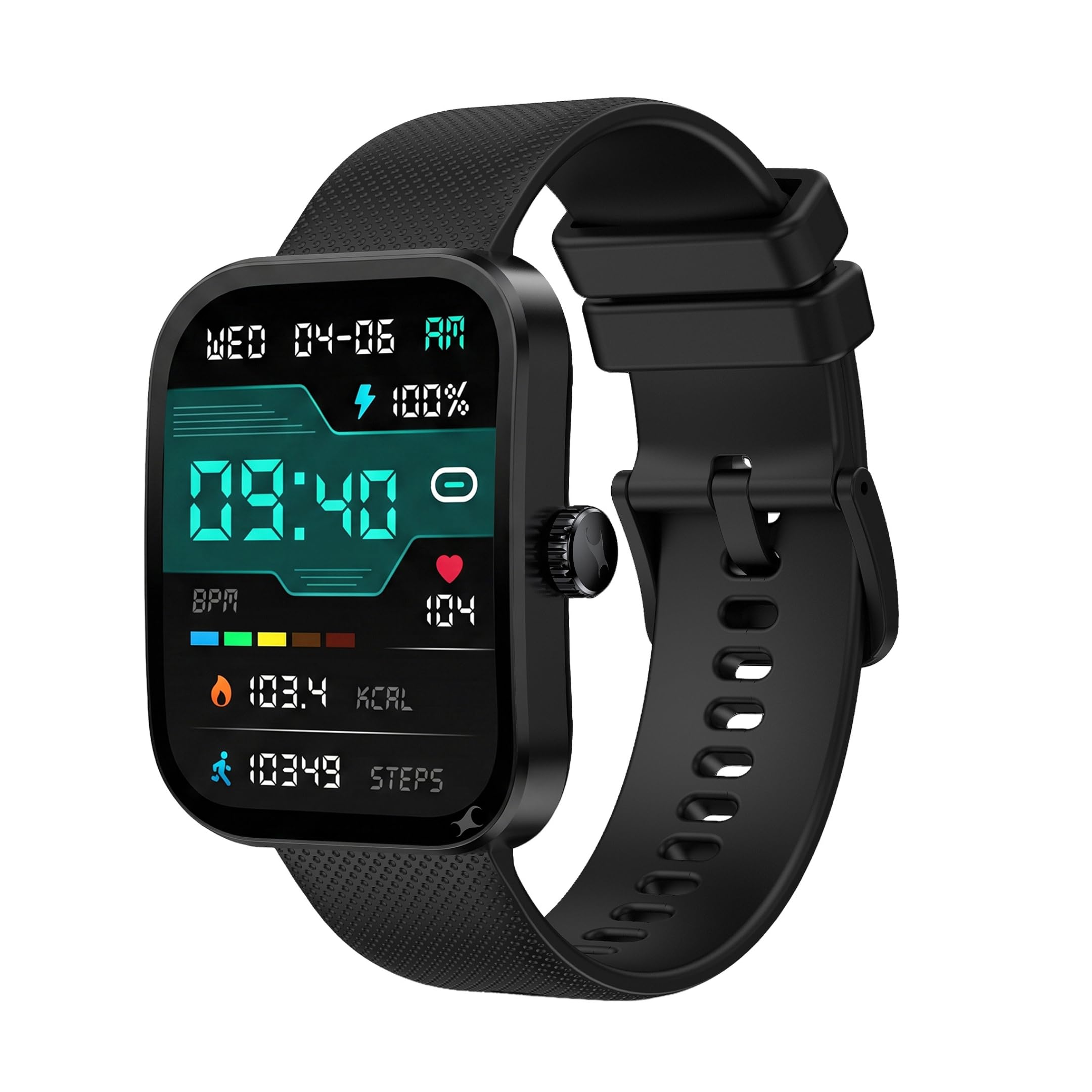
ภาพ: ด้านหน้า view of the Fastrack Revoltt FS3 Smart Watch.
2. การตั้งค่า
2.1 เนื้อหาบรรจุภัณฑ์
ตรวจสอบว่าแพ็คเกจของคุณมีรายการต่อไปนี้:
- Fastrack Revoltt FS3 Smart Watch
- Magnetic Charging Cable with Type-C connector
- คู่มือเริ่มต้นอย่างรวดเร็ว
- บัตรรับประกัน
2.2 การชาร์จสมาร์ทวอทช์
Before initial use, fully charge your Fastrack Revoltt FS3 Smart Watch. The watch features Nitrofast™ charging.
- เสียบสายชาร์จแม่เหล็กเข้ากับขั้วชาร์จที่ด้านหลังของนาฬิกา
- Connect the Type-C end of the cable to a compatible USB power adapter (not included).
- หน้าจอของนาฬิกาจะแสดงสถานะการชาร์จ โดยปกติการชาร์จเต็มจะใช้เวลาประมาณ 2 ชั่วโมง

Image: Fastrack Revoltt FS3 Smart Watch connected to its magnetic Type-C charging cable.
2.3 การจับคู่กับสมาร์ทโฟนของคุณ
To access all smart features, pair your watch with the Fastrack Smart World App on your smartphone.
- ดาวน์โหลด Fastrack Smart World App from your smartphone's app store (available for Android and iOS devices).
- ตรวจสอบให้แน่ใจว่าได้เปิดใช้งาน Bluetooth บนสมาร์ทโฟนของคุณแล้ว
- Open the Fastrack Smart World App and follow the on-screen instructions to add your device.
- Select "Fastrack Revoltt FS3" from the list of available devices to complete the pairing process.

Image: Smartphone displaying the Fastrack Smart World App interface.
3. การใช้งานสมาร์ทวอทช์
3.1 การแสดงผลและการนำทาง
The Fastrack Revoltt FS3 features a 2.01-inch TFT display with 2.5D graphics for clear visuals.
- หน้าจอสัมผัส: ปัดไปทางซ้าย ขวา ขึ้น หรือลง เพื่อนำทางผ่านเมนูและการแจ้งเตือน แตะเพื่อเลือกรายการ
- มงกุฎโรตารี่: Rotate the crown on the side of the watch to scroll through lists or adjust settings. Press the crown to return to the home screen or confirm selections.
- ปุ่มกด: Use the push button for quick access to specific functions or to power on/off the device.

Image: Fastrack Revoltt FS3 Smart Watch displaying various menu styles and highlighting the functional rotary crown.

Image: The 2.01-inch UltraVU Curved Display of the Fastrack Revoltt FS3 Smart Watch.
3.2 การตรวจติดตามสุขภาพ
The watch provides 24/7 health monitoring features:
- เครื่องวัดอัตราการเต้นของหัวใจ: ติดตามอัตราการเต้นของหัวใจของคุณตลอดทั้งวัน
- เครื่องตรวจวัด SpO2: วัดระดับความอิ่มตัวของออกซิเจนในเลือดของคุณ
- ติดตามการนอนหลับ: ตรวจสอบรูปแบบและคุณภาพการนอนหลับของคุณ
- ตัวติดตามกิจกรรม: บันทึกจำนวนก้าว ระยะทาง และปริมาณแคลอรีที่เผาผลาญ
- การติดตามความเครียด: ให้ข้อมูลเชิงลึกเกี่ยวกับระดับความเครียดของคุณ
Access detailed health data and trends through the Fastrack Smart World App.

Image: Fastrack Revoltt FS3 Smart Watch showing its 24/7 Health Suite features.
การโทรบลูทูธ 3.3
เมื่อเชื่อมต่อกับสมาร์ทโฟนแล้ว คุณสามารถโทรออกและรับสายได้โดยตรงจากนาฬิกาของคุณ
- Access the call log or dial pad from the watch interface.
- Use the built-in microphone and speaker for hands-free communication.
3.4 Smart Features and Tools
นาฬิกาเรือนนี้มีเครื่องมือที่มีประโยชน์หลายอย่าง:
- เตือน: ตั้งปลุกได้โดยตรงบนนาฬิกาหรือผ่านแอป
- นาฬิกาจับเวลา ใช้สำหรับจับเวลาในการทำกิจกรรมต่างๆ
- ตัวจับเวลา: Set countdown timers.
- รูปแบบเมนูหลากหลาย: Customize the watch interface by selecting different menu layouts (Grid, List, Waterfall, Circular, Wheel, Zoom).
4. การบำรุงรักษา
4.1 ความต้านทานต่อน้ำ
The Fastrack Revoltt FS3 Smart Watch is IP68 water and dust resistant, allowing it to withstand immersion in water up to 1.5 meters deep. It is suitable for daily use and activities like swimming in shallow water. However, it is not recommended for diving or high-pressure water activities.
4.2 การทำความสะอาด
To maintain your watch, clean it regularly:
- Wipe the display and watch body with a soft, dampผ้าที่ไม่เป็นขุย
- For the silicone band, you can use mild soap and water, then rinse thoroughly and dry.
- หลีกเลี่ยงการใช้สารเคมีรุนแรงหรือวัสดุที่มีฤทธิ์กัดกร่อน เพราะอาจทำให้นาฬิกาเสียหายได้

Image: Close-up of the Fastrack Revoltt FS3 Smart Watch's cross-grid pattern silicone strap.
4.3 การดูแลแบตเตอรี่
เพื่อยืดอายุแบตเตอรี่:
- หลีกเลี่ยงอุณหภูมิที่สูงหรือต่ำเกินไป
- ชาร์จนาฬิกาให้เต็มก่อนที่จะไม่ได้ใช้งานเป็นเวลานาน
- Do not leave the watch uncharged for extended periods.
5 การแก้ไขปัญหา
If you encounter issues with your Fastrack Revoltt FS3 Smart Watch, refer to the following common solutions:
| ปัญหา | วิธีแก้ปัญหาที่เป็นไปได้ |
|---|---|
| Watch does not power on or charge. |
|
| ไม่สามารถจับคู่กับสมาร์ทโฟนได้ |
|
| Health monitoring data appears inaccurate. |
|
| Time cannot be set manually. | The watch synchronizes time automatically with your paired smartphone. Ensure your watch is correctly paired and connected to the Fastrack Smart World App for accurate time display. |
| Stopwatch does not run in the background. | Some watch functions, such as the stopwatch, may require the display to remain active to function continuously. Refer to the app for any settings related to background activity for specific features. |
6. ข้อมูลจำเพาะ
| คุณสมบัติ | รายละเอียด |
|---|---|
| ชื่อรุ่น | Fastrack Revoltt FS3 |
| หมายเลขรุ่น | 38207PP01K |
| แสดง | 2.01-inch TFT Display with 2.5D Graphics |
| Maximum Display Brightness | 400 นิต |
| ระบบปฏิบัติการ | ระบบปฏิบัติการสมาร์ทวอทช์ |
| การเชื่อมต่อ | บลูทูธ |
| ประเภทแบตเตอรี่ | ลิเธียมโพลีเมอร์ |
| ความจุของแบตเตอรี่ | 300 มิลลิแอมป์ |
| อายุการใช้งานแบตเตอรี่โดยเฉลี่ย | นานถึง 5 วัน |
| เวลาในการชาร์จแบตเตอรี่ | ประมาณ 2 ชั่วโมง |
| การวัดตัวชี้วัดด้านสุขภาพ | Heart Rate, SpO2, Sleep Duration, Stress |
| ความต้านทานต่อน้ำ | IP68 (Water Resistant up to 1.5 meters) |
| วัสดุตัวเรือน | พลาสติก |
| วัสดุของวงดนตรี | ซิลิโคน |
| น้ำหนักสินค้า | 45 กรัม |
| อินพุตอินเทอร์เฟซมนุษย์ | ไมโครโฟน, หน้าจอสัมผัส |
| ประเภทตัวควบคุม | การควบคุมด้วยเสียง |
| อุปกรณ์ที่รองรับ | สมาร์ทโฟน (แอนดรอยด์, ไอโอเอส) |
7. การรับประกันและการสนับสนุน
7.1 ข้อมูลการรับประกัน
The Fastrack Revoltt FS3 Smart Watch comes with a การรับประกันจากผู้ผลิต 1 ปี นับจากวันที่ซื้อสินค้า การรับประกันนี้ครอบคลุมถึงข้อบกพร่องจากการผลิต โปรดเก็บใบเสร็จรับเงินและบัตรรับประกันไว้เพื่อใช้ในการเรียกร้องการรับประกัน
การรับประกันไม่ครอบคลุมความเสียหายที่เกิดจากการใช้งานผิดวิธี อุบัติเหตุ การซ่อมแซมโดยไม่ได้รับอนุญาต หรือการสึกหรอตามปกติ
7.2 การสนับสนุนลูกค้า
For technical assistance, warranty claims, or product inquiries, please contact Fastrack customer support. You can find contact details on the official Fastrack webตรวจสอบรายละเอียดเพิ่มเติมได้ที่เว็บไซต์ หรือดูจากบัตรรับประกันที่อยู่ในบรรจุภัณฑ์
ผู้ผลิต: Titan Company Limited, 3 Sipcot Industries complex, Hosur- 635126, India.