
1. บทนำ
This manual provides essential information for the safe and efficient operation of your PECRON F5000LFP Power Station. The F5000LFP is a high-capacity solar generator designed to provide reliable power for various applications, including emergency home backup, RV use, and off-grid power needs. It features a 5120Wh LiFePO4 battery, 7200W AC output, and supports dual voltagอี (120V/240V).
2. ข้อมูลด้านความปลอดภัย
Please read and understand all safety instructions before operating the PECRON F5000LFP Power Station. Failure to follow these instructions may result in electric shock, fire, or serious injury.
- Do not expose to water or moisture: Keep the power station away from rain, splashes, or submersion.
- Operate in well-ventilated areas: ตรวจสอบให้แน่ใจว่ามีการระบายอากาศที่เพียงพอรอบๆ ตัวเครื่องเพื่อป้องกันความร้อนสูงเกินไป
- หลีกเลี่ยงอุณหภูมิที่รุนแรง: Do not operate or store the unit in excessively hot or cold environments. Refer to specifications for operating temperature ranges.
- อย่าถอดแยกชิ้นส่วน: Unauthorized disassembly voids the warranty and may cause damage or injury. Contact customer support for service.
- เก็บให้ห่างจากเด็กและสัตว์เลี้ยง: Store the unit in a secure location.
- ใช้อุปกรณ์เสริมที่ได้รับอนุญาตเท่านั้น: Use only PECRON-approved charging cables, solar panels, and expansion batteries.
- การกำจัดที่เหมาะสม: Dispose of the battery and unit according to local regulations. Do not dispose of in household waste.
3. เนื้อหาบรรจุภัณฑ์
ตรวจสอบว่ามีสิ่งของทั้งหมดอยู่ครบเมื่อแกะกล่อง:
- 1x PECRON F5000LFP Power Station
- คู่มือการใช้งาน
- สายชาร์จ AC
- Detachable Cart (pre-installed or separate assembly required)
บันทึก: If your purchase included solar panels or extra batteries, these items may be shipped separately.
4. คุณสมบัติของผลิตภัณฑ์
- ความจุสูง: แบตเตอรี่ LiFePO4 ขนาด 5120 Wh
- เอาต์พุต AC ที่ทรงพลัง: Up to 7200W AC output with 120V/240V dual voltagการสนับสนุน
- Rapid Solar Charging: Supports up to 6400W total solar input.
- เครื่องจ่ายไฟสำรอง (UPS): Features 0ms online UPS outlets (two 20A, one 30A) for critical devices.
- เอาต์พุตอเนกประสงค์: 12 output ports including AC, DC (12-40V adjustable 5525 and XT-60), USB-A (18W), and USB-C (100W).
- การทำงานที่มีเสียงรบกวนต่ำ: Operates at a low noise level of 30dB, ideal for quiet environments.
- ความสามารถในการพกพา: Equipped with a detachable cart for easy movement.
- Battery Heating Function: Ensures optimal performance in cold environments.
- ความจุที่ขยายได้: Can be expanded up to 35.8kWh by connecting up to 6 FP5000-48V extra batteries.
- อายุการใช้งานยาวนาน: Retains 80% capacity after 4000 full charge cycles.
- การควบคุมแอพอัจฉริยะ: Monitor battery status, customize charging, and manage automation via a dedicated mobile application.
5. การตั้งค่า
5.1 การแกะบรรจุภัณฑ์และการตรวจสอบ
Carefully remove the power station from its packaging. Inspect the unit for any signs of damage during transit. If damage is found, contact customer support immediately.
5.2 การชาร์จเริ่มต้น
Before first use, fully charge the F5000LFP Power Station. Connect the included AC charging cable to the AC input port on the unit and then to a standard wall outlet. The display will indicate charging status. A full charge typically takes approximately 1.5 hours via AC.
5.3 Detachable Cart Assembly
If the detachable cart is not pre-installed, attach the caster wheels and frame to the base of the power station according to the diagrams provided in the separate cart assembly guide (if applicable). Ensure all connections are secure for safe transport.

Image: The PECRON F5000LFP Power Station shown with its detachable cart, illustrating its portability. The cart allows for easy movement of the unit.
5.4 Expanding Capacity (Optional)
The F5000LFP can be expanded by connecting FP5000-48V extra batteries. Follow the instructions provided with the expansion batteries for proper connection. Ensure the power station is turned off before connecting or disconnecting any expansion units. The system can be expanded up to 35.8kWh with 6 FP5000-48V batteries.

Image: The F5000LFP Power Station with multiple FP5000-48V batteries stacked, demonstrating how the system can be expanded to achieve higher energy capacities like 35.8kWh or 25.6kWh.
6. คู่มือการใช้งาน
6.1 การเปิด/ปิดเครื่อง
Press and hold the main power button for a few seconds to turn the unit on or off. The display screen will illuminate upon power-on.
6.2 การใช้งานเอาต์พุต AC
The F5000LFP provides five 3600W AC outlets and one 7200W AC outlet, supporting both 120V and 240V. Press the AC output button to activate the AC ports. Connect your appliances to the appropriate outlets. Ensure the total wattage of connected devices does not exceed the unit's maximum output capacity.

Image: The F5000LFP Power Station in a kitchen setting, powering a refrigerator. Labels indicate 120V input and 240V output, highlighting its dual voltage and high AC output capabilities.
6.3 Using DC and USB Outputs
Press the DC output button to activate the DC and USB ports. The unit features two 18W USB-A ports, one 100W USB-C port, a 12-40V adjustable 5525 port, and an XT-60 port. These ports are suitable for charging mobile devices, laptops, and other DC-powered equipment. The adjustable 5525 and XT-60 ports allow for voltage and current customization to adapt to various devices.
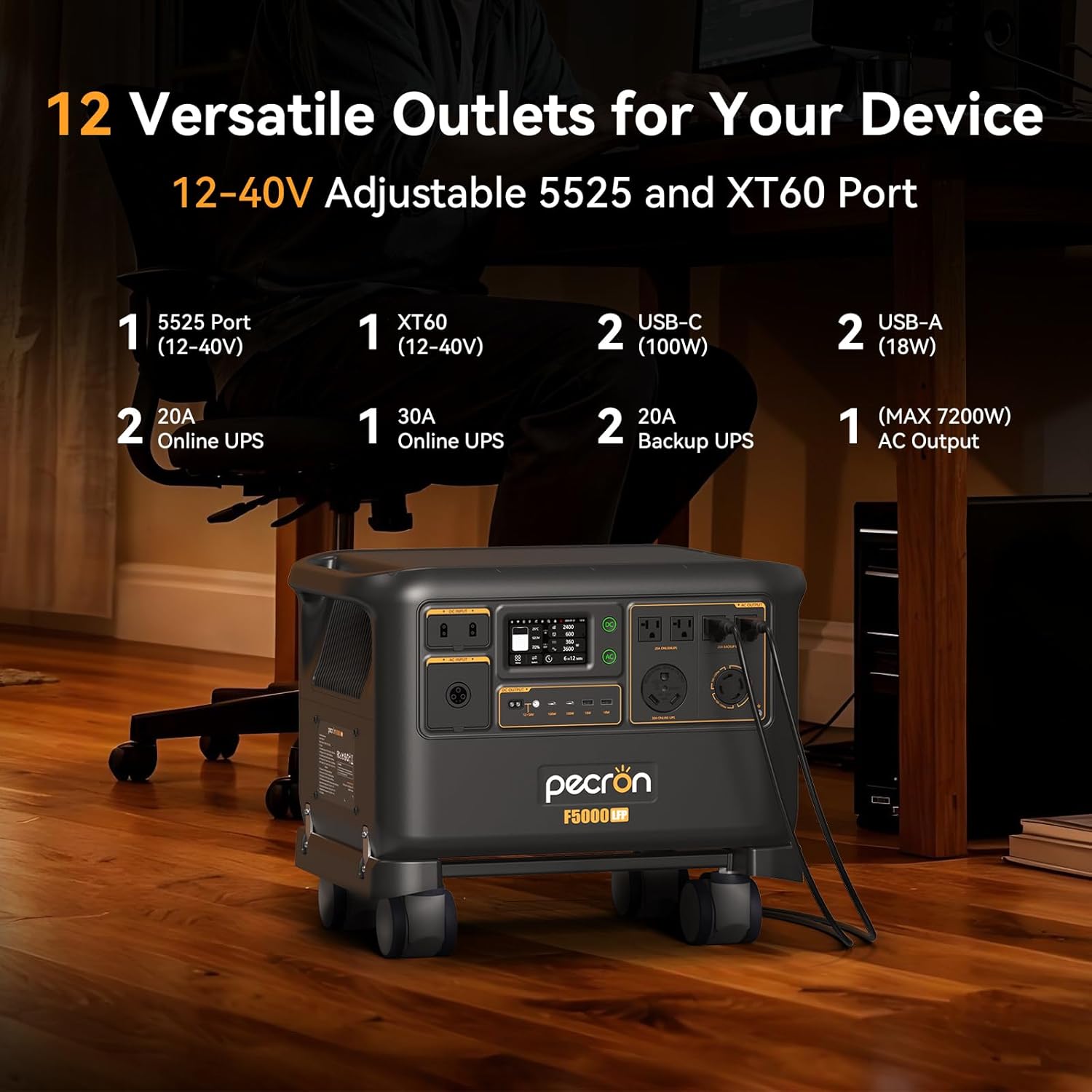
ภาพ: ภาพระยะใกล้ view of the F5000LFP's front panel, detailing the various output ports available: 5525 (12-40V), XT60 (12-40V), USB-C (100W), USB-A (18W), 20A Online UPS, 30A Online UPS, and AC outputs.
6.4 Uninterruptible Power Supply (UPS) Mode
The F5000LFP includes two 20A and one 30A 0ms online UPS outlets. When connected to grid power, the unit can act as an online UPS, providing seamless power transfer to connected devices during a power outage. This ensures continuous operation for sensitive electronics like computers, Wi-Fi routers, and medical equipment (e.g., CPAP machines).

Image: The F5000LFP Power Station positioned next to a desk, illustrating its 0ms 30A online UPS capability, providing reliable backup for devices such as computers and Wi-Fi.
6.5 Battery Heating Function
For optimal performance in cold weather, the F5000LFP features a battery heating function. This function helps maintain the battery's temperature within its ideal operating range, ensuring efficient charging and discharging even in sub-zero conditions. Activate this feature via the unit's display or the smart app.
7. วิธีการชาร์จ
The F5000LFP supports multiple charging methods, which can be combined for faster recharging.
- การชาร์จไฟ AC: Connect the power station to a standard wall outlet using the provided AC charging cable. The unit supports up to 3600W AC input.
- การชาร์จพลังงานแสงอาทิตย์: Connect compatible solar panels to the two solar charging ports. The F5000LFP supports a maximum total solar input of 6400W (25A per port). This allows for building a sustainable home energy system.
- การชาร์จไฟเครื่องปั่นไฟ: The unit can be charged using a compatible generator. Ensure the generator's output voltage and frequency are within the F5000LFP's input specifications (40-70Hz).
- การชาร์จรถยนต์: A 500W car charger (sold separately) can be used to charge the F5000LFP from a vehicle's 12V outlet.
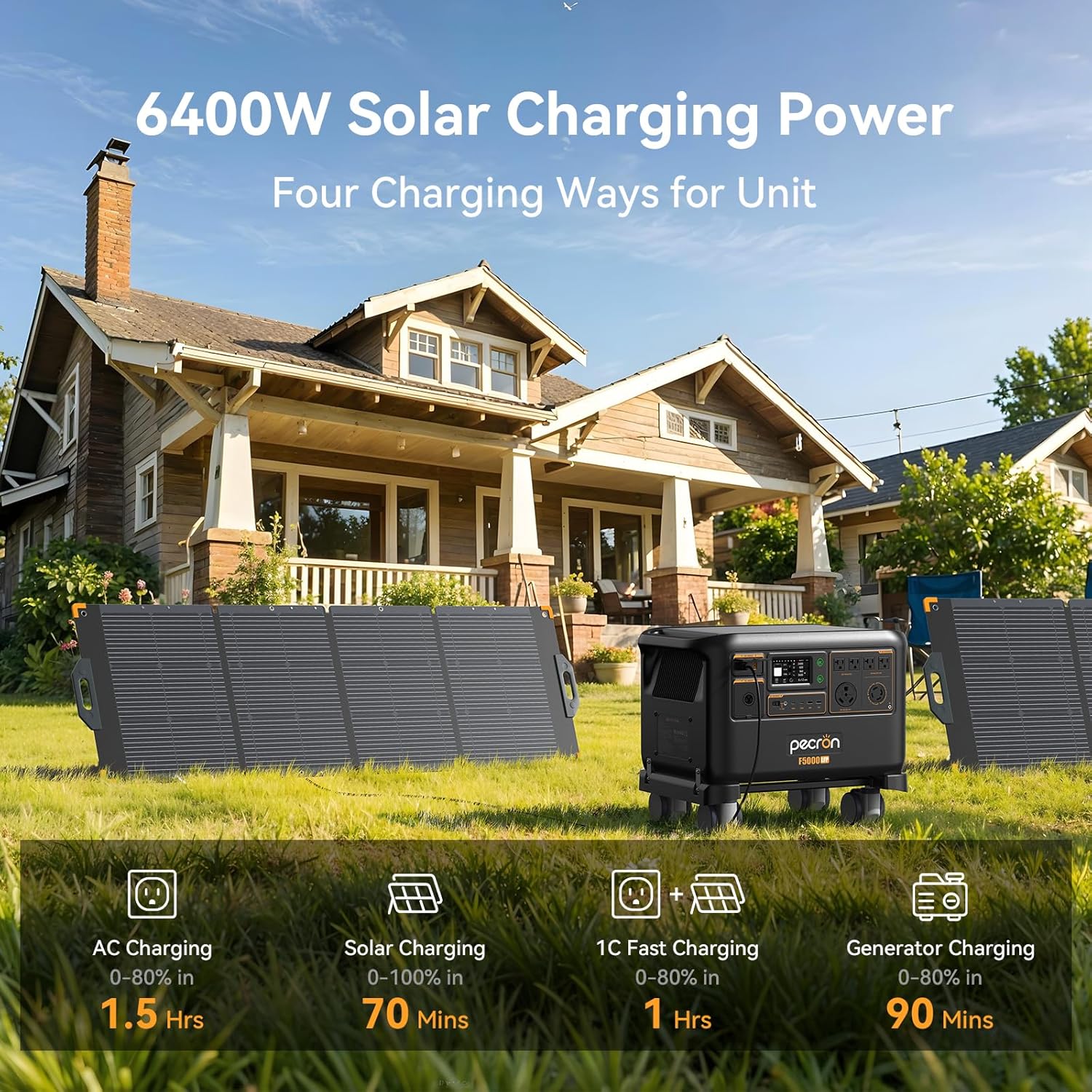
Image: The F5000LFP Power Station placed outdoors with two large solar panels, illustrating its 6400W solar charging capability and various charging methods including AC, solar, 1C fast charging, and generator charging.
8. การควบคุมแอปอัจฉริยะ
Download the PECRON smart app to unlock advanced control and monitoring features for your F5000LFP Power Station.
- การตรวจสอบตามเวลาจริง: View สถานะแบตเตอรี่, กำลังไฟเข้า/ออกtage และระยะเวลาการทำงานที่เหลืออยู่
- Customizable Charging: Set charging schedules to utilize off-peak electricity rates or prioritize solar charging to maximize clean energy use and reduce electricity bills.
- Automation Features: Create custom power usage plans, such as setting the unit to start charging when power drops below a certain percentage or adjusting AC charging speed based on battery level.
- การอัปเดตซอฟต์แวร์: Receive over-the-air (OTA) updates to enhance functionality and performance.
- Power Usage Statistics: Track historical power consumption and generation data.
- Equipment Records: Access detailed records of the unit's operation and events.
- Memory Output: The unit can automatically resume previous output settings after being restored.

Image: A user interacting with the PECRON smart app on a smartphone, demonstrating easy control and monitoring of the power station's functions, including battery condition, charging plans, and software updates.
9. การบำรุงรักษา
Regular maintenance ensures the longevity and optimal performance of your F5000LFP Power Station.
- การทำความสะอาด: Use a dry, soft cloth to clean the exterior of the unit. Do not use liquid cleaners or solvents.
- พื้นที่จัดเก็บ: When not in use for extended periods, store the power station in a dry, cool place, away from direct sunlight and extreme temperatures. It is recommended to charge the unit to 50-80% every 3-6 months to maintain battery health.
- สุขภาพแบตเตอรี่: The LiFePO4 battery is designed for over 4000 cycles to 80% capacity. Avoid consistently fully discharging the battery to prolong its lifespan.
- การระบายอากาศ : ตรวจสอบให้แน่ใจว่าช่องระบายอากาศไม่มีฝุ่นและเศษขยะเพื่อป้องกันความร้อนสูงเกินไป
10 การแก้ไขปัญหา
If you encounter issues with your F5000LFP Power Station, refer to the following common troubleshooting steps:
- หน่วยไม่เปิด:
- Ensure the battery is not completely depleted. Connect to an AC outlet for charging.
- Press and hold the main power button firmly for several seconds.
- ไม่มีเอาต์พุตจากพอร์ต:
- ตรวจสอบให้แน่ใจว่าได้เปิดใช้งานเอาต์พุตที่ต้องการ (AC, DC, USB) ผ่านปุ่มที่เกี่ยวข้องแล้ว
- Check if the connected device is within the power station's output limits. Overload protection may have been triggered.
- ตรวจสอบให้แน่ใจว่าสายเคเบิลเชื่อมต่ออย่างแน่นหนา
- ปัญหาการชาร์จ:
- For AC charging, ensure the cable is properly connected to a working wall outlet.
- For solar charging, verify solar panel connections, ensure panels are in direct sunlight, and check for any shading. Confirm solar input wattage บนจอแสดงผล
- Check for error messages on the display or in the smart app.
- เสียงหรือกลิ่นที่ผิดปกติ:
- Immediately turn off the unit and disconnect all power sources.
- Contact customer support. Do not attempt to operate the unit.
If the problem persists after following these steps, please contact PECRON customer support.
11. ข้อมูลจำเพาะ
| คุณสมบัติ | ข้อมูลจำเพาะ |
|---|---|
| ยี่ห้อ | เพครอน |
| ชื่อรุ่น | F5000LFP |
| ประเภทแบตเตอรี่ | ลิเธียมไอออนฟอสเฟต |
| ความจุของแบตเตอรี่ | 5120 วัตต์ชั่วโมง |
| AC เอาท์พุตวัตต์tage | 7200W (Running) |
| เล่มที่tage | โวลคู่ 120V/240Vtage |
| อินพุตพลังงานแสงอาทิตย์สูงสุด | 6400วัตต์ |
| วัตต์อินพุต ACtage | 3600วัตต์ |
| เอาท์พุต DC (รวม) | 1000วัตต์ |
| พอร์ตเอาท์พุต | 6 AC, 6 DC (including USB-A, USB-C, 5525, XT-60) |
| ฟังก์ชั่น UPS | 0ms Online UPS (20A, 30A) |
| ความสามารถในการขยาย | Up to 35.8kWh with FP5000-48V batteries |
| ระดับเสียง | 30dB (at 1500W or 1200W charging) |
| น้ำหนักสินค้า | 123.9 ปอนด์ |
| ขนาดสินค้า (กว้าง x ยาว x สูง) | 21.7" x 15" x 13.1" |
| คุณสมบัติพิเศษ | Overload Protection, Super Quiet, USB Port, Battery Heating |
12. การรับประกันและการสนับสนุน
12.1 ข้อมูลการรับประกัน
The PECRON F5000LFP Power Station comes with a 3+2 Year Warranty. Please retain your proof of purchase for warranty claims. For detailed terms and conditions, refer to the warranty card included with your product or visit the official PECRON webเว็บไซต์.
12.2 การสนับสนุนลูกค้า
For technical assistance, troubleshooting, or warranty inquiries, please contact PECRON Customer Support. Contact information can typically be found on the PECRON webไซต์หรือบนบรรจุภัณฑ์ผลิตภัณฑ์