
การแนะนำ
This manual provides detailed instructions for the operation and maintenance of your RadioShack Portable CD Player Boombox. Please read this manual thoroughly before using the device to ensure proper function and to maximize your listening experience. This boombox combines classic CD playback with modern connectivity options including Bluetooth, FM radio, USB, and AUX input.
มีอะไรอยู่ในกล่อง

Figure 1: Box Contents. This image displays the items included with your purchase: the boombox unit, AC power cord, remote control, and telescopic antenna.
- 1x RadioShack Portable CD Player Boombox Unit
- สายไฟ AC 1x
- 1x รีโมทคอนโทรล
- 1x Telescopic Antenna (pre-attached)
- 1x คู่มือผู้ใช้ (เอกสารนี้)
หมายเหตุ: ต้องใช้แบตเตอรี่ขนาด C จำนวน 4 ก้อนสำหรับการใช้งานแบบพกพา ซึ่งไม่ได้รวมอยู่ในชุด
สินค้าเกินview และคุณสมบัติ
The RadioShack Portable CD Player Boombox offers multiple audio playback options and user-friendly controls.

รูปที่ 2: คุณสมบัติหลัก This diagram highlights the boombox's main functionalities including Bluetooth 5.0, various CD formats, USB MP3 playback, FM radio, AUX input, and playback modes.
- การเล่นซีดี: Supports CD, CD-R, CD-RW, and CD-MP3 formats.
- การเชื่อมต่อบลูทูธ: สตรีมเสียงแบบไร้สายจากอุปกรณ์ที่รองรับ
- วิทยุ FM: Built-in tuner with telescopic antenna and 18 preset stations.
- การเล่น USB: เล่น MP3 fileโดยตรงจากไดรฟ์ USB
- อินพุต AUX: เชื่อมต่ออุปกรณ์เสียงภายนอกผ่านสายเคเบิลขนาด 3.5 มม.
- โหมดการเล่น: Includes random, repeat, and program play functions.
- รีโมทคอนโทรล: เพื่อการใช้งานที่สะดวกจากระยะไกล
การตั้งค่า
1. การเปิดเครื่อง

Figure 3: Power Options. The boombox can be powered by the included AC cord or by 4 C batteries for portable use.
Your boombox can be powered in two ways:
- ไฟฟ้ากระแสสลับ: Connect the included AC power cord to the AC input jack on the back of the boombox and then plug it into a standard wall outlet (110V-240V).
- พลังงานแบตเตอรี่: For portable use, open the battery compartment on the bottom of the unit and insert 4 "C" size batteries (not included), ensuring correct polarity (+/-). Close the compartment securely.
2. Antenna Setup (FM Radio)
เพื่อให้รับสัญญาณวิทยุ FM ได้ดีที่สุด โปรดกางเสาอากาศแบบยืดหดได้ที่อยู่ด้านหลังเครื่องออกจนสุด ปรับตำแหน่งเสาอากาศเพื่อให้ได้สัญญาณที่ดีที่สุด
คำแนะนำการใช้งาน
การควบคุมทั่วไป
- ปุ่มเพาเวอร์ (⏻): กดเพื่อเปิดหรือปิดเครื่อง
- ปุ่มปรับระดับเสียง: หมุนตามเข็มนาฬิกาเพื่อเพิ่มระดับเสียง หมุนทวนเข็มนาฬิกาเพื่อลดระดับเสียง
- ปุ่มฟังก์ชัน (FUNC): Press to cycle through playback modes: CD, Bluetooth, FM, USB, AUX.
- เล่น/หยุดชั่วคราว (⏸/⏸) ปุ่ม: เริ่มหรือหยุดเล่นชั่วคราว
- หยุด (⏹) ปุ่ม: หยุดการเล่น
- Skip/Search (⏮ / ⏭) ปุ่ม: Press briefly to skip tracks. Press and hold to search within a track.
การเล่นซีดี
- เปิดฝาช่องใส่ซีดี
- Place a CD (CD, CD-R, CD-RW, or CD-MP3) onto the spindle with the label side facing up.
- ปิดฝาช่องใส่ซีดีให้สนิท
- กดปุ่ม ฟังค์ชั่น กดปุ่มจนกว่าจะเลือกโหมด "CD"
- แผ่นซีดีจะเริ่มเล่นโดยอัตโนมัติ หากไม่เล่น ให้กดปุ่ม เล่น/หยุดชั่วคราว ปุ่ม.
จับคู่บลูทู ธ

Figure 4: Bluetooth Streaming. Easily stream audio from your smartphone or tablet to the boombox.
- กดปุ่ม ฟังค์ชั่น button until "BT" (Bluetooth) mode is selected. The display will show "BT" and flash, indicating it's in pairing mode.
- On your Bluetooth-enabled device (smartphone, tablet), go to its Bluetooth settings and search for available devices.
- Select "RadioShack Boombox" from the list.
- เมื่อจับคู่เสร็จแล้ว ไฟแสดงสถานะ "BT" บนหน้าจอแสดงผลของลำโพงจะหยุดกะพริบและติดสว่างค้างอยู่
- You can now play audio from your device through the boombox.
การทำงานของวิทยุ FM

Figure 5: FM Presets and Programmed Playback. Use the SCAN button to automatically save FM stations and REP/PROG for custom playback sequences.
- กดปุ่ม ฟังค์ชั่น กดปุ่มจนกว่าจะเลือกโหมด "FM"
- Auto Scan and Save Presets: กดปุ่มค้างไว้ สแกน button (often combined with Play/Pause). The radio will automatically scan for and save up to 18 available FM stations.
- การปรับด้วยตนเอง: กดปุ่มสั้นๆ ข้าม/ค้นหา ปุ่ม (⏮ / ⏭) to fine-tune the frequency.
- การเลือกค่าที่ตั้งไว้ล่วงหน้า: กดปุ่มสั้นๆ โปรเจกต์ button (often combined with Repeat) to cycle through saved preset stations.
การเล่นผ่าน USB
- ใส่แฟลชไดรฟ์ USB ที่มี MP3 fileลงในพอร์ต USB
- กดปุ่ม ฟังค์ชั่น กดปุ่มจนกว่าจะเลือกโหมด "USB"
- The boombox will automatically detect and begin playing MP3 fileจากไดรฟ์ USB
- ใช้ เล่น/หยุดชั่วคราว, หยุด, และ ข้าม/ค้นหา ปุ่มเพื่อควบคุมการเล่น
อินพุต AUX
- ต่อปลายด้านหนึ่งของสายสัญญาณเสียงขนาด 3.5 มม. (ไม่ได้รวมอยู่ในชุด) เข้ากับช่องเสียบ AUX IN บนเครื่องเล่นเพลงพกพา
- ต่อปลายอีกด้านของสายเคเบิลเข้ากับแจ็คหูฟังหรือช่องสัญญาณเสียงออกของอุปกรณ์เสียงภายนอกของคุณ (เช่น เครื่องเล่น MP3, สมาร์ทโฟน)
- กดปุ่ม ฟังค์ชั่น กดปุ่มจนกว่าจะเลือกโหมด "AUX"
- ควบคุมการเล่นและระดับเสียงจากอุปกรณ์เสียงภายนอกของคุณ
การใช้งานรีโมทคอนโทรล
The included remote control allows for convenient operation of most functions from a distance. Ensure the remote has working batteries (typically 2x AAA, not included) and point it towards the front of the boombox.
- พลัง: เปิด/ปิดเครื่อง
- ฟังก์: Select input mode (CD, BT, FM, USB, AUX).
- ระดับเสียง +/-: ปรับระดับเสียง
- Play/Pause, Stop, Skip/Search: ควบคุมการเล่น
- REP/PROG: Access repeat and program functions.
- สแกน: Auto-scan FM stations.
- EQ/SLEEP: Adjust equalizer settings or set sleep timer (refer to specific remote markings for details).
Playback Modes (CD/USB)
- ทำซ้ำ (REP): กดปุ่ม ผู้แทน button (on unit or remote) to cycle through repeat modes:
- Repeat One: Repeats the current track.
- Repeat All: Repeats all tracks on the CD/USB.
- Repeat Folder (for MP3 CDs/USB): Repeats all tracks in the current folder.
- โปรแกรม (PROG): Allows you to program a specific order of tracks for CD or USB playback.
- In CD or USB mode, with playback stopped, press the โปรเจกต์ ปุ่ม.
- ใช้ ข้าม/ค้นหา buttons to select your desired track.
- กด โปรเจกต์ อีกครั้งเพื่อยืนยันและเพิ่มเพลงลงในรายการโปรแกรม
- Repeat steps 2-3 to add more tracks.
- กด เล่น/หยุดชั่วคราว เพื่อเริ่มการเล่นตามโปรแกรม
- Random/Shuffle: Some models may have a dedicated shuffle button (often labeled "RDM" or "SHUF") or it may be part of the REP/PROG cycle. This plays tracks in a random order.
การซ่อมบำรุง
- การทำความสะอาด: Use a soft, dry cloth to clean the exterior of the boombox. Do not use abrasive cleaners or solvents. For the CD lens, use a specialized CD lens cleaner disc.
- พื้นที่จัดเก็บ: เมื่อไม่ได้ใช้งานเป็นเวลานาน ควรถอดแบตเตอรี่ออกเพื่อป้องกันการรั่วไหล เก็บอุปกรณ์ไว้ในที่แห้งและเย็น หลีกเลี่ยงแสงแดดโดยตรงและอุณหภูมิที่สูงหรือต่ำเกินไป
- การเปลี่ยนแบตเตอรี่: Replace all 4 "C" batteries simultaneously when they are depleted. Do not mix old and new batteries or different types of batteries.
- การดูแลรักษาซีดี: จับแผ่นซีดีที่ขอบ รักษาความสะอาดและป้องกันรอยขีดข่วน เก็บไว้ในกล่องเมื่อไม่ใช้งาน
การแก้ไขปัญหา
| ปัญหา | สาเหตุที่เป็นไปได้ | สารละลาย |
|---|---|---|
| ไม่มีไฟฟ้า | สายไฟ AC ไม่ได้เชื่อมต่อ; แบตเตอรี่หมดหรือใส่ไม่ถูกต้อง | Ensure AC cord is securely plugged in. Replace batteries with new ones, checking polarity. |
| ไม่มีเสียง | Volume too low; Incorrect input mode; Headphones connected. | Increase volume. Press FUNC to select correct mode. Disconnect headphones. |
| แผ่นซีดีสะดุดหรือเล่นไม่ได้ | แผ่นซีดีสกปรกหรือมีรอยขีดข่วน; ใส่แผ่นซีดีไม่ถูกต้อง; ช่องใส่แผ่นซีดีปิดไม่สนิท | Clean CD. Reinsert CD correctly. Close lid firmly. Try another CD. |
| บลูทูธไม่จับคู่ | Boombox not in BT mode; Device too far; Device already paired to another unit. | Ensure boombox is in BT mode and flashing. Move device closer. Disconnect from other devices. |
| การรับสัญญาณ FM ไม่ดี | เสาอากาศไม่ได้ยืดออกหรืออยู่ในตำแหน่งที่ถูกต้อง; บริเวณที่มีสัญญาณอ่อน | ยืดและปรับเสาอากาศแบบยืดหดได้จนสุด ลองย้ายเครื่องไปยังตำแหน่งอื่นดู |
| USB ไม่เล่น | เสียบ USB ไดรฟ์ไม่ถูกต้อง; Files not MP3 format; USB drive corrupted. | เสียบไดรฟ์ USB กลับเข้าไปใหม่ ตรวจสอบให้แน่ใจ fileไฟล์เป็น MP3 ลองใช้แฟลชไดรฟ์ USB อื่นดู |
ข้อมูลจำเพาะ
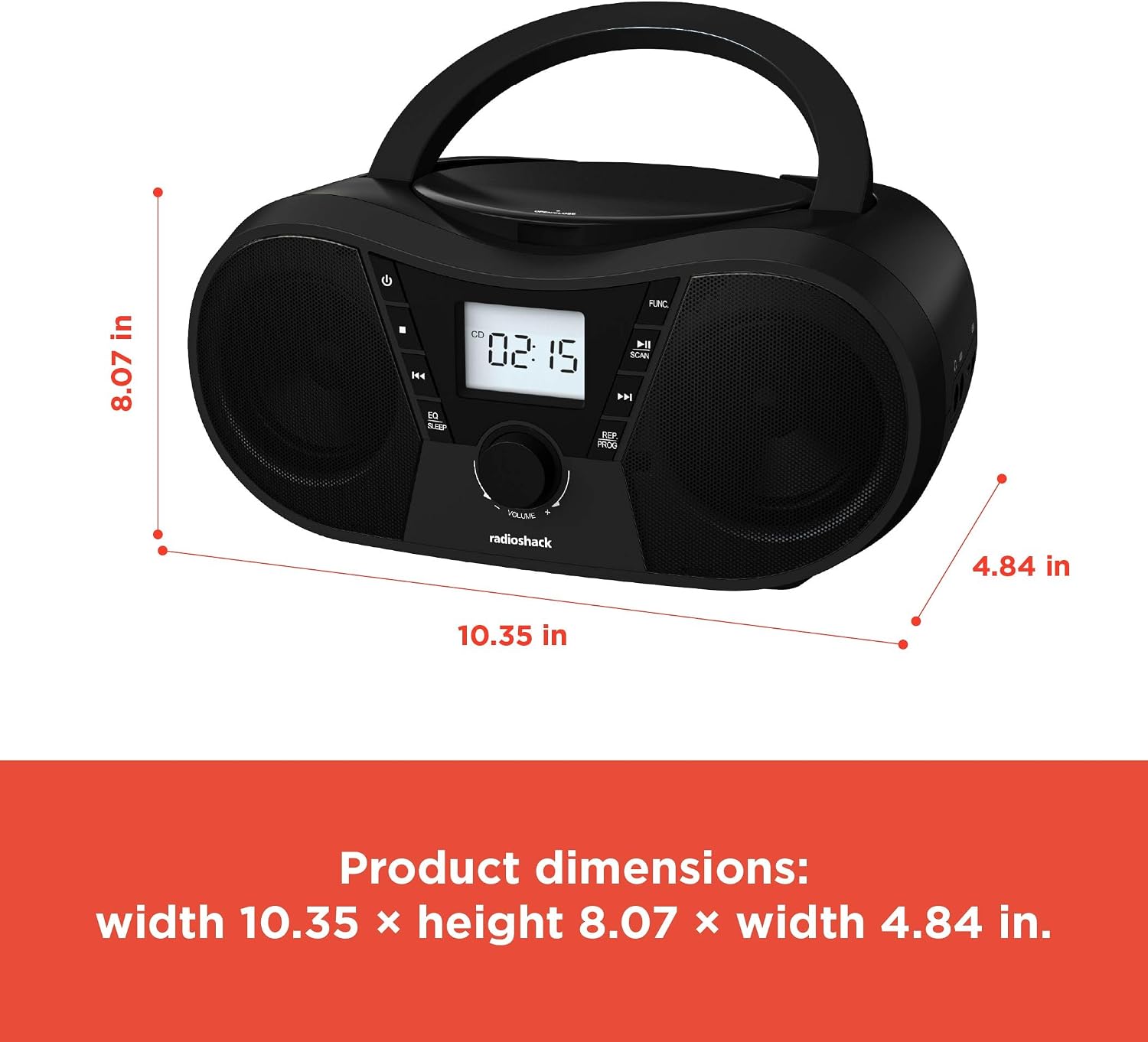
รูปที่ 6: ขนาดผลิตภัณฑ์ The boombox measures approximately 10.35 inches wide, 8.07 inches high, and 4.84 inches deep.
| คุณสมบัติ | รายละเอียด |
|---|---|
| หมายเลขรุ่น | 1402010 |
| แหล่งพลังงาน | AC 110V-240V ~ 50/60Hz or 4 x "C" Batteries (DC 6V) |
| สื่อที่รองรับ | CD, CD-R, CD-RW, CD-MP3, USB (MP3), Bluetooth, FM Radio, AUX Input |
| เวอร์ชันบลูทูธ | 5.0 (ใช้งานร่วมกันได้) |
| ช่วงความถี่ FM | 87.5 - 108 เมกะเฮิรตซ์ |
| โหมดเอาต์พุตเสียง | สเตอริโอ |
| จำนวนของลำโพง | 2 (Built-in Stereo Speakers) |
| วัดtage | 10 วัตต์ |
| การตอบสนองความถี่ | 20 เฮิรตซ์ - 20000 เฮิรตซ์ |
| ขนาด (กว้าง x สูง x ลึก) | ประมาณ 10.35 x 8.07 x 4.84 นิ้ว |
| สี | สีดำ |
การรับประกันและการสนับสนุน
This RadioShack Portable CD Player Boombox (Model 1402010) comes with a รับประกันจำกัด 1 ปี นับจากวันที่ซื้อ การรับประกันนี้ครอบคลุมถึงข้อบกพร่องในการผลิตวัสดุและฝีมือการผลิตภายใต้การใช้งานปกติ
For warranty claims, technical support, or customer service inquiries, please contact RadioShack customer support through their official webไซต์หรือข้อมูลการติดต่อที่ให้มาพร้อมกับเอกสารการซื้อของคุณ
โปรดเก็บหลักฐานการซื้อไว้เพื่อวัตถุประสงค์การรับประกัน