
1. บทนำ
ขอบคุณสำหรับการซื้อasing the PHILIPS SPK7858 Wireless Ergonomic Mouse. This manual provides detailed instructions for setup, operation, and maintenance to ensure optimal performance and longevity of your device. Please read this manual thoroughly before use.

Image: The PHILIPS SPK7858 Wireless Ergonomic Mouse, showcasing การออกแบบที่เพรียวบาง
2. เนื้อหาบรรจุภัณฑ์
- PHILIPS SPK7858 Wireless Ergonomic Mouse
- ตัวรับสัญญาณ USB-A
- ตัวรับสัญญาณ USB-C
- สายชาร์จ USB-C
- คู่มือการใช้งาน
3. สินค้าหมดview
Familiarize yourself with the various buttons and components of your mouse:

Image: Diagram illustrating the 7 buttons and 3D scroll wheel on the PHILIPS SPK7858 mouse.
- ปุ่มคลิกขวา
- ปุ่มคลิกซ้าย
- Scroll Wheel (3D Wheel): For vertical scrolling and middle-click function.
- ปุ่ม DPI: Adjusts sensitivity (800-4000 DPI).
- ล้อเลื่อนด้านข้าง: For horizontal scrolling.
- ปุ่มย้อนกลับ: Navigates back in web เบราว์เซอร์หรือ file นักสำรวจ
- ปุ่มเดินหน้า: Navigates forward in web เบราว์เซอร์หรือ file นักสำรวจ
- Device Switch Button (Bottom): Switches between connected devices (up to 3).
4. Connectivity & Setup
The PHILIPS SPK7858 mouse supports three connection methods: 2.4GHz USB-A, 2.4GHz USB-C, and Bluetooth 5.0.

Image: Visual representation of the three connection options: USB-A, USB-C, and Bluetooth 5.0.
4.1. 2.4GHz Wireless Connection (USB-A or USB-C Receiver)
- Insert the desired USB receiver (USB-A or USB-C) into an available port on your computer.
- เปิดเมาส์โดยใช้สวิตช์เปิด/ปิดที่อยู่ด้านล่าง
- เมาส์ควรเชื่อมต่อกับคอมพิวเตอร์ของคุณโดยอัตโนมัติ
4.2. การเชื่อมต่อบลูทูธ 5.0
- เปิดเมาส์โดยใช้สวิตช์เปิด/ปิดที่อยู่ด้านล่าง
- Press and hold the device switch button on the bottom of the mouse until the indicator light starts blinking, indicating pairing mode.
- On your computer or device, go to Bluetooth settings and search for "PHILIPS SPK7858".
- Select the mouse to pair. Once connected, the indicator light will stop blinking.
4.3 การสลับระหว่างอุปกรณ์
The mouse can be paired with up to 3 devices (2 via 2.4GHz receivers, 1 via Bluetooth). Use the device switch button on the bottom of the mouse to cycle through connected devices.
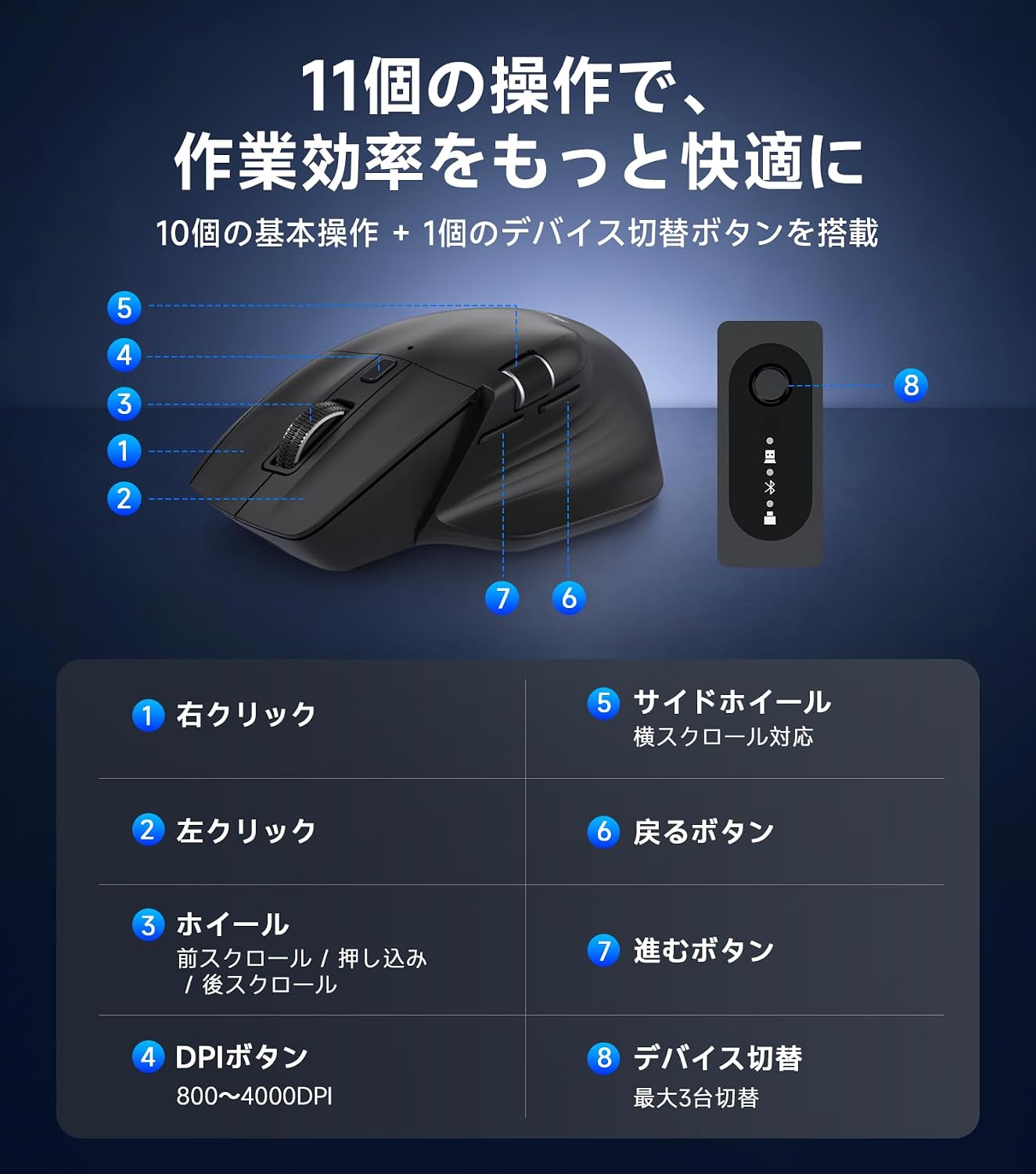
Image: The PHILIPS SPK7858 mouse connected to and controlling four different devices, demonstrating cross-screen functionality.
5. คู่มือการใช้งาน
5.1. การปรับ DPI
The mouse features 5-stage DPI adjustment (800/1600/2400/3200/4000 DPI) to suit various tasks. Press the DPI button (4) to cycle through the sensitivity settings. A lower DPI is suitable for precise work like graphic design, while a higher DPI is ideal for faster cursor movement across large screens.

Image: Graphic showing the 5 DPI settings (800-4000) and the DPI switch button on the mouse.
5.2. การเลื่อนแนวนอน
Utilize the side scroll wheel (5) for efficient horizontal navigation, especially useful for wide spreadsheets, timelines, or web หน้า

Image: Illustration demonstrating the use of the side scroll wheel for horizontal navigation in applications like Excel.
5.3. คุณสมบัติการคลิกเงียบ
The left and right click buttons are designed with silent switches, reducing click noise for a quiet working environment. This is beneficial in offices, libraries, cafes, or during late-night work.

Image: A hand operating the mouse with a visual indicator of reduced click sound, suitable for quiet environments.
6. การชาร์จและการจัดการพลังงาน
6.1. การชาร์จเมาส์
The mouse is equipped with a built-in 500mAh rechargeable battery. Connect the included USB-C charging cable to the mouse's USB-C port and to a power source (e.g., computer USB port, USB wall adapter). The indicator light will show charging status.

Image: The PHILIPS SPK7858 mouse connected via USB-C cable for charging, highlighting the 500mAh battery and 100-hour usage.
6.2. ฟังก์ชันปิดเครื่องอัตโนมัติ
To conserve power, the mouse will automatically enter sleep mode after a period of inactivity. Move the mouse or click any button to wake it up. After approximately 30 minutes of inactivity, it enters a deep sleep state for more efficient power saving.
7. การออกแบบตามหลักสรีรศาสตร์
The SPK7858 mouse features an ergonomic design specifically for right-handed users, providing a comfortable grip that supports the palm and reduces wrist strain during extended use. Its lightweight design (approx. 93g) ensures smooth and effortless operation.

ภาพ: รายละเอียด view of the ergonomic design, showing the natural tilt, thumb rest curve, and streamlined shape for comfortable hand fit.
8. การบำรุงรักษา
- การทำความสะอาด: Use a soft, dry cloth to clean the mouse. For stubborn dirt, slightly dampชุบผ้าด้วยน้ำหรือน้ำยาทำความสะอาดอ่อนๆ หลีกเลี่ยงสารเคมีรุนแรง
- พื้นที่จัดเก็บ:เก็บเมาส์ไว้ในที่แห้งและเย็น หลีกเลี่ยงแสงแดดโดยตรงและอุณหภูมิที่สูงหรือต่ำเกินไป
- การดูแลแบตเตอรี่: To prolong battery life, avoid fully discharging the mouse frequently. Charge it when the battery low indicator appears.
9 การแก้ไขปัญหา
| ปัญหา | สารละลาย |
|---|---|
| เมาส์ไม่ตอบสนอง | Ensure the mouse is powered on. Check battery level and charge if necessary. For 2.4GHz connection, ensure the receiver is properly inserted and try a different USB port. For Bluetooth, ensure it's paired correctly and try re-pairing. |
| การเคลื่อนไหวของเคอร์เซอร์ไม่แน่นอน | Clean the optical sensor on the bottom of the mouse. Ensure you are using the mouse on a suitable surface (avoid reflective or transparent surfaces). Adjust DPI settings. |
| ไม่สามารถเชื่อมต่อผ่านบลูทูธได้ | Ensure your device's Bluetooth is enabled. Put the mouse into pairing mode (blinking indicator). Remove previous pairings of the mouse from your device and try connecting again. |
| Side scroll wheel not working | Ensure the application you are using supports horizontal scrolling. Some applications may require specific settings or may not support this feature. |
10. ข้อมูลจำเพาะ

Image: A table summarizing the key specifications of the PHILIPS SPK7858 mouse.
| คุณสมบัติ | รายละเอียด |
|---|---|
| แบบอย่าง | SPK7858 |
| การเชื่อมต่อ | 2.4GHz USB-A, 2.4GHz USB-C, Bluetooth 5.0 |
| การตั้งค่า DPI | 800/1600/2400/3200/4000 |
| ปุ่ม | 7 Buttons + 3D Scroll Wheel + Side Scroll Wheel |
| แบตเตอรี่ | 500mAh Rechargeable (3.7V) |
| อายุการใช้งานแบตเตอรี่ | สูงสุด 100 ชั่วโมง (ใช้งานต่อเนื่อง) |
| พอร์ตชาร์จ | ยูเอสบี-ซี |
| เซ็นเซอร์ | ออปติคัลเซนเซอร์ PixArt 3215 |
| ระบบปฏิบัติการที่รองรับ | Windows 7/8/10/11, Mac OS X 10.5 and later |
| น้ำหนัก | ประมาณ 93กรัม |
| ขนาด | ประมาณ 123.0 x 82.7 x 44.8 มม. |

Image: Diagram showing the dimensions of the PHILIPS SPK7858 mouse and its included accessories (USB-A and USB-C receivers).
11. การรับประกันและการสนับสนุน
ผลิตภัณฑ์นี้มาพร้อมกับ การรับประกันจากผู้ผลิต 1 ปี from the date of purchase. In the unlikely event of a product defect, repair or replacement will be provided free of charge.
For customer support, please contact us through your Amazon account:
- ไปที่ "คำสั่งซื้อของคุณ"
- Find the relevant order for this product.
- คลิก "ติดต่อผู้ขาย"
Our Japanese customer support team is available to assist you promptly and courteously.
ชั่วโมงการสนับสนุน: 10:00 - 19:00 (Excluding weekends and manufacturer holidays)
*Please note that damage caused by human error, disasters, or other force majeure events is not covered under warranty.