
1. บทนำ
The AOPUTTRIVER AP-5000Y is a versatile hot wire anemometer designed for accurate measurement of wind speed, airflow (CFM/CMM), and temperature. Its retractable, 360° revolving probe allows for precise measurements in various environments, including tight spaces like HVAC ducts. This manual provides essential information for the proper setup, operation, maintenance, and troubleshooting of your device.
2. อะไรอยู่ในกล่อง
- AP-5000Y Hot Wire Anemometer Unit
- กระเป๋าผ้าแคนวาส
- คู่มือการใช้งาน
- สายดาต้า (Type-C)

Image: Contents of the AP-5000Y package, showing the anemometer, canvas bag, instruction manual, and Type-C data cable.
3. การตั้งค่า
Before initial use, it is crucial to connect the internal battery and fully charge the device.
- เชื่อมต่อแบตเตอรี่:
Locate the battery compartment on the back of the device. Use a small screwdriver to remove the battery cover. Connect the battery line interface to the corresponding port inside the compartment. Ensure a secure connection.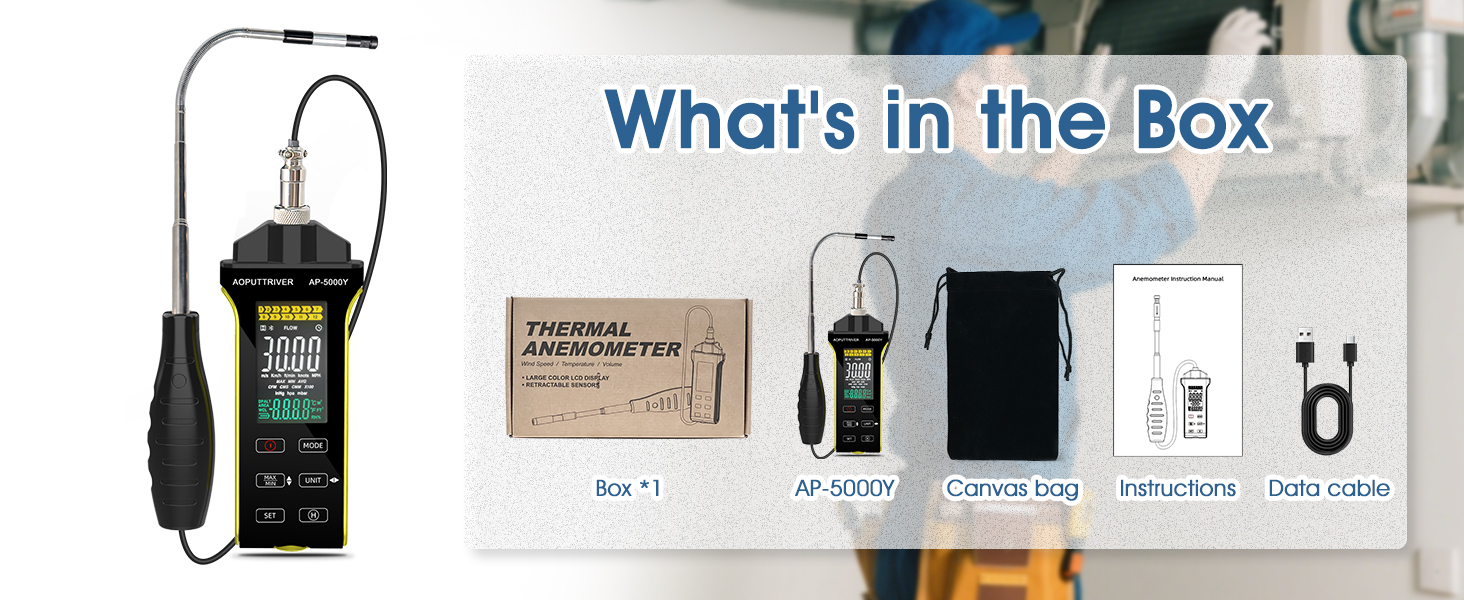
Image: Detailed steps for connecting the internal battery. This involves removing the battery cover with a screwdriver, connecting the battery cable, and then securing the cover.
- ยึดฝาครอบแบตเตอรี่:
Once the battery is connected, carefully place the battery back into its compartment and tighten the cover using the screwdriver. - ชาร์จอุปกรณ์:
Connect the provided Type-C data cable to the anemometer and a suitable USB power source. The device is powered by a 600mAh lithium-ion battery. The battery icon on the LCD will indicate charging status. Charge until the battery icon shows a full charge. Note: The device cannot be turned on while it is charging.
4. คู่มือการใช้งาน
4.1 อุปกรณ์เกินview และการควบคุม
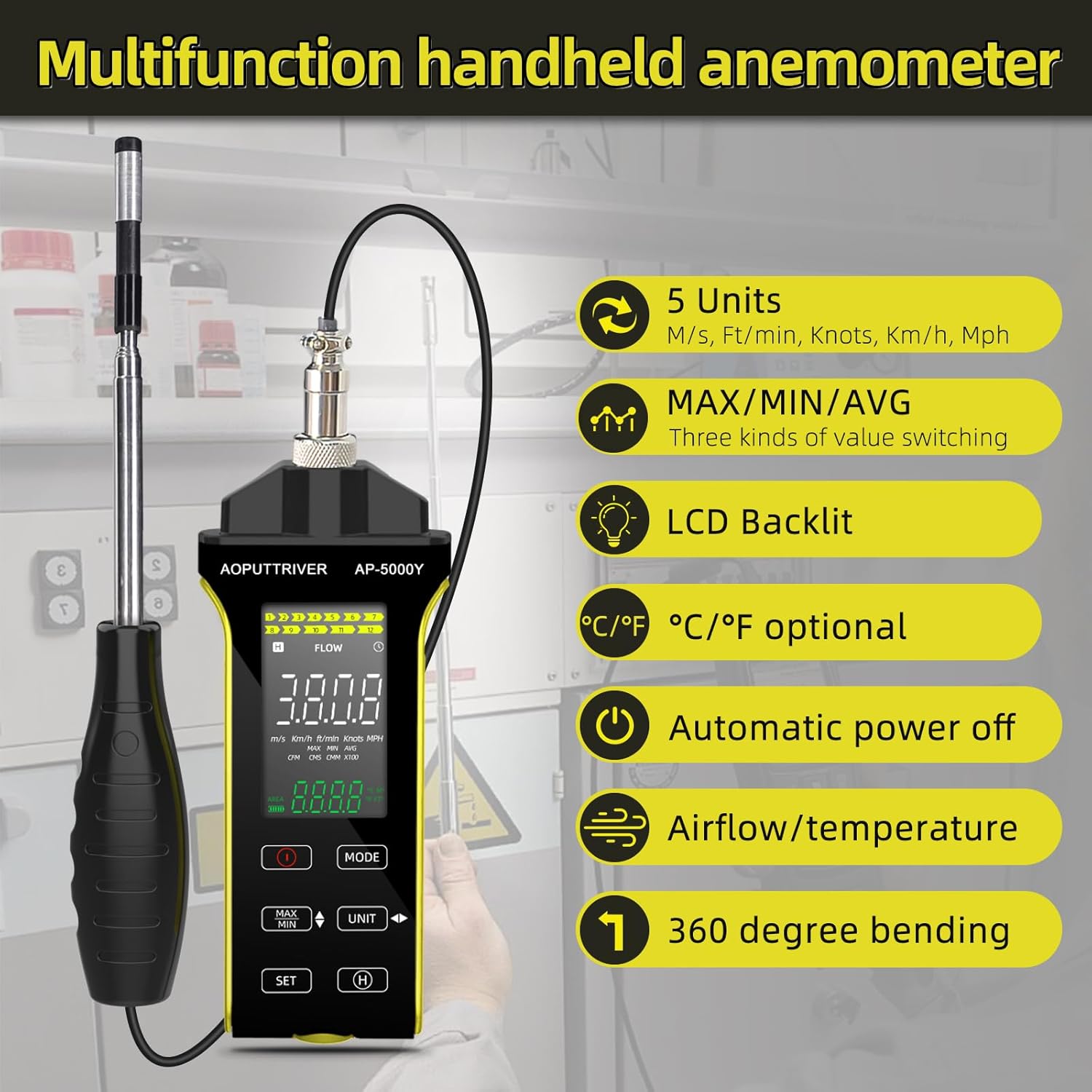
Image: Labeled diagram of the AP-5000Y anemometer, highlighting the LCD screen, power button, mode selection, unit selection, data retention, and the retractable sensor probe with its protective cover.
- ปุ่มเปิด/ปิด: กดเพื่อเปิดหรือปิดอุปกรณ์
- ปุ่มโหมด: Cycles through different measurement functions (Air Speed, Air Volume, Temperature).
- ปุ่ม UNIT: Changes the measurement units for the selected function (e.g., m/s, km/h, ft/min, knots, mph for wind speed; CFM/CMM for airflow; °C/°F for temperature).
- MAX/MIN/AVG Button: Toggles between maximum, minimum, and average values recorded during a measurement session.
- ปุ่ม ตลท.: Used for data retention (data hold) and other settings.
- จอแสดงผล LCD: Shows real-time measurements, units, battery status, and other indicators. Features a backlight for visibility in low-light conditions.
4.2 การวัด
- เปิดเครื่อง: Press the On/Off button to turn on the anemometer. The LCD display will illuminate.
- เลือกโหมด: กดปุ่ม โหมด button to choose between wind speed, airflow, or temperature measurement.
- เลือกหน่วย: กดปุ่ม หน่วย button to select your desired measurement units.
- เตรียมหัววัด: Gently pull out the retractable probe to the desired length. Remove the sensor protective cover. The probe can be rotated and twisted 360 degrees for optimal positioning in various spaces.

Image: A user demonstrating the use of the AP-5000Y anemometer with its flexible, retractable probe extended and bent to measure airflow inside a ventilation duct.
- จัดวางหัววัด: Place the sensor end of the probe directly into the airflow or area you wish to measure. Ensure the sensor is fully exposed to the flow for accurate readings.
- อ่านการวัด: Observe the real-time values on the LCD display. You can press the สูงสุด / นาที / เฉลี่ย ปุ่มที่จะ view the maximum, minimum, or average readings during your measurement session.
- การเก็บข้อมูล: กดปุ่ม ชุด ปุ่มนี้ใช้สำหรับหยุดการแสดงค่าปัจจุบันบนหน้าจอ กดอีกครั้งเพื่อปล่อย
- หมดแรง: After use, retract the probe and replace the sensor protective cover. Press the On/Off button to turn off the device. The anemometer also features an automatic power-off function to conserve battery.
4.3 LCD Display with Backlight
The LCD display provides clear readings of wind speed, airflow, temperature, and humidity. It is equipped with a backlight for enhanced visibility in various lighting conditions. To activate or deactivate the backlight, refer to the specific instructions in the full user manual if not controlled automatically.

Image: A comparison showing the AP-5000Y's LCD display in both a well-lit room and a dark environment, demonstrating the clarity provided by its backlight feature.
5. การบำรุงรักษา
- การทำความสะอาด: Wipe the device and probe with a soft, dry cloth. Do not use abrasive cleaners or solvents. The probe is waterproof and dustproof, but avoid submerging the main unit in liquids.
- การดูแลเซ็นเซอร์: Always replace the sensor protective cover when the probe is not in use to prevent damage to the delicate hot wire sensor.
- การดูแลแบตเตอรี่ Recharge the lithium-ion battery when the low battery indicator appears on the display. For long-term storage, ensure the battery is partially charged (around 50%) and store the device in a cool, dry place.
- พื้นที่จัดเก็บ: Store the anemometer in its canvas bag to protect it from dust and physical damage.
6 การแก้ไขปัญหา
| ปัญหา | สาเหตุที่เป็นไปได้ | สารละลาย |
|---|---|---|
| เปิดเครื่องไม่ติด | แบตเตอรี่ไม่ได้เชื่อมต่อหรือหมดไฟ | Ensure the internal battery is properly connected (refer to Setup section). Charge the device using the Type-C cable. |
| การอ่านที่ไม่ถูกต้อง | Incorrect probe placement, wrong unit selected, sensor obstruction | Ensure the probe's hot wire sensor is fully exposed to the airflow. Verify that the correct measurement mode and units are selected. Clean the sensor if necessary. |
| จอแสดงผลว่างเปล่าหรือมืด | Low battery, backlight off | Recharge the battery. Check if the backlight needs to be manually activated (refer to Operating Instructions). |
| อุปกรณ์ไม่ชาร์จ | Cable issue, power source issue | ตรวจสอบให้แน่ใจว่าเสียบสาย Type-C แน่นดีแล้ว ลองใช้ตัวแปลงไฟ USB หรือพอร์ตอื่นดู |
7. ข้อมูลจำเพาะ
| คุณสมบัติ | ข้อมูลจำเพาะ |
|---|---|
| ช่วงความเร็วลม | 0.1 ~ 30 ม |
| Air Velocity Units | m/s, km/h, ft/min, knots, mph |
| ช่วงอุณหภูมิของอากาศ | 0 ~ 45 ° C (32 ~ 113 ° F) |
| Air Volume Range | 0 ~ 999900 m³/min (CFM/CMM) |
| ขนาดโพรบ | 298.5 x 40.84 x 23.7 mm (retractable) |
| แบตเตอรี่ | ลิเธียมไอออน 600mAh |
| อินเตอร์เฟซการชาร์จ | ประเภทซี |
| ขนาด (ยูนิตหลัก) | 5.74 x 2.36 x 1.1 นิ้ว |
| น้ำหนัก | 237 กรัม |
| วัสดุ | พลาสติก |
| แสดง | LCD พร้อม Backlight |
| คุณสมบัติพิเศษ | Retractable 360° revolving probe, MAX/MIN/AVG, Data Hold, Auto Power-Off, Waterproof & Dustproof Probe |
8. การรับประกันและการสนับสนุน
For specific warranty information regarding your AOPUTTRIVER AP-5000Y Hot Wire Anemometer, please refer to the documentation included with your purchase or contact the seller directly. Warranty terms may vary based on region and retailer.
Should you encounter any issues or require technical assistance, please contact AOPUTTRIVER customer support through their official website or the retailer from whom you purchased the product. Please have your model number (AP-5000Y) and purchase details ready when contacting support.