
การแนะนำ
Welcome to the VIBOX PC Gamer VTX-8 instruction manual. This guide provides essential information for setting up, operating, maintaining, and troubleshooting your new gaming computer. Please read this manual carefully to ensure optimal performance and longevity of your system.
The VIBOX VTX-8 is a high-performance gaming PC equipped with an AMD Ryzen 5 5500 processor, Nvidia RTX 5060 graphics card, 16GB of RAM, and a 1TB SSD, running on Windows 11 Home. It is designed to deliver an immersive gaming experience and handle demanding tasks with ease.

Image: The VIBOX PC Gamer VTX-8 desktop computer, showcasing its sleek white chassis and internal components.
การตั้งค่า
1. การแกะกล่องและการวางตำแหน่งเริ่มต้น
Carefully remove your VIBOX PC Gamer from its packaging. Ensure all accessories, including the power cable, USB Wi-Fi 6 AX900 and Bluetooth 5.4 adapter, and any included RGB lighting components, are present. Place the PC on a stable, flat surface with adequate ventilation around the chassis.
2. การเชื่อมต่ออุปกรณ์ต่อพ่วง
Connect your monitor(s) to the graphics card's HDMI or DisplayPort outputs. Connect your keyboard and mouse to the available USB ports. Plug in any other peripherals such as a headset or external storage devices.
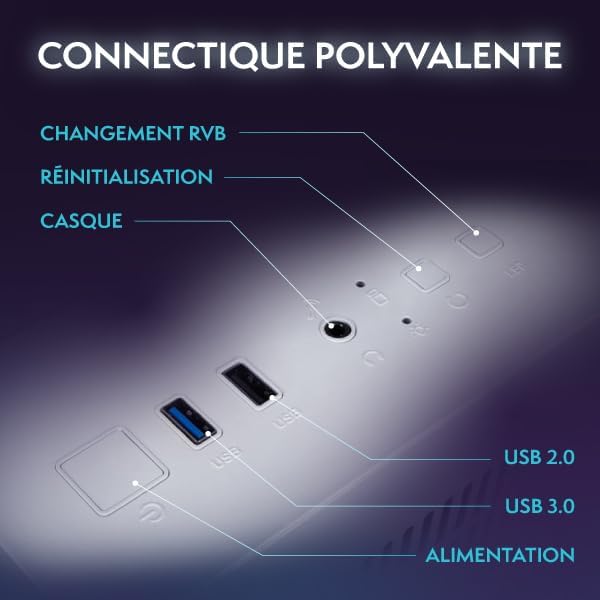
ภาพ: ภาพระยะใกล้ view of the versatile connectivity ports on the VIBOX PC Gamer, including USB 2.0, USB 3.0, headset jack, reset button, and RGB change button.
3. การเชื่อมต่อไฟฟ้า
Connect the power cable to the PC's power supply unit (PSU) and then to a wall outlet. Ensure the power switch on the PSU (if present) is in the 'ON' position.
4. First Boot and Windows 11 Setup
Press the power button on the front of the PC. The system will boot up, and you will be guided through the initial setup process for Windows 11 Home. Follow the on-screen instructions to configure your language, region, network, and user account.
การใช้งานพีซีของคุณ
1. เปิด/ปิดเครื่องและรีสตาร์ท
- เปิดเครื่อง: กดปุ่มเปิด/ปิดหนึ่งครั้ง
- ปิดระบบ: คลิกปุ่มเริ่ม จากนั้นคลิกเปิด/ปิดเครื่อง > ปิดเครื่อง
- เริ่มต้นใหม่อีกครั้ง: คลิกปุ่มเริ่ม จากนั้นคลิกเปิด/ปิดเครื่อง > เริ่มระบบใหม่
2. Windows 11 Home Features
Your VIBOX PC Gamer comes pre-installed with Windows 11 Home, optimized for gaming. Key features include:
- ไดเรกต์สตอเรจ: Enables faster game load times.
- AutoHDR: Automatically enhances game graphics for compatible displays.
- Xbox Game Pass Integration: Seamless access to a library of games.
- Optimized CPU Performance: Enhanced performance for gaming and multitasking.

Image: An illustration highlighting the gaming-centric features of Windows 11 Home, including faster load times, AutoHDR, Xbox Game Pass integration, and optimized CPU performance.
3. การเชื่อมต่อเครือข่าย
Your PC includes a USB Wi-Fi 6 AX900 and Bluetooth 5.4 adapter for wireless connectivity. To connect to Wi-Fi, click the network icon in the taskbar, select your network, and enter the password. For Bluetooth devices, go to Settings > Bluetooth & devices to pair.
4. Gaming and Multimedia
The VIBOX VTX-8 is designed for gaming, photo editing, and video editing. Utilize the powerful Nvidia RTX 5060 graphics card and AMD Ryzen 5 5500 processor for demanding applications.
การซ่อมบำรุง
1. การทำความสะอาด
Regularly clean the exterior of your PC with a soft, dry cloth. For internal components, use compressed air to remove dust from fans and heatsinks. Ensure the PC is powered off and unplugged before cleaning. Pay attention to the air intake and exhaust vents to maintain optimal airflow.
2. การอัปเดตซอฟต์แวร์
Keep your Windows operating system and graphics drivers updated. Windows updates can be managed via Settings > Windows Update. Graphics drivers can be downloaded from the official NVIDIA webเว็บไซต์.
3. การไหลเวียนของอากาศและการระบายความร้อน
The VTX-8 features an inverted airflow design and Hex RGB Infinity 120mm fans for efficient cooling. Ensure that the PC's vents are not obstructed to allow proper air circulation. Good airflow is crucial for maintaining system stability and performance, especially during intensive gaming sessions.
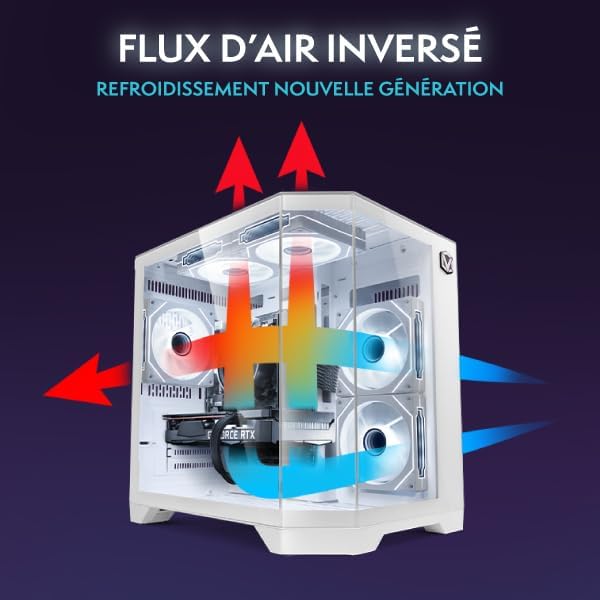
Image: A diagram illustrating the inverted airflow design of the VIBOX PC Gamer, showing how air is drawn in and expelled for next-generation cooling efficiency.

Image: A display of the Hex RGB Infinity 120mm fans, highlighting their customizable multiple colors and RGB modes for personalizing your setup.
การแก้ไขปัญหา
This section addresses common issues you might encounter with your VIBOX PC Gamer.
ไม่มีไฟฟ้า
- ตรวจสอบว่าสายไฟเชื่อมต่อกับคอมพิวเตอร์และเต้ารับที่ผนังอย่างแน่นหนาแล้วหรือไม่
- ตรวจสอบให้แน่ใจว่าสวิตช์เปิด/ปิดของแหล่งจ่ายไฟ (PSU) อยู่ในตำแหน่ง 'เปิด'
- ลองใช้เต้ารับไฟอื่น
ไม่มีการแสดงผลบนจอภาพ
- Verify that the monitor is powered on and correctly connected to the graphics card (not the motherboard's integrated graphics ports, if any).
- Check the input source on your monitor.
- ลองใช้สายจอภาพหรือจอภาพอื่นหากเป็นไปได้
Performance Issues / Lag
- ตรวจสอบให้แน่ใจว่าไดรเวอร์ทั้งหมด (โดยเฉพาะไดรเวอร์การ์ดจอ) ได้รับการอัปเดตแล้ว
- ตรวจสอบแอปพลิเคชันเบื้องหลังที่ใช้ทรัพยากรระบบ
- Monitor CPU and GPU temperatures to prevent thermal throttling. Ensure proper airflow and clean any dust buildup.
Windows Installation Issues (e.g., Bugs, Language Mix)
Some users have reported initial Windows installations being buggy or having mixed languages. If you experience this:
- Immediately run all available Windows Updates. Go to Settings > Windows Update and check for updates repeatedly until no more are found.
- Ensure your display language is correctly set in Settings > Time & Language > Language & Region.
- If issues persist, consider performing a clean reinstallation of Windows 11 Home using official Microsoft media creation tools. This can resolve deep-seated software conflicts.
เสียงพัดลม
A slight fan noise can be normal, especially under load. However, if you notice an unusual or loud noise from a specific fan:
- Check for any obstructions (cables, dust) that might be hitting the fan blades.
- Ensure fans are securely mounted.
- If the noise is persistent and disruptive, contact VIBOX support.
ข้อมูลจำเพาะ
| ส่วนประกอบ | รายละเอียด |
|---|---|
| ชื่อรุ่น | VTX-8 (V-506) |
| โปรเซสเซอร์ | AMD Ryzen 5 5500 (6 Cores, 3.6 GHz base, up to 4.2 GHz max) |
| การ์ดจอ | Nvidia GeForce RTX 5060 (8GB GDDR7, HDMI 2.1, DisplayPort) |
| แรม | หน่วยความจำ DDR4 ขนาด 16GB (2666 MHz) |
| พื้นที่จัดเก็บ | 1TB SATA SSD |
| ระบบปฏิบัติการ | วินโดวส์ 11 โฮม |
| การเชื่อมต่อแบบไร้สาย | USB Wi-Fi 6 AX900 & Bluetooth 5.4 (Dual-band support) |
| การเชื่อมต่อแบบมีสาย | Ethernet, HDMI, DisplayPort, USB |
| วิธีการทำความเย็น | Air Cooling (Hex RGB Infinity 120mm Fans) |
| การออกแบบเคส | 3-Panel Tempered Glass |
| ขนาด (กว้าง x ยาว x สูง) | 35 x 28 x 38 ซม. |
| ความละเอียดการแสดงผลสูงสุด | ขนาด 3840x2160 |
| ประเภทปลั๊กไฟ | Type C/EF (European/Hybrid FR-DE plug) |

Image: The VIBOX PC Gamer VTX-8 case with dimensions indicated: 29.5cm (depth), 22cm (width), 37.5cm (height), and 8cm (base height).
ข้อมูลการรับประกัน
Your VIBOX PC Gamer VTX-8 comes with a comprehensive warranty:
- ส่วน: 2 ปี
- แรงงาน: ตลอดอายุการใช้งาน
Please retain your proof of purchase for warranty claims. The warranty covers manufacturing defects and hardware failures under normal use conditions. It does not cover damage caused by misuse, accidents, unauthorized modifications, or improper maintenance.
สนับสนุน
For technical assistance, warranty claims, or any questions regarding your VIBOX PC Gamer, please contact VIBOX Gaming customer support. You can typically find contact information on the VIBOX official webเว็บไซต์หรือผ่านผู้ค้าปลีกของคุณ
สำหรับทรัพยากรเพิ่มเติมและข้อมูลผลิตภัณฑ์ โปรดไปที่ VIBOX Gaming Store on Amazon.