
1. บทนำ
The Zapco Z-OTG-BT C is a high-resolution audio converter designed to enhance your audio experience by converting digital audio signals to high-quality analog and digital outputs. This device supports various input and output formats, ensuring compatibility with a wide range of audio systems. It features a high-performance DAC and OP-amp for superior sound reproduction.
2. ข้อมูลด้านความปลอดภัย
โปรดอ่านและทำความเข้าใจคำแนะนำด้านความปลอดภัยทั้งหมดก่อนใช้งานอุปกรณ์นี้ เก็บคู่มือนี้ไว้เพื่อใช้อ้างอิงในอนาคต
- แหล่งจ่ายไฟ: Use only the specified DC 9-16V power supply. Using an incorrect power adapter may damage the device and void the warranty.
- ความชื้น: Do not expose the device to water, moisture, or extreme humidity. This can cause electric shock or fire.
- การระบายอากาศ : ตรวจสอบให้แน่ใจว่ามีการระบายอากาศที่เพียงพอรอบๆ เครื่อง อย่าปิดกั้นช่องระบายอากาศ ความร้อนสูงเกินไปอาจทำให้เครื่องทำงานผิดปกติได้
- การจัดวาง: วางอุปกรณ์บนพื้นผิวที่มั่นคงและเรียบ หลีกเลี่ยงการวางไว้ใกล้แหล่งความร้อนหรือในที่ที่มีแสงแดดส่องโดยตรง
- การบริการ: อย่าพยายามเปิดหรือซ่อมบำรุงเครื่องด้วยตัวเอง แนะนำให้ช่างผู้ชำนาญการเป็นผู้ดำเนินการซ่อมบำรุงทั้งหมด
- การทำความสะอาด: ถอดปลั๊กไฟออกก่อนทำความสะอาด ใช้ผ้านุ่มและแห้ง ห้ามใช้น้ำยาทำความสะอาดชนิดน้ำหรือสเปรย์
3. เนื้อหาบรรจุภัณฑ์
ตรวจสอบว่ามีรายการทั้งหมดอยู่ในแพ็คเกจ:
- Zapco Z-OTG-BT C Audio Converter Unit
- อะแดปเตอร์แปลงไฟ (DC 9-16V)
- คู่มือการใช้งาน (เอกสารนี้)
4. การตั้งค่า
Follow these steps to set up your Zapco Z-OTG-BT C audio converter:
- เชื่อมต่อแหล่งเสียง: Connect your digital audio source device (e.g., smartphone, tablet, computer) to the OTG input port on the Zapco Z-OTG-BT C. This input supports 192KHz/32bit audio and also supports a charging function for the connected device.
- เชื่อมต่อเอาต์พุตเสียง: Choose your desired audio output method:
- อาร์ซีเอเอาท์พุท: Connect the Left and Right RCA outputs (1.5V RMS) to your amplifier or receiver's analog audio inputs.
- Digital Outputs (Optical/Coaxial): Connect either the Optical or Coaxial digital output to a compatible digital input on your external DAC or amplifier. These outputs support 48/96/192KHz digital inputs.
- เชื่อมต่อพลังงาน: Connect the provided power adapter to the DC 9-16V power input on the Zapco Z-OTG-BT C, then plug the adapter into a suitable power outlet.
- เปิดเครื่อง: The device will power on automatically once connected to power. Ensure all connections are secure before playing audio.
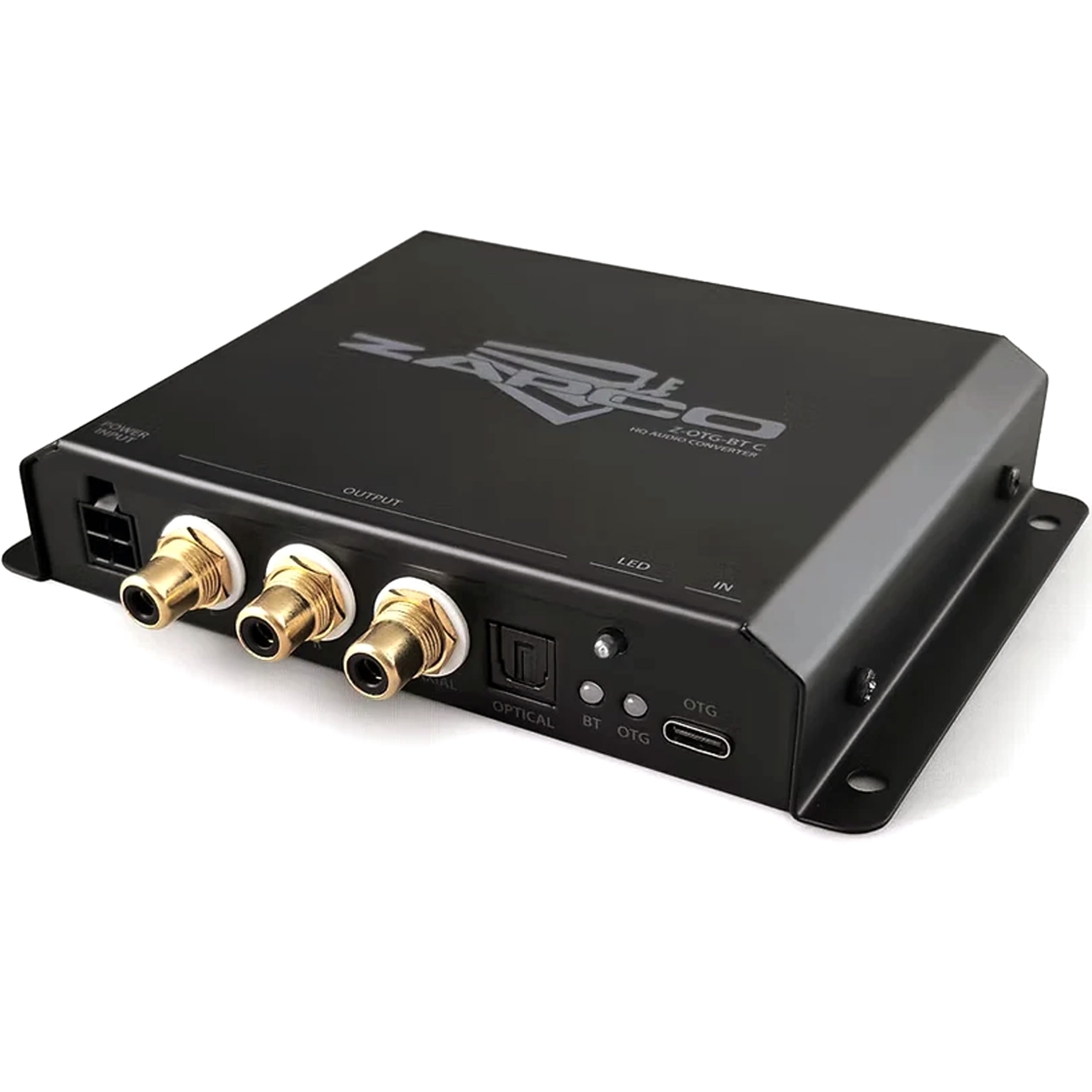
ภาพที่ 1: ด้านหน้า view of the Zapco Z-OTG-BT C Hi-Res HQ Audio Converter, showing its various input and output ports.
5. ปฏิบัติการ
Once the Zapco Z-OTG-BT C is set up and powered on, it operates automatically:
- ตรวจสอบให้แน่ใจว่าอุปกรณ์ต้นทางเสียงของคุณกำลังเล่นเสียงอยู่
- The Z-OTG-BT C will convert the incoming digital audio signal from the OTG input to the selected analog (RCA) or digital (Optical/Coaxial) outputs.
- ปรับระดับเสียงบนเครื่องที่เชื่อมต่อของคุณ amplifier or receiver. The Z-OTG-BT C does not have its own volume control.
6. การบำรุงรักษา
การบำรุงรักษาอย่างถูกต้องจะช่วยให้มั่นใจได้ว่าอุปกรณ์ของคุณจะมีอายุการใช้งานยาวนานและทำงานได้อย่างมีประสิทธิภาพสูงสุด:
- การทำความสะอาด: Use a soft, dry, lint-free cloth to clean the exterior of the unit. Do not use abrasive cleaners, solvents, or chemical sprays.
- พื้นที่จัดเก็บ: หากต้องเก็บรักษาอุปกรณ์เป็นเวลานาน ควรตัดการเชื่อมต่อจากแหล่งจ่ายไฟและเก็บไว้ในที่แห้งและเย็น หลีกเลี่ยงแสงแดดโดยตรงและอุณหภูมิที่สูงหรือต่ำเกินไป
- การจัดการสายเคเบิล: Ensure all cables are routed neatly and are not under strain or bent sharply, which can damage them over time.
7 การแก้ไขปัญหา
If you encounter issues with your Zapco Z-OTG-BT C, refer to the following troubleshooting guide:
| ปัญหา | สาเหตุที่เป็นไปได้ | สารละลาย |
|---|---|---|
| ไม่มีเสียงออก |
|
|
| คุณภาพเสียงไม่ดี / เสียงผิดเพี้ยน |
|
|
| Device not recognized by source (OTG) |
|
|
8. ข้อมูลจำเพาะ
Detailed technical specifications for the Zapco Z-OTG-BT C:
- พิมพ์: เครื่องแปลงไฟล์เสียง
- แบบอย่าง: Z-OTG-BT C
- OTG Input: 192KHz/32bit (Supports Charging function)
- โอพี-Amp: JRC 5532 (High Performance Low-Noise Dual OP)
- ดีเอซี: TI PCM5102A 384KHz/32bit
- เอาต์พุตดิจิตอล: Optical and Coaxial (for connection with 48/96/192KHz Digital Inputs)
- อาร์ซีเอเอาท์พุท: Left + Right (1.5V RMS)
- แหล่งจ่ายไฟ: DC 9-16V
- ปริมาณอุปทานขั้นต่ำtage: 9 โวลต์_ออฟ_ไดเร็ก_ปัจจุบัน
- ปริมาณอุปทานสูงสุดtage: 16 โวลต์_ออฟ_ไดเร็ก_ปัจจุบัน
- ประเภทอินเทอร์เฟซ: โคแอกเซียล, ออปติคอล, อาร์ซีเอ
- จำนวนช่องสัญญาณ: 2
- โหมดเอาต์พุตเสียง: สเตอริโอ
- ขนาดหน่วย (มม.): 140 x 23 x 96
- น้ำหนักสินค้า: 3 ปอนด์
9. การรับประกัน
The Zapco Z-OTG-BT C Hi-Res HQ Audio Converter comes with a รับประกัน 1 ปี นับจากวันที่ซื้อสินค้า การรับประกันนี้ครอบคลุมถึงข้อบกพร่องจากการผลิตและการทำงานผิดปกติภายใต้การใช้งานปกติ ไม่ครอบคลุมถึงความเสียหายที่เกิดจากการใช้งานผิดวิธี อุบัติเหตุ การดัดแปลงโดยไม่ได้รับอนุญาต หรือการติดตั้งที่ไม่ถูกต้อง โปรดเก็บหลักฐานการซื้อไว้เพื่อใช้ในการเรียกร้องการรับประกัน
10. การสนับสนุน
For technical assistance, warranty claims, or further inquiries regarding your Zapco Z-OTG-BT C, please contact Zapco customer support through their official website or the retailer from whom you purchased the product. Please have your model number (Z-OTG-BT C) and proof of purchase ready when contacting support.