
สินค้าเกินview
The FOSSIBOT S7 is an Android 16 smartphone featuring a dual-screen design, a 6.9-inch 120Hz main display, and a 1.85-inch rear display. It is equipped with a Unisoc T615 Octa-Core processor, 16GB RAM, 128GB internal storage (expandable up to 2TB), and a 5000mAh battery. This device supports 4G connectivity and includes a 16MP AI rear camera and an 8MP front camera.

Figure 1: FOSSIBOT S7 Android 16 Cell Phone. This image provides a general view of the phone's design.
1. การตั้งค่า
1.1 เนื้อหาบรรจุภัณฑ์
ตรวจสอบว่าแพ็คเกจของคุณมีรายการต่อไปนี้:
- FOSSIBOT S7 Cell Phone
- สาย USB
- เครื่องมือถอดซิม (โดยทั่วไปมีมาให้)
- คู่มือเริ่มต้นใช้งานฉบับย่อ (ถ้ามี)
1.2 การติดตั้งซิมการ์ดและที่เก็บข้อมูล
The FOSSIBOT S7 supports dual SIM cards and expandable storage via a TF card (up to 2TB).
- ค้นหาถาดใส่การ์ด SIM ที่ด้านข้างของอุปกรณ์
- ใส่เครื่องมือถอดซิมเข้าไปในรูเล็ก ๆ ข้างถาดแล้วกดเบา ๆ จนกว่าถาดจะดีดออกมา
- ใส่ซิมการ์ดนาโนและ/หรือการ์ด TF ลงในช่องที่กำหนดบนถาด ตรวจสอบให้แน่ใจว่าด้านที่เป็นสีทองหันลงด้านล่าง
- ใส่ถาดกลับเข้าไปในโทรศัพท์อย่างระมัดระวังจนกระทั่งล็อคเข้าที่

Figure 2: Dual SIM Card Slots. This image illustrates the proper placement of two SIM cards and an expandable storage card (TF card) into the phone's tray.
1.3 การเปิดเครื่องครั้งแรกและการตั้งค่าพื้นฐาน
- Press and hold the Power button (usually on the right side) until the FOSSIBOT logo appears.
- ทำตามคำแนะนำบนหน้าจอเพื่อเลือกภาษา เชื่อมต่อกับเครือข่าย Wi-Fi และตั้งค่าบัญชี Google ของคุณ
1.4 Security Setup (Face ID & Fingerprint ID)
Enhance your phone's security with biometric authentication.
- นำทางไปที่ การตั้งค่า > ความปลอดภัยและความเป็นส่วนตัว > ปลดล็อคอุปกรณ์.
- เลือก การปลดล็อคด้วยใบหน้า and follow the instructions to register your face.
- เลือก ปลดล็อคด้วยลายนิ้วมือ and follow the instructions to register your fingerprint(s). The fingerprint sensor is typically integrated into the power button.

Figure 3: Face ID and Fingerprint Unlock. This image demonstrates the use of facial recognition and fingerprint scanning for unlocking the device.
2. คู่มือการใช้งาน
2.1 Main Display (6.9" 120Hz)
The FOSSIBOT S7 features a large 6.9-inch HD+ IPS display with a 120Hz refresh rate for smooth visuals and responsive touch interactions.
- การนำทาง: Use gestures or the traditional navigation bar (configurable in settings) to move between apps and screens.
- ความสว่าง: Adjust screen brightness from the Quick Settings panel (swipe down from the top) or in การตั้งค่า > แสดง.
- อัตราการรีเฟรช: The 120Hz refresh rate is designed to provide a fluid experience. Actual performance may vary based on application and system load.
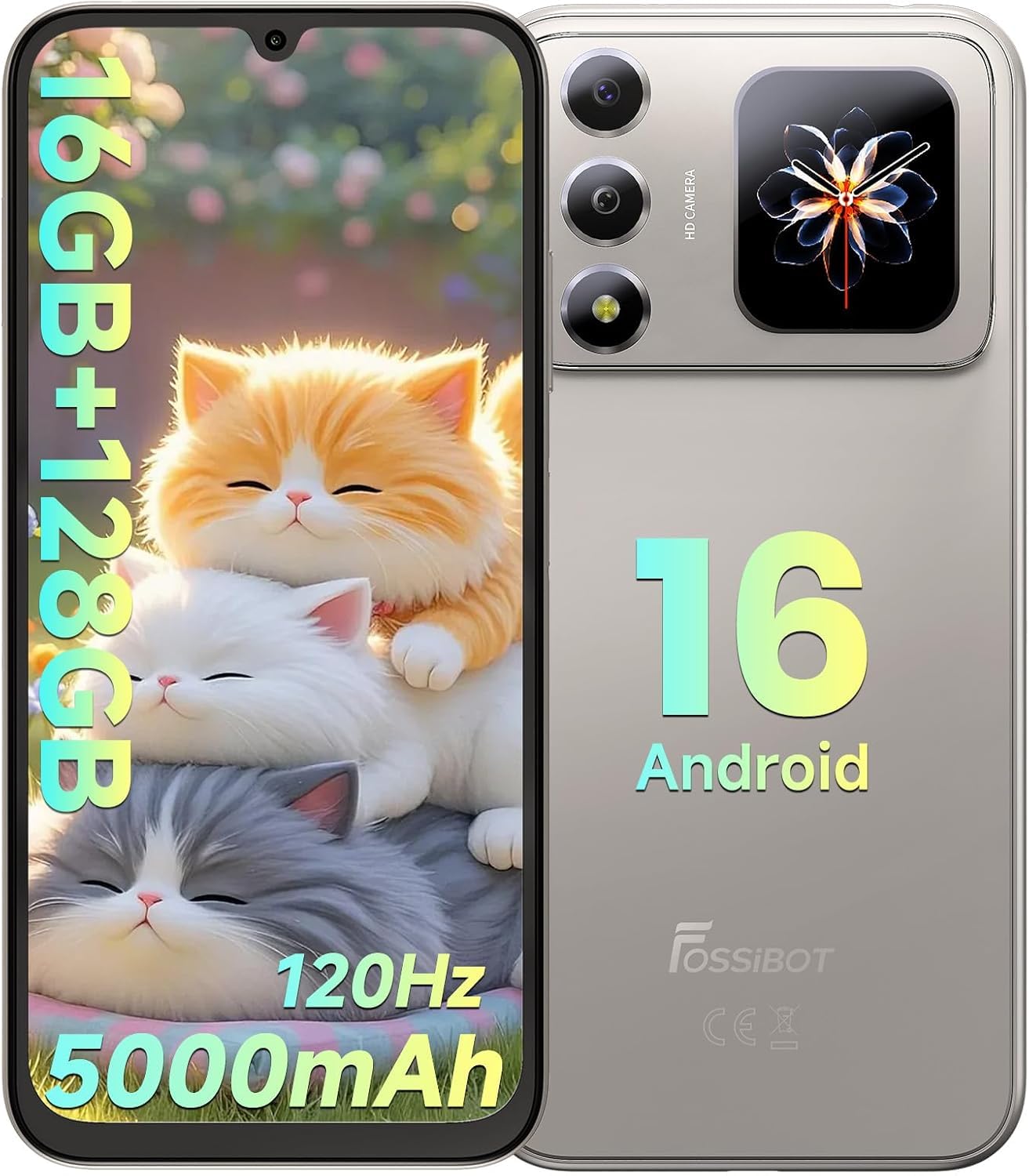
Figure 4: Main Display Features. This image highlights the 6.9-inch HD+ 120Hz display and its technical specifications.
2.2 Rear Screen (1.85" Multifunction Display)
The 1.85-inch rear display provides quick access to essential information without needing to activate the main screen.
- การแจ้งเตือน: View incoming call alerts, messages, and other app notifications.
- เวลาและวันที่: Always-on display for current time and date.
- ระดับแบตเตอรี่: Monitor your phone's battery status.
- การควบคุมเพลง: Control media playback (play, pause, skip tracks).
- การปรับแต่ง: Explore display settings to personalize the rear screen's appearance and displayed information.

Figure 5: Personalized Secondary Display. This image demonstrates the customizable interface of the rear screen, showing different widgets and information layouts.
ระบบปฏิบัติการ Android 16 2.3
The FOSSIBOT S7 runs on Android 16, offering an optimized user experience with enhanced privacy controls and customizable themes.
- การจัดการแอพ: Install, uninstall, and manage applications through the Google Play Store.
- การแจ้งเตือน: Manage notification preferences for individual apps in การตั้งค่า > การแจ้งเตือน.
- การควบคุมความเป็นส่วนตัว: Utilize Android 16's advanced privacy features to control app permissions and data access.

Figure 6: Android 16 OS Interface. This image represents the Android 16 operating system with various application icons.
2.4 ประสิทธิภาพ (โปรเซสเซอร์, RAM, หน่วยเก็บข้อมูล)
The FOSSIBOT S7 is powered by a Unisoc T615 Octa-Core processor, ensuring efficient multitasking and smooth operation.
- โปรเซสเซอร์: Unisoc T615 12nm 4G octa-core CPU for balanced performance.
- แรม : 16GB RAM (4GB physical + up to 12GB extended RAM) for seamless app switching and demanding tasks.
- พื้นที่เก็บข้อมูลภายใน: 128GB internal storage, expandable up to 2TB with a TF card for ampพื้นที่สำหรับแอพ รูปภาพ และสื่อ

Figure 7: Performance Specifications. This image details the phone's processor, RAM, and storage capabilities.
2.5 ฟังก์ชันกล้อง
Capture photos and videos using the 16MP AI rear camera and 8MP front camera.
- กล้องหลัง (16MP): Features AI enhancements for scene recognition, auto-adjustment, and portrait optimization. Supports Panorama, Night, and Video modes.
- กล้องหน้า (8MP): เหมาะสำหรับการถ่ายเซลฟี่และการสนทนาทางวิดีโอ
- แอปกล้องถ่ายรูป: Open the camera application to switch between photo, video, and other modes. Tap to focus, pinch to zoom.

Figure 8: Camera System. This image details the 16MP rear and 8MP front cameras, showcasing their capabilities with exampภาพถ่าย
2.6 การบูรณาการ Gemini AI
The integrated Gemini AI assists in optimizing performance and provides intelligent suggestions.
- การเพิ่มประสิทธิภาพการทำงาน: Gemini AI learns usage patterns to manage battery and system resources efficiently.
- คำแนะนำที่ชาญฉลาด: Receive intelligent recommendations for various tasks, including photo editing and app usage.
- ผู้ช่วย AI: Utilize Gemini for conversational queries and creative tasks, such as AI coding assistance and image generation.

Figure 9: Gemini AI Assistant. This image illustrates the various functions of the Gemini AI, from conversational interaction to creative assistance.
2.7 การเชื่อมต่อ
The FOSSIBOT S7 supports various connectivity options:
- 4G แอลทีอี: สำหรับการเชื่อมต่อข้อมูลมือถือ
- ไวไฟ : Supports 2.4GHz and 5GHz networks. Connect via การตั้งค่า > เครือข่ายและอินเตอร์เน็ต > ไวไฟ.
- Bluetooth 5.0: For connecting wireless accessories. Pair devices via การตั้งค่า > อุปกรณ์ที่เชื่อมต่อ > บลูทูธ.
- GPS/GLONASS/Galileo/Beidou: เพื่อบริการระบุตำแหน่งที่แม่นยำ
- USB Type-C: สำหรับการชาร์จและถ่ายโอนข้อมูล
- แจ็คหูฟัง 3.5 มม.: สำหรับอุปกรณ์เสียงแบบมีสาย

Figure 10: Connectivity and Features. This image displays the phone's various connectivity options and integrated software tools.
2.8 Software Toolkit
The device includes a built-in software toolkit for various utilities:
- เข็มทิศ: For navigation and direction.
- SoundMeter: Measures ambient sound levels.
- Gradienter: Measures angles and slopes.
- pedometer: ติดตามขั้นตอนที่ดำเนินการ
- คบเพลิง: Activates the LED flash as a flashlight.
- กระดิ่งปลุก: A utility for alarms.
- โปรแทรกเตอร์: Measures angles.
- HeightMeasure: Estimates height.
2.9 วิดีโอผลิตภัณฑ์view
Video 1: FOSSIBOT S7 Android 16 Cell Phone Overview. This video provides a visual demonstration of the FOSSIBOT S7 smartphone's key features and design.
3. การบำรุงรักษา
3.1 การดูแลแบตเตอรี่
The FOSSIBOT S7 is equipped with a 5000mAh battery. To maximize battery lifespan:
- หลีกเลี่ยงอุณหภูมิที่สูงหรือต่ำเกินไป
- Use the provided USB cable for charging. The device supports 10W fast charging.
- หลีกเลี่ยงการระบายแบตเตอรี่จนหมดบ่อยครั้ง
- For prolonged storage, charge the battery to approximately 50%.

Figure 11: Battery Life. This image illustrates the 5000mAh battery and its estimated usage times for standby, talk, video, and gaming.
3.2 การอัปเดตซอฟต์แวร์
การอัปเดตซอฟต์แวร์เป็นประจำจะช่วยเพิ่มประสิทธิภาพด้านความปลอดภัยและฟีเจอร์ใหม่ๆ โปรดตรวจสอบให้แน่ใจว่าอุปกรณ์ของคุณเชื่อมต่อกับ Wi-Fi และมีแบตเตอรี่เพียงพอก่อนเริ่มการอัปเดต
- ไปที่ การตั้งค่า > ระบบ > การอัพเดทระบบ.
- Check for available updates and follow the on-screen instructions.
3.3 การทำความสะอาดเครื่อง
To clean your FOSSIBOT S7:
- ปิดเครื่องก่อนทำความสะอาด
- ใช้ผ้านุ่มไม่เป็นขุย
- สำหรับรอยฝังแน่น ให้ลบออกเล็กน้อยampชุบผ้าด้วยน้ำหรือน้ำยาทำความสะอาดหน้าจอ หลีกเลี่ยงสารเคมีรุนแรง
4 การแก้ไขปัญหา
This section addresses common issues you might encounter with your FOSSIBOT S7.
4.1 อุปกรณ์ไม่เปิดเครื่อง
- ตรวจสอบให้แน่ใจว่าแบตเตอรี่ชาร์จเต็มแล้ว เสียบโทรศัพท์เข้ากับที่ชาร์จอย่างน้อย 15 นาที ก่อนที่จะลองเปิดเครื่องอีกครั้ง
- ทำการรีสตาร์ทเครื่องแบบบังคับโดยกดปุ่มเปิด/ปิดค้างไว้ 10-15 วินาที
4.2 Slow Performance or Lag
- ปิดแอพพลิเคชันพื้นหลังที่ไม่จำเป็น
- ล้างแคชสำหรับแอปที่ใช้งานบ่อย (การตั้งค่า > แอปพลิเคชั่น > [ชื่อแอป] > การจัดเก็บและแคช > ล้างแคช).
- ให้แน่ใจว่ามีพื้นที่เก็บข้อมูลเพียงพอ
- While the display supports 120Hz, actual refresh rates can be influenced by processor load and battery status. For optimal performance, ensure the device is adequately charged and not running too many demanding applications simultaneously.
4.3 แบตเตอรี่หมดเร็ว
- ตรวจสอบการใช้งานแบตเตอรี่ใน การตั้งค่า > แบตเตอรี่ เพื่อระบุแอปที่กินพลังงาน
- ลดความสว่างหน้าจอและปิดใช้งานฟีเจอร์ต่างๆ เช่น Wi-Fi, Bluetooth หรือ GPS เมื่อไม่ได้ใช้งาน
- จำกัดการรีเฟรชแอปพื้นหลัง
4.4 Connectivity Issues (Wi-Fi/4G)
- ไวไฟ : Restart your router and phone. Forget the network and reconnect.
- 4จี: Ensure your SIM card is properly inserted and your mobile data plan is active. Check network coverage in your area.
- สลับเปิดและปิดโหมดเครื่องบิน
4.5 Rear Screen Not Responding
- Ensure the main screen is locked or off to allow the rear screen to function.
- Check rear screen settings in การตั้งค่า > แสดง (or a similar dedicated section for the secondary display).
- รีสตาร์ทโทรศัพท์
5. ข้อมูลจำเพาะ
| คุณสมบัติ | รายละเอียด |
|---|---|
| ยี่ห้อ | ฟอสซิบอต |
| ชื่อรุ่น | S7 |
| ระบบปฏิบัติการ | แอนดรอยด์ 16 |
| โปรเซสเซอร์ | Unisoc T615 Octa-Core (1.8 GHz CPU Speed) |
| แรม | 16 GB (4GB physical + up to 12GB extended) |
| การจัดเก็บข้อมูลภายใน | 128GB |
| พื้นที่เก็บข้อมูลแบบขยายได้ | ความจุสูงสุด 2TB (การ์ด TF) |
| ขนาดจอแสดงผลหลัก | 6.9 นิ้ว |
| Main Display Type | HD+ IPS LCD |
| ความละเอียดหน้าจอหลัก | ขนาด 1280x720 |
| อัตราการรีเฟรช | 120 เฮิรตซ์ |
| ขนาดจอแสดงผลด้านหลัง | 1.85 inches (Multifunction) |
| กล้องหลัง | กล้อง AI 16 ล้านพิกเซล |
| กล้องหน้า | 8 MP |
| ความจุของแบตเตอรี่ | 5000 มิลลิแอมป์ |
| การชาร์จไฟ | 10W Fast Charging (USB Type C) |
| เทคโนโลยีเซลลูล่าร์ | 4G LTE (Dual SIM) |
| การเชื่อมต่อแบบไร้สาย | ไวไฟ (2.4GHz/5GHz), บลูทูธ 5.0 |
| การนำทาง | GPS, GLONASS, กาลิเลโอ, เป่ยโต่ว |
| การรักษาความปลอดภัยด้วยไบโอเมตริกซ์ | Face Recognition, Fingerprint ID |
| ขนาด (ความหนา) | 8.6 มม. |
| น้ำหนัก | 216 กรัม |
| รวมอยู่ในกล่อง | สาย USB |

รูปที่ 12: คุณสมบัติหลักเหนือview. This image provides a summary of the FOSSIBOT S7's main specifications and functionalities.
6. ข้อมูลการรับประกัน
The FOSSIBOT S7 comes with a รับประกัน 2 ปี นับจากวันที่ซื้อสินค้า การรับประกันนี้ครอบคลุมถึงข้อบกพร่องจากการผลิตและการทำงานผิดปกติภายใต้การใช้งานปกติ ไม่ครอบคลุมถึงความเสียหายที่เกิดจากการใช้งานผิดวิธี อุบัติเหตุ การซ่อมแซมโดยไม่ได้รับอนุญาต หรือการสึกหรอตามปกติ
โปรดเก็บหลักฐานการซื้อสำหรับการเรียกร้องการรับประกันทั้งหมด
7. การสนับสนุนลูกค้า
For further assistance, technical support, or warranty claims, please contact FOSSIBOT customer service through their official webไซต์หรือผู้ค้าปลีกที่ซื้อผลิตภัณฑ์
You can visit the FOSSIBOT store on Amazon for more information: FOSSIBOT Store