
1. การตั้งค่า
1.1 การแกะกล่องและเนื้อหาภายในบรรจุภัณฑ์
Carefully remove the television and all components from the packaging. Ensure all items listed below are present.
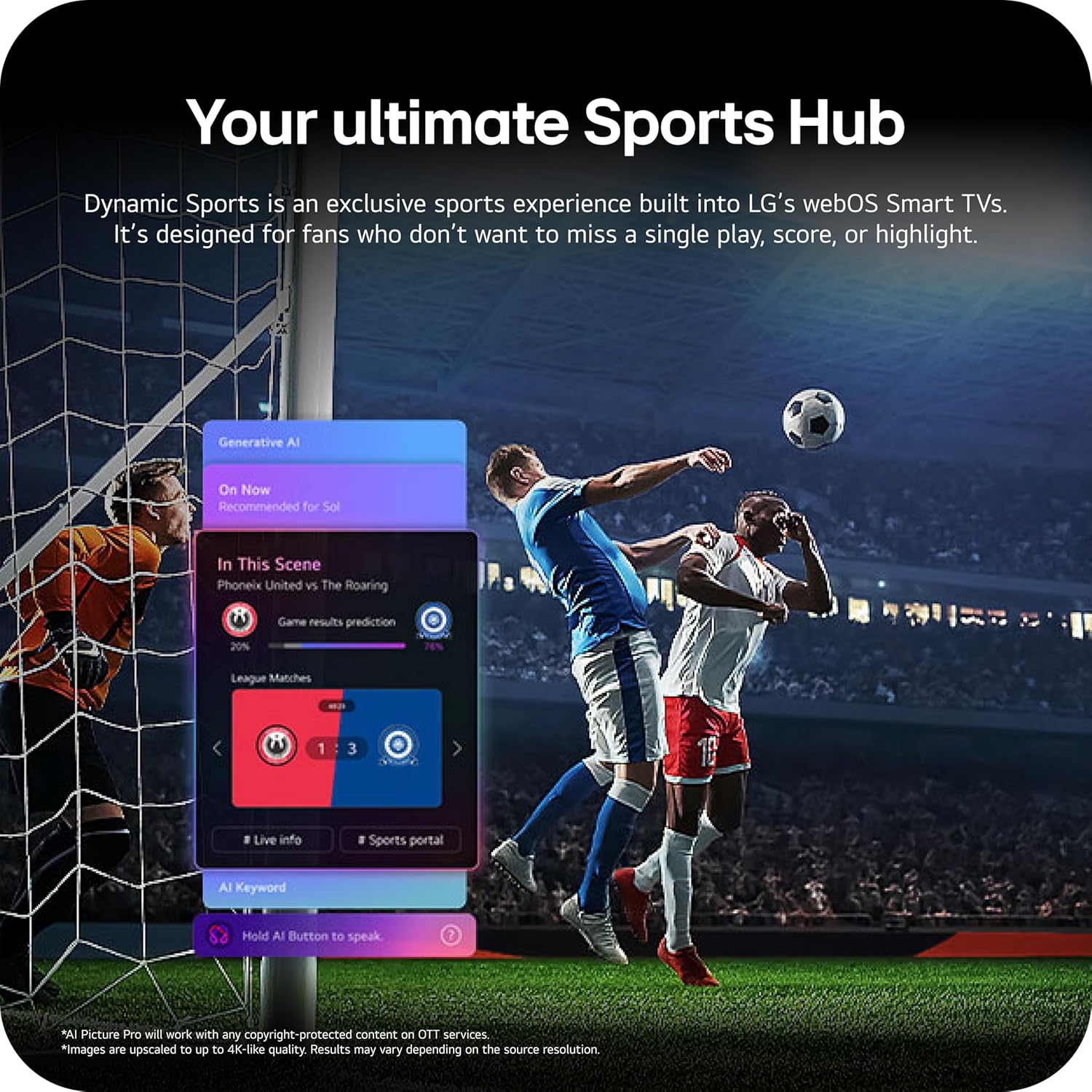
Image: The LG 65-inch OLED TV showing its dimensions with and without the stand, and a list of included accessories such as the Magic Remote, batteries, power cable, stand, and quick start guide.
ส่วนประกอบที่รวมอยู่:
- ทีวี LG 65 นิ้ว Class OLED evo AI 4K C6 Series Smart
- เมจิกรีโมท
- แบตเตอรี่รีโมทคอนโทรล (2 AAA)
- สายไฟ
- ยืน
- คู่มือการใช้งาน (เอกสารนี้)
1.2 การติดตั้งทางกายภาพ
The LG OLED65C6PUA can be installed using the included stand or mounted on a wall. Refer to the separate Installation Manual (PDF) for detailed wall mounting instructions.
การติดตั้งขาตั้ง:
- วางจอทีวีลงบนพื้นผิวที่นุ่มและเรียบเพื่อป้องกันความเสียหาย
- Attach the stand to the designated area on the bottom of the TV using the provided screws. Ensure it is securely fastened.
- ยกทีวีขึ้นอย่างระมัดระวังแล้ววางบนพื้นผิวที่มั่นคงและระดับ
ขนาด :
- TV Dimensions with Stand (WxHxD): 56.7" x 34.6" x 9.1"
- TV Dimensions without Stand (WxHxD): 56.7" x 32.5" x 1.8"
- Stand Footprint: 18.5"
1.3 การเชื่อมต่อ
Connect your external devices to the appropriate ports on the rear and side of the television.

Image: The back panel of the LG OLED TV, displaying multiple HDMI ports, USB ports, Ethernet port, and antenna input for connecting various devices.
- พอร์ต HDMI (4): Connect Blu-ray players, gaming consoles, soundbars, and other HDMI-enabled devices.
- พอร์ต USB (2): เชื่อมต่ออุปกรณ์จัดเก็บข้อมูล USB สำหรับการเล่นสื่อหรืออัปเดตซอฟต์แวร์
- พอร์ตอีเทอร์เน็ต (LAN): สำหรับการเชื่อมต่ออินเตอร์เน็ตแบบใช้สาย
- อินพุตเสาอากาศ/สายเคเบิล: เชื่อมต่อสัญญาณเสาอากาศหรือเคเบิลทีวี
- Optical Digital Audio Out (S/PDIF): สำหรับเชื่อมต่อกับระบบเสียงภายนอก
1.4 การเปิดเครื่องครั้งแรกและการตั้งค่าเครือข่าย
- เสียบสายไฟเข้ากับทีวี แล้วเสียบเข้ากับเต้ารับที่ผนัง
- กดปุ่มเปิดปิดบนรีโมทคอนโทรลหรือทีวี
- Follow the on-screen instructions to complete the initial setup, including language selection, time zone, and network connection (Wi-Fi or Ethernet).
- An LG account may be required to access network-based smart services.
2. คู่มือการใช้งาน
2.1 เมจิกรีโมท
The Magic Remote allows for intuitive control of your TV with point, click, scroll, and voice commands.

Image: The LG Magic Remote, featuring a central scroll wheel, directional buttons, and dedicated buttons for various functions and streaming services.
- ปุ่มเปิด/ปิด: เปิดหรือปิดทีวี
- ปุ่มตัวเลข: การเข้าถึงช่องทางโดยตรง
- เพิ่ม/ลดระดับเสียง: ปรับระดับเสียง
- ช่องขึ้น/ลง: เปลี่ยนช่อง
- ปุ่มโฮม: เข้าถึง webหน้าจอหลักของระบบปฏิบัติการสมาร์ททีวี
- Pointer/Scroll Wheel: นำทางเมนูและเลือกสินค้า
- ปุ่มคำสั่งเสียง: Activates intelligent voice recognition.
2.2 webOS Smart TV Platform (AI Hub)
การ webOS 2026 platform provides access to streaming services, apps, and AI-powered features.

ภาพ: การแสดงภาพของ LG webOS Smart TV interface, highlighting AI features like Multi AI Search, AI Concierge, AI Voice ID, AI Picture Wizard, AI Chatbot, and AI Sound Wizard, all accessible via the remote's AI button.
- AI Hub: Press the AI button on your remote to access personalized recommendations and AI features.
- บริการสตรีมมิ่ง: Access popular apps like Netflix, Disney+, Prime Video, Apple TV, and YouTube.
- ช่อง LG: Enjoy over 400 free channels and 10,000+ movies & shows on-demand.
- Multi AI Search: Powered by Google Gemini & Microsoft Copilot for broader, more relevant search results.
2.3 การตั้งค่าภาพและเสียง
เพิ่มประสิทธิภาพของคุณ viewประสบการณ์การรับชมและการฟังด้วยเทคโนโลยีภาพและเสียงขั้นสูง

Image: A split screen on an LG OLED TV illustrating the difference between an anti-glare matte display and a Perfect Black & Perfect Color display, emphasizing the deep blacks and vibrant colors achieved by OLED technology.
- บูสเตอร์ความสว่าง: Enhances visuals for brighter, more vivid detail, powered by the α11 AI Processor Gen 3.
- สีดำที่สมบูรณ์แบบและสีที่สมบูรณ์แบบ: Over 8.3 million self-lit pixels deliver infinite contrast and accurate colors.
- Dolby Vision, HDR10, HLG: รองรับรูปแบบ HDR หลายรูปแบบเพื่อความคมชัดและสีสันที่ดีขึ้น
- โหมดผู้สร้างภาพยนตร์: Preserves the director's original vision by disabling motion smoothing and other post-processing.
- ระบบเสียง Dolby Atmos: มอบประสบการณ์เสียงที่สมจริงและมีมิติ
- AI Picture & AI Sound: AI-assisted deep learning analyzes content to optimize picture and sound settings.
2.4 คุณสมบัติการเล่นเกม
Experience responsive and fluid gameplay with dedicated gaming enhancements.

Image: A dynamic image of a race car on a track, overlaid with logos for 165Hz refresh rate, NVIDIA G-Sync, and AMD FreeSync Premium, indicating the TV's advanced gaming capabilities.
- อัตราการรีเฟรช 165Hz: Provides ultra-smooth motion for gaming (up to 165Hz for PC gaming).
- เวลาตอบสนอง 0.1ms: Minimizes input lag for quick reactions.
- NVIDIA G-Sync และ AMD FreeSync Premium: Reduces screen tearing and stuttering for compatible graphics cards.
- Four HDMI 2.1 Inputs: Supports high bandwidth features required for next-gen gaming.
2.5 Dynamic Sports Hub
Access an exclusive sports experience built into LG's webOS Smart TVs.

Image: A soccer match displayed on an LG webOS Smart TV, with an overlay showing the 'Dynamic Sports Hub' interface, offering game results predictions, live info, and a sports portal.
The Dynamic Sports Hub is designed for fans to track scores, highlights, and relevant information without missing live action.
3. การบำรุงรักษา
3.1 OLED Care
The OLED Care feature helps protect your OLED display and maintain picture quality over time.

Image: A simple graphic displaying the 'OLED Care' logo with the LG brand, indicating a feature designed for display maintenance.
Access OLED Care settings through the TV menu to manage features like Pixel Cleaning and Screen Shift, which help prevent image retention.
3.2 การทำความสะอาดทีวี
- ควรถอดปลั๊กทีวีทุกครั้งก่อนทำความสะอาด
- ใช้ผ้าไมโครไฟเบอร์ที่นุ่มและแห้งเช็ดหน้าจอและตู้เบาๆ
- สำหรับรอยฝังแน่น ให้เช็ดเบาๆampen the cloth with water or a specialized screen cleaner (ensure it is safe for OLED displays). Do not spray liquid directly onto the screen.
- หลีกเลี่ยงการใช้สารทำความสะอาดที่มีฤทธิ์กัดกร่อน ขี้ผึ้งหรือตัวทำละลาย
4 การแก้ไขปัญหา
หัวข้อนี้ให้แนวทางแก้ไขปัญหาทั่วไปที่คุณอาจพบเจอ
4.1 ไม่มีไฟ / ทีวีไม่เปิด
- ตรวจสอบให้แน่ใจว่าสายไฟเสียบเข้ากับทีวีและเต้ารับที่ใช้งานได้สนิทแล้ว
- ตรวจสอบว่าปลั๊กไฟได้รับกระแสไฟฟ้าหรือไม่ โดยลองเสียบอุปกรณ์อื่นเข้าไป
- ลองกดปุ่มเปิดปิดบนทีวีโดยตรง ไม่ใช่แค่ที่รีโมท
4.2 ไม่มีภาพหรือภาพบิดเบี้ยว
- ตรวจสอบว่าเลือกแหล่งสัญญาณอินพุตที่ถูกต้อง (เช่น HDMI 1, HDMI 2)
- Check all cable connections between the TV and external devices (HDMI, antenna, etc.). Ensure they are firmly seated.
- หากใช้เสาอากาศ ให้ตรวจสอบการเชื่อมต่อและตำแหน่ง
- รีสตาร์ทอุปกรณ์ที่เชื่อมต่อ (เช่น กล่องรับสัญญาณเคเบิล คอนโซลเกม)
4.3 รีโมทคอนโทรลไม่ทำงาน
- Replace the batteries in the Magic Remote (requires 2 AAA batteries).
- ตรวจสอบให้แน่ใจว่าไม่มีสิ่งกีดขวางระหว่างรีโมทและทีวี
- Re-pair the Magic Remote if it has become disconnected. Point the remote at the TV and press the Wheel (OK) button.
4.4 ไม่มีเสียงหรือเสียงเบา
- ตรวจสอบระดับเสียงทีวีและตรวจสอบให้แน่ใจว่าไม่ได้ปิดเสียงอยู่
- หากใช้อุปกรณ์เสียงภายนอก (ซาวด์บาร์, เครื่องรับสัญญาณ) โปรดตรวจสอบให้แน่ใจว่าอุปกรณ์เหล่านั้นเปิดอยู่และเชื่อมต่ออย่างถูกต้อง
- Check the audio output settings in the TV menu to ensure the correct output is selected (e.g., TV Speaker, Optical Out).
4.5 ปัญหาการเชื่อมต่อเครือข่าย
- For Wi-Fi, ensure the router is on and within range. Try restarting the router.
- สำหรับการเชื่อมต่อแบบใช้สาย โปรดตรวจสอบให้แน่ใจว่าได้เสียบสายอีเธอร์เน็ตเข้ากับทีวีและเราเตอร์อย่างแน่นหนาแล้ว
- Check network settings in the TV menu to ensure correct configuration.
5. ข้อมูลจำเพาะ
| คุณสมบัติ | ข้อมูลจำเพาะ |
|---|---|
| ชื่อรุ่น | LGOLED65C6PUA |
| หมายเลขรุ่น | OLED65C6PUA |
| ขนาดหน้าจอ | 65 นิ้ว |
| เทคโนโลยีการแสดงผล | โอแอลอีดี |
| ปณิธาน | 4K (3840x2160) ความคมชัดระดับ XNUMXK |
| อัตราการรีเฟรช | 120 Hz (Native), up to 165Hz for PC gaming |
| โปรเซสเซอร์ | α11 AI Processor 4K Gen3 (Dual AI Engine) |
| รองรับรูปแบบ HDR | ดอลบีวิชั่น, HDR10, HLG |
| เวลาตอบสนอง | 0.1 มิลลิวินาที |
| ระบบปฏิบัติการ | webโอเอส 2026 |
| เทคโนโลยีการเชื่อมต่อ | Bluetooth (v5.3), Ethernet, HDMI, USB, Wi-Fi |
| พอร์ต HDMI ทั้งหมด | 4 (HDMI 2.1) |
| พอร์ต USB รวม | 2 (ยูเอสบี 2.0) |
| เอาท์พุตเสียง | ออปติคอล (S/PDIF) |
| คำอธิบายลำโพง | Dolby Atmos (2.2 Channel) |
| คุณสมบัติพิเศษ | AMD FreeSync, Built-In Speaker, Chromecast, Intelligent Voice Recognition, NVIDIA G-Sync |
| แหล่งจ่ายไฟ | 120 โวลต์ |
| น้ำหนักสินค้า (ไม่รวมขาตั้ง) | 36.6 ปอนด์ |
| ขนาดสินค้า (รวมขาตั้ง) | ลึก 9.1 นิ้ว x กว้าง 56.7 นิ้ว x สูง 34.6 นิ้ว |
| มาตรฐาน VESA Mount | 300 x 200 มม. |
6. การรับประกันและการสนับสนุน
6.1 การรับประกันสินค้า
This LG OLED TV (Model OLED65C6PUA) comes with a การรับประกันชิ้นส่วนและค่าแรงแบบจำกัด 1 ปี นับจากวันที่ซื้อ โปรดเก็บหลักฐานการซื้อไว้เพื่อใช้ในการเคลมประกัน
6.2 แผนการคุ้มครองเพิ่มเติม
อาจมีแผนคุ้มครองเพิ่มเติมให้เลือกซื้อแยกต่างหาก:
- แผนคุ้มครอง 4 ปี: Provides coverage for 48 months.
- การปกป้องที่สมบูรณ์: แผนการสมัครสมาชิกรายเดือนที่ครอบคลุมการซื้อที่เข้าเงื่อนไขในอดีตและอนาคต
For details on coverage and terms, please refer to the respective plan documentation or contact the provider.
6.3 การสนับสนุนลูกค้า
หากต้องการความช่วยเหลือด้านเทคนิค การแก้ไขปัญหาที่อยู่นอกเหนือคู่มือนี้ หรือบริการรับประกัน โปรดติดต่อฝ่ายบริการลูกค้าของ LG คุณสามารถค้นหาข้อมูลการติดต่อได้จากเว็บไซต์อย่างเป็นทางการของ LG website or in the Quick Start Guide included with your TV.
คุณยังสามารถอ้างอิงอย่างเป็นทางการได้ คู่มือการใช้งาน (PDF) และ คู่มือการติดตั้ง (PDF) เพื่อดูข้อมูลโดยละเอียดเพิ่มเติม