
1. บทนำ
This manual provides essential information for the safe and efficient operation of your PowMr 4000W Hybrid Solar Inverter. This device is designed to convert 24VDC battery power into 110/120VAC pure sine wave electricity, integrating a 140A MPPT charge controller for optimal solar energy utilization. It supports various battery types and off-grid system configurations. Please read this manual thoroughly before installation and use, and retain it for future reference.
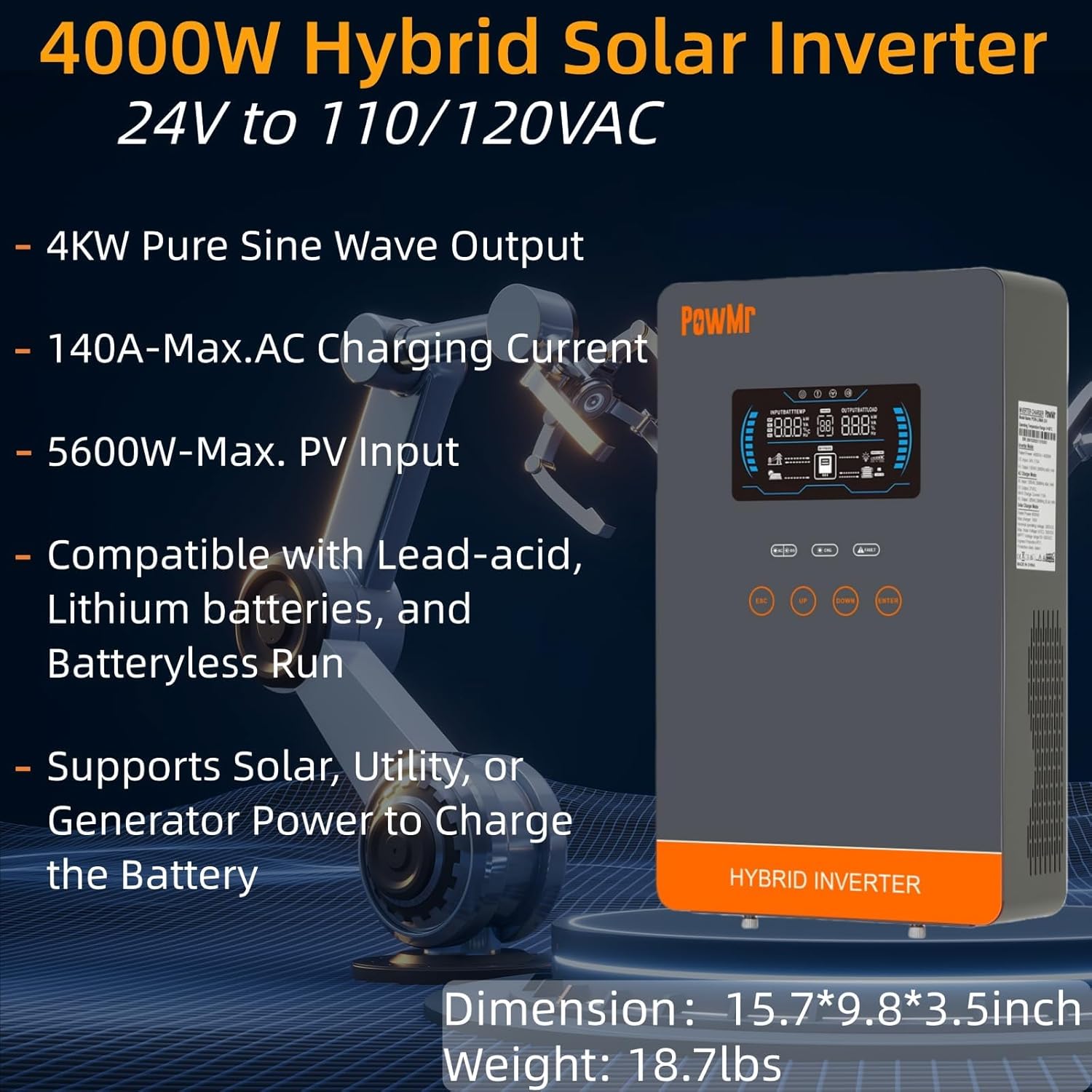
Image: The PowMr 4000W Hybrid Solar Inverter, highlighting its 4KW pure sine wave output, 140A max AC charging current, 5600W max PV input, compatibility with various batteries, and support for solar, utility, or generator power to charge the battery. Dimensions are 15.7"L x 9.8"W x 3.5"H and weight is 18.7lbs.
2. คำแนะนำด้านความปลอดภัย
โปรดปฏิบัติตามข้อควรระวังด้านความปลอดภัยต่อไปนี้เสมอ เพื่อลดความเสี่ยงจากไฟฟ้าช็อต ไฟไหม้ หรือการบาดเจ็บ:
- การติดตั้งจะต้องดำเนินการโดยบุคลากรที่มีคุณสมบัติเหมาะสม
- ตรวจสอบให้แน่ใจว่าสายไฟทั้งหมดมีขนาดถูกต้องและหุ้มฉนวนอย่างเหมาะสม
- ห้ามถอดชิ้นส่วนอินเวอร์เตอร์ เนื่องจากไม่มีชิ้นส่วนใดที่ผู้ใช้สามารถซ่อมแซมได้เอง
- ควรเก็บอินเวอร์เตอร์ให้ห่างจากวัสดุไวไฟ ความชื้น และแสงแดดโดยตรง
- ตรวจสอบให้แน่ใจว่ามีการระบายอากาศที่เพียงพอรอบๆ อินเวอร์เตอร์เพื่อป้องกันความร้อนสูงเกินไป
- ควรตัดการเชื่อมต่อแหล่งจ่ายไฟทั้งหมด (แผงโซลาร์เซลล์ แบตเตอรี่ ไฟฟ้ากระแสสลับ) ก่อนทำการบำรุงรักษาหรือเดินสายไฟทุกครั้ง
- ควรสวมใส่อุปกรณ์ป้องกันส่วนบุคคล (PPE) ที่เหมาะสมระหว่างการติดตั้งและบำรุงรักษา
3. สินค้าหมดview
3.1. คุณสมบัติ
- เอาท์พุตคลื่นไซน์บริสุทธิ์: ให้พลังงานที่เสถียรและสะอาด เหมาะสำหรับอุปกรณ์อิเล็กทรอนิกส์ที่ต้องการพลังงานคุณภาพสูง
- ตัวควบคุมการชาร์จ MPPT ในตัว: 140A MPPT for efficient solar charging.
- ความเข้ากันได้ของแบตเตอรี่ที่กว้าง: Supports AGM, Gel, Lead-acid, Lithium-ion, and LiFePO4 batteries.
- Batteryless Mode: Can power loads directly from PV/AC grid without a connected battery.
- โหมดการชาร์จหลายโหมด: Solar Only, Mains Only, Mains & Solar Hybrid.
- Multiple Load Output Modes: Utility Priority, Solar Priority, Solar and SBU Priority.
- การป้องกันขั้นสูง: ไฟฟ้าลัดวงจรเกิน voltage ภายใต้ voltage, overload, reverse polarity, over-temperature, and backfill protection.
- อินเทอร์เฟซที่เป็นมิตรกับผู้ใช้: 6.25-inch LCD screen with touch controls for real-time data display.
- พอร์ตสื่อสาร: RS485 and RS232 for monitoring and control.
3.2. การระบุส่วนประกอบ

Image: A detailed diagram of the PowMr Hybrid Solar Inverter, showing its front panel and connection ports. Key components labeled include: 1. LCD display, 2. Status indicator, 3. Charging indicator, 4. Fault indicator, 5. Function touch buttons, 6. On/off switch, 7. AC input, 8. AC output, 9. PV input, 10. Battery input, 11. RS485/RS232 communication port.
3.3. คุณสมบัติการป้องกัน

Image: An illustration detailing the comprehensive protection features of the inverter, including Short Circuit Protection, Over-Load Protection, Over Current Protection, Backfill Protection, Over Voltage Protection, Over-Temperature Protection, Under Voltage Protection, and Over Charge Protection.
4. เนื้อหาบรรจุภัณฑ์
เมื่อแกะกล่องแล้ว โปรดตรวจสอบว่าสินค้าทั้งหมดอยู่ในกล่องและไม่ได้รับความเสียหาย:
- PowMr 4000W Hybrid Solar Inverter
- คู่มือการใช้งาน (เอกสารนี้)
- Communication Cables (if applicable, check packaging)
- อุปกรณ์สำหรับติดตั้ง (ถ้ามี โปรดตรวจสอบบรรจุภัณฑ์)
5. การติดตั้งและการตั้งค่า
5.1. การติดตั้งอินเวอร์เตอร์
Select a suitable location for mounting the inverter. It should be:
- เก็บไว้ในที่ร่ม ป้องกันจากแสงแดดโดยตรง ฝน และฝุ่นละออง
- มีการระบายอากาศที่ดีเพื่อช่วยระบายความร้อน
- Close to the battery bank to minimize cable length and voltagอีลดลง
- On a solid, non-flammable surface.
5.2. แผนภาพการเดินสายไฟ
Follow the wiring diagram carefully. Incorrect wiring can cause damage to the inverter, batteries, or connected loads, and may pose a safety hazard.

Image: A comprehensive wiring diagram illustrating connections for PV input, Mains/Generator input, AC output, and Battery input. It specifies voltage ranges, current ratings, and recommended wire gauges for each connection point.
5.3. การเชื่อมต่อแบตเตอรี่
The inverter is compatible with various 24V battery types. Ensure your battery bank matches the inverter's voltagข้อกำหนดอี

Image: An illustration showing the inverter's compatibility with various battery types including AGM, GEL, FLD (Flooded), LI (Lithium-ion), SLD (Sealed Lead-Acid), and USER-defined settings. It also indicates a maximum battery charging current of 140A (utility charging + solar charging).
- Connect the battery cables to the inverter's battery terminals, ensuring correct polarity (positive to positive, negative to negative).
- ขันการเชื่อมต่อทั้งหมดให้แน่น
5.4. PV Array Connection
- Connect the solar panel array to the PV input terminals, observing correct polarity.
- Ensure the PV array's open circuit voltage and power are within the inverter's specifications.
5.5. การเชื่อมต่ออินพุต/เอาต์พุต AC
- เชื่อมต่อสายไฟกระแสสลับจากระบบไฟฟ้าหลักหรือเครื่องกำเนิดไฟฟ้าเข้ากับขั้วต่ออินพุตกระแสสลับ
- Connect your AC loads to the AC output terminals.
- Ensure all AC connections are properly grounded.
6. คู่มือการใช้งาน
6.1. การเปิด/ปิดเครื่อง
- การเปิดเครื่อง: Ensure all connections are secure. First, connect the battery, then the PV array, and finally the AC input. Press the On/Off switch.
- วิธีปิดเครื่อง: Disconnect the AC input, then the PV array, and finally the battery. Press the On/Off switch.
6.2. จอแสดงผล LCD และปุ่มควบคุม
The LCD screen displays real-time system data. Use the touch buttons to navigate menus and adjust settings.
6.3. Setting Charging and Output Modes
อินเวอร์เตอร์นี้มีโหมดการชาร์จและการจ่ายพลังงานที่ยืดหยุ่น เพื่อให้เหมาะกับความต้องการด้านการจัดการพลังงานที่หลากหลาย

Image: An illustration detailing the three charging modes (1. Only Solar, 2. Only Utility, 3. Solar+Utility) and three output modes (1. Utility First, 2. Solar First (default), 3. SBU priority). Steps to set programs are also provided: 1. Long press and hold ENTER button for 3s, 2. Press UP and DOWN to select setting programs, 3. Press ENTER to confirm or ESC to exit.
6.3.1. โหมดการชาร์จ
- พลังงานแสงอาทิตย์เท่านั้น: ชาร์จแบตเตอรี่โดยใช้พลังงานแสงอาทิตย์เพียงอย่างเดียว
- เฉพาะไฟหลัก: Charges batteries exclusively from the AC utility grid or generator.
- ระบบไฮบริดระหว่างไฟบ้านและพลังงานแสงอาทิตย์: Prioritizes solar charging, supplementing with AC utility/generator if solar power is insufficient.
6.3.2. โหมดเอาต์พุตโหลด
- ลำดับความสำคัญของสาธารณูปโภค: Loads are primarily powered by the AC utility grid. Inverter switches to battery/solar if utility fails.
- ลำดับความสำคัญของพลังงานแสงอาทิตย์: Loads are primarily powered by solar and battery. Inverter switches to utility if solar/battery power is insufficient.
- ลำดับความสำคัญของ SBU (พลังงานแสงอาทิตย์-แบตเตอรี่-สาธารณูปโภค): Loads are primarily powered by solar, then battery, and finally by utility as a last resort.
7. การบำรุงรักษา
การบำรุงรักษาอย่างสม่ำเสมอจะช่วยให้เครื่องแปลงกระแสไฟฟ้าทำงานได้อย่างมีประสิทธิภาพสูงสุดและมีอายุการใช้งานยาวนานขึ้น
- การทำความสะอาด: Periodically clean the inverter's exterior with a dry cloth. Do not use liquid cleaners.
- การระบายอากาศ : Ensure cooling fan vents are clear of dust and obstructions. The triple cooling fan design helps dissipate heat efficiently.
- การเชื่อมต่อ: ควรตรวจสอบความแน่นหนาของจุดเชื่อมต่อไฟฟ้าทั้งหมดและร่องรอยการกัดกร่อนเป็นประจำทุกปี
- สิ่งแวดล้อม: Maintain a clean, dry, and well-ventilated environment around the inverter. The dust-proof design helps prevent dust ingress.
8 การแก้ไขปัญหา
If you encounter issues, refer to the following common problems and solutions. For persistent issues, contact customer support.
| ปัญหา | สาเหตุที่เป็นไปได้ | สารละลาย |
|---|---|---|
| อินเวอร์เตอร์ไม่เปิด | No battery connection; Low battery voltage; On/Off switch off | Check battery connections; Charge battery; Turn on switch |
| ไม่มีเอาท์พุต AC | โอเวอร์โหลด; ไฟฟ้าลัดวงจร; อินเวอร์เตอร์ขัดข้อง | Reduce load; Check for short circuits; Restart inverter |
| การชาร์จ PV ไม่ทำงาน | PV array disconnected; Insufficient sunlight; PV voltage ต่ำ/สูงเกินไป | Check PV connections; Ensure adequate sunlight; Verify PV array specifications |
| คำเตือนเกินพิกัด | Connected loads exceed inverter capacity | Disconnect some loads; Ensure total load is within 4000W |
| คำเตือนอุณหภูมิสูง | Poor ventilation; Ambient temperature too high | Clear vents; Improve airflow; Relocate inverter if necessary |
9. ข้อมูลจำเพาะ
Technical specifications for the PowMr 4000W Hybrid Solar Inverter:
| พารามิเตอร์ | ค่า |
|---|---|
| หมายเลขรุ่น | POW-LVM4K-24V-FBA2 |
| กำลังขับสูงสุด | 4000วัตต์ |
| อินพุต Voltagอี (DC) | 24VDC |
| ปริมาณการส่งออกtagอี (AC) | 110/120VAC |
| รูปคลื่นเอาท์พุต | เพียวไซน์เวฟ |
| แม็กซ์ PV Open Circuit Voltage | 350VDC |
| PV Array MPPT ฉบับที่tagอี เรนจ์ | 55-350VDC |
| กำลังไฟฟ้าเข้า PV สูงสุด | 5600วัตต์ |
| Rated Grid Input Voltage | 110/120VAC |
| Max. Hybrid Charging Current (AC+PV) | 140เอ |
| การสื่อสาร | RS485, RS232 |
| ประเภทจอภาพ | จอแอลซีดี |
| ขนาด (กว้าง x ยาว x สูง) | ยาว 15.7 นิ้ว x กว้าง 9.8 นิ้ว x สูง 3.5 นิ้ว |
| น้ำหนัก | 18.7 lbs (approximate, derived from image) |
10. การรับประกันและการสนับสนุน
10.1. ข้อมูลการรับประกัน
The PowMr 4000W Hybrid Solar Inverter comes with an รับประกัน 18 เดือน นับจากวันที่ซื้อสินค้า การรับประกันนี้ครอบคลุมถึงข้อบกพร่องในวัสดุและฝีมือการผลิตภายใต้การใช้งานปกติ ไม่ครอบคลุมถึงความเสียหายที่เกิดจากการติดตั้งที่ไม่ถูกต้อง การใช้งานผิดวิธี อุบัติเหตุ การดัดแปลงโดยไม่ได้รับอนุญาต หรือภัยพิบัติทางธรรมชาติ
10.2. การสนับสนุนลูกค้า
For technical assistance, warranty claims, or any questions regarding your PowMr inverter, please contact PowMr customer support through the retailer's platform or the official PowMr website. Please have your model number (POW-LVM4K-24V-FBA2) and purchase date available when contacting support.