
การแนะนำ
The Linkifun Wireless CarPlay & Android Auto Adapter provides a seamless wireless connection for your smartphone to your car's infotainment system. This 2-in-1 adapter supports both Apple CarPlay (iOS 10+) and Android Auto (Android 11+), offering hands-free convenience for navigation, music, and communication while driving. Its plug-and-play design ensures easy setup and fast auto-reconnection.
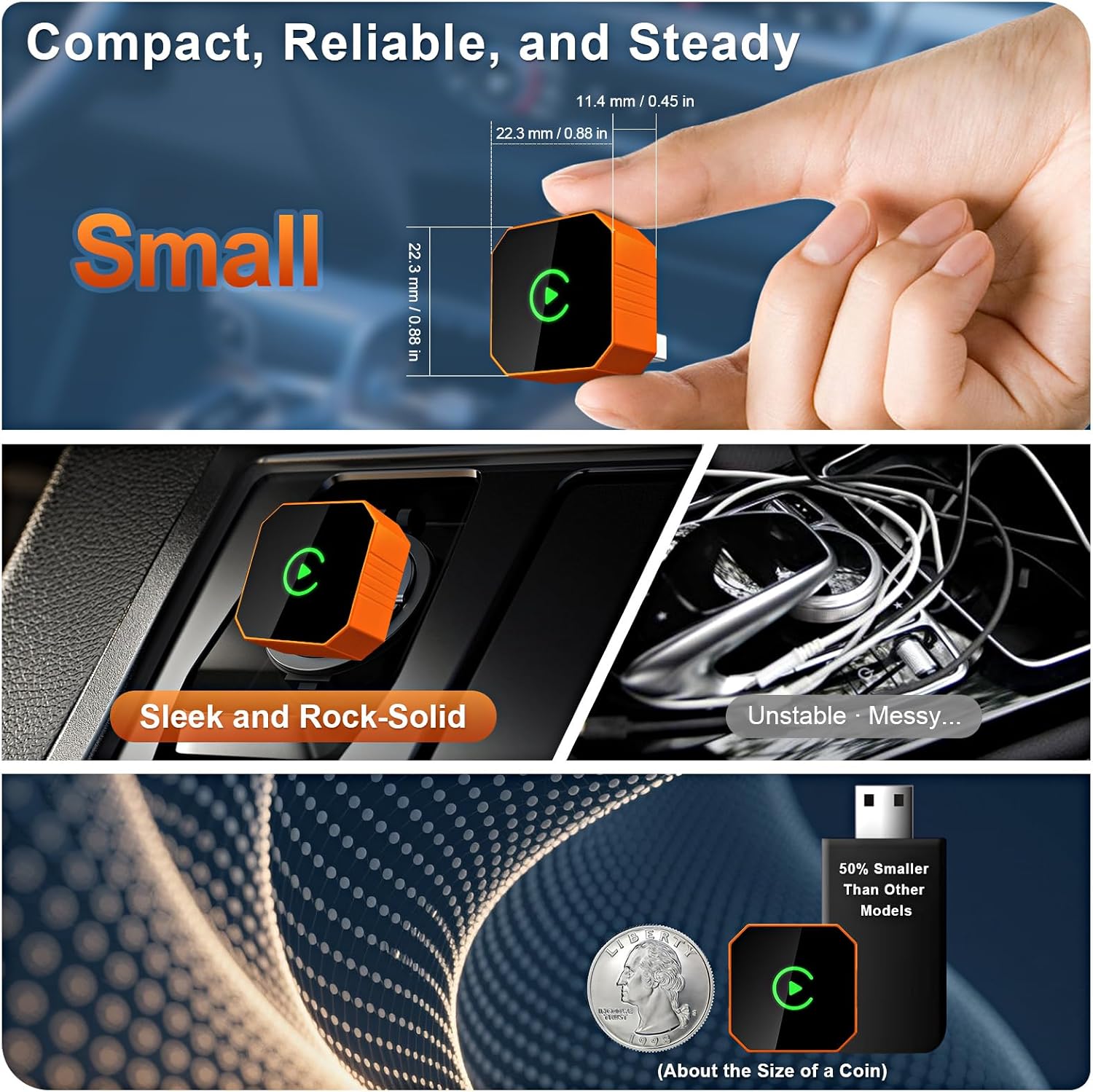
Image: Car dashboard display showing the CarPlay interface with navigation, music, and phone call options, demonstrating the 2-in-1 wireless functionality.
คำแนะนำการตั้งค่า
Follow these steps to connect your Linkifun Wireless Adapter to your vehicle:
- เสียบอะแดปเตอร์: Connect the Linkifun adapter into your car's USB-A or USB-C port. Ensure your car supports factory-wired CarPlay or Android Auto.
- เปิดใช้งาน Wi-Fi: On your car's infotainment screen, navigate to the Wi-Fi settings. Connect to the network named "SmartBox-9996".
- Turn on Bluetooth & Pair: On your smartphone, enable Bluetooth and search for available devices. Select "SmartBox-9996" from the list. Confirm the pairing code displayed on both your phone and car screen, then tap "Pair".
- เชื่อมต่อกับ CarPlay/Android Auto: Once paired, a prompt to "Connect to CarPlay" or "Connect to Android Auto" will appear. Tap "Connect" to initiate the wireless connection.
The adapter is designed for quick and easy setup, and will automatically reconnect to your device within seconds after the initial pairing when you start your car.

Image: Four-step visual guide for connecting the wireless adapter: 1. Plug into USB/Type-C port, 2. Enable Wi-Fi and connect to 'SmartBox-9996', 3. Turn on Bluetooth and pair, 4. Tap 'Connect' to start CarPlay.
คำแนะนำการใช้งาน
Once connected, the Linkifun adapter provides a stable, low-latency connection, allowing you to use your smartphone's features directly on your car's display.
คุณสมบัติหลัก:
- การนำทาง: Access your preferred navigation apps (e.g., Apple Maps, Google Maps) for real-time directions.
- ดนตรีและสื่อ: ฟังเพลง พอดแคสต์ และหนังสือเสียงจากแอปโปรดของคุณได้เลย
- การสื่อสาร: Make calls, send messages, and access your contacts using voice commands or the car's interface.
- ผู้ช่วยเสียง: Utilize your phone's voice assistant (Siri or Google Assistant) for hands-free control.
วิธีการควบคุม:
The adapter fully supports your car's original control mechanisms:
- การควบคุมหน้าจอสัมผัส: โต้ตอบโดยตรงกับจอแสดงผลของรถยนต์
- OEM Control Knob: Use your vehicle's factory control knob for navigation.
- ระบบควบคุมพวงมาลัย: ควบคุมเสียง การโทร และฟังก์ชันอื่นๆ โดยใช้ปุ่มบนพวงมาลัย
- การควบคุมผู้ช่วยด้วยเสียง: เปิดใช้งาน Siri หรือ Google Assistant เพื่อสั่งการด้วยเสียง

Image: Car dashboard showing CarPlay interface with navigation and music, alongside images of a hand using a touch screen, an OEM control knob, and steering wheel controls, illustrating full support for original vehicle controls.
ความเข้ากันได้
The Linkifun Wireless Adapter is designed for broad compatibility with both smartphones and vehicles.
- ความเข้ากันได้ของสมาร์ทโฟน: Supports iPhones running iOS 10 or later, and Android devices with Android 11 or later.
- ความเข้ากันได้ของยานพาหนะ: Compatible with a wide range of vehicles (over 800 models) that are equipped with factory-wired CarPlay or Android Auto.
For detailed compatibility lists, please refer to the official resources:
- รุ่นรถที่รองรับ Apple CarPlay: https://www.apple.com/ios/carplay/available-models
- Android Auto Compatible Vehicles: https://www.android.com/auto/compatibility/#compatibility-vehicles

Image: The Linkifun wireless adapter shown next to various smartphone models and a collage of car brand logos, indicating wide compatibility with iOS 10+, Android 11+, and over 800 vehicle models.
การแก้ไขปัญหา
If you encounter issues with your Linkifun Wireless Adapter, consider the following solutions:
- ไม่มีการเชื่อมต่อ:
- ตรวจสอบให้แน่ใจว่ารถของคุณมีระบบ CarPlay หรือ Android Auto ที่ติดตั้งมาจากโรงงานแล้ว
- Verify the adapter is securely plugged into the USB port.
- Check that Wi-Fi and Bluetooth are enabled on your phone and connected to "SmartBox-9996".
- รีสตาร์ทระบบข้อมูลความบันเทิงในรถและสมาร์ทโฟนของคุณ
- การเชื่อมต่อไม่เสถียร/ความล่าช้า:
- Ensure there are no other devices interfering with Wi-Fi or Bluetooth signals.
- อัปเดตระบบปฏิบัติการของสมาร์ทโฟนของคุณให้เป็นเวอร์ชันล่าสุด
- Try a different USB port in your vehicle, if available.
- Auto-Reconnect Failure:
- Ensure your phone's Bluetooth and Wi-Fi remain active when you start the car.
- Remove and re-pair the device from your phone's Bluetooth settings and the car's Wi-Fi settings.
ข้อมูลจำเพาะ
| คุณสมบัติ | คำอธิบาย |
|---|---|
| ยี่ห้อ | ลิงค์กิฟุน |
| หมายเลขรุ่น | B0GR14XZ8Q |
| เทคโนโลยีการเชื่อมต่อ | Wireless (Wi-Fi & Bluetooth 5.2) |
| ประเภทตัวควบคุม | ไอโอเอส, แอนดรอยด์ |
| คุณสมบัติพิเศษ | Plug & Play, Fast Auto-Reconnect, Stable Connection, Compact Design, Portable |
| อุปกรณ์ที่รองรับ | สมาร์ทโฟน (iOS 10 ขึ้นไป, Android 11 ขึ้นไป) |
| ประเภทขั้วต่อ | ยูเอสบี ไทป์ ซี |
| สี | ส้ม |
| จำนวนหน่วย | 1.0 จำนวน |

Image: The Linkifun wireless adapter shown in a hand, next to a US quarter coin for size comparison, and installed discreetly in a car's console, highlighting its compact and sleek design.
การรับประกันและการสนับสนุน
The Linkifun Wireless CarPlay & Android Auto Adapter comes with a รับประกัน 1 ปี ตั้งแต่วันที่ซื้อ ครอบคลุมถึงข้อบกพร่องในการผลิต
For technical support, warranty claims, or further assistance, please contact Linkifun customer service through the retailer's platform or visit the official Linkifun webเว็บไซต์สำหรับข้อมูลการติดต่อ