
1. สินค้าหมดview
The G-Shock Casio GD010 digital watch is engineered for durability and functionality, designed to withstand demanding conditions while providing essential timekeeping features. This timepiece incorporates bio-based resin components and a CORDURA re/cor band, reflecting a commitment to environmental considerations.
This manual provides detailed instructions for setting up, operating, maintaining, and troubleshooting your GD010 watch.
คุณสมบัติหลัก
- Shock Resistant Construction: Designed to endure impacts and vibrations.
- โครงสร้างป้องกันแกนคาร์บอน: Enhances durability and protection for the internal module.
- กันน้ำได้ลึก 200 เมตร: เหมาะสำหรับว่ายน้ำ ดำน้ำตื้น และดำน้ำลึก (ไม่ใช่ดำน้ำลึกแบบ SCUBA)
- อายุการใช้งานแบตเตอรี่ยาวนาน: Approximately 10 years on a CR2025 battery.
- Bio-based Resin Components: Case and bezel made with environmentally conscious materials.
- CORDURA re/cor Band: Durable strap made from recycled PET plastic fiber.
- จอแสดงผลดิจิตอล: Clear and easy-to-read time and function information.
- ฟังก์ชั่นหลากหลาย: Includes alarm, chronograph (stopwatch), and timer.

Image 1.1: The G-Shock GD010 watch, showcasing its core features including shock resistance, Carbon Core Guard structure, and a 10-year battery life.
2. การเริ่มต้น: การตั้งค่า
ปุ่มฟังก์ชั่น
Your GD010 watch features several buttons for navigation and function control. Familiarize yourself with their locations and primary roles.

ภาพที่ 2.1: ด้านข้าง view of the G-Shock GD010, illustrating the location of the control buttons.
- ปรับ (มุมบนซ้าย): ใช้สำหรับเข้าและออกจากโหมดการตั้งค่า และเพื่อยืนยันการตั้งค่า
- โหมด (ด้านล่างซ้าย): Cycles through the watch's various modes (Timekeeping, Stopwatch, Timer, Alarm).
- REVERSE (Top Right): Used to decrease values or move backward through options during setting.
- FORWARD / START (Bottom Right): Used to increase values or move forward through options during setting. Also used to start/stop stopwatch or timer.
- LIGHT (Center Bottom): เปิดใช้งานไฟแบ็คไลท์เพื่อให้แสงสว่าง
การตั้งค่าเวลาและวันที่เริ่มต้น
- ในโหมดจับเวลา ให้กดปุ่มค้างไว้ ปรับ กดปุ่มค้างไว้จนกว่ารหัสเมืองจะเริ่มกะพริบ ซึ่งแสดงว่าเข้าสู่โหมดการตั้งค่าแล้ว
- ใช้ ย้อนกลับ และ ซึ่งไปข้างหน้า buttons to select your desired Home City Code. This will automatically set the correct time zone.
- กดปุ่ม โหมด ปุ่มสำหรับวนดูการตั้งค่าต่างๆ: เวลาออมแสง (Daylight Saving Time) → รูปแบบ 12/24 ชั่วโมง → วินาที → ชั่วโมง → นาที → ปี → เดือน → วัน
- สำหรับแต่ละการตั้งค่า ให้ใช้ ย้อนกลับ และ ซึ่งไปข้างหน้า ปุ่มเพื่อเปลี่ยนค่า
- เมื่อกำหนดค่าการตั้งค่าทั้งหมดแล้ว ให้กด ปรับ ปุ่มเพื่อออกจากโหมดการตั้งค่า
3. การใช้งานนาฬิกาของคุณ
The GD010 offers various modes for different functions. Press the โหมด กดปุ่มเพื่อสลับดูตัวเลือกต่างๆ
โหมดบอกเวลาปกติ
นี่คือโหมดเริ่มต้น ซึ่งจะแสดงเวลาปัจจุบัน วันในสัปดาห์ และวันที่
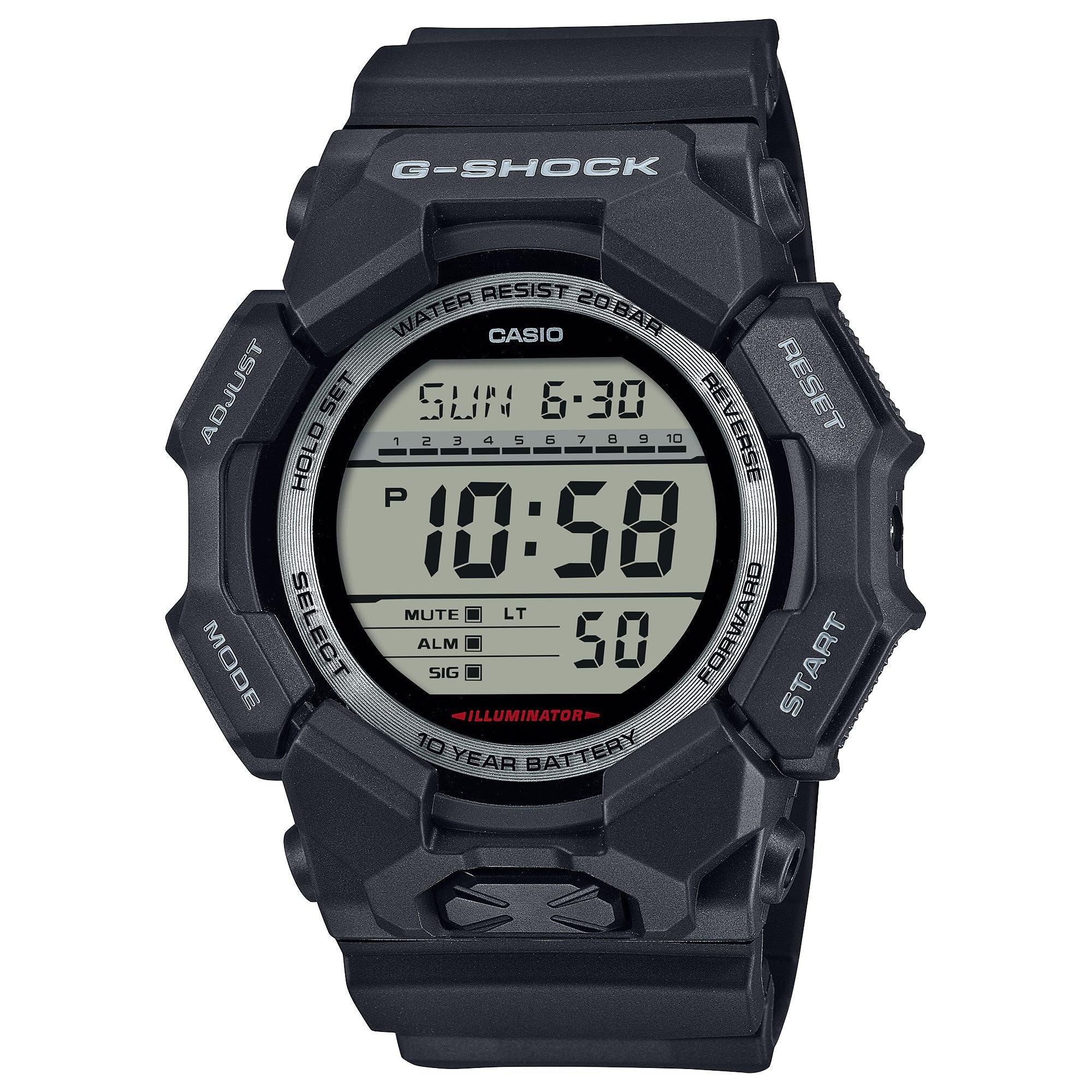
Image 3.1: The G-Shock GD010 watch face in Timekeeping Mode.
การใช้เครื่องจับเวลา (โครโนกราฟ)
- จากโหมดแสดงเวลา ให้กดปุ่ม โหมด button until "STW" or "STOPWATCH" appears on the display.
- กดปุ่ม FORWARD / START ปุ่มสำหรับเริ่มจับเวลา
- กดปุ่ม FORWARD / START กดปุ่มอีกครั้งเพื่อหยุดนาฬิกาจับเวลา
- หากต้องการรีเซ็ตนาฬิกาจับเวลาเป็นศูนย์ ให้กดปุ่ม ย้อนกลับ กดปุ่มขณะที่นาฬิกาจับเวลาหยุดทำงาน
การตั้งเวลานับถอยหลัง
- จากโหมดแสดงเวลา ให้กดปุ่ม โหมด button until "TMR" or "TIMER" appears.
- กดปุ่มค้างไว้ ปรับ button until the current timer setting starts to flash.
- ใช้ โหมด button to select the hour or minute setting.
- ใช้ ย้อนกลับ และ ซึ่งไปข้างหน้า ปุ่มสำหรับตั้งเวลาถอยหลังตามต้องการ
- กดปุ่ม ปรับ ปุ่มเพื่อออกจากโหมดการตั้งค่า
- กดปุ่ม FORWARD / START button to start the countdown. An alarm will sound when the timer reaches zero.
ฟังก์ชั่นปลุก
- จากโหมดแสดงเวลา ให้กดปุ่ม โหมด button until "ALM" or "ALARM" appears.
- กดปุ่มค้างไว้ ปรับ กดปุ่มค้างไว้จนกว่าเวลาปลุกจะเริ่มกระพริบ
- ใช้ โหมด button to select the hour or minute setting.
- ใช้ ย้อนกลับ และ ซึ่งไปข้างหน้า ปุ่มสำหรับตั้งเวลาปลุกที่ต้องการ
- กดปุ่ม ปรับ ปุ่มเพื่อออกจากโหมดการตั้งค่า
- หากต้องการเปิด/ปิดนาฬิกาปลุก ให้กดปุ่ม FORWARD / START button while in Alarm Mode (without holding ADJUST).
แนวทางการกันน้ำ
Your GD010 watch is rated for 200-meter water resistance. This means it is suitable for recreational diving (excluding saturation diving), swimming, snorkeling, and water sports.
- Do not operate buttons while the watch is submerged in water or wet.
- Avoid exposing the watch to hot water, steam, or extreme temperature changes, as this can compromise water resistance.
- หลังจากนาฬิกาโดนน้ำเค็มแล้ว ให้ล้างนาฬิกาให้สะอาดด้วยน้ำจืดและเช็ดให้แห้ง
4. การดูแลรักษา
การดูแลทั่วไป
- ควรเช็ดนาฬิกาเป็นประจำด้วยผ้าแห้งเนื้อนุ่มเพื่อขจัดสิ่งสกปรกและความชื้น
- Avoid exposing the watch to strong chemicals, solvents, or detergents, as these can damage the resin materials.
- เก็บนาฬิกาไว้ในที่แห้งและเย็น หลีกเลี่ยงแสงแดดโดยตรงและอุณหภูมิที่สูงหรือต่ำมากเมื่อไม่ได้ใช้งาน
- The watch's resin components and band are designed for durability, but prolonged exposure to UV light may cause discoloration over time.
การเปลี่ยนแบตเตอรี่
The GD010 watch is equipped with a CR2025 battery, providing an approximate battery life of 10 years. When the display becomes dim or functions become erratic, it may be time for a battery replacement.
Battery replacement should ideally be performed by a qualified watch technician to ensure proper sealing and maintain water resistance. Attempting to replace the battery yourself may void the warranty and compromise the watch's water resistance.
การทำความสะอาด
To clean your watch, use a soft cloth dampened with mild soap and water. Gently wipe the case and band. For stubborn dirt, a soft brush can be used. Rinse thoroughly with fresh water and dry completely with a soft cloth.
5. คำแนะนำการแก้ไขปัญหา
If you encounter issues with your GD010 watch, refer to the following common problems and their solutions.
| ปัญหา | สาเหตุที่เป็นไปได้ | สารละลาย |
|---|---|---|
| จอแสดงผลว่างเปล่าหรือมืดลง | แบตเตอรี่อ่อน | Replace the battery (CR2025). Consult a professional watch technician. |
| เวลาไม่ถูกต้อง | Incorrect time zone or manual setting error. | Re-adjust the time and date settings as described in Section 2. |
| ปุ่มต่างๆ ไม่ตอบสนอง | Watch is wet, or internal module error. | Ensure the watch is dry. If the problem persists, a reset may be required (consult support), or professional service. |
| สัญญาณเตือนภัยไม่ดัง | Alarm is turned off or volume is too low (if adjustable). | Verify the alarm is set to ON in Alarm Mode. Check watch settings for alarm volume if applicable. |
If the problem persists after attempting these solutions, please contact G-Shock customer support for further assistance.
6. ข้อมูลจำเพาะผลิตภัณฑ์
| ชื่อรุ่น | จีดี010 |
| หมายเลขรุ่น | GD010-1 |
| Case Size (L× W× H) | 54.9 × 51.9 × 16.1 มม. |
| น้ำหนัก | 73 กรัม (ประมาณ 2.57 ออนซ์) |
| Case and Bezel Material | Bio-based Carbon / Bio-based Resin |
| ประเภทวัสดุของสาย | Resin (CORDURA re/cor) |
| การก่อสร้าง | Shock Resistant, Carbon Core Guard structure |
| ความต้านทานต่อน้ำ | ทนน้ำลึก 200 เมตร |
| แหล่งจ่ายไฟ | CR2025 (1 Lithium Metal battery, included) |
| อายุการใช้งานแบตเตอรี่โดยประมาณ | 10 ปี |
| คริสตัล | กระจกมิเนอรัล |
| ประเภทจอภาพ | ดิจิตอล |
| ประเภทการเคลื่อนไหว | ควอตซ์ญี่ปุ่น |
| คุณสมบัติเพิ่มเติม | Alarm, Chronograph, Timer |
| ประเภทตัวล็อค | หัวเข็มขัด |
| สีแถบ | สีดำ |
| สีหน้าปัด | สีดำ |
7. การรับประกันและการสนับสนุนลูกค้า
ข้อมูลการรับประกัน
Your G-Shock GD010 watch comes with a การรับประกันแบบจำกัด. The terms and conditions of this warranty cover manufacturing defects under normal use. Please refer to the warranty card included with your purchase for specific details regarding coverage duration, exclusions, and how to make a claim. Keep your proof of purchase for warranty validation.
การติดต่อฝ่ายสนับสนุนลูกค้า
For technical assistance, warranty service, or any other inquiries regarding your G-Shock GD010 watch, please contact G-Shock customer support.
- Visit the official G-Shock website for support contact information, FAQs, and service center locations.
- Have your watch model number (GD010-1) and proof of purchase ready when contacting support.