
1. สินค้าหมดview
The Keenso F4 V3S PLUS Brushless ESC Stack is a high-performance 4-in-1 controller designed for FPV drones and RC airplanes. This integrated unit combines a flight controller and a 45A Electronic Speed Controller (ESC) into a compact design, simplifying installation and wiring.
คุณสมบัติที่สำคัญ ได้แก่:
- High Performance 45A ESC: Integrates four 45A ESCs for efficient power management and simplified setup.
- Anti-Jamming & Fast Response: Supports various throttle modes including Oneshot, Multishot, and Dshot for rapid signal processing and interference resistance.
- Powerful BLHeli_S Firmware: Facilitates easy ESC parameter configuration, firmware updates, and compatibility with Cleanflight and Betaflight firmware.
- งานฝีมือพรีเมี่ยม: Constructed with industrial-grade LDO and high-resistance MOS for enhanced durability, strong load capacity, and high-temperature resilience.
- ฟังก์ชันเสริม: Equipped with a gyroscope and barometer for superior control and flight stability.
2. เนื้อหาบรรจุภัณฑ์
ตรวจสอบว่ารายการทั้งหมดที่ระบุไว้ด้านล่างนี้รวมอยู่ในแพ็คเกจของคุณ:
- 1 x 4-in-1 ESC (Electronic Speed Controller)
- 1 x ตัวควบคุมการบิน
- 1 x Capacitance (Capacitor)
- 3 x Connecting Wires (various types)
- 2 x Accessories (unspecified, typically connectors or small parts)
- 8x ลึกampแผ่นรอง
- 4 x ถั่ว

ภาพที่ 2.1: จบแล้วview ของส่วนประกอบทั้งหมดที่รวมอยู่

ภาพที่ 2.2: รายละเอียด view of the ESC and Flight Controller boards with accompanying parts.

Image 2.3: Components laid out for inspection.
3. ข้อมูลจำเพาะทางเทคนิค
3.1. 4-in-1 ESC Parameters
| พารามิเตอร์ | ค่า |
|---|---|
| ขนาด ESC | Approx. 42x41mm / 1.7x1.6in |
| ระยะรู | Approx. 30.5x30.5mm / 1.2x1.2in |
| กระแสไฟฟ้าต่อเนื่อง | 45เอ |
| กระแสระเบิด | 50A (10 วินาที) |
| โปรเซสเซอร์ | EFM8BB21F16G |
| เฟิร์มแวร์ | BLS J H 30 7 |
| Drive Signal Support | DShot300/600, Multshot, Oneshot, PMW |
| อินพุต Voltage | 7.4 to 22.2V (2 to 6S LiPo) |
| ESC Weight | ประมาณ 12 กรัม / 0.4 ออนซ์ |
3.2. Flight Controller Parameters
| พารามิเตอร์ | ค่า |
|---|---|
| ขนาดตัวควบคุม | Approx. 36x36mm / 1.4x1.4in |
| ระยะห่างของรู | Approx. 30.5x30.5mm / 1.2x1.2in |
| มหาเทพ | เอฟ405 |
| ฟังก์ชั่นที่รองรับ | Drag and drop OSD via Betaflight configuration, SBUS, PPM, Spketrum ports, Micro storage card black box |
| ไจโรสโคป | รวมอยู่ด้วย |
| บารอมิเตอร์ | บีเอ็มพี280 |
| เอาท์พุต BEC | 5V/3A, 9V/3A |
| น้ำหนักตัวควบคุม | ประมาณ 7 กรัม / 0.2 ออนซ์ |
3.3. ข้อมูลผลิตภัณฑ์ทั่วไป
- ยี่ห้อ: คีนโซ
- ชื่อรุ่น : Keensox6h89r54l1
- วัสดุ: ส่วนประกอบอิเล็กทรอนิกส์
- แอปพลิเคชัน: FPV UAV, RC Airplanes
4. การตั้งค่าและการติดตั้ง
Proper installation is crucial for the performance and safety of your FPV drone or RC airplane. Always refer to the specific wiring diagrams for your frame and components.
4.1. การตรวจสอบก่อนการติดตั้ง
- Ensure your workspace is clean and static-free.
- ตรวจสอบว่าส่วนประกอบทั้งหมดมีอยู่ครบถ้วนและไม่ได้รับความเสียหาย
- Gather necessary tools: soldering iron, solder, flux, wire cutters, heat shrink tubing, multimeter.
4.2. Mounting the ESC Stack
- แนบ damping pads to the mounting holes on your frame.
- Carefully place the 4-in-1 ESC board onto the damping pads, aligning the mounting holes.
- Place the flight controller board on top of the ESC, ensuring proper orientation and alignment.
- Secure the stack using the provided nuts or standoffs, ensuring not to overtighten.
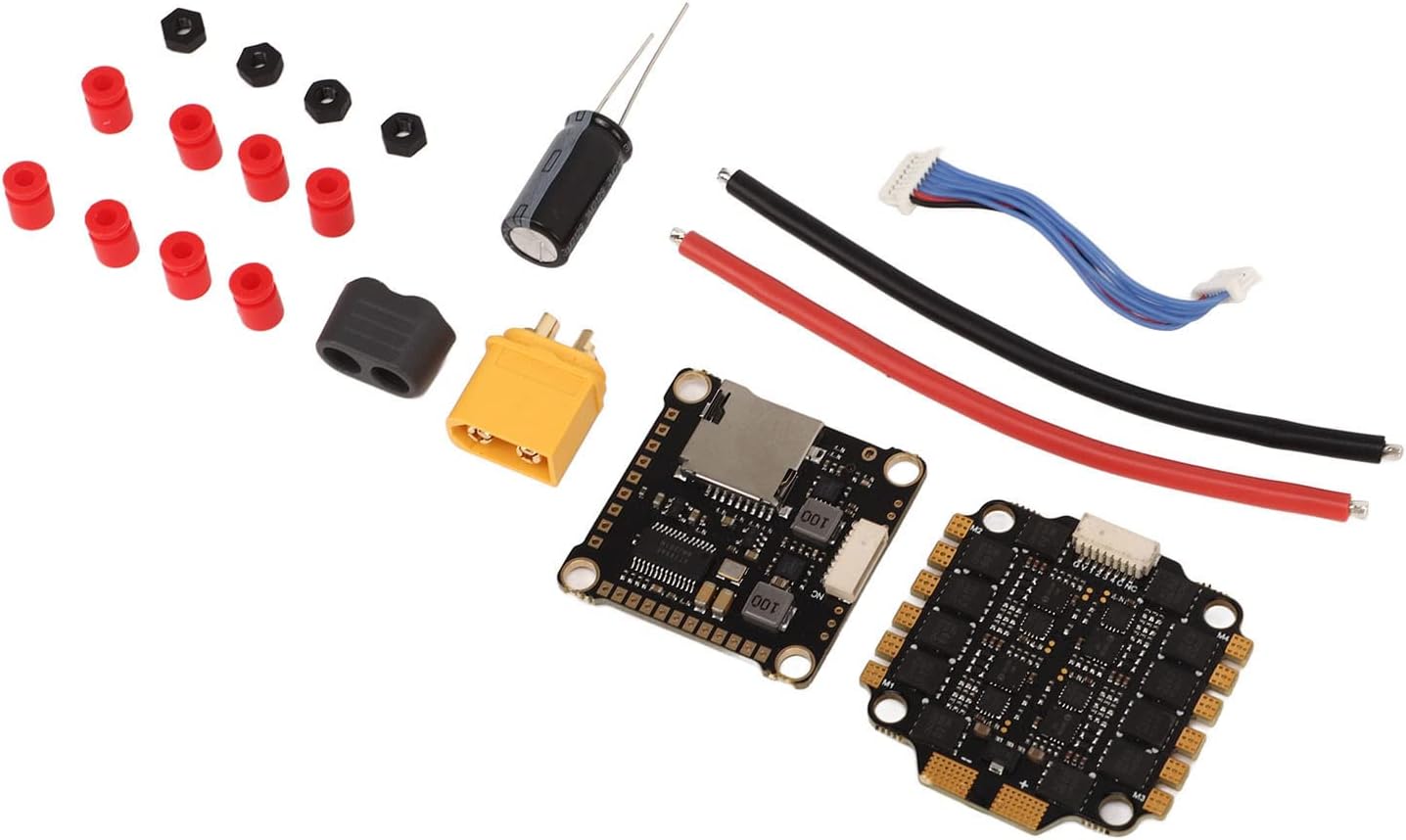
ภาพที่ 4.1: รายละเอียด view of the ESC and Flight Controller boards, highlighting mounting points.
4.3. การเชื่อมต่อสายไฟ
Connect the ESC stack to your drone's power distribution board (PDB) or direct battery connection, motors, receiver, and other peripherals. Always double-check polarity before powering on.
- กำลังไฟเข้า: Solder the main battery leads (red for positive, black for negative) to the designated pads on the 4-in-1 ESC. Ensure the capacitor is soldered across the main battery pads for voltage spike suppression.
- การเชื่อมต่อมอเตอร์: Solder the three motor wires from each motor to the corresponding motor pads on the ESC. The order of wires may need adjustment in software for correct motor direction.
- Flight Controller to ESC: Use the provided connecting wire harness to link the flight controller to the 4-in-1 ESC. This typically carries telemetry, current sensing, and motor control signals.
- การเชื่อมต่อตัวรับสัญญาณ: Connect your receiver (SBUS, PPM, or Spektrum) to the appropriate UART port on the flight controller. Refer to the flight controller's pinout diagram.
- อุปกรณ์ต่อพ่วงอื่นๆ: Connect FPV camera, video transmitter (VTX), GPS, or other accessories to the designated pads/ports on the flight controller, paying attention to voltage requirements (5V/9V BEC outputs are available).
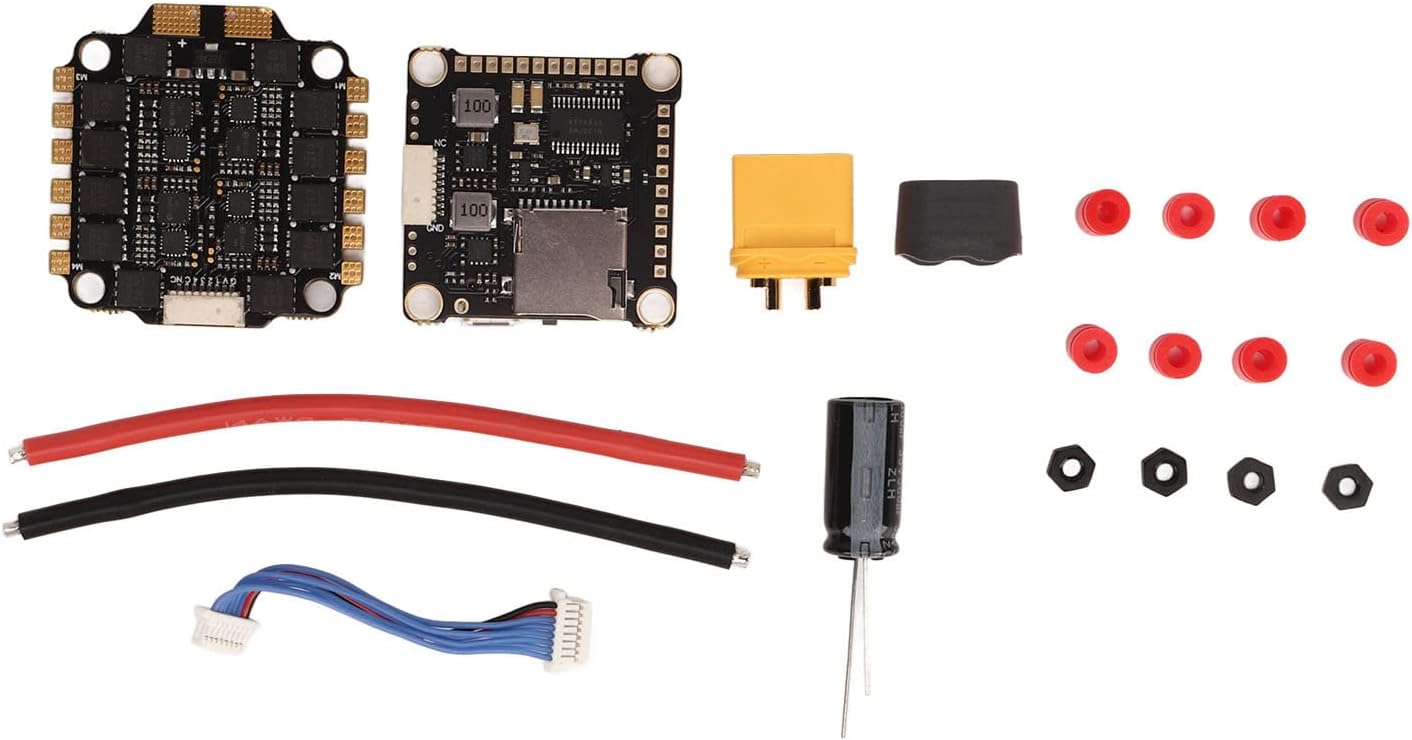
Image 4.2: Connection points on the ESC and Flight Controller.

Image 4.3: Included connecting wires.

Image 4.4: Included capacitor for power filtering.
4.4. การกำหนดค่าเฟิร์มแวร์
The flight controller supports Betaflight and Cleanflight firmware. The ESCs utilize BLHeli_S firmware.
- Flight Controller: Connect the flight controller to your computer via USB. Use the Betaflight Configurator or Cleanflight Configurator software to flash the latest firmware and configure settings such as PID tuning, motor output, receiver protocols, and OSD.
- ESC: Use the BLHeliSuite software (accessible through Betaflight/Cleanflight passthrough) to configure ESC settings, calibrate motors, reverse motor direction if needed, and update BLHeli_S firmware.
5. คู่มือการใช้งาน
Once installed and configured, the Keenso F4 V3S PLUS ESC Stack is ready for operation.
5.1. การตรวจสอบก่อนบิน
- ตรวจสอบให้แน่ใจว่าการเชื่อมต่อทั้งหมดแน่นหนาและไม่มีไฟฟ้าลัดวงจร
- Verify propeller direction and tightness.
- ตรวจสอบปริมาณแบตเตอรี่tagอีและระดับการชาร์จ
- Confirm radio control link and arming switch functionality.
5.2. Powering On and Arming
- Connect the flight battery to the ESC stack. You should hear a series of beeps indicating successful initialization.
- วางโดรนบนพื้นราบ
- Arm the motors using your configured arming switch on your radio transmitter. The motors will typically spin slowly or make a distinct sound to indicate they are armed.
5.3. Throttle Modes
The ESC supports various throttle protocols for precise motor control:
- DShot300/600: Digital protocol offering high resolution and noise immunity. Recommended for optimal performance.
- มัลติช็อต: Analog protocol, faster than Oneshot.
- Oneshot125: Analog protocol, faster than standard PWM.
- พรอมต์: Standard analog protocol, generally not recommended for FPV drones due to latency.
Select the desired throttle mode in your flight controller software (e.g., Betaflight Configurator).
6. การบำรุงรักษา
Regular maintenance helps ensure the longevity and reliability of your ESC stack.
- การตรวจสอบภาพ: Periodically check for any signs of physical damage, loose connections, or burnt components.
- การทำความสะอาด: Keep the boards free from dust, dirt, and debris. Use compressed air or a soft brush. Avoid using liquids directly on the electronics.
- อัพเดตเฟิร์มแวร์: Regularly check for and apply the latest firmware updates for both the flight controller (Betaflight/Cleanflight) and ESCs (BLHeli_S) to benefit from performance improvements and bug fixes.
- การจัดการความร้อน: Ensure adequate airflow around the ESC stack, especially during intense flight, to prevent overheating.
7 การแก้ไขปัญหา
หัวข้อนี้จะกล่าวถึงปัญหาทั่วไปที่คุณอาจพบเจอ
7.1. No Power / No Initialization Beeps
- ตรวจสอบแบตเตอรี่: ตรวจสอบให้แน่ใจว่าแบตเตอรี่ชาร์จแล้วและเชื่อมต่ออย่างถูกต้อง
- ตรวจสอบขั้ว: Verify that the battery leads are connected with correct polarity to the ESC. Reverse polarity can cause severe damage.
- Inspect Soldering: Look for cold solder joints or bridges on the main power pads.
7.2. Motors Not Spinning / Incorrect Direction
- การติดอาวุธ: Ensure the flight controller is armed.
- การเชื่อมต่อมอเตอร์: Verify all motor wires are securely soldered to the ESC.
- BLHeli_S Configuration: Use BLHeliSuite to check motor direction and calibrate ESCs. Motor direction can be reversed in the software.
- Throttle Protocol: Confirm the correct DShot/Multishot/Oneshot protocol is selected in Betaflight/Cleanflight.
7.3. Unstable Flight / Jittery Motors
- การปรับจูน PID: Adjust PID settings in Betaflight/Cleanflight.
- Dampแผ่นรอง: Ensure the ESC stack is properly mounted on damping pads to reduce vibrations.
- ใบพัด: ตรวจสอบใบพัดว่าชำรุดหรือเสียสมดุลหรือไม่
- ตัวเก็บประจุ: Verify the capacitor is correctly installed across the main power leads to filter electrical noise.
7.4. USB Connection Issues
- สาย USB: Try a different USB cable, ensuring it is a data-capable cable.
- ไดรเวอร์: Install necessary drivers (e.g., STM32 Virtual COM Port Driver, Zadig for DFU mode) for your flight controller.
- ตัวกำหนดค่า: Ensure you are using the correct version of Betaflight/Cleanflight Configurator.
8. การรับประกันและการสนับสนุน
For warranty information and technical support, please refer to the official Keenso webหรือติดต่อผู้ค้าปลีกของคุณ โปรดเก็บหลักฐานการซื้อไว้เพื่อใช้ในกรณีที่ต้องการเคลมประกัน
This product has no known safety hazards to users when installed and operated correctly.


