
สินค้าเกินview
The AT&T EL2131-11 is a DECT 6.0 cordless landline phone designed for reliable communication. It features a powerful call blocker, caller ID, a full-duplex speakerphone, and a backlit display and keypad for enhanced visibility. This model includes one handset.
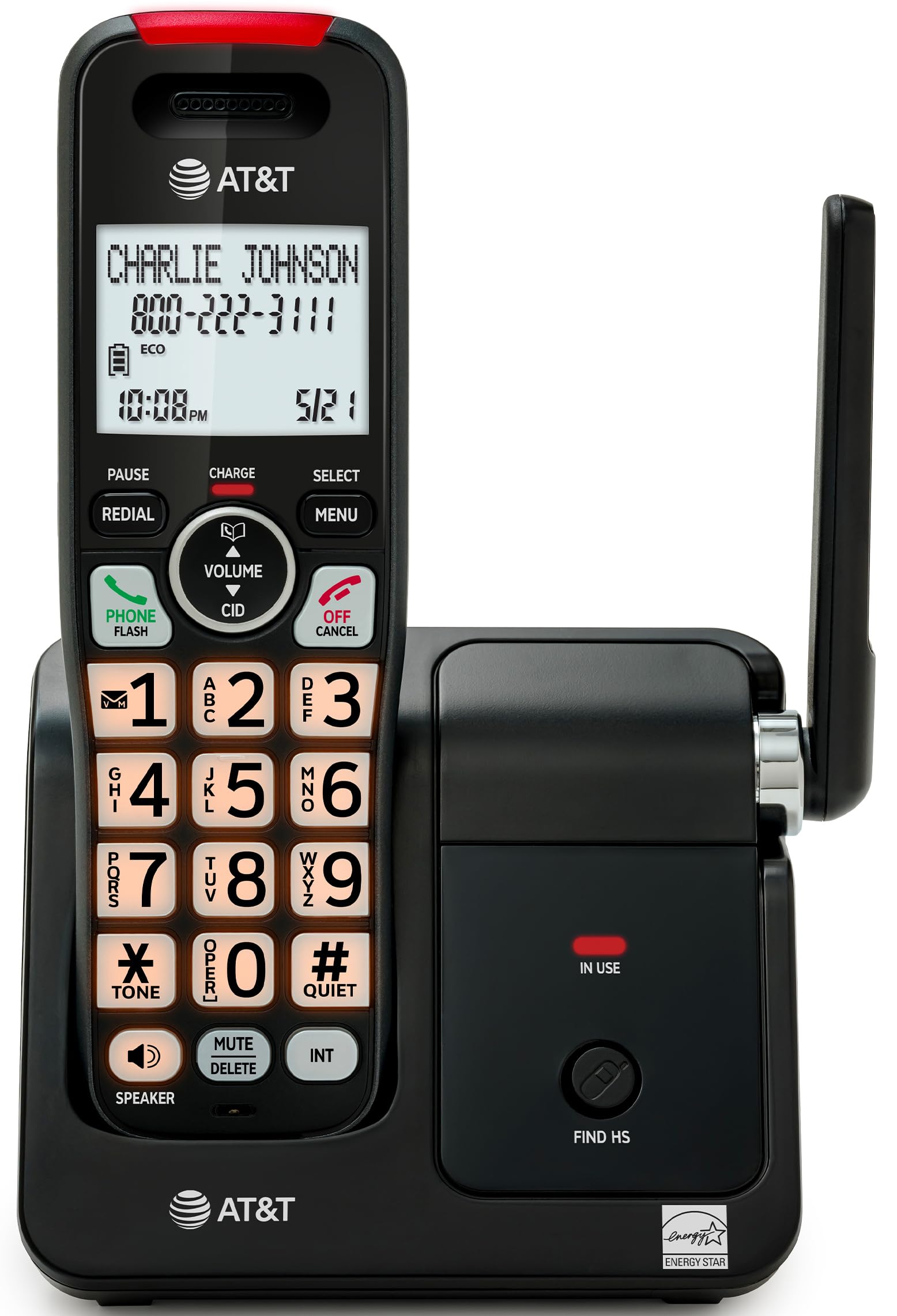
Image: The AT&T EL2131-11 cordless phone, showing the handset docked in its base unit.
คุณสมบัติหลัก:
- โปรแกรมบล็อกสายเรียกเข้า: Blocks up to 50 unwanted numbers.
- หมายเลขผู้โทร: บันทึกประวัติการโทรได้สูงสุด 50 รายการ โดยแสดงชื่อ หมายเลข เวลา และวันที่
- สปีกเกอร์โฟนฟูลดูเพล็กซ์: Allows both parties to speak and listen simultaneously.
- จอแสดงผลแบ็คไลท์และปุ่มกด: ให้ทัศนวิสัยที่ชัดเจนแม้ในสภาพแสงน้อย
- โหมดเงียบ: Silences the ringer instantly.
- โหมด ECO: Reduces power consumption and extends battery life.
- เทคโนโลยี DECT 6.0: Ensures interference-free communication and extended range.
การตั้งค่า
อะไรอยู่ในกล่อง:
- หน่วยฐาน
- โทรศัพท์ไร้สาย 1 เครื่อง
- 1 อะแดปเตอร์
- สายโทรศัพท์
- 2 เซลล์แบตเตอรี่
- คู่มือเริ่มต้นอย่างรวดเร็ว
- ตัวยึดติดผนัง
1. การติดตั้งแบตเตอรี่
- ค้นหาช่องใส่แบตเตอรี่ที่ด้านหลังของโทรศัพท์
- Insert the two supplied battery cells, ensuring correct polarity (+ and -).
- ปิดฝาช่องใส่แบตเตอรี่ให้แน่น
2. การเชื่อมต่อหน่วยฐาน
- Connect the small end of the power adapter to the power jack on the back of the base unit.
- เสียบปลั๊กอะแดปเตอร์ไฟฟ้าด้านใหญ่เข้ากับเต้ารับไฟฟ้ามาตรฐาน
- ต่อปลายด้านหนึ่งของสายโทรศัพท์เข้ากับช่องเสียบ TEL LINE ที่ด้านหลังของตัวเครื่องหลัก
- เสียบปลายอีกด้านหนึ่งของสายโทรศัพท์เข้ากับช่องเสียบโทรศัพท์ที่ผนัง
3. การชาร์จครั้งแรก
Place the handset in the base unit with the display facing forward. The handset will begin charging. Allow the handset to charge for at least 16 hours before initial use to ensure optimal battery performance.

Image: The handset charging in its base, with an overlay indicating a 5-day battery life on a single charge.
คำแนะนำการใช้งาน
การโทรออกและรับสาย
- ในการโทรออก: กด โทรศัพท์ / แฟลชจากนั้นกดหมายเลขดังกล่าว
- เพื่อรับสาย: เมื่อโทรศัพท์ดัง ให้กด โทรศัพท์ / แฟลช หรือปุ่มโทรออกใดๆ (0-9, * หรือ #)
- วิธีวางสาย: กด ปิด/ยกเลิก หรือวางโทรศัพท์กลับลงในฐานวาง
การใช้สปีกเกอร์โฟน
ระหว่างการโทร ให้กด ผู้พูด button to activate the full-duplex speakerphone. Press it again to switch back to the handset earpiece.

Image: A man holding a small dog, speaking hands-free using the phone's speakerphone function. The phone's base unit is visible on a table.
การระบุหมายเลขผู้โทร
When a call comes in, the caller's information (name and number) will appear on the handset display if you subscribe to Caller ID service. The phone stores up to 50 caller ID records.

Image: A close-up of the phone's display showing a caller's name and number, along with the time and date.
การบล็อคการโทร
The call blocker feature allows you to block up to 50 unwanted numbers. To block a number:
- During a call or from the Caller ID log, press เมนู.
- Scroll to 'Call Blocker' and press เลือก.
- Follow the on-screen prompts to add the number to the block list.

Image: A visual representation of the call blocker feature, showing a list of blocked numbers on the phone's display.
โหมดเงียบ
To temporarily silence the ringer, press and hold the #เงียบ button on the handset. The ringer will be silenced for a set period, typically 1 to 12 hours, which can be adjusted in the settings.

Image: A close-up of the phone's display indicating that 'Quiet mode' is active.
โหมด ECO
The ECO mode automatically adjusts power consumption to conserve battery life. This mode is typically active by default and indicated by an 'ECO' icon on the display.

Image: The phone's display showing the 'ECO' icon, indicating power-saving mode is active.
โทรซ้ำ
หากต้องการโทรซ้ำหมายเลขสุดท้ายที่โทร ให้กด ซ้ำ ปุ่ม.

Image: The phone's display showing the 'Redial' function with a previously dialed number.
จอแสดงผลพร้อมไฟแบ็คไลท์และแป้นพิมพ์
The handset features a backlit LCD display and illuminated keypad for easy readability and operation in various lighting conditions.

Image: A hand holding the phone, demonstrating its bright backlit screen and illuminated keypad in a low-light environment.
การซ่อมบำรุง
การทำความสะอาดโทรศัพท์
- ใช้แปรงนุ่มๆ ปัดเบาๆamp cloth to clean the surfaces of the phone and base unit.
- ห้ามใช้สเปรย์ทำความสะอาดหรือสารเคมีรุนแรง เนื่องจากอาจทำให้พื้นผิวหรือชิ้นส่วนอิเล็กทรอนิกส์เสียหายได้
- Ensure the phone is unplugged from the power outlet before cleaning.
การดูแลแบตเตอรี่
- For optimal battery life, keep the handset in the base unit when not in use.
- หากจะไม่ได้ใช้งานโทรศัพท์เป็นเวลานาน ควรถอดแบตเตอรี่ออกเพื่อป้องกันการรั่วไหล
- Replace batteries when they no longer hold a charge effectively. Use only the specified battery type.
การแก้ไขปัญหา
If you experience issues with your AT&T EL2131-11 phone, refer to the following common troubleshooting steps:
| ปัญหา | สารละลาย |
|---|---|
| ไม่มีเสียงสัญญาณโทรศัพท์ |
|
| โทรศัพท์ไม่ชาร์จ |
|
| ไม่สามารถโทรออก/รับสายได้ |
|
| คุณภาพเสียงไม่ดี/สัญญาณรบกวน |
|
ข้อมูลจำเพาะ
| คุณสมบัติ | รายละเอียด |
|---|---|
| ยี่ห้อ | เอทีแอนด์ที |
| หมายเลขรุ่น | EL2131-11 |
| ประเภทโทรศัพท์ | ไร้สาย |
| เทคโนโลยี | DECT6.0 ภาษาไทย |
| สี | สีดำและสีเงิน |
| วัสดุ | พลาสติก |
| แหล่งพลังงาน | ใช้พลังงานจากแบตเตอรี่ |
| ขนาดรายการ (ยาว x กว้าง x สูง) | 5.06 x 4.65 x 7.23 นิ้ว (หน่วยฐาน) |
| เวลาสนทนาทางโทรศัพท์ | 10 ชั่วโมง |
| เวลาสแตนด์บายของโทรศัพท์ | 5 วัน |
| การระบุผู้โทร | ใช่ |
| การทำงานแบบหลายบรรทัด | การทำงานแบบบรรทัดเดียว |
| ประเภทของระบบตอบรับ | เลขที่ |
| ยูพีซี | 650530034510 |

Image: The AT&T EL2131-11 base unit with handset, showing its height (7.23 inches), length (5.06 inches), and width (4.65 inches).
ข้อมูลการรับประกัน
This AT&T EL2131-11 Cordless Landline Phone comes with a รับประกันจำกัด 1 ปี from the manufacturer. Please retain your proof of purchase for warranty claims. For specific terms and conditions, refer to the warranty card included in your product packaging or visit the official AT&T support webเว็บไซต์.
การสนับสนุนลูกค้า
For further assistance, technical support, or to inquire about replacement parts, please contact AT&T customer service. You can typically find contact information on the official AT&T website or in the quick start guide provided with your phone.
Online resources may include FAQs, detailed user manuals, and support forums.