
สินค้าเกินview
The RAINPOINT ITV156 Smart Watering Timer with Rain Sensor is designed to automate your garden and lawn irrigation, ensuring efficient water usage and healthy plant growth. This kit includes the ITV156 watering timer and a dedicated rain sensor for intelligent operation.
- Intelligent Watering System with Rain Sensor: The system automatically detects rainfall, stopping irrigation immediately and resuming once dry, ensuring efficient and effortless watering.
- Quick Plug & Play Connection: The RAINPOINT rain sensor connects directly via the DC port without tools, allowing for quick installation in minutes.
- Precise 4-Level Triggering: Adjust rain thresholds (3-19 mm) to automatically stop watering during rain, preventing soil saturation and overwatering.
- 3 Independent Watering Programs: Set up to 3 daily programs with customizable start times, durations (1 min to 7h 59min), and days (Mon-Sun) to meet your garden's specific needs.
- ดีไซน์ทนทานสำหรับใช้งานกลางแจ้ง: Features an IP65 waterproof casing and a solid brass inlet for long-lasting outdoor use, ensuring reliable performance in various weather conditions.
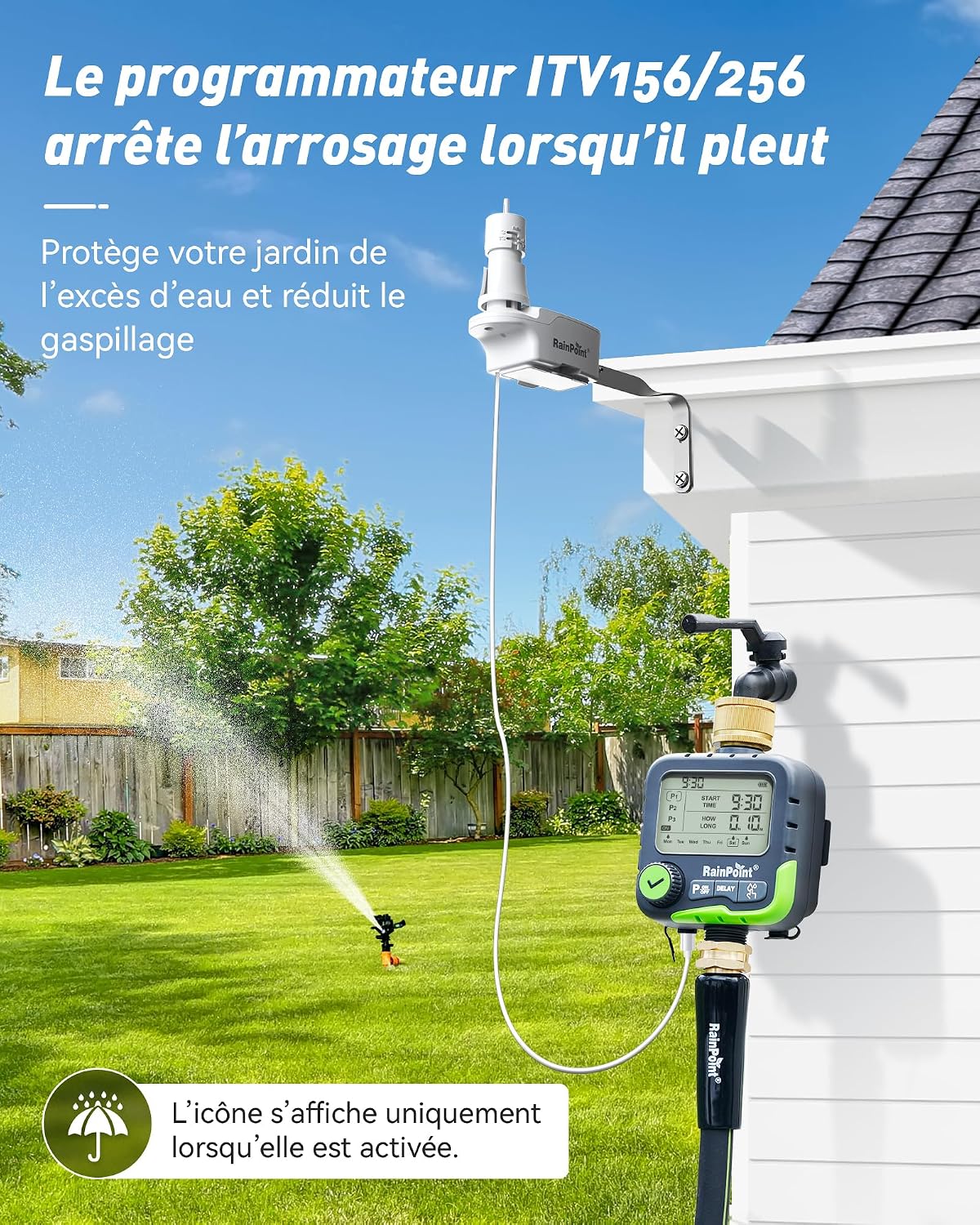
1. การตั้งค่าและการติดตั้ง
1.1 เนื้อหาบรรจุภัณฑ์
Before installation, ensure all components are present in the package:
- 1x RAINPOINT ITV156 Watering Timer
- 1x Rain Sensor
- 1x Faucet Connector (EU 3/4" or 1")
- ฟิลเตอร์ 1x
- 1x คู่มือผู้ใช้
- เทปเทฟลอน 1 ชิ้น
- 4x AA Batteries (may be pre-installed or included separately)

1.2 Installing the Rain Sensor
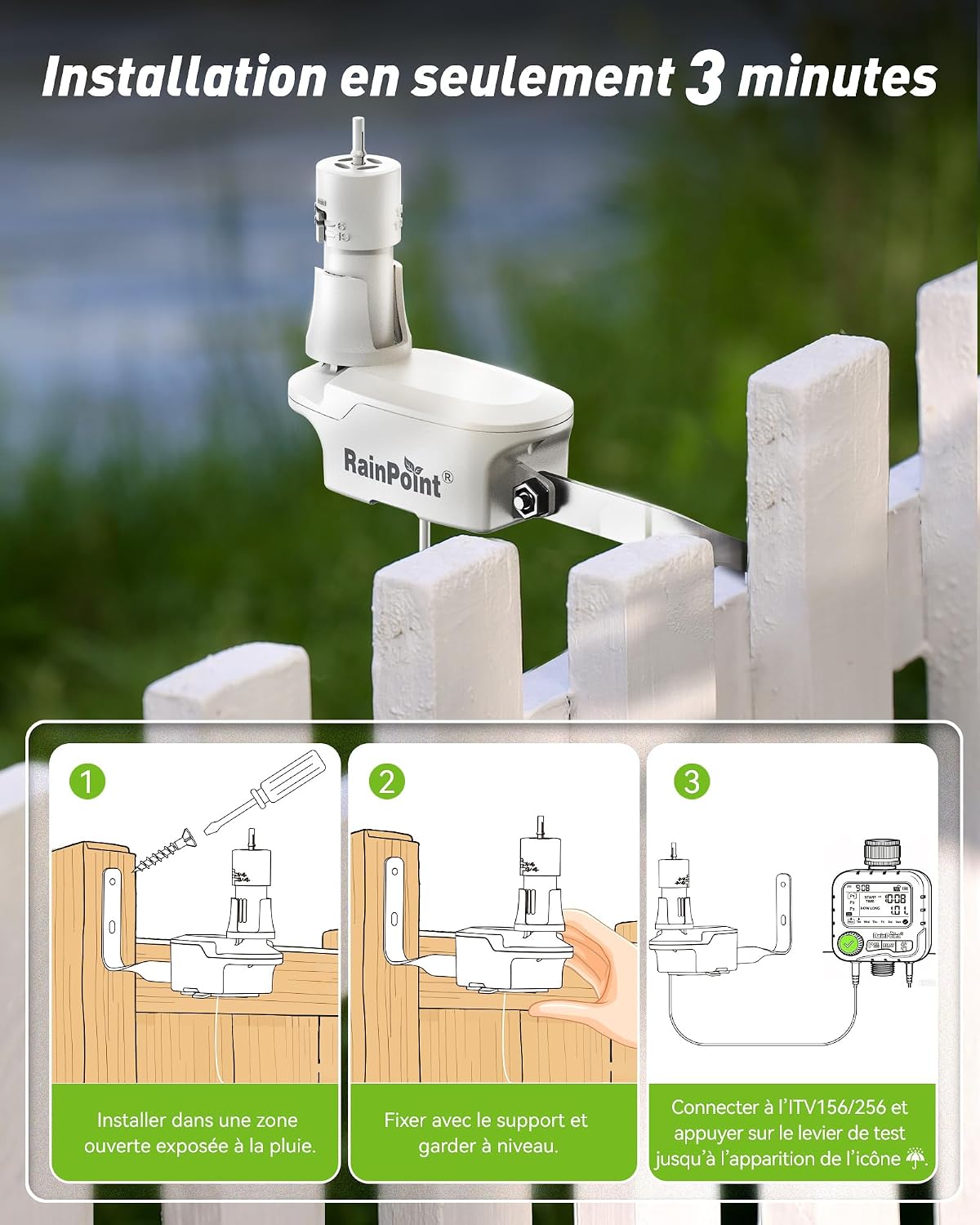
The rain sensor should be installed in an area that receives direct rainfall and is not obstructed by eaves or trees.
- เลือกสถานที่: Select an open area exposed to rain.
- เมานต์เซนเซอร์: Fix the sensor with its support bracket, ensuring it is level.
- Connect to Timer: Connect the rain sensor cable directly to the DC port on the ITV156 timer. Press the test lever on the sensor until the rain icon appears on the timer's display to confirm connection.
1.3 Mounting Options for Rain Sensor
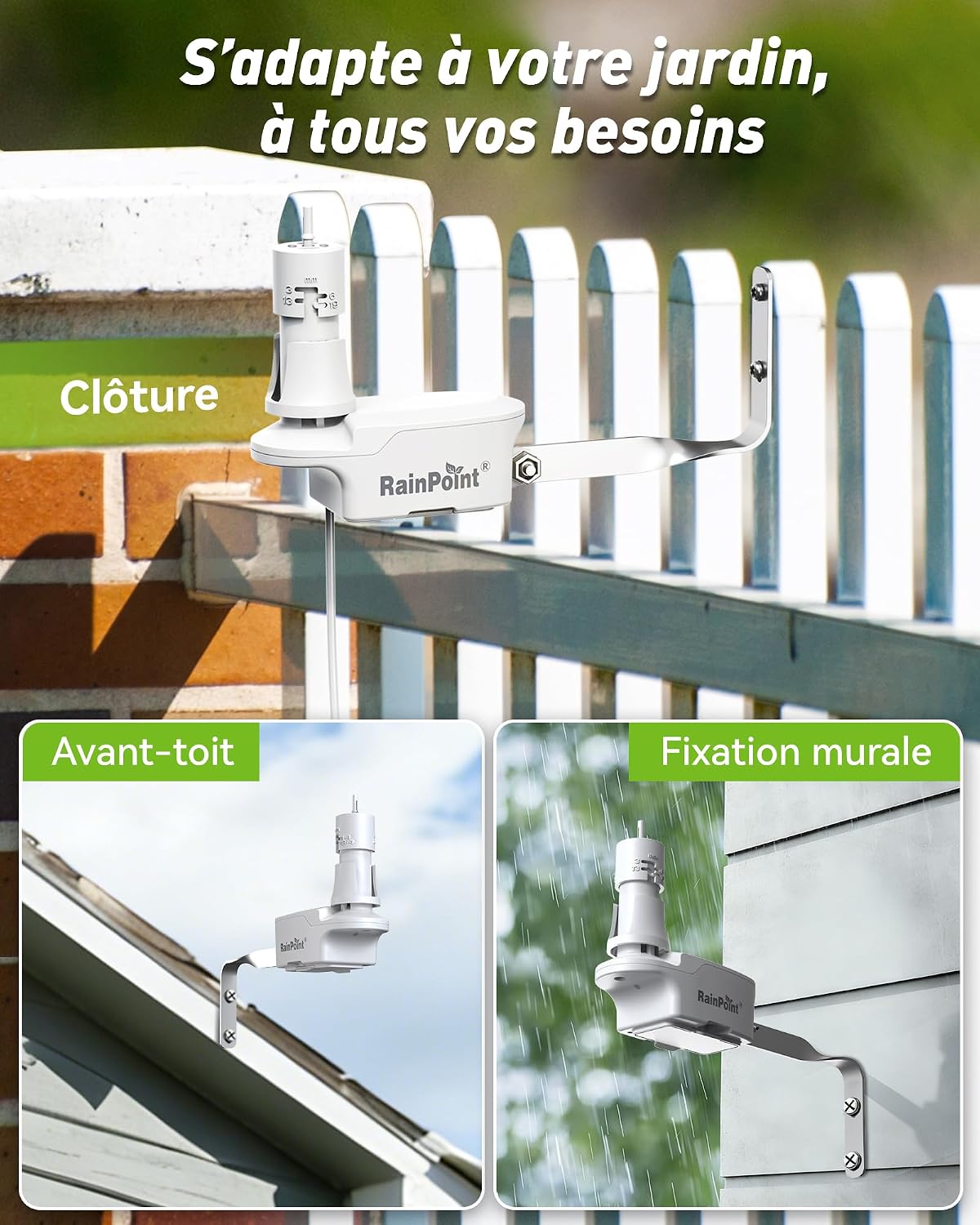
The rain sensor offers flexible mounting options to best suit your garden layout:
- การติดตั้งบนรั้ว: Attach the sensor to a fence post.
- Eaves Mounting: Secure the sensor under the eaves of your roof.
- การติดตั้งบนผนัง: Directly fix the sensor to a wall.
1.4 Connecting the Timer to the Faucet
Connect the ITV156 timer to your outdoor faucet and garden hose.
- เตรียมก๊อกน้ำ: ตรวจสอบให้แน่ใจว่าก๊อกน้ำกลางแจ้งของคุณสะอาดและปราศจากสิ่งสกปรก
- ติดเทปเทฟลอน: Wrap the provided Teflon tape around the threads of your faucet for a watertight seal.
- Attach Timer: Screw the brass inlet of the timer onto the faucet. Hand-tighten firmly.
- เชื่อมต่อท่อ: Attach your garden hose to the outlet of the watering timer.

2. การดำเนินการ
2.1 การตั้งเวลาและวันปัจจุบัน
Before programming, set the current time and day on the timer. Refer to the user manual for specific button presses to enter time/day setting mode.
2.2 การตั้งโปรแกรมการรดน้ำ
The ITV156 allows for up to three independent watering programs (P1, P2, P3) to customize your irrigation needs.
- เลือกโปรแกรม: Use the program selection button to choose P1, P2, or P3.
- ตั้งเวลาเริ่มต้น: Adjust the start time for the chosen program.
- กำหนดระยะเวลา: Specify the watering duration from 1 minute to 7 hours and 59 minutes.
- เลือกวัน: Choose the specific days of the week for the program to run (Monday to Sunday).

2.3 Adjustable Rain Sensitivity
The rain sensor's sensitivity can be adjusted to prevent unnecessary watering based on actual rainfall levels.
- เกณฑ์: Choose from four adjustable rain thresholds: 3mm (1/8"), 6mm (1/4"), 13mm (1/2"), or 19mm (3/4").
- หยุดชั่วคราวอัตโนมัติ: When the selected rainfall threshold is met, the timer will automatically pause all active watering programs.

2.4 Automatic Resumption After Rain
The system is designed to automatically resume watering once the rain sensor dries, eliminating the need for manual intervention.
- Drying Mechanism: The rain sensor features a ventilation ring that adjusts the drying speed, ensuring watering resumes at the appropriate time.
- No Manual Reset: Once the sensor is dry, the timer will automatically reactivate its programmed schedules.

2.5 การรดน้ำด้วยตนเอง
คุณสามารถเริ่มการรดน้ำด้วยตนเองได้ตลอดเวลาโดยไม่กระทบต่อกำหนดการที่คุณตั้งโปรแกรมไว้
- Activate Manual Mode: Press the dedicated manual watering button (often labeled 'ON' or 'Manual').
- กำหนดระยะเวลา: Use the dial or buttons to set the desired duration for manual watering.
- เริ่ม/หยุด: Confirm to start manual watering. Press the button again to stop.

2.6 User Interface and Controls
The ITV156 timer features an intuitive interface for easy programming and control.
- หน้าจอขนาดใหญ่ 3.3 นิ้ว: Provides clear visibility of all settings and current status.
- 360-degree Continuous Adjustment Dial: Allows for smooth and precise setting adjustments.
- Quick Start/Stop Button: Enables rapid activation or deactivation of programs in 5 seconds.

3. การบำรุงรักษา
3.1 การดูแลทั่วไป
To ensure the longevity and optimal performance of your RAINPOINT watering timer and rain sensor:
- รักษาความสะอาด: Regularly wipe down the timer and sensor to remove dirt and debris.
- ตรวจสอบการเชื่อมต่อ: Periodically inspect all connections for leaks or damage.
- ที่เก็บของในฤดูหนาว: In freezing conditions, disconnect the timer and sensor, remove batteries, and store them indoors to prevent damage.
- ความทนทาน: The IP65 waterproof rating ensures protection against water jets, but avoid submerging the device.
3.2 การเปลี่ยนแบตเตอรี่
The timer requires 4 AA batteries for operation. Replace them when the low battery indicator appears on the display.
- ค้นหาช่องใส่แบตเตอรี่: The battery compartment is typically on the back or side of the timer.
- ช่องเปิด: Use a screwdriver or coin if necessary to open the battery cover.
- เปลี่ยนแบตเตอรี่: Remove old batteries and insert 4 new AA alkaline batteries, ensuring correct polarity (+/-).
- ปิดช่อง: Securely close the battery cover to maintain water resistance.
4 การแก้ไขปัญหา
If you encounter issues with your RAINPOINT ITV156 watering timer, refer to the following common troubleshooting steps:
- ตัวตั้งเวลาไม่รดน้ำ:
- ตรวจสอบว่าก๊อกน้ำเปิดอยู่หรือไม่
- Ensure batteries are installed correctly and have sufficient power. Replace if necessary.
- Verify that a watering program is set and active.
- Check if the rain sensor is wet or activated, pausing the schedule.
- Continuous Watering:
- Ensure no manual watering is active.
- Check program settings for excessively long durations.
- Inspect the timer for any physical damage or stuck buttons.
- Rain Sensor Not Detecting Rain:
- Confirm the sensor is installed in an open area receiving direct rainfall.
- Check the cable connection between the sensor and the timer.
- Ensure the sensor's test lever is functioning and the rain icon appears on the timer.
- แรงดันน้ำต่ำ:
- Check the water supply from your faucet.
- Clean the filter inside the timer's inlet to remove any blockages.
5. ข้อมูลจำเพาะผลิตภัณฑ์
| ยี่ห้อ | เรนพอยท์ |
| หมายเลขรุ่น | ITV156-ICS044 |
| สี | สีเขียว |
| ขนาดสินค้า | 11P x 13W x 16.2H เซนติเมตร |
| จำนวนโปรแกรม | 3 |
| ระดับการกันน้ำ | IP65 |
| แหล่งพลังงาน | 4x AA แบตเตอรี่ |
| การเชื่อมต่อเซ็นเซอร์วัดปริมาณน้ำฝน | พอร์ต DC |
| ความเข้ากันได้ของสมาร์ทโฮม | ไม่รองรับระบบบ้านอัจฉริยะ |
6. การรับประกันและการสนับสนุน
6.1 ข้อมูลการรับประกัน
RAINPOINT products are designed for durability and performance. For specific warranty details regarding your ITV156 watering timer and rain sensor kit, please refer to the warranty card included in your product packaging or visit the official RAINPOINT webไซต์นี้ โปรดเก็บหลักฐานการซื้อไว้เพื่อใช้ยืนยันการรับประกัน
6.2 การสนับสนุนลูกค้า
If you have any questions, require technical assistance, or need to report an issue, please contact RAINPOINT customer support through the following channels:
- เป็นทางการ Webเว็บไซต์: เยี่ยมชมเว็บไซต์อย่างเป็นทางการของ RAINPOINT webเว็บไซต์นี้รวบรวมคำถามที่พบบ่อย แหล่งข้อมูลสนับสนุน และแบบฟอร์มติดต่อ
- การสนับสนุนทางอีเมล์: Refer to your user manual for the dedicated customer support email address.
- ผู้ค้าปลีกออนไลน์: For purchase-related inquiries, you may also contact the retailer where you purchased the product.