
1. บทนำ
This manual provides essential information for setting up, operating, and maintaining your iFFALCON 50U95A 50-inch 4K QD-Mini LED Smart Google TV. Please read it thoroughly before using the product to ensure safe and optimal performance. Keep this manual for future reference.
The iFFALCON 50U95A combines advanced QD-Mini LED display technology with a 144Hz native refresh rate, HDR 1000nit peak brightness, and an ONKYO 2.1 Hi-Fi audio system to deliver an immersive viewing and listening experience. Powered by Google TV, it offers a wide range of smart features and content.
2. ข้อมูลด้านความปลอดภัยที่สำคัญ
ปฏิบัติตามข้อควรระวังด้านความปลอดภัยขั้นพื้นฐานเสมอเมื่อใช้โทรทัศน์เครื่องนี้เพื่อลดความเสี่ยงต่อการเกิดไฟไหม้ ไฟฟ้าช็อต และการบาดเจ็บ
- อย่าให้ทีวีโดนฝนหรือความชื้น
- ห้ามเปิดตู้ ให้ส่งการบริการทั้งหมดให้กับบุคลากรที่มีคุณสมบัติเหมาะสม
- ตรวจสอบให้แน่ใจว่ามีการระบายอากาศที่เหมาะสม และอย่าปิดกั้นช่องระบายอากาศ
- Use only the power adapter and cable supplied with the unit.
- วางทีวีบนพื้นผิวที่มั่นคงและเรียบเพื่อป้องกันไม่ให้ทีวีล้ม
- เก็บทีวีให้ห่างจากแสงแดดโดยตรง แหล่งความร้อน และอุณหภูมิที่สูงหรือต่ำเกินไป
- ถอดปลั๊กทีวีในระหว่างที่มีพายุฝนฟ้าคะนองหรือเมื่อไม่ได้ใช้งานเป็นเวลานาน
3. สิ่งที่รวมอยู่
ตรวจสอบว่าบรรจุภัณฑ์มีส่วนประกอบทั้งหมด:
- iFFALCON 50U95A 50-inch 4K QD-Mini LED Smart Google TV
- อะแดปเตอร์แปลงไฟ
- สายไฟ
- รีโมทคอนโทรล
- ชั้นวางทีวี (2 ชิ้น)
- คู่มือการใช้งาน (เอกสารนี้)

ภาพ: ด้านหน้า view of the iFFALCON 50U95A 50-inch TV. This image shows the television from the front, highlighting its slim bezels and stand.
4. การตั้งค่า
4.1 การติดตั้งขาตั้ง
- วางทีวีคว่ำหน้าลงบนพื้นผิวเรียบและนุ่มอย่างระมัดระวังเพื่อป้องกันไม่ให้หน้าจอเสียหาย
- จัดวางชิ้นส่วนขาตั้งให้ตรงกับรูสกรูที่ด้านล่างของทีวี
- ยึดขาตั้งด้วยสกรูที่ให้มา ตรวจสอบให้แน่ใจว่ายึดแน่น

ภาพ: ด้านข้าง view of the iFFALCON 50U95A TV with stand. This image illustrates the television's profile and how the stand supports it.
4.2 การเชื่อมต่ออุปกรณ์ต่อพ่วง
ทีวีมีตัวเลือกการเชื่อมต่อหลายแบบ:
- พอร์ต HDMI (x4): เชื่อมต่อเครื่องเล่นบลูเรย์ เครื่องเล่นเกม และอุปกรณ์อื่นๆ ที่รองรับ HDMI
- พอร์ต USB (x1): เชื่อมต่ออุปกรณ์จัดเก็บข้อมูล USB สำหรับการเล่นสื่อ
- Wi-Fi และบลูทูธ: สำหรับการเชื่อมต่อเครือข่ายไร้สายและอุปกรณ์เสริม
ภาพ: ด้านหลัง view of the iFFALCON 50U95A TV showing ports. This image displays the back panel of the television, indicating the location of various input and output ports.
4.3 การเปิดเครื่อง
- เชื่อมต่อสายไฟเข้ากับทีวีแล้วจึงเสียบเข้ากับเต้ารับไฟฟ้า
- กดปุ่มเปิดปิดบนรีโมทคอนโทรลหรือบนทีวีโดยตรง
- Follow the on-screen instructions for initial setup, including network connection and Google TV account login.
5. คู่มือการใช้งาน
5.1 ฟังก์ชั่นการควบคุมระยะไกล
The remote control allows you to navigate the TV's interface, adjust settings, and access smart features. Refer to the remote control diagram in the separate quick start guide for button layout.
5.2 อินเทอร์เฟซ Google TV
Your iFFALCON TV runs on Google TV, providing a personalized experience with content recommendations, access to streaming apps, and Google Assistant voice control.
- หน้าจอหลัก: Access your favorite apps, movies, and shows.
- ผู้ช่วย Google: กดปุ่ม Google Assistant บนรีโมทของคุณเพื่อใช้คำสั่งเสียงในการค้นหาเนื้อหา ควบคุมอุปกรณ์สมาร์ทโฮม และอื่นๆ
- แอป: ดาวน์โหลดและจัดการแอปจาก Google Play Store
5.3 การตั้งค่าภาพและเสียง
เข้าถึงเมนูการตั้งค่าเพื่อปรับแต่งของคุณ viewประสบการณ์การเรียนรู้และการฟัง:
- โหมดภาพ: Choose from various presets (e.g., Standard, Vivid, Movie, Game) or customize brightness, contrast, color, and sharpness.
- โหมดเสียง: Select audio presets (e.g., Standard, Music, Movie) or adjust equalizer settings.
- การตั้งค่า HDR: The TV supports HDR10, HDR10+, Dolby Vision, and HLG. Ensure your content source is HDR compatible for optimal performance.
- เกมมาสเตอร์: Activate Game Master mode for reduced input lag and optimized gaming performance.
6. คุณสมบัติหลัก
6.1 QD-Mini LED Display Technology
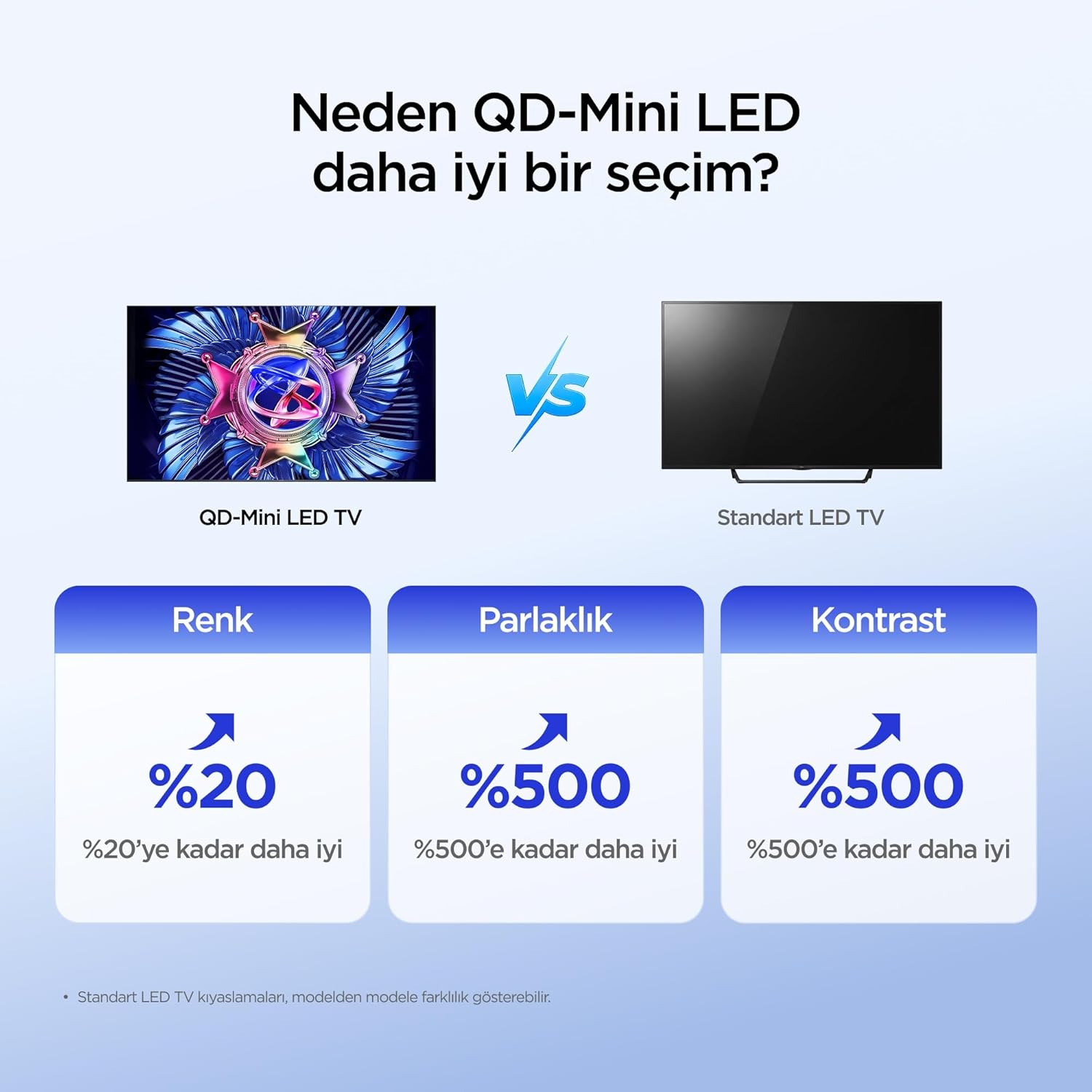
The iFFALCON 50U95A utilizes QD-Mini LED technology, combining Quantum Dot color with Mini LED backlighting. This results in superior brightness, contrast, and color accuracy compared to traditional LED TVs.

Image: Comparison illustrating the benefits of QD-Mini LED over standard LED TVs in terms of color, brightness, and contrast.
With over 500 local dimming zones, the TV provides precise light control at a pixel level, enhancing detail in both bright and dark scenes. It achieves a peak brightness of 1000 nits, ensuring vibrant images even in well-lit environments.

Image: A vibrant image demonstrating the 1000 nits peak brightness capability of the TV.
6.2 144Hz Native Refresh Rate
Experience smoother motion and clearer images with the 144Hz native refresh rate. This is particularly beneficial for fast-paced action movies and gaming, reducing motion blur and ghosting.

Image: A dynamic image of a race car, illustrating the smooth motion provided by the 144Hz native refresh rate.
6.3 ONKYO 2.1 Hi-Fi Audio System with Dolby Atmos
The integrated ONKYO 2.1 channel speaker system delivers rich, immersive stereo sound with deep bass. Combined with Dolby Atmos, it creates a cinematic audio experience, bringing sound to life with incredible clarity and depth.

Image: A living room scene depicting sound waves emanating from the TV, illustrating the immersive audio experience of the 2.1 speaker system.
6.4 AI PQ Pro Processor
The AI PQ Pro Processor intelligently analyzes and optimizes content pixel by pixel. This advanced processor enhances picture quality, delivering sharper details, improved contrast, and more vibrant colors for an overall superior viewการสร้างประสบการณ์

Image: A visual representation of the AI PQ Pro Processor chip, highlighting its role in optimizing image quality.
6.5 Matte HVA Panel & Ultra Slim Design
The Matte HVA Panel reduces glare and reflections, providing a comfortable viewing experience even in bright rooms. Its ultra-slim design allows for seamless integration into any living space, whether on a stand or wall-mounted.

Image: A comparison showing the reduced reflections and improved viewing experience of a Matte HVA Panel compared to a standard panel.

Image: A visual representation of the TV's ultra-slim design, highlighting its sleek profile.
7. การบำรุงรักษา
7.1 การทำความสะอาดหน้าจอ
- ปิดทีวีและถอดปลั๊กไฟออก
- ค่อยๆ เช็ดหน้าจอด้วยผ้านุ่มไม่มีขุย
- สำหรับรอยฝังแน่น ให้เช็ดเบาๆampเทน้ำหรือน้ำยาทำความสะอาดหน้าจอชนิดพิเศษลงบนผ้า (อย่าฉีดลงบนหน้าจอโดยตรง)
- หลีกเลี่ยงการใช้สารเคมีรุนแรง สารกัดกร่อน หรือน้ำยาทำความสะอาดที่มีส่วนผสมของแอลกอฮอล์
7.2 การทำความสะอาดตู้
- เช็ดตู้ด้วยผ้าแห้งนุ่มๆ
- Do not use liquid or aerosol cleaners directly on the cabinet.
8 การแก้ไขปัญหา
| ปัญหา | สาเหตุที่เป็นไปได้ | สารละลาย |
|---|---|---|
| ไม่มีไฟฟ้า | ไม่ได้เสียบสายไฟ ปลั๊กไฟใช้งานไม่ได้ | ตรวจสอบให้แน่ใจว่าเสียบสายไฟแน่นดีแล้ว ทดสอบเต้ารับกับอุปกรณ์อื่น |
| ไม่มีภาพแต่มีเสียง | Incorrect input source selected; backlight off. | กดปุ่ม "Input" บนรีโมทเพื่อเลือกแหล่งสัญญาณที่ถูกต้อง ตรวจสอบการตั้งค่าภาพ |
| ไม่มีเสียงแต่มีภาพ | ปิดเสียงหรือเสียงเบาเกินไป; เลือกเอาต์พุตเสียงไม่ถูกต้อง | Unmute volume or increase level. Check audio output settings (e.g., TV speakers, external soundbar). |
| รีโมตคอนโทรลไม่ทำงาน | แบตเตอรี่หมดหรือใส่ไม่ถูกต้อง มีสิ่งกีดขวางระหว่างรีโมทและทีวี | เปลี่ยนแบตเตอรี่ ตรวจสอบให้แน่ใจว่ามองเห็นตัวรับสัญญาณอินฟราเรดของทีวีได้อย่างชัดเจน |
| ปัญหาการเชื่อมต่อ Wi-Fi | รหัสผ่านไม่ถูกต้อง ปัญหาเกี่ยวกับเราเตอร์ ทีวีอยู่ห่างจากเราเตอร์มากเกินไป | Re-enter Wi-Fi password. Restart router. Move TV closer to router or use a Wi-Fi extender. |
If the problem persists after trying these solutions, please contact iFFALCON customer support.
9. ข้อมูลจำเพาะ
| คุณสมบัติ | รายละเอียด |
|---|---|
| แบบอย่าง | 50U95A |
| ขนาดหน้าจอ | 50 นิ้ว |
| เทคโนโลยีการแสดงผล | QD-มินิ LED |
| ปณิธาน | 4K (3840x2160) ความคมชัดระดับ XNUMXK |
| อัตราการรีเฟรช | 144 เฮิรตซ์ (เนทีฟ) |
| ความสว่างสูงสุด | 1000 นิต |
| รองรับ HDR | HDR10, HDR10+, Dolby Vision, HLG |
| ระบบเสียง | ONKYO 2.1 Channel Speakers, Dolby Atmos, DTS Virtual:X |
| ระบบปฏิบัติการ | กูเกิลทีวี |
| โปรเซสเซอร์ | AI PQ Pro Processor |
| การเชื่อมต่อ | 4x HDMI, 1x USB, Wi-Fi, Bluetooth |
| ขนาด (D x W x H) | 6.9D x 111.1W x 64.6H ซม. |
| น้ำหนัก | 13 กก. |
10. การรับประกันและการสนับสนุน
Your iFFALCON 50U95A TV comes with a การรับประกันจากผู้ผลิต 2 ปี. This warranty covers defects in materials and workmanship under normal use. For warranty claims or technical support, please contact iFFALCON customer service through their official webไซต์หรือข้อมูลการติดต่อที่ระบุไว้ในเอกสารผลิตภัณฑ์ของคุณ
For the latest support information, FAQs, and software updates, visit the official iFFALCON support webเว็บไซต์: www.อิฟฟัลคอน.คอม
