
โมโตโรล่า XT2601-3
Motorola Moto Edge 70 5G Ai User Manual
รุ่น : XT2601-3
1. บทนำ
The Motorola Moto Edge 70 5G Ai is a powerful and slim smartphone designed for enhanced performance and photography. It features a 50MP triple camera system, a vibrant 6.67-inch Super HD pOLED display, and a long-lasting 4800mAh silicon-carbon battery with 68W TurboPower charging.
2. อะไรอยู่ในกล่อง
Upon unboxing your Motorola Moto Edge 70 5G Ai, you should find the following items:
- Motorola Moto Edge 70 5G Ai Smartphone
- เครื่องชาร์จ TurboPower 68W
- สายเคเบิล USB Type-C
- เครื่องมือถอดซิม
- เคสโทรศัพท์
หมายเหตุสำคัญ: If you receive a Euro charger instead of a US Specs Charger, please return the phone immediately and contact Amazon customer service.
3. ทางกายภาพมากกว่าview
3.1 การออกแบบและความทนทาน
The Moto Edge 70 5G Ai features an ultra-thin design, measuring just 5.99mm. It boasts a rubberized, nylon-inspired silicone textured back for a comfortable grip. The device is lightweight at 159.6 grams.
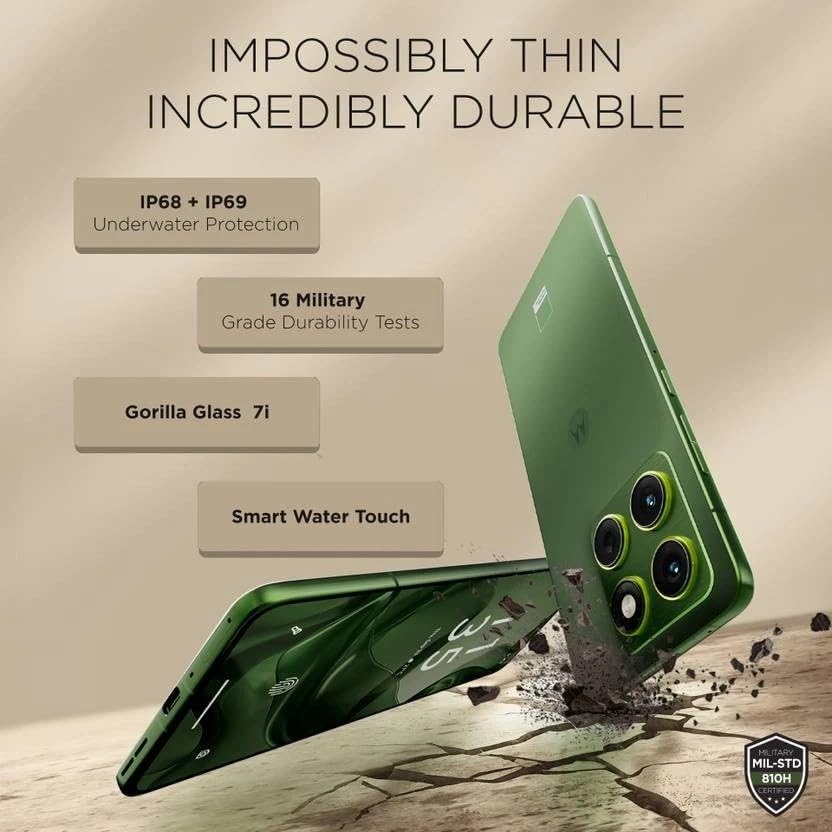
Image: Motorola Moto Edge 70 5G Ai showcasinจี มันบางมากfile and durability features like IP68+IP69 underwater protection, 16 military-grade durability tests, Gorilla Glass 7i, and Smart Water Touch.
The phone is built with MIL-STD 810H military-grade durability, Corning Gorilla Glass 7i protection on the display, and IP68/IP69 water and dust resistance, ensuring robust protection against environmental elements.
3.2 ปุ่มและพอร์ต
The device includes a volume rocker and power button on the side. It also features a dedicated AI key. At the bottom, you will find the speaker grille, a USB Type-C 2.0 port, and the SIM card tray. The earpiece doubles as a stereo speaker.
4. การแสดงผล
The Motorola Moto Edge 70 5G Ai is equipped with a 6.67-inch Super HD pOLED display (2712 x 1220 resolution, 446ppi) with a 120Hz refresh rate. It offers a peak brightness of 4500 nits for excellent visibility, even in bright conditions. The display is Pantone Validated for authentic color and skin tones, and supports HDR10+ for infinite contrast. It is a flat panel design with a tiny punch-hole camera.
While the panel supports HDR10+, HDR video playback on platforms like Netflix may not be available due to certification requirements.
An optical in-display fingerprint scanner is integrated for secure and fast unlocking.
5. การปฏิบัติงาน
Powered by the Qualcomm Snapdragon 7 Gen 4 (4nm) Octa-core processor, the Moto Edge 70 5G Ai delivers a stable and smooth user experience. It comes with 12GB of LPDDR5x RAM and 512GB of UFS 3.1 storage.
Benchmark scores indicate strong performance for everyday tasks and casual gaming, with an AnTuTu score of approximately 1.4 million and good CPU/GPU stability.
For gaming, the device supports up to 120 FPS in BGMI and 90 FPS in Call of Duty, providing a fluid experience for short gaming sessions.
6. กล้องถ่ายรูป
The Moto Edge 70 5G Ai features a versatile triple camera system: a 50MP primary camera with Optical Image Stabilization (OIS), a 50MP ultrawide camera with autofocus (allowing for macro shots), and a 3-in-1 dedicated light sensor for accurate color reproduction. The front-facing camera is also 50MP, capable of high-resolution selfies and 4K video recording.
The camera excels in HDR tuning, providing excellent control over highlights and detailed retrieval from shadows across all lenses. While primary shots offer natural colors, some noise may be visible in shadows at 100% zoom due to less aggressive noise processing. Color consistency between lenses may vary slightly.
7. ซอฟต์แวร์
The device runs on Hello UI based on Android 15, offering a clean and feature-rich experience. Motorola promises 3 years of software updates and 4 years of security updates.
It includes Moto features like Moto Gestures, Smart Connect 2.0, Moto Secure, and Family Spaces. The phone also integrates AI features such as Google Gemini, Circle to Search, 'Remember This', Image Studio, and Playlist Studio.
During initial setup, users should be mindful to deselect any unwanted third-party apps (bloatware) or Glance integration to maintain a cleaner user experience.
8. Battery and Connectivity
Equipped with a 4800mAh silicon-carbon battery, the Moto Edge 70 5G Ai supports 68W TurboPower fast charging, capable of reaching 0-100% charge in approximately 40 minutes. It also supports 15W wireless charging.

Image: Motorola Moto Edge 70 5G Ai showing its 4800mAh silicon-carbon battery, 68W TurboPower charger, and 15W wireless charger.
Connectivity options include 16 5G bands, 4G VoLTE, Wi-Fi 6E, Bluetooth 5.4, and NFC.
9. การตั้งค่า
- แกะกล่อง: Carefully remove all items from the box: Motorola Moto Edge 70 5G Ai smartphone, 68W TurboPower charger, USB Type-C cable, and SIM ejector tool. A phone case is also included.
- การใส่ซิมการ์ด: Use the SIM ejector tool to open the SIM card tray. Insert your Nano SIM card (and eSIM if applicable). This device supports Dual SIM (1 Nano SIM + eSIM) and does not have a MicroSD slot.
- เปิดเครื่องครั้งแรก: Press and hold the power button until the Motorola logo appears. Follow the on-screen prompts to select your language, region, and connect to a Wi-Fi network.
- การตั้งค่าบัญชี: ลงชื่อเข้าใช้ด้วยบัญชี Google ของคุณหรือสร้างบัญชีใหม่ ซึ่งถือเป็นสิ่งสำคัญสำหรับการเข้าถึง Google Play Store และบริการอื่น ๆ ของ Google
- การถ่ายโอนข้อมูล (ทางเลือก): If you are upgrading from another device, follow the prompts to transfer your data. You can use Google's backup and restore features or Motorola's migration tools.
- การตั้งค่าความปลอดภัย: Set up your preferred security methods, including PIN, pattern, password, fingerprint recognition (in-display sensor), and face unlock.
- App Installation & Bloatware: During the setup process, you may be prompted to install additional apps or enable features like Glance. Review these options carefully and deselect any unwanted applications or services to optimize your phone's performance and privacy.
- การอัปเดตซอฟต์แวร์: After initial setup, connect to Wi-Fi and check for any available software updates to ensure your device has the latest features and security patches.
10. การใช้งานอุปกรณ์ของคุณ
- การนำทาง: The Moto Edge 70 5G Ai uses gesture navigation by default. Swipe up from the bottom to go home, swipe up and hold for recent apps, and swipe from the left or right edge to go back.
- ท่าทาง Moto: Access quick actions with intuitive gestures. For example, a chop-chop motion to turn on the flashlight or a twist motion to open the camera.
- AI Key: Utilize the dedicated AI key for quick access to AI features like Google Gemini or 'Remember This'.
- การตั้งค่าการแสดงผล: Adjust display settings such as refresh rate (up to 120Hz), color mode (Natural, Radiant, Vivid), and brightness for optimal viewการไอเอ็นจี
- เสียง: The device features stereo speakers (earpiece and bottom speaker). Adjust volume using the volume rocker. Be aware of potential channel imbalance due to the earpiece acting as one speaker.
- การใช้งานกล้อง:
- กล้องหลัก: Open the camera app and select 'Photo' mode for standard shots.
- Ultrawide/Macro: Switch to 'Ultrawide' mode for wider scenes or use the macro feature for close-up shots.
- กล้องเซลฟี่: Switch to the front camera for selfies. Use 'High-Res' mode for 50MP output.
- การบันทึกวิดีโอ: Record videos in up to 4K UHD at 30fps, or FHD at 30fps. Slow motion is available at FHD (240fps/120fps).
11. การบำรุงรักษา
- การทำความสะอาด: ใช้ผ้านุ่มไม่เป็นขุยทำความสะอาดหน้าจอและตัวเครื่องโทรศัพท์ หลีกเลี่ยงสารเคมีรุนแรงหรือวัสดุที่มีฤทธิ์กัดกร่อน
- ความต้านทานน้ำและฝุ่น: The device has an IP68/IP69 rating, meaning it is protected against dust ingress and can withstand immersion in water up to 1.5 meters for 30 minutes. However, it is not waterproof. Avoid intentional submersion and exposure to pressurized water.
- การอัปเดตซอฟต์แวร์: ติดตั้งซอฟต์แวร์และอัปเดตความปลอดภัยอย่างสม่ำเสมอ เพื่อให้มั่นใจได้ถึงประสิทธิภาพสูงสุดและการป้องกันช่องโหว่ต่างๆ
- การดูแลแบตเตอรี่ To prolong battery life, avoid extreme temperatures. Use the provided 68W TurboPower charger for fast and efficient charging. Wireless charging is also supported.
- การจัดการพื้นที่เก็บข้อมูล: ล้างสิ่งที่ไม่จำเป็นออกเป็นระยะๆ files and apps to maintain optimal storage performance. The device comes with 512GB internal storage.
12 การแก้ไขปัญหา
- ปัญหาการเชื่อมต่อเครือข่าย:
- ตรวจสอบให้แน่ใจว่าคุณใส่และเปิดใช้งานซิมการ์ดอย่างถูกต้อง
- Check if your carrier (T-Mobile, Mint, Tello, Ultra, or any T-Mobile network in the USA; any carrier worldwide outside the USA) is compatible with the phone's GSM unlocked status.
- รีสตาร์ทอุปกรณ์
- Reset network settings if problems persist.
- ความล่าช้าของประสิทธิภาพ:
- ปิดแอพพลิเคชันพื้นหลัง
- Clear app caches.
- ตรวจสอบให้แน่ใจว่ามีพื้นที่เก็บข้อมูลว่างเพียงพอ
- รีสตาร์ทโทรศัพท์
- ปัญหาการแสดงผล:
- ปรับการตั้งค่าความสว่าง
- Check for software updates that might address display anomalies.
- คุณภาพกล้อง:
- Ensure lenses are clean.
- For optimal detail, especially in low light or zoomed shots, ensure good lighting conditions.
- Check for software updates that may improve camera processing.
- Unwanted Apps/Bloatware: If you accidentally installed unwanted apps during setup, you can uninstall them from the 'Apps' section in Settings. For Glance integration, disable it during setup or from the lock screen settings.
13. ข้อมูลจำเพาะ
| คุณสมบัติ | รายละเอียด |
|---|---|
| ยี่ห้อ | โมโตโรล่า |
| ชื่อรุ่น | EDGE 70 5G (XT2601-3) |
| ระบบปฏิบัติการ | แอนดรอยด์ 15 |
| โปรเซสเซอร์ | Qualcomm SM7750-AB Snapdragon 7 Gen 4 (4 nm) Octa-core (1x2.8 GHz Cortex-720 & 4x2.4 GHz Cortex-720 & 3x1.8 GHz Cortex-520) |
| แรม | 12GB LPDDR5x ความจุ |
| พื้นที่จัดเก็บ | 512GB UFS 3.1 |
| ขนาดหน้าจอ | 6.67 นิ้ว |
| ประเภทจอภาพ | pOLED, HDR10+, Pantone Validated Colors, 100% DCI-P3 |
| ปณิธาน | 2712 x 1220 pixels (Super HD), 446 PPI |
| อัตราการรีเฟรช | สูงถึง 120Hz |
| ความสว่างสูงสุด | 4500 นิต |
| กล้องหลัง | 50MP (OIS) Primary, 50MP Ultrawide (with AF/Macro), 3-in-1 Light Sensor |
| กล้องหน้า | 50MP |
| ความละเอียดในการจับภาพวิดีโอ | 4K UHD (30fps), FHD (30fps), Slow motion: FHD (240fps/120fps) |
| ความจุของแบตเตอรี่ | 4800 มิลลิวินาทีamp Hours (Silicon-Carbon) |
| การชาร์จไฟ | 68W TurboPower (wired), 15W Wireless Charging |
| ซิมการ์ด | ซิมคู่ (1 นาโนซิม + eSIM) |
| การเชื่อมต่อ | 5G (16 bands), 4G VoLTE, Wi-Fi 802.11 a/b/g/n/ac/ax (2.4 GHz | 5 GHz | 6 GHz / Wi-Fi 6E), Bluetooth 5.4, NFC |
| ความปลอดภัย | On-screen fingerprint reader, Face Unlock, ThinkShield |
| ความทนทาน | IP69/IP68 underwater protection, MIL-STD 810H |
| สี | Pantone Lily Pad (Olivo) |
| ยูพีซี | 840493607603 |
14. การรับประกันและการสนับสนุน
14.1 ข้อมูลการรับประกัน
The Motorola Moto Edge 70 5G Ai comes with a 30-day Amazon warranty and a 1-year Latin America warranty.
14.2 การสนับสนุนลูกค้า
For further assistance, troubleshooting, or warranty claims, please refer to the official Motorola support webไซต์หรือติดต่อฝ่ายบริการลูกค้าของ Amazon
Ask a question about this manual
Ask about setup, troubleshooting, compatibility, parts, safety, or missing instructions. Manuals+ will review the question and use this page’s manual context to help answer it.