
การแนะนำ
This manual provides instructions for the RadioShack Mechanical Gaming Keyboard, Model 2607135. This keyboard features a 98-key layout, mechanical switches designed for durability, adjustable rainbow backlighting, 25-key anti-ghosting, and an integrated rotary knob for volume control. It is designed for plug-and-play operation via USB and is compatible with Windows operating systems.
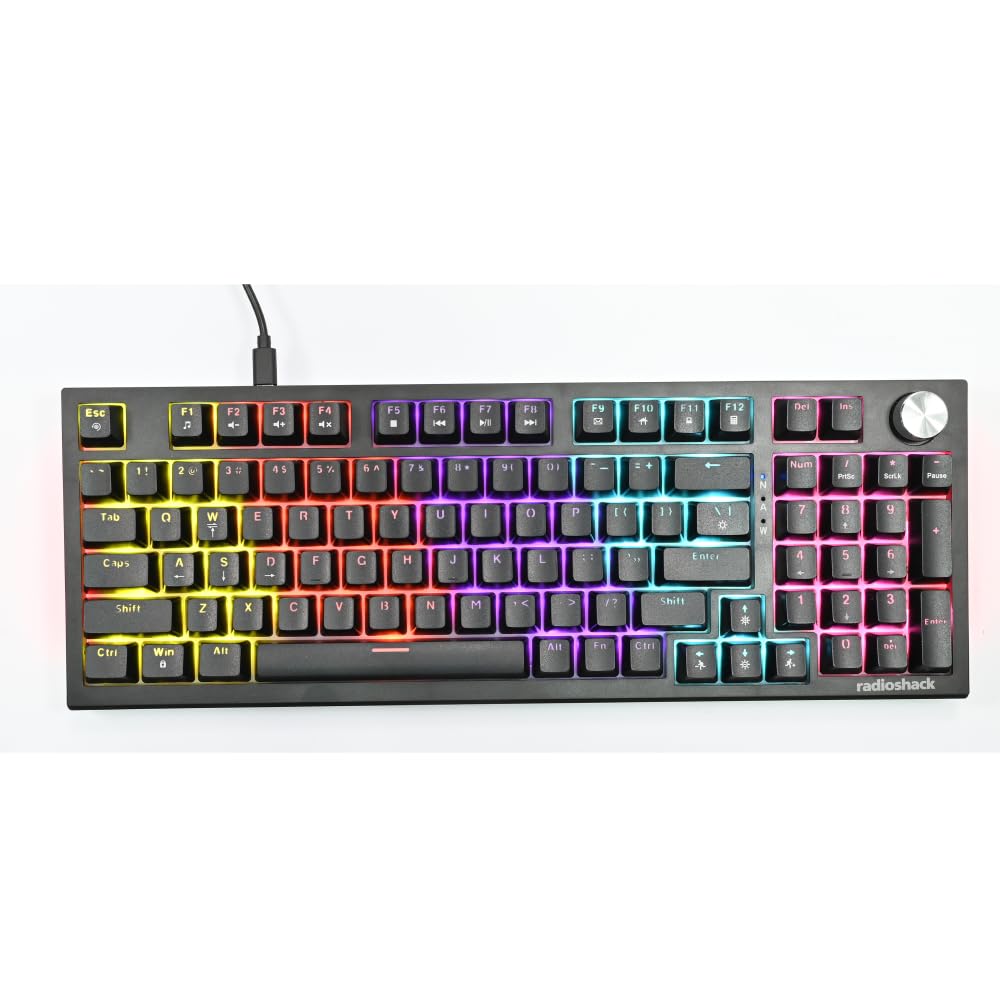
Image: The RadioShack Mechanical Gaming Keyboard, showcasing its 98-key layout and vibrant rainbow backlighting.
เนื้อหาแพ็คเกจ
กรุณาตรวจสอบเนื้อหาในแพ็คเกจเพื่อให้แน่ใจว่ามีสินค้าครบทั้งหมด:
- 1x RadioShack Mechanical Gaming Keyboard
- สาย USB 1x
- 1x คู่มือผู้ใช้ (เอกสารนี้)

Image: A graphic illustrating the contents of the product package, including the gaming keyboard and user manual.
การตั้งค่า
- แกะคีย์บอร์ดออก: Carefully remove the keyboard and USB cable from its packaging.
- เชื่อมต่อกับคอมพิวเตอร์: Insert the USB-A connector of the provided USB cable into an available USB port on your computer.
- การติดตั้งไดร์เวอร์: The keyboard is plug-and-play. Your operating system (Windows XP-10 compatible) will automatically detect and install the necessary drivers. No additional software installation is required.
- การจัดวาง: Place the keyboard on a stable, flat surface. Adjust the rear feet for your preferred typing angle.

Image: An illustration highlighting key features such as the 1.5m USB cable length and compatibility with Windows XP through 10.
คำแนะนำการใช้งาน
เค้าโครงแป้นพิมพ์และฟังก์ชันต่างๆ
The keyboard features a 98-key layout, providing a compact design while retaining essential keys, including a numeric keypad.
ฟังก์ชันปุ่มหมุน
The dedicated rotary knob located on the top right of the keyboard controls audio volume.
- หมุนตามเข็มนาฬิกา: เพิ่มปริมาณเสียง
- หมุนทวนเข็มนาฬิกา: ลดระดับเสียง
- กดลง: ปิดเสียง/เปิดเสียง

Image: A close-up of a hand interacting with the rotary knob, demonstrating its use for volume adjustment.
การควบคุมไฟแบ็คไลท์
The keyboard features adjustable rainbow backlighting with multiple modes and side-light effects. Specific key combinations (often Fn + a function key) are used to cycle through lighting modes, adjust brightness, or change speed. Refer to the keycap legends for specific lighting control functions.
- การสลับโหมด: Typically Fn + Ins, Home, PgUp, Del, End, PgDn.
- การปรับความสว่าง: โดยทั่วไปจะเป็นปุ่มลูกศร Fn + ขึ้น/ลง
- การปรับความเร็ว: โดยทั่วไปจะเป็นปุ่ม Fn + ปุ่มลูกศรซ้าย/ขวา

Image: A collage showing the keyboard with various backlighting patterns and side-light effects, illustrating the 17 available lighting modes.
ป้องกันการโดนผีหลอก
The keyboard supports 25-key anti-ghosting, ensuring that multiple simultaneous key presses are registered accurately, which is crucial for gaming and fast typing.

Image: A user actively typing on the keyboard during a gaming session, emphasizing the accuracy provided by 25 anti-ghosting keys.
การซ่อมบำรุง
- การทำความสะอาด: Use a soft, dry cloth to wipe the surface of the keyboard. For deeper cleaning, use compressed air to remove dust and debris from between the keycaps. Avoid using liquid cleaners directly on the keyboard.
- พื้นที่จัดเก็บ: เมื่อไม่ได้ใช้งานเป็นเวลานาน ควรเก็บแป้นพิมพ์ไว้ในสภาพแวดล้อมที่สะอาดและแห้ง หลีกเลี่ยงแสงแดดโดยตรงและอุณหภูมิที่สูงหรือต่ำเกินไป
- หลีกเลี่ยงการหกเลอะ: Liquids can damage the internal components. Exercise caution to prevent spills on the keyboard.
การแก้ไขปัญหา
แป้นพิมพ์ไม่ตอบสนอง
- ตรวจสอบให้แน่ใจว่าสาย USB เชื่อมต่อกับคีย์บอร์ดและคอมพิวเตอร์อย่างแน่นหนา
- ลองเชื่อมต่อคีย์บอร์ดกับพอร์ต USB อื่นบนคอมพิวเตอร์ของคุณ
- รีสตาร์ทเครื่องคอมพิวเตอร์ของคุณ
- ทดสอบแป้นพิมพ์บนคอมพิวเตอร์เครื่องอื่นเพื่อตรวจสอบว่าปัญหาอยู่ที่แป้นพิมพ์หรือพอร์ต USB/ไดรเวอร์ของคอมพิวเตอร์
ไฟแบ็คไลท์ไม่ทำงาน
- Check if the backlighting has been turned off using the keyboard's function keys (e.g., Fn + brightness down key).
- Cycle through the lighting modes to see if it reactivates.
Keys Not Registering / Ghosting Issues
- Ensure the keyboard is clean and free of debris that might be obstructing key switches.
- The keyboard features 25-key anti-ghosting. If more than 25 keys are pressed simultaneously, some inputs may not register.
ข้อมูลจำเพาะ
| หมายเลขรุ่น | 2607135 |
| ยี่ห้อ | เรดิโอแช็ค |
| ประเภทแป้นพิมพ์ | แป้นพิมพ์สำหรับเล่นเกมแบบเครื่องกล |
| เค้าโครงคีย์ | 98-คีย์ |
| การเชื่อมต่อ | USB-A (Corded Electric) |
| ความทนทานของสวิตช์ | รองรับการกดแป้นพิมพ์สูงสุด 50 ล้านครั้ง |
| การแบ็คไลท์ | Rainbow (Adjustable modes, brightness, speed) |
| ป้องกันการโดนผีหลอก | 25-คีย์ |
| คุณสมบัติพิเศษ | Rotary Volume Knob, Ergonomic Design |
| อุปกรณ์ที่รองรับ | Laptop, PC (Windows XP-10) |
| ส่วนประกอบที่รวมอยู่ | สาย USB |

ภาพ: รายละเอียด view of a mechanical switch, illustrating the 50-million keystroke life for long-term reliability.
สนับสนุน
For further assistance or inquiries, please refer to the official RadioShack support channels or webเว็บไซต์.