
การแนะนำ
Welcome to the SONICAKE NeoUke Smart Guitar instruction manual. This document provides essential information for setting up, operating, maintaining, and troubleshooting your NeoUke. Please read this manual thoroughly before using the device to ensure optimal performance and longevity.

Image: The NeoUke is designed for ease of use, allowing quick engagement with music.
สินค้าเกินview
The SONICAKE NeoUke is a stringless smart guitar designed for beginners and music enthusiasts. It features a light-up fretboard, built-in speaker, and smart accompaniment system, offering a unique and interactive musical experience.
ส่วนประกอบที่รวมอยู่:
- NeoUke Smart Guitar unit
- สายชาร์จ USB Type-C
- Strap with clips
- Mini jack male to jack female adapter
- คู่มือเริ่มต้นใช้งานฉบับย่อ (ดูคำแนะนำโดยละเอียดในคู่มือนี้)

Image: The NeoUke package contents, including the instrument and essential accessories.
การควบคุมและพอร์ต:
- Transpose Knob: Adjusts the key of the chords.
- Fretboard Pads: 21 silicone chord buttons with dynamic light guidance.
- Pick A & Pick B: Strumming/picking sensors.
- ปุ่มปรับระดับเสียง: ควบคุมระดับเสียงเอาต์พุต
- พอร์ต Type-C: สำหรับการชาร์จและเชื่อมต่อข้อมูล
- สวิตช์เปิด/ปิด: เปิดหรือปิดอุปกรณ์
- Play/Stop & Fill-in Button: Controls accompaniment playback and adds musical fills.
- ผู้บรรยาย: Integrated 10W Bluetooth speaker.
- วงแหวนไฟ RGB: Visual feedback for rhythm and volume.
- BLE and Audio Dual Module: สำหรับการเชื่อมต่อแบบไร้สาย
- Pressable Wheel: For menu navigation or parameter adjustment.
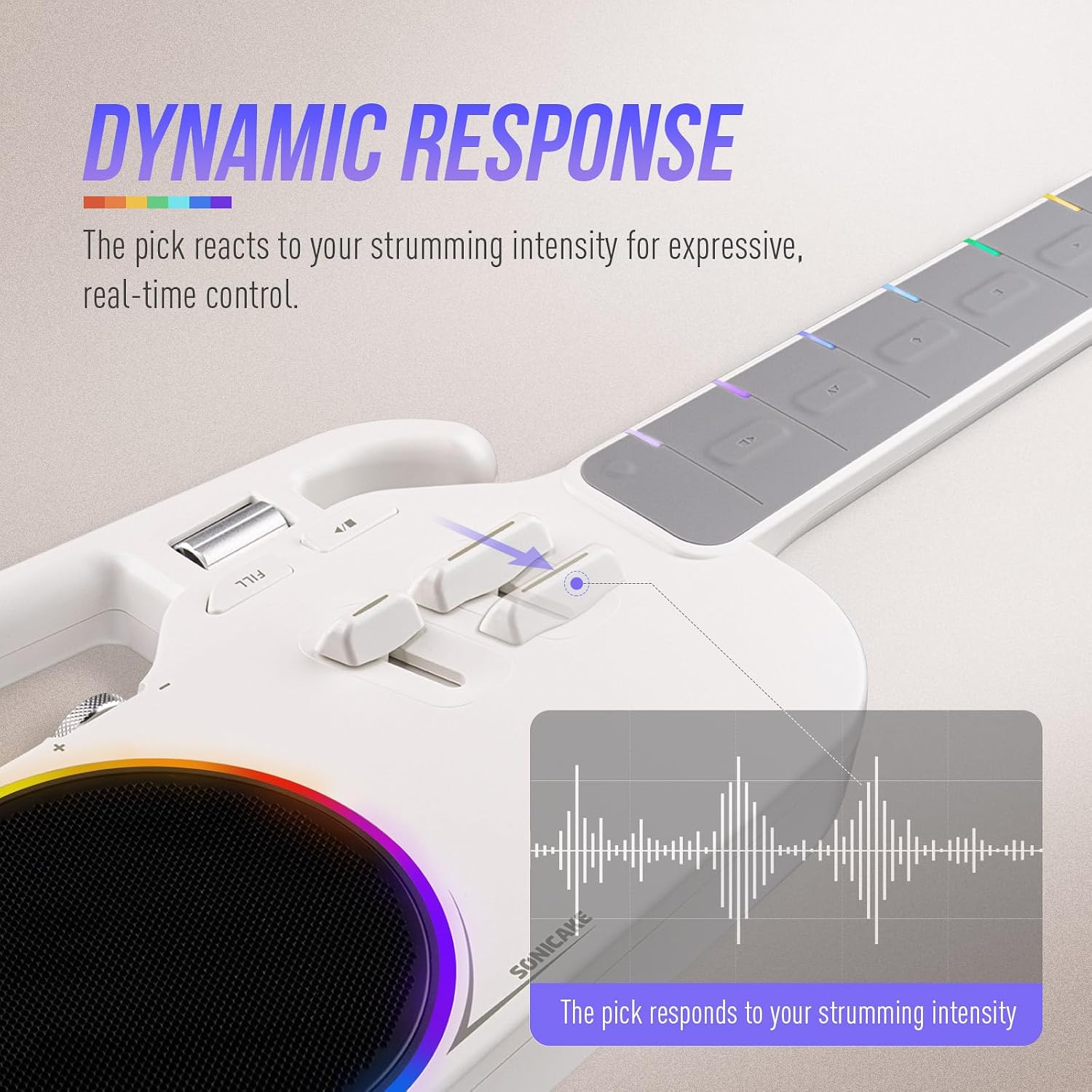
ภาพ: รายละเอียด view of the NeoUke's strumming area and dynamic response indicators.
การตั้งค่า
1. การชาร์จอุปกรณ์
Before first use, fully charge your NeoUke. Connect the provided USB Type-C cable to the Type-C port on the device and the other end to a compatible USB power adapter (not included). The device can be used while charging.
2. การเปิด/ปิดเครื่อง
Locate the On/Off switch on the side of the NeoUke. Slide the switch to the 'ON' position to power on the device. Slide it to 'OFF' to power off.
3. การติดตั้งและการเชื่อมต่อแอป
The NeoUke integrates with a mobile application for enhanced functionality and learning. ค้นหา the official SONICAKE NeoUke app on your device's app store (iOS/Android). Follow the on-screen instructions to install.
- ตรวจสอบให้แน่ใจว่าได้เปิดใช้งาน Bluetooth บนอุปกรณ์มือถือของคุณ
- Open the NeoUke app and follow the pairing instructions. The app will guide you through connecting to your NeoUke via Bluetooth.

Image: The NeoUke seamlessly integrates with its companion app for interactive learning and control.
คำแนะนำการใช้งาน
1. การเล่นพื้นฐาน
The NeoUke features 21 silicone chord buttons on the fretboard. Press a button with one hand and use the 'Pick A' or 'Pick B' sensors with the other hand to generate sound. The fretboard lights will guide you on which buttons to press for various songs and chords.
Video: Demonstration of basic playback and interaction with the SONICAKE NeoUke. This video shows how to play your first song using the device's features.
2. Interactive Lighting System
The fretboard lights indicate chord positions and rhythm. The RGB light ring around the speaker syncs with your playing, providing visual feedback and enhancing the experience.

Image: The NeoUke's speaker and LED ring, illustrating the dynamic visual feedback during play.
3. Accompaniment System
The NeoUke features a smart accompaniment system with Intro, Loop, Fill-in, and Ending functions. Use the Play/Stop & Fill-in button to control these features. The intelligent algorithm automatically adjusts keys and transitions. You can switch between various instrument sounds (Piano, Acoustic Guitar, Ukulele, Electric Guitar) and styles (Pop, Rock, Folk) using the controls or the app.
4. ฟังก์ชั่นลำโพงบลูทูธ
The built-in 10W speaker can also function as a standalone Bluetooth speaker. Pair your mobile device with the NeoUke via Bluetooth to stream audio. The speaker delivers a clear sound with a frequency response of 80Hz–16kHz.
5. การควบคุมแอป
The companion app provides comprehensive control over the NeoUke's functions. It offers lessons, songs with lyrics and chords, and allows customization of chord layouts and instrument settings. Refer to the app's internal guide for detailed usage.
การซ่อมบำรุง
1. การทำความสะอาด
Wipe the NeoUke with a soft, dry cloth. For stubborn dirt, a slightly damp cloth can be used, followed by immediate drying. Avoid using harsh chemicals or abrasive cleaners, as these can damage the finish and electronic components.
2. การดูแลแบตเตอรี่
The NeoUke is equipped with dual 2000mAh lithium batteries. To prolong battery life:
- หลีกเลี่ยงการปล่อยแบตเตอรี่จนหมดบ่อยครั้ง
- เก็บอุปกรณ์ไว้ในที่แห้งและเย็นเมื่อไม่ได้ใช้งานเป็นเวลานาน
- ควรชาร์จอุปกรณ์เป็นระยะหากเก็บไว้นานเพื่อป้องกันการคายประจุจนหมด
การแก้ไขปัญหา
| ปัญหา | สาเหตุที่เป็นไปได้ | สารละลาย |
|---|---|---|
| ไม่มีเสียงออก | Volume too low; device not powered on; battery depleted; incorrect chord/pick action. | Increase volume; ensure device is on; charge battery; ensure proper pressure on fretboard pads and pick sensors. |
| การจับคู่บลูทูธล้มเหลว | Bluetooth not enabled on mobile device; NeoUke not in pairing mode; interference. | Enable Bluetooth; restart both devices; move closer to the NeoUke; try pairing in a different location. |
| Fretboard lights not working | Device off; low battery; software glitch. | Ensure device is on and charged; restart the NeoUke; check app settings for light controls. |
| ปัญหาการเชื่อมต่อแอพ | Outdated app version; operating system incompatibility; Bluetooth issues. | Update the app; check app store for compatibility; ensure stable Bluetooth connection; contact support if issues persist. |
| อายุการใช้งานแบตเตอรี่สั้น | Frequent use of high volume or bright lights; aging battery. | Reduce volume or light intensity; ensure full charge before use; battery performance may degrade over time. |
ข้อมูลจำเพาะ
- ชื่อรุ่น : NeoUke
- หมายเลขรุ่น: QUK-01
- ขนาด (ยาว x กว้าง x สูง): 24.37" x 8.15" x 2.28" (619 มม. x 207 มม. x 58 มม.)
- น้ำหนัก: 1.3 กก. (2.87 ปอนด์)
- วัสดุตัวเครื่อง: อะคริโลไนไตรล์ บิวทาไดอีน สไตรีน (ABS)
- วัสดุของฟิงเกอร์บอร์ด: ซิลิโคน
- แบตเตอรี่: Dual 2000mAh Lithium-ion (approx. 4+ hours continuous play)
- ผู้บรรยาย: 10W BT Speaker, 2.5-3 inch full-range unit, 550mL acoustic chamber
- การตอบสนองความถี่ของลำโพง: 80เฮิรตซ์–16กิโลเฮิรตซ์
- การเชื่อมต่อ: USB Type-C, Bluetooth Low Energy (BLE)
- ยูพีซี: 843037103203

Image: The NeoUke's design emphasizes portability and modern aesthetics.
ข้อมูลการรับประกัน
The SONICAKE NeoUke Smart Guitar comes with a รับประกันจำกัด 1 ปี นับจากวันที่ซื้อสินค้า การรับประกันนี้ครอบคลุมถึงข้อบกพร่องจากการผลิตและฝีมือการผลิตภายใต้การใช้งานปกติ ไม่ครอบคลุมถึงความเสียหายที่เกิดจากการใช้งานผิดวิธี อุบัติเหตุ การดัดแปลงโดยไม่ได้รับอนุญาต หรือการสึกหรอตามปกติ โปรดเก็บหลักฐานการซื้อไว้เพื่อใช้ในการเรียกร้องการรับประกัน
การสนับสนุนลูกค้า
For technical assistance, warranty claims, or any questions regarding your SONICAKE NeoUke Smart Guitar, please contact SONICAKE customer support through their official website or the contact information provided with your purchase. Please have your model number (QUK-01) and proof of purchase ready when contacting support.


