
1. บทนำ
This manual provides detailed instructions for the safe and effective use of the HABOTEST HT821A Thermal Imager. The HT821A is a professional-grade handheld thermal imaging camera designed for fast, accurate, and intuitive temperature detection across various applications. It features a temperature measurement range of -20°C to 550°C (-4°F to 1022°F) and an infrared resolution of 96x96, which can be enhanced to 240x240 using super-resolution technology. Please read this manual thoroughly before operating the device.
2. ข้อมูลด้านความปลอดภัย
To ensure safe operation and to prevent damage to the device, please observe the following safety precautions:
- Do not point the thermal imager directly at strong energy sources, such as the sun or high-power lasers, as this may damage the detector.
- หลีกเลี่ยงการสัมผัสอุปกรณ์ในอุณหภูมิที่สูงหรือความชื้นสูงหรือสภาพแวดล้อมที่มีฤทธิ์กัดกร่อน
- ห้ามถอดประกอบหรือดัดแปลงอุปกรณ์ การซ่อมแซมควรดำเนินการโดยช่างผู้ชำนาญการที่ได้รับอนุญาตเท่านั้น
- ใช้เฉพาะสายชาร์จและอะแดปเตอร์ไฟที่ระบุเท่านั้น
- เก็บอุปกรณ์ให้ห่างจากน้ำและของเหลวอื่นๆ
- Ensure the device is securely held during operation to prevent accidental drops.
- กำจัดแบตเตอรี่และอุปกรณ์ตามระเบียบข้อบังคับท้องถิ่น
3. สินค้าหมดview และส่วนประกอบ
The HABOTEST HT821A Thermal Imager package includes the following items:
- HABOTEST HT821A Thermal Imager
- สายเคเบิลข้อมูล USB
- คู่มือการใช้งาน (เอกสารนี้)
Familiarize yourself with the main parts of the thermal imager:

รูปที่ 3.1: ด้านหน้า view of the HABOTEST HT821A Thermal Imager, showing the display screen and control buttons.
4. การตั้งค่า
4.1 การชาร์จอุปกรณ์
The HT821A Thermal Imager is equipped with a built-in 2000mAh Lithium battery. Before initial use, ensure the device is fully charged.
- Connect the provided USB-C data cable to the USB-C port on the thermal imager.
- ต่อปลายอีกด้านของสาย USB-C เข้ากับอะแดปเตอร์แปลงไฟ USB ที่ใช้งานร่วมกันได้ (ไม่ได้รวมอยู่ในชุด) หรือพอร์ต USB ของคอมพิวเตอร์
- The charging indicator on the device will illuminate, indicating that charging is in progress.
- Once fully charged, the indicator light will change (refer to device display for battery status).
4.2 การเปิด/ปิดเครื่อง
- การเปิดเครื่อง: กดปุ่มเปิด/ปิด (โดยปกติจะมีสัญลักษณ์รูปพลังงาน) ค้างไว้จนกว่าหน้าจอจะสว่างขึ้น
- วิธีปิดเครื่อง: กดปุ่มเปิด/ปิดค้างไว้จนกว่าอุปกรณ์จะปิดลง
5. คู่มือการใช้งาน
5.1 การวัดอุณหภูมิขั้นพื้นฐาน
The HT821A provides real-time temperature readings with automatic tracking of the highest, lowest, and center temperatures on the screen.

รูปที่ 5.1: Display showing automatic tracking of highest and lowest temperature points.
The device automatically identifies and displays the maximum, minimum, and center point temperatures within the field of view, providing immediate insights into temperature distribution.
5.2 Super-Resolution Mode
Enhance the clarity of thermal images by activating the super-resolution mode. This technology increases the infrared resolution from 96x96 to 240x240.
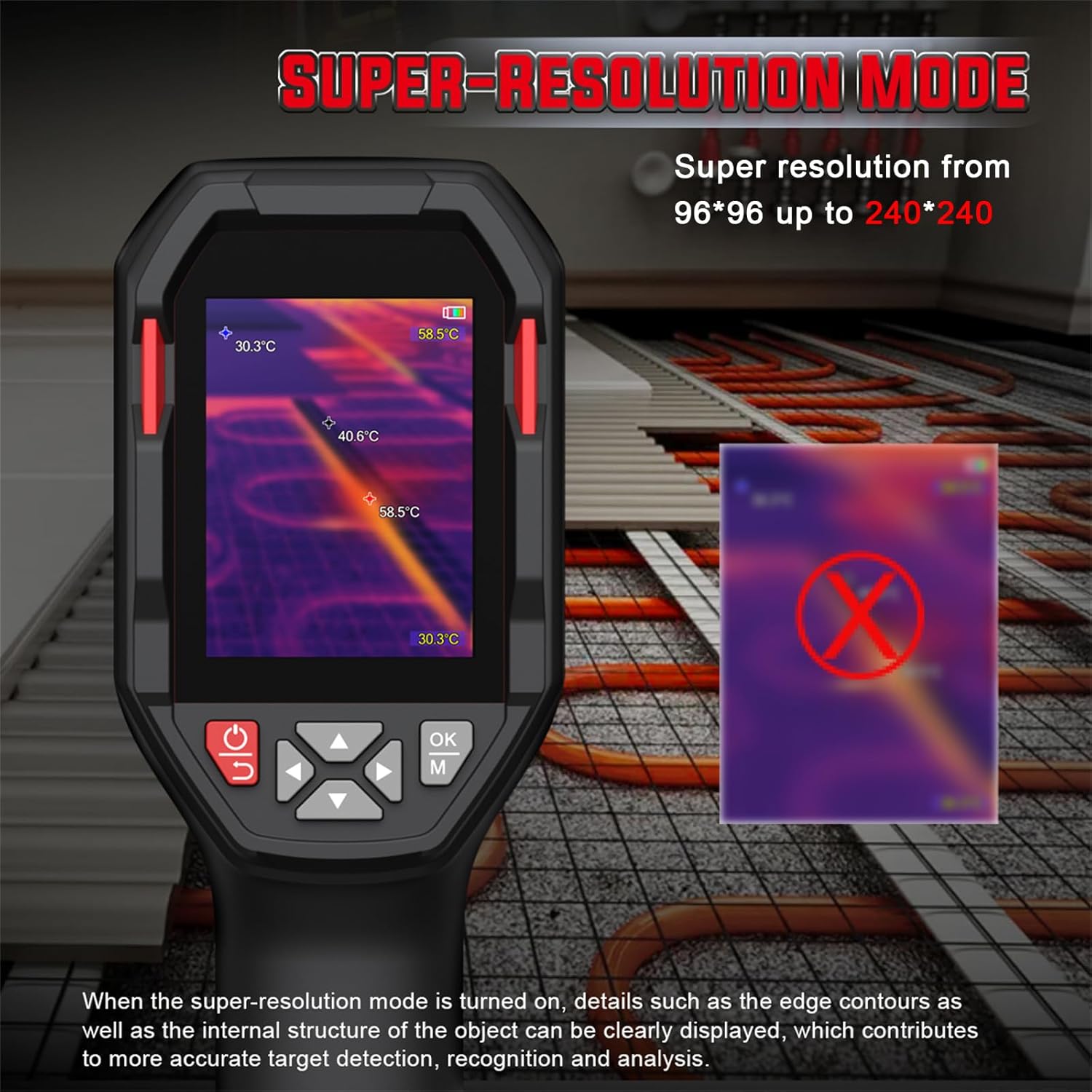
รูปที่ 5.2: Comparison of standard and super-resolution thermal images, showing enhanced detail.
- Refer to the device menu for activating or deactivating the super-resolution feature.
- When active, details such as edge contours and internal structures of objects become clearer, aiding in precise target detection and analysis.
5.3 Multiple Color Palettes
The HT821A offers 8 pseudocolor palettes to visualize temperature differences. Different palettes can highlight specific temperature ranges or details, making them suitable for various inspection scenarios.
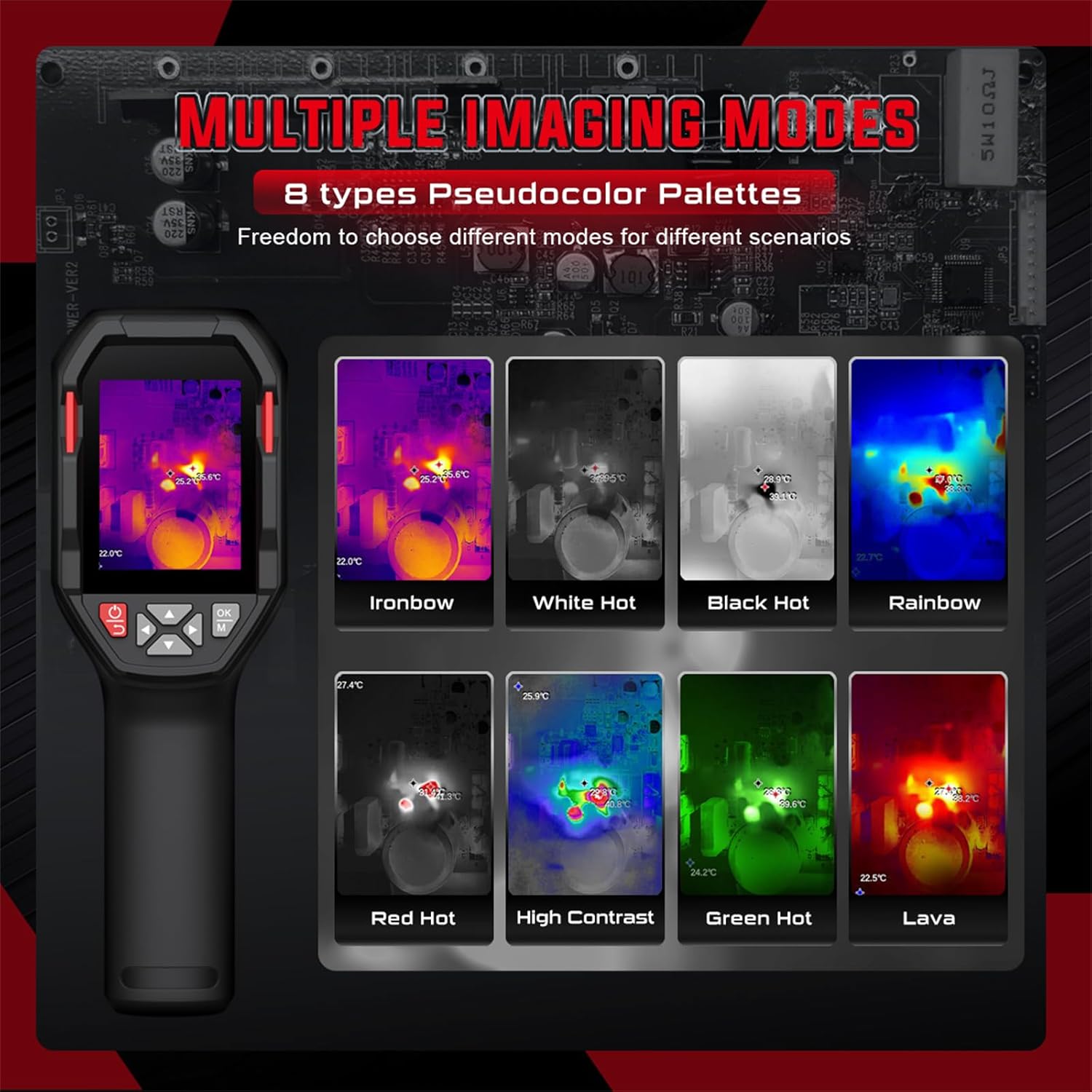
รูปที่ 5.3: Examples of different pseudocolor palettes available on the HT821A.
- Common palettes include Ironbow, White Hot, Black Hot, Rainbow, Red Hot, High Contrast, Green Hot, and Lava.
- Navigate through the device menu to select the desired color palette.
5.4 สัญญาณเตือนอุณหภูมิสูงและต่ำ
Set custom temperature limits to trigger an alarm when measured temperatures exceed or fall below the defined thresholds.

รูปที่ 5.4: Visual representation of high and low temperature alarm functionality.
- Access the alarm settings in the device menu.
- Define the upper and lower temperature limits.
- The device will provide a visual or audible alert when temperatures fall outside the set range.
5.5 Area Temperature Measurement
The device allows for fixed-area temperature measurement, enabling you to analyze temperatures within a specific region of interest.

รูปที่ 5.5: Display with a fixed-area measuring frame, showing center, maximum, and minimum temperatures within that frame.
- Activate the area measurement function through the menu.
- A frame will appear on the screen, and the device will measure the center, maximum, and minimum temperatures exclusively within this frame.
5.6 Distance Compensation and Emissivity
- การชดเชยระยะทาง: The HT821A supports distance compensation for improved accuracy, with settings for 0.5 M, 1 M, 2 M, and 3 M. Adjust this setting based on your distance to the target object.
- ปรับ Emissivity: The device features adjustable emissivity to ensure accurate readings across different material surfaces. Consult a table of common material emissivities and adjust the setting in the menu accordingly.
5.7 การตั้งค่าภาษา
The HT821A supports multiple languages for user interface navigation.
รูปที่ 5.6: Language selection menu on the HT821A.
- Navigate to the language settings in the device menu.
- Select from available languages including English, Spanish, French, German, Dutch, Japanese, Korean, Russian, Arabic, Simplified Chinese, and Traditional Chinese.
5.8 Image Storage and Data Transfer
- การจัดเก็บภาพ: The device has built-in memory to store thermal images in JPG format. Press the capture button (refer to device layout) to save an image.
- การถ่ายโอนข้อมูล: Connect the thermal imager to a computer using the provided USB-C cable. The device will appear as a removable storage device, allowing you to transfer stored images for further analysis.
5.9 ฟังก์ชันไฟฉาย
The HT821A includes a built-in flashlight for reliable operation in dark or low-light environments. Activate the flashlight through the device menu or a dedicated button (refer to device layout).
6. การสมัคร
The HABOTEST HT821A Thermal Imager is a versatile tool suitable for a wide range of professional and home inspection scenarios.

รูปที่ 6.1: Examples of the HT821A in use for various inspection tasks.
- Building Inspection: Detecting insulation deficiencies, moisture issues, and air leaks.
- การบำรุงรักษาระบบไฟฟ้า: Identifying overheating components in electrical panels, circuits, and motors.
- HVAC Performance: Inspecting heating and cooling systems for blockages or inefficiencies.
- Mechanical Equipment: ตรวจสอบเครื่องจักรเพื่อตรวจจับสัญญาณความร้อนที่ผิดปกติ ซึ่งบ่งชี้ถึงการสึกหรอหรือการทำงานผิดปกติ
- ประปา: Locating hidden water leaks behind walls or under floors.
- การตรวจสอบยานยนต์: Diagnosing engine overheating, brake issues, or HVAC system problems.
7. การบำรุงรักษา
7.1 การทำความสะอาดเครื่อง
- Use a soft, dry cloth to clean the exterior of the thermal imager.
- For the lens and screen, use a lens cleaning cloth and a specialized lens cleaning solution. Do not use abrasive materials or harsh chemicals.
- Ensure no moisture enters the device openings.
7.2 การดูแลแบตเตอรี่
- ควรชาร์จแบตเตอรี่เป็นประจำ แม้ว่าจะไม่ได้ใช้งานอุปกรณ์ก็ตาม เพื่อรักษาอายุการใช้งานของแบตเตอรี่
- หลีกเลี่ยงการปล่อยแบตเตอรี่จนหมดบ่อยครั้ง
- เก็บอุปกรณ์ไว้ในที่แห้งและเย็นเมื่อไม่ได้ใช้งานเป็นเวลานาน
7.3 พื้นที่จัดเก็บ
When storing the thermal imager, ensure it is kept in its protective packaging or a suitable case to prevent damage from impacts or dust. Avoid storing it in direct sunlight or areas with extreme temperature fluctuations.
8 การแก้ไขปัญหา
If you encounter issues with your HT821A Thermal Imager, refer to the following common problems and solutions:
| ปัญหา | สาเหตุที่เป็นไปได้ | สารละลาย |
|---|---|---|
| อุปกรณ์ไม่เปิดเครื่อง | แบตเตอรี่เหลือน้อยหรืออุปกรณ์ทำงานผิดปกติ | Charge the device for at least 2 hours. If it still doesn't power on, contact customer support. |
| ภาพไม่ชัดหรือไม่คมชัด | Dirty lens, incorrect focus (if applicable), or environmental factors. | Clean the lens with a soft cloth. Ensure the object is within the optimal measurement range. Activate Super-Resolution mode for enhanced clarity. |
| การอ่านอุณหภูมิไม่ถูกต้อง | Incorrect emissivity setting, distance compensation, or environmental interference. | Adjust the emissivity setting to match the target material. Verify distance compensation is set correctly. Avoid measuring through reflective surfaces. |
| ไม่สามารถโอนภาพไปยังคอมพิวเตอร์ได้ | Faulty USB cable, incorrect connection, or driver issue. | Ensure the USB-C cable is securely connected to both the device and the computer. Try a different USB port or cable. Restart both devices. |
If the problem persists after attempting these solutions, please contact HABOTEST customer support for further assistance.
9. ข้อมูลจำเพาะ
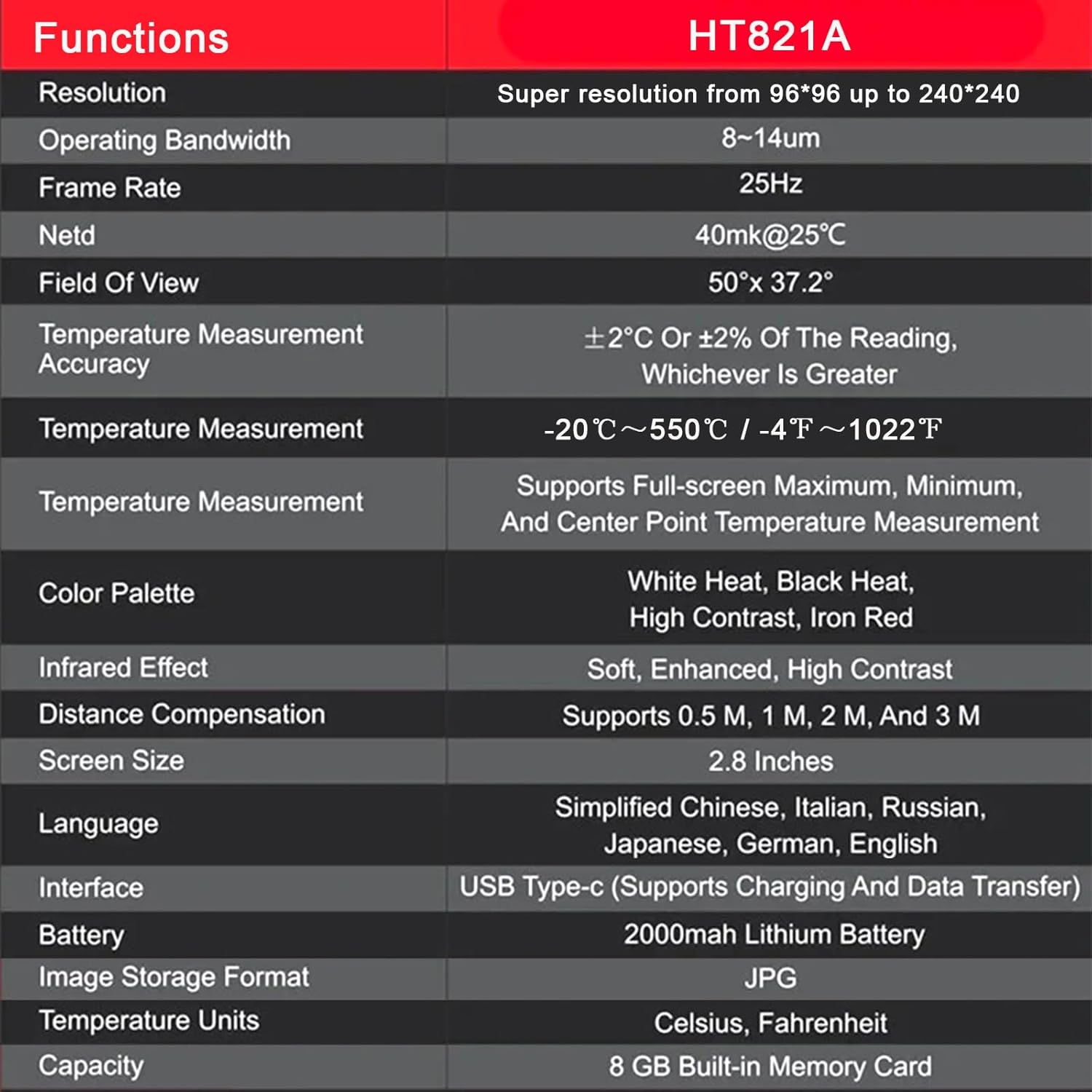
The following table outlines the key technical specifications of the HABOTEST HT821A Thermal Imager:
| คุณสมบัติ | รายละเอียด |
|---|---|
| แบบอย่าง | เอชที821เอ |
| ปณิธาน | 96x96 (Super resolution up to 240x240) |
| แบนด์วิดธ์การทำงาน | 8-14ไมโครเมตร |
| อัตราเฟรม | 25เฮิรตซ์ |
| สพธอ | 40mk@25°C |
| ที่ดินของ View | 50 °× 37.2 ° |
| ความแม่นยำในการวัดอุณหภูมิ | ±2°C or ±2% of the reading, whichever is greater |
| ช่วงการวัดอุณหภูมิ | -20°C ถึง 550°C (-4°F ถึง 1022°F) |
| Temperature Measurement Features | Supports Full-screen Maximum, Minimum, and Center Point Measurement |
| จานสี | White Heat, Black Heat, High Contrast, Iron Red (and others) |
| Infrared Effect | Soft, Enhanced, High Contrast |
| การชดเชยระยะทาง | Supports 0.5 M, 1 M, 2 M, and 3 M |
| ขนาดหน้าจอ | 2.8 นิ้ว |
| การรองรับภาษา | Simplified Chinese, Italian, Russian, Japanese, German, English, Spanish, French, Dutch, Korean, Arabic, Traditional Chinese |
| อินเทอร์เฟซ | USB Type-C (Supports Charging and Data Transfer) |
| แบตเตอรี่ | แบตเตอรี่ลิเธียม 2000mAh |
| รูปแบบการจัดเก็บภาพ | JPG |
| หน่วยอุณหภูมิ | เซลเซียสฟาเรนไฮต์ |
| การจัดเก็บข้อมูลภายใน | 8 GB Built-in Memory Card |
| วัสดุภายนอก | พลาสติก |
10. การรับประกันและการสนับสนุน
10.1 ข้อมูลการรับประกัน
HABOTEST products are manufactured to high-quality standards. For specific warranty terms and conditions, please refer to the warranty card included with your product or visit the official HABOTEST webไซต์ โดยทั่วไปการรับประกันจะครอบคลุมถึงข้อบกพร่องในวัสดุและฝีมือการผลิตภายใต้การใช้งานปกติ
10.2 การสนับสนุนลูกค้า
If you have any questions, require technical assistance, or need to report a problem with your HABOTEST HT821A Thermal Imager, please contact HABOTEST customer support.
- การสนับสนุนทางออนไลน์: Visit the official HABOTEST webเว็บไซต์นี้รวบรวมคำถามที่พบบ่อย (FAQ) การลงทะเบียนผลิตภัณฑ์ และแบบฟอร์มติดต่อ
- การสนับสนุนทางอีเมล์: ดูที่บรรจุภัณฑ์ผลิตภัณฑ์ของคุณหรือที่ทางการ webเว็บไซต์สำหรับที่อยู่อีเมลฝ่ายบริการลูกค้า
Please have your product model number (HT821A) and purchase information ready when contacting support.